AI Grocery Lists for Weight Loss Diets: Guide 2025
• Updated
AI grocery list tools are transforming weight loss meal planning. These apps create precise, organized shopping lists based on your calorie and macro goals, saving time and reducing food waste. Features include grouping items by store aisles, avoiding duplicates, and adjusting portions for your diet.
Key Highlights:
- Tools like Honeydew Recipe Manager allow you to import recipes from social media, calculate nutrition, and generate smart grocery lists.
- AI adjusts recipes for specific diets (e.g., keto, vegan, paleo) and suggests healthier ingredient swaps.
- Pantry tracking prevents overbuying, while Instacart integration simplifies online grocery shopping.
- Premium features like unlimited recipe storage and family sharing enhance meal planning.
With these tools, sticking to a weight loss plan becomes easier and more efficient.
Chat GPT Makes Meal Planning and Grocery Shopping so Easy: A Step-by-Step Guide

Setting Up Honeydew Recipe Manager for Weight Loss
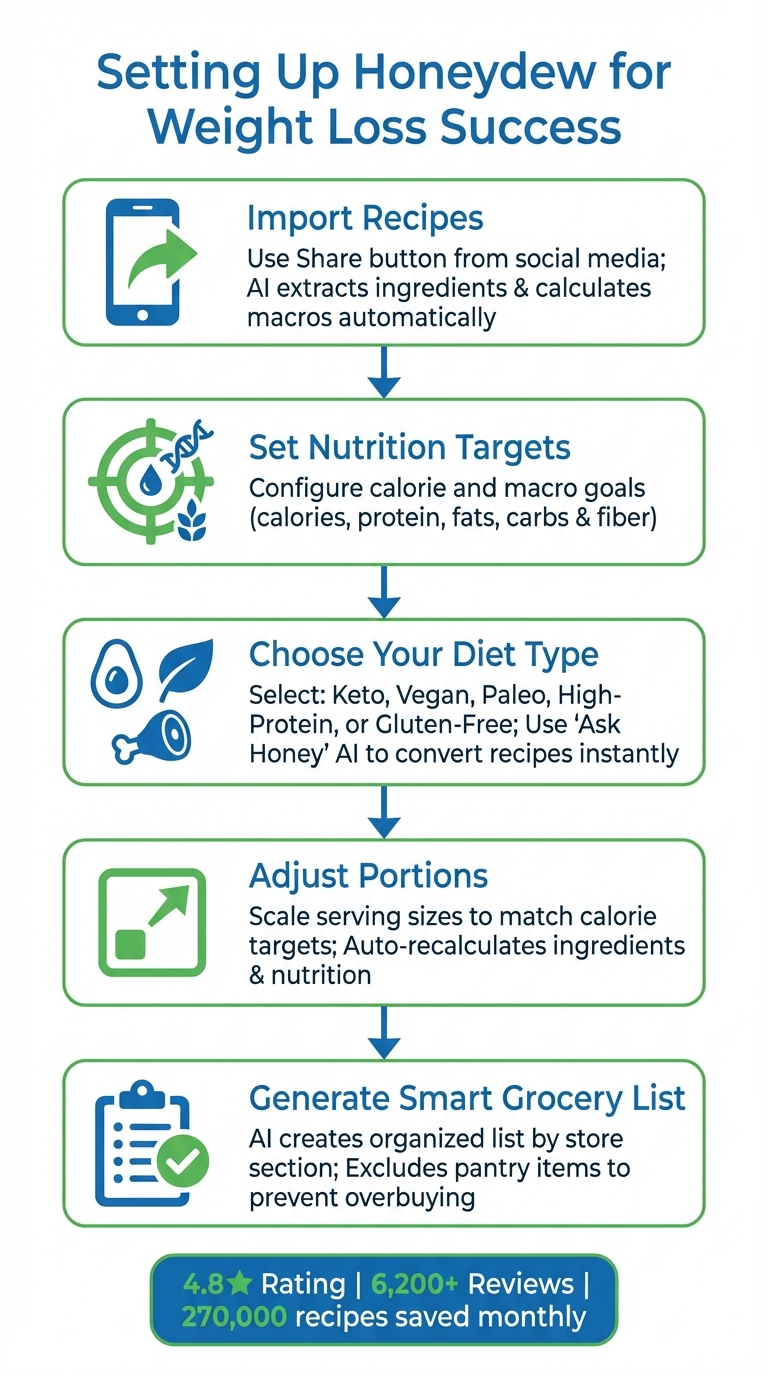
How to Set Up Honeydew Recipe Manager for Weight Loss in 5 Steps
Getting started with Honeydew is quick and straightforward. Begin by setting your nutrition goals and personalizing recipes to align with your weight loss plan. The app’s auto calorie and macro calculator keeps track of your daily intake, including calories, protein, fats, carbs, and fiber. Once you’ve configured your targets, Honeydew analyzes recipes and adjusts grocery lists to fit your goals seamlessly.
Here’s how to set calorie targets and fine-tune recipes for effective weight management.
Setting Your Calorie and Nutrition Targets
Honeydew makes it easy to import recipes directly from TikTok, Instagram, or YouTube using the "Share" button. The app’s AI extracts ingredients and provides a detailed macro breakdown, helping you stay on track with your weight loss strategy. With the release of version 1.6.7 in November 2025, the app enhanced its accuracy in analyzing nutritional data.
Whether you’re following a Keto, vegan, paleo, high-protein, or gluten-free diet, Honeydew has you covered. Using the "Ask Honey" AI assistant, you can adapt recipes instantly. For example, you can type, "Convert this to low-carb," and the app will adjust the ingredient list and update the nutritional details accordingly.
"The calorie and macro calculator has helped me stick to my health goals while still enjoying great meals." - Michael B.
Once your calorie and nutrition targets are set, you can tweak recipes to align with your plan by adjusting portions and making smart ingredient swaps.
Adjusting Dietary Preferences and Portion Sizes
Honeydew’s serving size scaling feature ensures your portions are optimized for weight loss. You can easily resize portions and switch between Imperial and Metric units to match your calorie targets. If a recipe exceeds your daily limit, simply scale it down before generating your grocery list. The app automatically recalculates ingredient quantities and updates the nutritional information.
For those with dietary restrictions or calorie-specific needs, Honeydew’s AI-powered ingredient substitution tool is a lifesaver. You can swap out ingredients for lower-calorie or diet-friendly alternatives. The "Search by ingredients" feature lets you find meals based on what you already have in your pantry, whether you’re looking for high-protein options or low-calorie dishes. Plus, when creating a grocery list, you can manually exclude ingredients you don’t need, avoiding unnecessary purchases like high-calorie additives.
"The ingredient substitution feature is a game-changer for my dietary restrictions. I can adapt any recipe easily!" - Emily C.
Importing Recipes and Creating AI Grocery Lists
Once you've set your weight loss goals, it's time to start building a personalized recipe collection. Honeydew makes it easy to turn online recipes into meal plans tailored to your calorie targets, with users saving around 270,000 recipes every month. Here's how you can import recipes and let AI handle your grocery list planning.
Importing Recipes from Social Media and Websites
With your goals in place, importing recipes from social media or websites is a breeze. Use the native Share button on platforms like TikTok, Instagram Reels, Facebook Reels, YouTube, or Pinterest, and select the Honeydew icon. The app's AI takes care of the rest, automatically extracting ingredients, instructions, and cooking details. Prefer another method? Paste a URL directly into the app or snap a photo of a cookbook page or restaurant dish, and the copycat recipe generator will structure it for you.
Once imported, the app's calorie and macro calculator helps you ensure the recipe fits your daily targets. If a trendy recipe seems too calorie-heavy, you can ask the built-in AI assistant, "Ask Honey", to tweak it - like lowering carbs or cutting fat - before adding it to your meal plan.
Generating AI Grocery Lists
After adding recipes to your drag-and-drop calendar, Honeydew creates a single, organized shopping list for you. The AI calculates ingredient quantities, organizes items by store section, and skips pantry staples to avoid overbuying. This ensures your list focuses on foods that align with your weight loss goals.
To make it even smarter, use the pantry mode to photograph your current inventory. The AI cross-references what you already have and only adds the missing items to your shopping list. This feature not only minimizes waste but also saves money by avoiding unnecessary purchases. Once finalized, the list integrates seamlessly into your meal planning calendar.
Using Smart Ingredient Substitutions
Honeydew’s AI also helps you make healthier ingredient swaps. Whether you're cutting calories, lowering sugar or sodium, or boosting protein, the app suggests alternatives that fit your dietary needs - whether you’re following keto, vegan, paleo, or gluten-free plans. These substitutions work alongside portion adjustments to help you stay on track with your weight loss goals. Plus, when you choose a substitution, your grocery list updates instantly with the correct quantities.
With a 4.8-star rating on the Google Play Store and over 6,200 reviews, Honeydew users often highlight the ease of importing recipes and the effectiveness of its smart ingredient swaps for achieving health goals.
Planning Your Weekly Meals with the Drag-and-Drop Calendar
Building a Balanced Weekly Meal Plan
Planning your meals for the week has never been easier. With the drag-and-drop calendar, you can organize recipes by simply placing them into specific meal slots. The interface lets you quickly see your week - or even your month - at a glance, making it a breeze to map out your eating schedule.
As you add recipes, the daily nutritional dashboard updates instantly, showing your calorie and macro totals to help you stay on track. If you’re unsure where to start, the Meal Plan Generator can create a complete 7-day menu tailored to your calorie goals and dietary preferences, whether you’re keto, vegan, paleo, or something else entirely.
"I used to waste so much food. Now with Honeydew's meal planning, I buy exactly what I need and save money!" - Mark T., Honeydew User
This tool doesn’t just simplify your planning - it also refines your grocery shopping. Ingredient quantities are updated in real time, ensuring your grocery list is accurate and efficient. Plans changed last minute? No problem. You can drag recipes to a new day, and the app will automatically adjust your nutritional totals and shopping list.
Once you’ve set your weekly plan, you can fine-tune portion sizes to make sure every meal aligns with your weight loss or health goals.
Managing Portions and Serving Sizes
Portion control is key, and this app makes it simple. You can adjust serving sizes before adding recipes to your plan, and the app will instantly recalculate ingredient amounts and convert units for you.
The auto calorie and macro calculator is a game-changer here. Whether you’re scaling a recipe down for a single meal or doubling it to prep for the week, you’ll see real-time updates to ensure your nutritional goals stay intact. This eliminates the guesswork that can often derail healthy eating. Just remember, if you’re scaling recipes significantly, double-check your grocery list to make sure it reflects the updated quantities before you head to the store or place an order.
Ordering Groceries Through Instacart Integration
One-Click Grocery Ordering
Once your meal plan is ready and your grocery list is set, the next step is a breeze: ordering your ingredients without any fuss.
Honeydew Recipe Manager syncs seamlessly with Instacart, making grocery shopping as easy as a few clicks. The app transfers your carefully curated list straight into your online cart, saving you time and effort .
Before you check out, take a moment to remove items you already have, like olive oil, salt, or spices. This simple step not only helps you avoid duplicates but also keeps your Instacart total in check . Plus, the app organizes your list by store section, making it easy to review everything and ensuring a smooth shopping experience .
If you've swapped out any ingredients for lower-calorie options, those changes will automatically reflect in your Instacart cart, so you don’t have to worry about updating it manually .
"The smart grocery lists save me hundreds of dollars a month. I love how it suggests recipes based on what I already have!" - James L.
Before finalizing your order, double-check ingredient quantities, as minor inaccuracies can occasionally occur.
Honeydew Plus Features for Long-Term Weight Loss
Honeydew Plus builds on its core offerings with premium tools designed to support your weight loss journey over the long haul.
Sharing Meal Plans with Your Household
Honeydew Plus makes it easy to share meal plans with your household, helping everyone stay on track together. You can share recipes, meal plans, and grocery lists with up to six family members, all synced in real time. This means everyone sees the same meal calendar and grocery list, cutting down on confusion and avoiding unnecessary high-calorie purchases. Plus, shared accountability encourages family members to pitch in with healthy recipe suggestions they find online.
"My family of five uses Honeydew for all our meal planning. The household sharing feature keeps everyone organized." – Alex P., User
Unlimited Recipe Storage and Ad-Free Access
Say goodbye to the 10-recipe limit of the free plan - Honeydew Plus lets you store as many recipes as you want, creating a robust library of meals that keeps your diet varied and exciting. This feature helps prevent the boredom that can derail healthy eating.
On top of that, upgrading to Honeydew Plus removes ads, allowing you to focus entirely on meal planning. For just $4.17 per month, you also gain access to advanced AI meal planning, smart ingredient substitutions, recipe translation, and priority support. These tools make it easier to manage your diet consistently and effectively.
"Being able to import recipes from anywhere has built my cookbook faster than I ever imagined." – Priya K., Honeydew User
Conclusion
Honeydew Recipe Manager takes the hassle out of meal planning with AI-driven tools that do the heavy lifting for you. From importing recipes and tracking nutrition to creating grocery lists and placing Instacart orders with a single click, this app streamlines the entire process. Its 4.8/5-star rating on major platforms speaks volumes about how effectively it helps people stick to sustainable weight loss goals. Features like automated grocery lists, smart ingredient swaps, and built-in nutrition tracking mean you can spend less time planning and more time enjoying healthy meals. Imagine importing a trending TikTok recipe, tweaking it to fit your diet, scheduling it for the week, and ordering all the ingredients in just a few minutes - staying on track has never been this simple.
For those who want even more, Honeydew Plus offers premium perks like unlimited recipe storage, household sharing, and an ad-free experience for just $4.17 per month. It’s designed to adapt to your lifestyle, giving you the tools to create a meal planning system that works for you, instead of locking you into rigid routines.
The real game-changer here isn’t just the convenience - it’s the consistency. By eliminating the usual obstacles of meal prep and grocery shopping, Honeydew helps you build and maintain healthy eating habits. Whether you’re focused on tracking macros, managing portions, or cutting down on food waste while eating better, the app brings structure and flexibility together to make sustainable weight loss part of your everyday life.
FAQs
How does AI adapt recipes to fit specific diets like keto or vegan?
AI-powered tools are transforming how recipes are customized to fit various dietary needs. By understanding specific nutritional guidelines - like low-carb for keto or completely plant-based for vegan diets - these systems can pinpoint ingredients that don’t align with your diet and suggest suitable replacements. For instance, they might swap out wheat flour for almond flour in keto recipes or replace butter with plant-based oil for vegan dishes. Plus, they’ll recalculate nutrition facts and even adjust portion sizes to match your daily targets.
Take keto recipes, for example - AI tools can suggest high-fat options like avocado to keep the flavor and texture intact. For vegan meals, they might recommend plant-based proteins like tofu. Honeydew Recipe Manager goes a step further by creating detailed grocery lists based on these tweaks, making shopping easier and helping you stick to your diet and weight-loss goals effortlessly.
Can Honeydew help me track pantry items and prevent overbuying?
Honeydew simplifies keeping track of what's in your pantry. Its search by ingredients feature lets you quickly see what you already have on hand. You can then create grocery lists that make use of those items, helping you avoid buying extras and stay on top of your weight loss goals - all while shopping smarter.
What are the benefits of upgrading to a premium Honeydew plan?
Currently, there’s no detailed information about a premium or upgraded Honeydew plan and what it might include. The Honeydew Recipe Manager already comes packed with handy tools like AI-generated grocery lists, drag-and-drop meal planning, and Instacart integration to make meal prep and grocery shopping a breeze. If there is an upgraded plan available, any extra features or perks haven’t been outlined yet.