Best Apps for Saving Recipes from Social Media
• Updated
Social media is a goldmine for recipes, but saving and organizing them can be frustrating. Posts vanish, links lead to cluttered sites, and details are often incomplete. Recipe-saving apps solve these problems by extracting ingredients, instructions, and nutritional info from social media posts, videos, and websites. They also offer features like meal planning, grocery lists, and cloud storage, tailored for U.S. kitchens with imperial measurements and °F.
Here’s a quick rundown of the top apps:
- Honeydew Recipe Manager: AI-powered imports from URLs, photos, and screenshots; meal planning with grocery lists; $4.17/month for unlimited recipes.
- Paprika Recipe Manager 3: Built-in browser for recipe imports; one-time purchase of $4.99 per platform.
- Whisk (Samsung Food): One-tap imports from Instagram, TikTok, and Pinterest; free with optional $29.99/year premium.
- Cookmate (My CookBook): In-app search and file imports; lifetime access for ~$20.
- Recipe Keeper: Imports from URLs, PDFs, and screenshots; $14.99 per platform.
These apps streamline the process of saving recipes, planning meals, and shopping for ingredients, making your cooking experience more efficient and organized.
Best Apps to Save TikTok & Instagram Recipes
How Recipe Saving From Social Media Works
Saving recipes from social media is a breeze. When you come across a recipe on Instagram, TikTok, or Pinterest, you can either tap the share button and choose your recipe app from the share menu or paste the recipe's URL directly into the app's import field. The app then uses AI-powered tools to extract the ingredients, measurements, and step-by-step instructions in just seconds. This process works for both text and image-based recipes.
For video recipes, many apps use AI to transcribe spoken instructions and interpret on-screen text, converting everything into a clear, structured recipe. Those quick, 60-second videos suddenly become easy-to-follow guides, complete with ingredients measured in cups, teaspoons, and tablespoons - no more pausing and rewinding to catch details.
The automatic ingredient extraction feature scans content, identifies ingredients and quantities, and converts them into U.S. imperial units like ounces, pounds, and °F. For example, Honeydew Recipe Manager processes about 270,000 recipe saves every month, showing just how popular and efficient this technology has become. These apps can also adjust recipes based on the number of servings, making it simple to cook for two or a crowd.
"Our AI automatically extracts ingredients, instructions, and cooking details, saving them to your recipe collection in seconds." - Honeydew
Most recipe apps also provide nutrition information and let you tag recipes by cuisine, cooking time, or dietary preferences. Everything is stored in searchable collections, so whether you're planning meals or just looking for inspiration, finding the perfect recipe is quick and easy.
1. Honeydew Recipe Manager
Social Media Recipe Import
Honeydew Recipe Manager makes it easy to save recipes from platforms like Instagram, TikTok, and Pinterest. You can either paste a recipe URL directly into the app or use the share button on these platforms to send recipes straight to Honeydew.
For those recipes that don’t have direct links - like ones hidden in video captions or Instagram stories - the Honeydew Plus plan has you covered. It includes a photo capture feature that uses OCR (optical character recognition) technology. Just take a screenshot of the recipe, and the app will extract the text to create a complete recipe. This is especially helpful for those quick TikTok videos where the recipe details appear on the screen for only a moment. Once imported, the recipes are ready for organizing and can easily be added to meal plans.
Meal Planning and Grocery Features
Once your recipes are saved, organizing them into meal plans is a breeze. Honeydew’s drag-and-drop calendar lets you schedule meals effortlessly, and it even generates grocery lists for you. These lists use U.S. imperial measurements like cups, ounces, and tablespoons for convenience. Plus, with its Instacart integration, you can order your groceries with just one click, all priced in USD.
The app goes a step further by suggesting ingredient swaps based on what’s already in your pantry or any dietary preferences you’ve set. This not only helps cut down on food waste but can also save you money. As James L. shared, “The smart grocery lists save me hundreds of dollars a month. I love how it suggests recipes based on what I already have!”
Cloud Storage and Collaboration
Honeydew keeps your recipes and meal plans synced across all your devices, ensuring everything stays organized. Its household sharing feature supports up to six family members, making collaboration simple. For example, if someone adds a new TikTok recipe to Thursday’s dinner plan, everyone in the household will see the update in real time. No more texting screenshots or juggling recipe notes!
Nutrition Tracking and Dietary Support
Every recipe you import comes with detailed nutrition information calculated using USDA databases. You’ll see data like calories, protein, fat, carbs, and fiber per serving, presented in easy-to-read formats such as “500 calories per serving” or “25g protein per 8 oz serving.” For those with specific dietary needs, the app’s AI can flag recipes that might not align with your goals - like high-sugar desserts - and suggest healthier alternatives. It can even tweak Pinterest recipes to make them gluten-free. As Michael B. noted, “The calorie and macro calculator has helped me stick to my health goals while still enjoying great meals.”
Honeydew Recipe Manager boasts a 4.8 out of 5-star rating, with users frequently praising its speed and accuracy when importing recipes from social media. The free version allows up to 10 recipe imports, while the Honeydew Plus subscription, priced at $4.17 per month, unlocks unlimited storage, advanced AI tools, and the photo capture feature for social media recipes.
2. Paprika Recipe Manager 3
Social Media Recipe Import
Paprika Recipe Manager 3 makes importing recipes from social media a breeze. Its built-in browser lets you grab recipes directly from Instagram, Pinterest, or TikTok. Simply tap the Download button, and the app automatically pulls in ingredients, instructions, and images. If you come across a recipe without a shareable link, you can manually add the details. Known for its precision, Paprika ensures recipes are captured accurately, making meal planning and shopping much easier.
Meal Planning and Grocery Features
With its drag-and-drop calendar, Paprika simplifies meal scheduling and creates well-organized grocery lists in U.S. imperial units. The app adjusts ingredient quantities based on your desired servings and smartly combines duplicate items when you're planning meals with overlapping ingredients. As you shop, you can check off items directly in the app, and its pantry tracker helps you avoid buying things you already have.
Cloud Storage and Collaboration
For just $5 a year, Paprika Cloud Sync keeps your recipes, meal plans, and grocery lists synced across iOS, Android, Mac, and Windows devices. This means you can save a recipe on your phone while out and about and access it later on your tablet in the kitchen. Even better, Paprika works offline, so you can check recipes or lists in places with poor internet, like a grocery store with weak cell service.
Nutrition Tracking and Dietary Support
Paprika goes beyond organization by offering nutrition tracking for your recipes. Using USDA data and AI, it calculates details like calories, protein, fat, and carbohydrates per serving, all displayed in U.S. formats. You can also tag recipes with dietary labels - such as vegan, keto, or low-carb - making it easy to find meals that fit your dietary preferences.
Paprika is available as a one-time purchase: $4.99 for iOS/Android, $29.99 for macOS, and $20 for Windows. With no free tier or recurring subscriptions, it’s a great choice for those who prefer a long-term, ad-free solution. It's no surprise the app maintains a stellar 4.7+ star rating, thanks to its reliable features and user-friendly design.
3. Whisk
Social Media Recipe Import
Whisk, now operating under the name Samsung Food, makes it incredibly easy to save recipes from social media. Found a recipe link in an Instagram bio or TikTok description? Just tap the Share button and select Samsung Food. The app's AI-powered Recipe Clipper takes care of the rest, pulling ingredients and instructions into a neatly formatted recipe card - no more taking screenshots or copying details by hand. You can even sync your Pinterest account to import entire boards of saved recipes into your personal collection. Recipe One calls Samsung Food "one of the best recipe manager apps", applauding its seamless one-tap capture feature for social media recipes.
Next, let’s see how Samsung Food simplifies meal planning and grocery shopping.
Meal Planning and Grocery Features
Samsung Food offers a drag-and-drop meal planning calendar that allows you to schedule recipes for specific meals - whether it’s breakfast, lunch, or dinner. Once your plan is set, the app generates a smart shopping list, combining duplicate ingredients into a single entry. For instance, if two recipes require flour, the app lists the total amount needed instead of separating them. The shopping list is organized by grocery store aisles, making your trips faster and more efficient. Plus, Samsung Food integrates with major retailers like Walmart, Amazon Fresh, Instacart, and Kroger, so you can order ingredients online directly through the app.
Cloud Storage and Collaboration
With its cloud-based setup, Samsung Food keeps everything - recipes, meal plans, and shopping lists - synced across all your devices. Save a recipe on your laptop during lunch, and it’ll be ready on your phone when you’re at the store. The app also offers collaborative tools, such as shared shopping lists that update in real time. Household members can create shared "Spaces" to manage joint meal plans and grocery lists, cutting down on duplicate purchases and helping coordinate meals. You’ll also find support for nutrition tracking built into the app.
Nutrition Tracking and Dietary Support
Samsung Food provides detailed nutritional information for every saved recipe, including calorie counts and macro/micronutrient breakdowns formatted for U.S. users. If you grab a recipe from a blog linked on Instagram, the app analyzes the ingredients to calculate per-serving nutrition details. You can also apply filters like vegetarian, vegan, gluten-free, or low-carb to find recipes that match your dietary preferences. Best of all, the app is free to use, with no subscription required for its core features. It’s a fan favorite too, boasting an average rating of 4.5 out of 5 stars on the Google Play Store, backed by tens of thousands of reviews.
4. Cookmate (My CookBook)
Social Media Recipe Import
Cookmate makes saving recipes from Instagram and TikTok a breeze, all without leaving the app. Just tap the share button, and Cookmate will automatically pull the recipe details and organize them for you. For instance, if you stumble upon a TikTok video featuring a delicious pasta dish, Cookmate will extract details like "1 lb spaghetti" or "2 cups marinara sauce" and convert everything into U.S. imperial measurements (cups, pounds, etc.) for easy cooking.
The app also supports importing recipes from popular websites. You can paste a link or use its built-in scanner to add recipes to your collection. This functionality makes meal planning and recipe management much simpler.
Meal Planning and Grocery Features
Cookmate provides an intuitive meal planning tool that works for both weekly and monthly schedules. You can easily drag and drop your saved recipes onto a calendar to plan out breakfast, lunch, and dinner. Once your meal plan is set, the app generates a grocery list with a single tap. The list is organized by aisle, making your shopping trips more efficient.
Need to adjust a recipe for a larger group? No problem - Cookmate recalculates ingredient quantities if you scale a recipe from, say, 4 servings to 6, and updates your grocery list accordingly. These features are designed to simplify meal prep and grocery shopping, especially for busy U.S. households.
Cloud Storage and Collaboration
With Cookmate Online, the app’s cloud-based service, your recipes sync effortlessly across devices, whether you're using an iPhone, iPad, Android, PC, or Mac. Save a recipe on your phone during the day, and it'll be ready to view on your laptop when you get home. Sharing recipes is just as easy - you can send them via email, text, or social media platforms like Facebook and Instagram. Recipes can even be exported in formats like PDF or text, so you can share them with friends or family who don’t use the app.
For families managing meal planning together, Cookmate allows real-time access to shared grocery lists and imported recipes. This makes it a great tool for households looking to stay organized and connected. Plus, the app offers flexible, budget-friendly pricing options.
Pricing and Availability
Cookmate starts you off with 20 free recipes, giving you a chance to try out features like social media importing before making a purchase. To unlock unlimited recipes, you’ll need to make a one-time in-app purchase, which typically ranges from $5 to $15 depending on your platform. However, keep in mind that the app is sold separately for each device type - if you use both iOS and Android, you’ll need to buy it for each platform. There’s no subscription fee, and the app is ad-free, making it a cost-effective choice for families who want to organize their favorite social media recipes without breaking the bank.
5. Recipe Keeper
Social Media Recipe Import
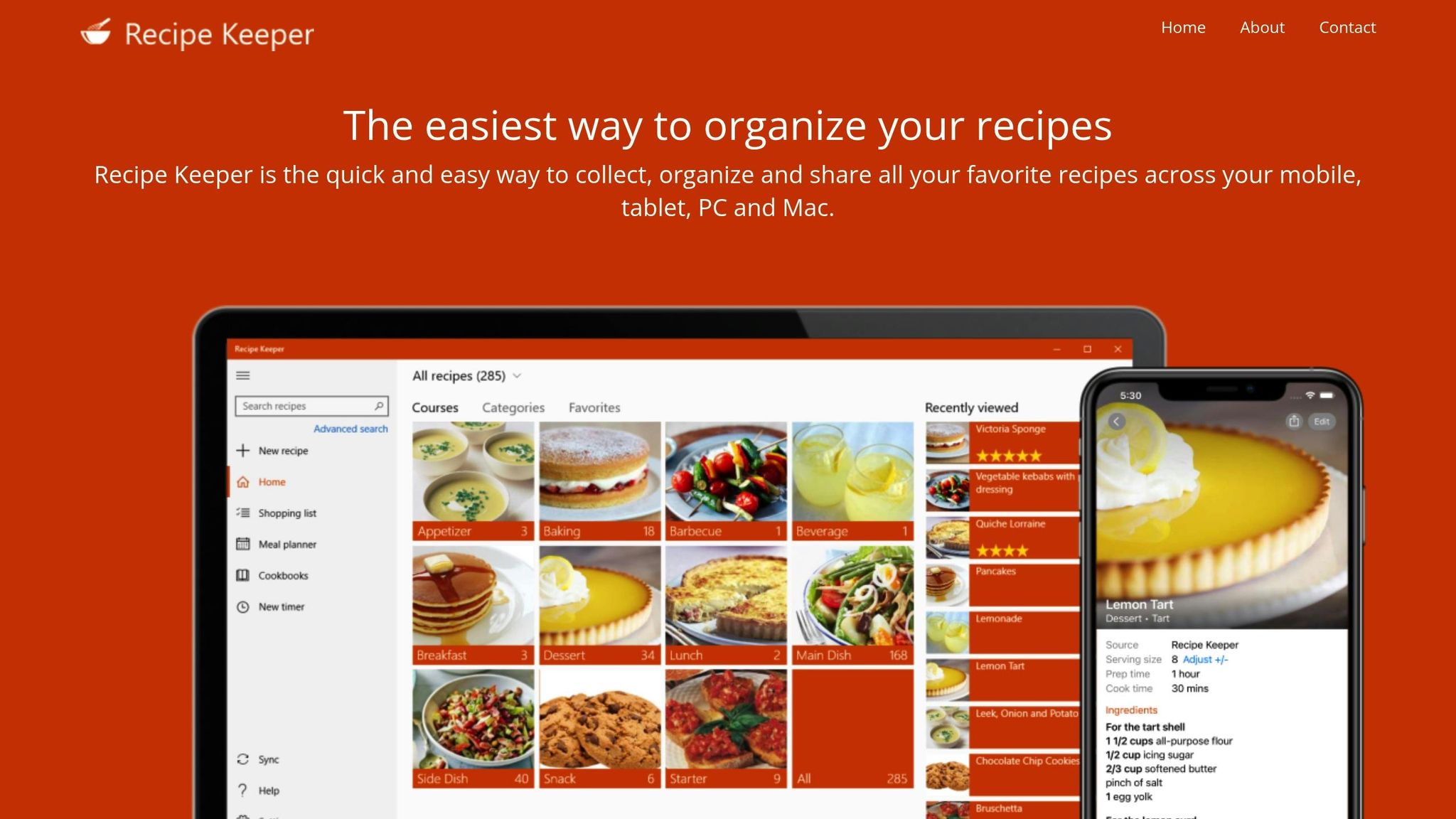
Recipe Keeper makes saving recipes from social media a breeze. Whether it's a URL, a screenshot, or even text from a video caption on Instagram or TikTok, the app uses OCR (Optical Character Recognition) to extract the details. It organizes ingredients and cooking steps into a neat, customizable recipe card, ready for you to use in your kitchen workflow. This feature is especially handy for turning those viral recipe posts into something you can easily follow.
Meal Planning and Grocery Features
Planning meals is straightforward with Recipe Keeper’s built-in meal planner. Once you've saved a recipe, simply drag it onto your weekly or monthly calendar to map out your meals. The app does the heavy lifting by adjusting serving sizes and combining ingredients from multiple recipes into a single, organized shopping list. You can even review the list to eliminate duplicates before heading to the store. It’s a time-saver for anyone juggling a busy schedule.
Cloud Storage and Collaboration
With Recipe Keeper Cloud, everything syncs across your devices effortlessly. Capture a recipe on your phone, tweak it on your laptop, and follow it on your tablet in the kitchen - no re-importing needed. Sharing recipes is just as easy. You can email them or post directly to platforms like Facebook, Instagram, or Twitter.
However, there’s a limit: the free version allows you to save about 20 recipes before requiring a purchase. Also, keep in mind that the app charges a one-time fee for each platform, meaning you’ll need to pay separately for iOS and Windows, for example. These features make Recipe Keeper a solid choice for organizing your culinary adventures.
Feature Comparison
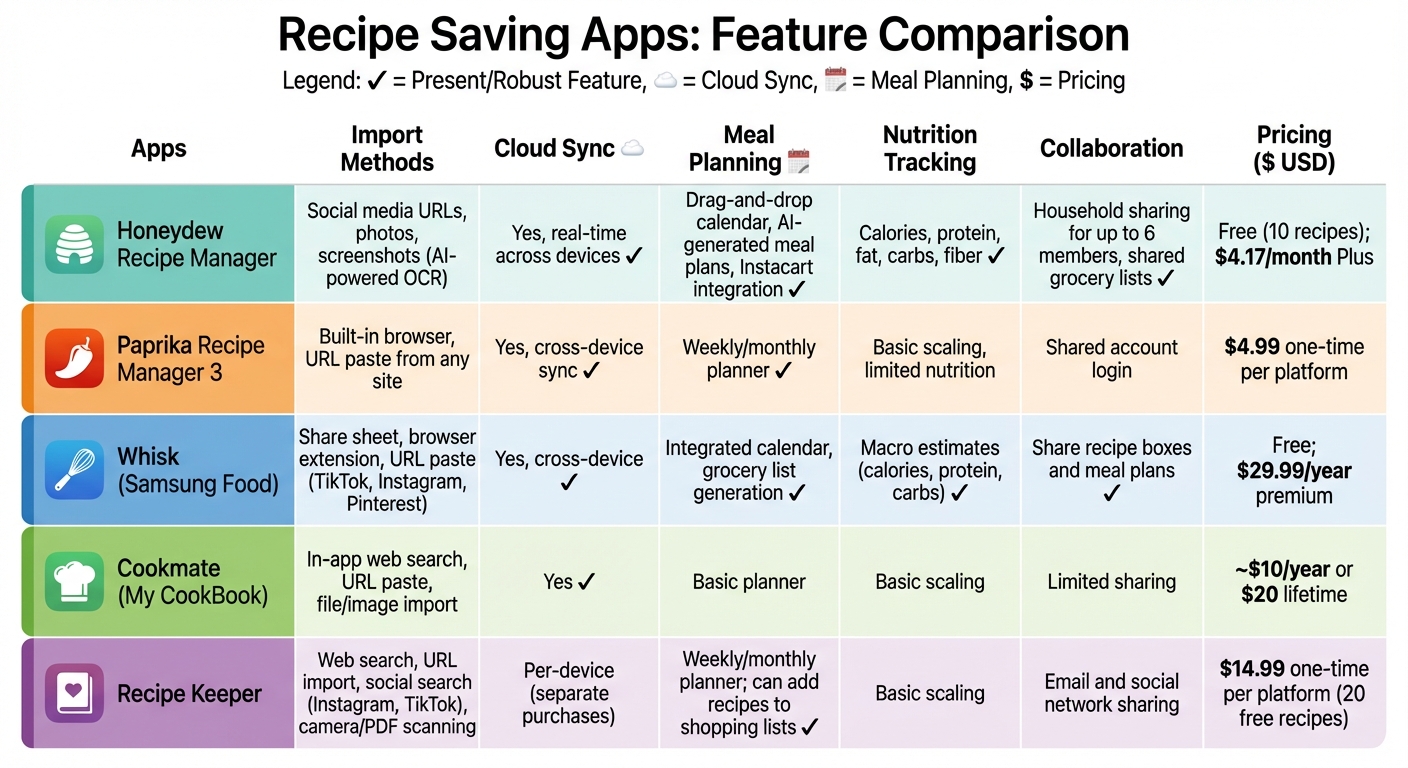
Recipe Saving Apps Feature Comparison Chart
Here's a breakdown of key features for saving and organizing social media recipes across five popular apps:
| App Name | Import Methods | Cloud Sync | Meal Planning | Nutrition Tracking | Collaboration | Pricing (USD) |
|---|---|---|---|---|---|---|
| Honeydew Recipe Manager | Social media URLs, photos, screenshots (AI-powered OCR) | Yes, real-time across devices | Drag-and-drop calendar, AI-generated meal plans, Instacart integration | Calories, protein, fat, carbs, fiber | Household sharing for up to 6 members, shared grocery lists | Free (10 recipes); $4.17/month Plus |
| Paprika Recipe Manager 3 | Built-in browser, URL paste from any site | Yes, cross-device sync | Weekly/monthly planner | Basic scaling, limited nutrition | Shared account login | $4.99 one-time per platform |
| Whisk | Share sheet, browser extension, URL paste (TikTok, Instagram, Pinterest) | Yes, cross-device | Integrated calendar, grocery list generation | Macro estimates (calories, protein, carbs) | Share recipe boxes and meal plans | Free; $29.99/year premium |
| Cookmate (My CookBook) | In-app web search, URL paste, file/image import | Yes | Basic planner | Basic scaling | Limited sharing | ~$10/year or $20 lifetime |
| Recipe Keeper | Web search, URL import, social search (Instagram, TikTok), camera/PDF scanning | Per-device (separate purchases) | Weekly/monthly planner; can add recipes to shopping lists | Basic scaling | Email and social network sharing | $14.99 one-time per platform (20 free recipes) |
Key Insights
- Honeydew Recipe Manager stands out for its AI-powered features, including OCR for importing recipes from photos and screenshots. Its Instacart integration and household sharing make it a strong choice for families or those who shop frequently online. U.S. users may find its imperial measurement support especially convenient.
- Paprika Recipe Manager 3 is a favorite among food blog enthusiasts, thanks to its built-in browser that captures recipes seamlessly. With a one-time purchase model, it’s an affordable option for users who prefer not to deal with subscriptions. It boasts a high 4.8/5 rating on the App Store.
- Whisk excels in social media integration, offering one-tap saving from platforms like TikTok and Instagram. It’s a great option for users who frequently discover recipes online. The free plan offers robust features, while the premium version adds advanced meal planning tools. It holds a solid 4.7/5 rating.
- Cookmate (My CookBook) offers flexibility with its in-app web search and file import options. Although its sharing capabilities are more limited, its affordable pricing (including a lifetime option) makes it appealing for budget-conscious users.
- Recipe Keeper supports a variety of import methods, including camera and PDF scanning, but its per-device cloud sync model can be a drawback for those using multiple platforms. At $14.99 per platform, it’s a one-time investment for users who don’t mind managing separate purchases.
These apps tackle common frustrations like disappearing social media posts or scattered screenshots by offering tools to organize and save recipes effectively. For U.S. home cooks, features like imperial measurements (cups, tablespoons, °F) and grocery list integration align well with everyday kitchen needs, turning social media recipe discoveries into actionable meal plans.
Conclusion
Recipe-saving apps turn the chaos of scattered social media recipes into a streamlined meal-planning system. Instead of losing TikTok recipes in an endless feed or scrolling through old screenshots, these apps gather every ingredient and step into one searchable hub. They help you plan weekly meals, generate smart grocery lists, and keep everything organized. The result? Less time spent figuring out dinner, fewer impulse buys at the store, and a noticeable reduction in food waste by week's end. These tools simplify every kitchen task mentioned earlier.
When picking an app, consider your cooking habits and priorities. If you're a casual cook, focus on apps that excel at importing recipes from social media and offer simple organization. For meal preppers or those with fitness goals, look for features like drag-and-drop meal calendars, nutrition tracking (calories, protein, carbs, fiber), and easy serving-size adjustments. Families and busy professionals might find the most value in apps with collaborative tools, such as shared lists and meal plans that sync across devices, ensuring everyone knows what's for dinner and what's missing from the pantry.
For those with dietary restrictions or specific health goals, apps with recipe filters and AI-driven ingredient swaps are game-changers. Seek out options that allow filtering by diet type - whether vegetarian, vegan, gluten-free, or low-carb - and let you tag recipes for allergies. Built-in nutrition breakdowns and ingredient substitutions can help you adapt recipes to fit your lifestyle or make use of what’s already in your kitchen.
To make the most of these tools, start by identifying your top priorities. Are you looking to save TikTok recipes, plan meals for the week, track macros, or share grocery lists with a partner? Test one or two apps for a week to see how they fit your routine. Import a handful of favorite recipes, plan a few dinners, generate a grocery list, and cook directly from the app’s instructions. Most of these apps offer free tiers or trials, so U.S. users can explore their features without spending a dime while building a personalized digital cookbook.
FAQs
How can apps help save recipes from social media videos?
Many recipe-saving apps make it easy to save recipes straight from social media videos. Using AI-powered tools, they can pull recipe details by scanning text, analyzing images, or grabbing captions from the videos. Once saved, these recipes are stored in a digital cookbook, keeping everything organized and ready for meal planning.
Some apps go a step further, offering features like grocery list creation, meal planning, and nutrition tracking. This means you can take the inspiration you find online and turn it into delicious, real-life meals with less hassle.
Can these apps help adjust recipes based on serving sizes?
Honeydew Recipe Manager simplifies the process of adjusting recipes for any number of servings. Just input the desired serving size, and the app takes care of recalculating ingredient amounts instantly. Whether you're preparing a meal for yourself or planning a feast, it ensures accurate measurements every time.
How can recipe-saving apps make meal planning easier?
Recipe-saving apps make meal planning a breeze by allowing you to effortlessly save recipes from popular social media platforms like Instagram, TikTok, and Pinterest. These tools keep all your favorite dishes neatly organized, help you create grocery lists based on your chosen meals, and simplify planning your weekly menu.
Many of these apps go a step further with features like AI-driven meal suggestions, nutrition tracking, and collaborative options. These extras can help you stay on track with your goals, cut down on food waste, and save valuable time in the kitchen.