How AI Customizes Recipes for Picky Eaters

• Updated

Cooking for picky eaters doesn’t have to be stressful anymore. AI-powered tools like Honeydew Recipe Manager simplify meal planning by tailoring recipes to your family’s preferences and needs. Here’s how these tools can help:

With features like scaling portions, hidden veggies, and real-time grocery adjustments, AI makes family meals easier, healthier, and less wasteful. For advanced options like shared family meal plans and unlimited recipe storage, Honeydew Plus offers additional tools for $4.99/month.

How AI Customizes Recipes for Picky Eaters: 5-Step Process

How AI Customizes Recipes for Picky Eaters: 5-Step Process

Chat GPT Planned My Dinners?! | Can AI Make a Family Friendly Menu?

How AI Learns Picky Eater Preferences

When it comes to customizing recipes for picky eaters, AI starts by understanding your family's specific likes and dislikes.

Setting Up Preferences and Food Restrictions

To get tailored recipe suggestions, you need to provide the AI with detailed information about your household's dietary needs. For instance, in the Honeydew Recipe Manager, you can input allergies, dietary restrictions, and lifestyle preferences. You can also list ingredients your family avoids, like mushrooms, onions, or cilantro, to fine-tune the recommendations.

Texture plays a big role for picky eaters too. If certain textures are off-limits, make sure to note that. You can also include favorite cuisines, go-to comfort foods, and constraints like quick 30-minute meals or budget-friendly options. Adding details such as the number of people you're feeding and typical portion sizes helps the AI adjust recipes to fit your household perfectly.

"Our AI suggests ingredient alternatives based on dietary restrictions, allergies, or what you have on hand. Perfect for adapting recipes to your needs or pantry inventory." – Honeydewcook.com FAQ

Armed with this information, the AI crafts recipe suggestions tailored to your family's unique preferences.

How AI Identifies Flavor Patterns

The AI doesn't stop at preferences - it learns from your feedback too. For example, if your child loves mac and cheese or quesadillas but avoids curries and stir-fries, the system picks up on a preference for mild, creamy, and familiar flavors while steering clear of heavily spiced dishes. Similarly, if you frequently rate roasted Brussels sprouts or kale salads poorly but give high marks to carrots and sweet potatoes, the AI recognizes a tendency toward sweeter, less bitter vegetables.

This goes beyond simple keyword matching. Using advanced context analysis, the AI understands what you mean when you ask for "kid-friendly" meals or recipes "for picky eaters." It filters out options that are overly spicy, bitter, or strongly flavored, even if you didn’t explicitly mention those dislikes. Over time, as you rate meals and share feedback like "Toddler loved it!" or "Too many crunchy bits", the AI refines its understanding of your family's tastes and adjusts future recommendations to better suit your needs.

Making Ingredient Swaps with AI

When the AI gets a handle on your family's likes and dislikes, it can start making smart ingredient swaps that keep meals tasty while steering clear of foods your picky eaters won't touch. Using your household's unique taste profile, these swaps tweak recipes to match your needs while keeping the flavors intact.

AI-Powered Ingredient Substitutions

The Honeydew Recipe Manager uses advanced algorithms to suggest creative replacements. If broccoli is a no-go for your child, the AI might suggest sneaking it into quesadillas or swapping it out for a milder option like cauliflower in creamy sauces. For a pasta dish that calls for mushrooms - another frequent picky eater hurdle - the AI could recommend finely chopped zucchini instead. It offers a similar texture but without the bold, earthy flavor that some find off-putting.

This system isn’t limited to basic one-to-one ingredient swaps. If you input an ingredient that’s disliked or unavailable, the AI dives into your preferences and pantry inventory to come up with alternatives that fit your dietary needs. For instance, if a recipe calls for spinach in mac and cheese but green veggies are off the table, the AI might suggest pureed cauliflower. It keeps the dish creamy and visually appealing while sneaking in some nutrition. These thoughtful substitutions ensure meals stay both nutritious and flavorful.

Maintaining Nutrition and Taste

The AI doesn’t just focus on swapping ingredients; it ensures the substitutes match the original in nutrition and flavor. By cross-referencing nutritional databases, it can suggest alternatives that maintain the balance of a dish. For example, if you swap salmon for grilled chicken in a 450-calorie dinner, the AI ensures the replacement delivers similar protein and nutrients. This approach not only makes meals more appealing but also helps cut food waste by 20-30% in family meal plans.

As you provide feedback like "Kids loved this!" or "Too spicy", the AI learns what works best for your family. Over time, it refines its suggestions, making future meal planning even smoother and more personalized. Whether it’s sneaking veggies into baked dishes or finding the perfect substitute, the system evolves to fit your household’s tastes and needs.

Adjusting Portions and Planning Family Meals

Scaling Recipes for Your Family

With Honeydew Recipe Manager, adjusting recipes to fit your family's needs is effortless. The tool automatically scales ingredients based on the number of people you're feeding. For instance, if a recipe serves four but you're cooking for six, the system increases quantities proportionally - like turning 1 lb of chicken into 1.5 lbs - while ensuring the dish stays balanced. It even takes into account who's eating, adjusting portion sizes for kids versus adults, and aligning with individual calorie goals.

Take Jordan’s experience in 2023: a parent who used AI meal planning to prepare 21 customized meals for their family of four (two adults and two picky kids) on a budget of under $125 per week. By scaling recipes to include overlapping ingredients and adjusting kid portions to about half the size of adult servings (250 calories for kids, 450 for adults), Jordan achieved zero food waste. Even better, the kids loved the meals so much they asked for repeats! And thanks to Honeydew, Jordan didn’t have to manually convert measurements - like figuring out how much broccoli to sneak into mac-and-cheese (about 1/4 cup per kid portion).

Planning Meals with the Drag-and-Drop Calendar

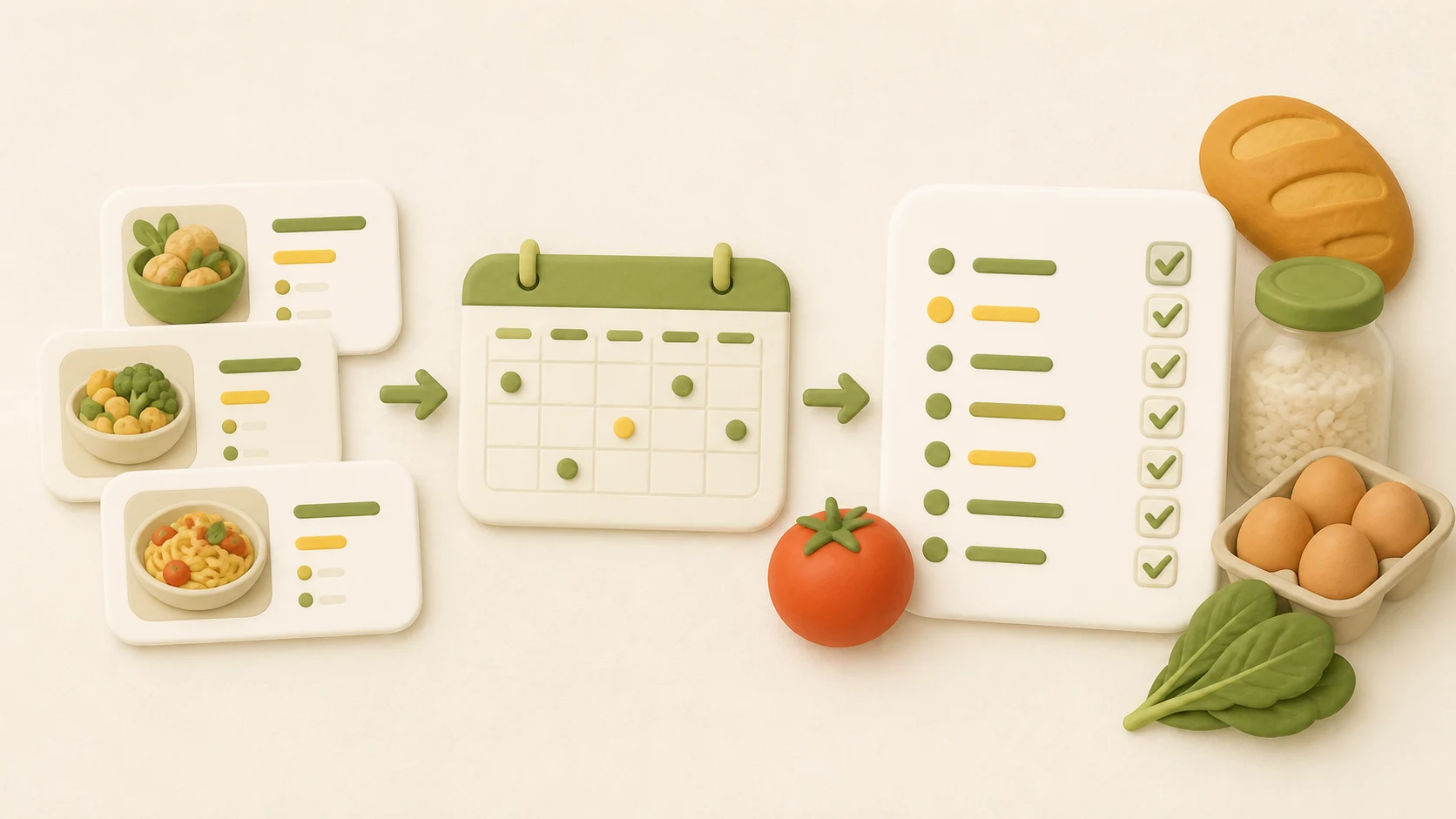
Honeydew’s drag-and-drop calendar makes weekly meal planning simple and visual. You can pick recipes from your collection and drop them into specific days of the week. If Tuesday’s broccoli pasta seems like a no-go for the kids, you can easily swap it out for a hidden-veggie quesadilla. The AI even flags overlapping ingredients - like rice for Monday’s tacos and Wednesday’s stir-fry - helping cut down on waste and trimming your grocery costs.

"My family of five uses Honeydew for all our meal planning. The household sharing feature keeps everyone organized." - Alex P., Honeydew User

As you rate meals with feedback like "kid loved hidden spinach", the AI learns your preferences and suggests similar recipes for future weeks. This smart system can cut your planning time by about 80%, turning what used to take hours into just a few minutes of dragging and dropping. Plus, it uses imperial measurements (cups, pounds, °F), making it easy for US-based families to follow recipes without any extra conversions.

Simplifying Grocery Shopping with AI

Creating Grocery Lists with AI

Once you've planned your week, the Honeydew Recipe Manager takes over and creates a precise grocery list based on your recipes and any ingredient swaps you’ve made. Whether you’re replacing rice with cauliflower or choosing a milder cheese for those who prefer it, the AI factors in all your adjustments. The result? A neatly organized list, grouped by store sections like produce, dairy, pantry, and proteins, so you can shop efficiently without zigzagging through the aisles.

The system also handles overlapping ingredients seamlessly. For instance, if ground turkey shows up in Monday’s tacos and Thursday’s spaghetti, Honeydew calculates the total amount needed - say, 3 lbs - helping you avoid waste and stick to your budget.

"The smart grocery lists save me hundreds of dollars a month." - James L., Honeydew User

These smart lists also make it easier to adjust on the fly when certain items aren’t available.

Getting Substitute Suggestions for Grocery Items

When something isn’t in stock, the AI steps in with substitute suggestions tailored to your family’s preferences. It cross-references your saved flavor, texture, and nutritional choices with commonly available options, ensuring the replacement fits seamlessly into your meals. Studies even suggest that tools like this can cut household food waste by 25–40% through intelligent matching and substitutions.

Once substitutions are confirmed, the next step - ordering - becomes just as effortless.

Ordering Ingredients Through Instacart

Instacart

With your grocery list finalized, including any substitutions, Honeydew makes ordering a breeze. A single tap on "Order via Instacart" sends your list - complete with exact quantities and preferences like organic options or bulk sizes - directly to the Instacart app. You can even have your groceries delivered the same day, saving you time and hassle.

This streamlined process not only saves hours each week but also helps curb impulse purchases. Users frequently report less waste, fewer forgotten items, and reduced stress, ensuring you’re always ready - even if a last-minute pizza night pops up.

Tracking Nutrition and Improving Recipes

Monitoring Calories and Nutritional Goals

Honeydew takes the guesswork out of meal planning by evaluating the nutritional profile of every recipe. Whether you're working with an imported recipe or one generated by the AI, the Honeydew Recipe Manager provides a detailed breakdown of nutrients per serving. This allows you to set and track specific calorie and macronutrient goals. For picky eaters, this feature is a game-changer - especially when you're sneaking in hidden vegetables or tweaking ingredients to add nutrition without altering the flavors they love.

You can customize targets, like specific macronutrient ratios (e.g., 40% carbs, 30% protein) or dietary restrictions, such as low-sodium options. The dashboard uses color-coded visuals to show how close you are to meeting each goal, such as hitting 85% of your daily protein target. Plus, it offers weekly summaries that compare your planned intake with what you actually consumed.

"The calorie and macro calculator has helped me stick to my health goals while still enjoying great meals." - Michael B., User

When adapting a recipe for a picky eater - like blending cauliflower into mac-and-cheese - Honeydew instantly updates the nutritional information. This real-time feedback highlights how ingredient swaps or portion changes impact overall nutrition. For example, it can help you meet USDA guidelines, which recommend 2–3 cups of vegetables daily. Research even shows that families can increase their vegetable intake by 25% through strategic ingredient swaps.

This precise tracking feeds directly into Honeydew's AI, refining each recipe to better align with your nutritional goals.

Using Feedback to Improve Recipes

Honeydew doesn't just track what you eat - it learns from how your family reacts to each meal. After dinner, you can rate recipes on a 1–5 star scale and leave notes like "too bland" or "kids skipped the carrots." The AI uses this feedback, along with data on what was actually eaten, to adjust future recipes. For instance, if a picky eater rates a dish 4 stars and comments "needs more cheese", the AI might increase the cheese content by 20% in similar recipes while maintaining nutritional balance.

This feedback loop creates a system of continuous improvement. If the AI notices that carrots consistently go untouched, it flags the aversion and adjusts future meal plans. Instead of carrots, the next recipe might use pureed sweet potatoes, which offer similar nutrition at 110 calories per serving but in a form that's more likely to be eaten. Over time, this approach mirrors behavioral therapy techniques, gradually introducing new foods in small amounts - about 10% novelty per meal. Studies show this method can increase acceptance of new foods by 40% in just four weeks.

Advanced Features with Honeydew Plus

Honeydew Plus

Honeydew Plus takes meal planning to the next level, making it easier to coordinate family meals and refine recipes - even for the pickiest eaters.

Sharing Meal Plans with Family Members

With Honeydew Plus, you can invite up to six family members to a shared meal planning space. Everyone has access to the same calendar, recipes, and grocery lists. Parents can easily drag-and-drop dinners into the weekly planner, while kids can give feedback on AI-suggested meals - thumbs-up for tacos, thumbs-down for fish - helping the AI learn and adapt to everyone’s preferences.

Each family member gets a personalized profile to account for preferences and dietary restrictions (like “no mushrooms” or “peanut allergy”). You can even assign specific prep tasks, such as “preheat oven at 5:30 PM” or “chop veggies,” which appear on their devices. Plus, real-time updates to grocery lists ensure you won’t accidentally buy the same item twice.

Unlimited Recipe Storage and Advanced Substitutions

Honeydew Plus also upgrades recipe management with unlimited storage and smarter substitutions. While the free version limits you to 10 recipe imports, Honeydew Plus removes this cap entirely, letting you save every variation of your favorite meals. Whether it’s “hidden veggie mac and cheese” or three different versions of taco night (mild, medium, and vegetarian), you can store and refine recipes without worrying about space.

The advanced substitution feature goes beyond basic ingredient swaps. The AI takes into account flavor, texture, and nutrition to suggest thoughtful alternatives. For example, it can transform a creamy pasta dish into a lactose-free version without losing its richness or find ways to sneak puréed carrots into tomato sauce for veggie-averse eaters. It can even handle complex customizations, like creating per-person variations of a dish - gluten-free crust for one, regular crust for others - while automatically adjusting ingredient quantities in cups, teaspoons, or ounces, and updating your grocery list accordingly.

Ad-Free Experience and Priority Support

Honeydew Plus also enhances your experience with an ad-free interface and priority support. Say goodbye to banner ads, pop-ups, and sponsored recipes that can distract you or slow you down. The clean interface makes it easier to plan meals, follow step-by-step instructions, and check ingredient lists - especially when you’re juggling a busy schedule of homework, sports, and bedtime routines.

With priority support, you’ll get faster responses - typically within 24 hours via chat or email - and early access to new AI features. Whether you’re troubleshooting recipe imports from TikTok, fine-tuning AI prompts for picky eaters, or managing multiple allergies alongside a teen’s sports nutrition needs, help is just a message away.

Honeydew Plus is available for $4.99/month or $49.99/year (a 20% discount), billed in USD.

Conclusion

Feeding picky eaters doesn’t have to feel like a never-ending struggle, complete with endless meal planning, frantic takeout orders, or dinnertime standoffs. The Honeydew Recipe Manager takes the guesswork out of your routine by learning each family member’s likes and dislikes. It customizes recipes, adjusts portions, and even tailors grocery lists to match your household’s unique needs. Whether it’s honoring a “no mushrooms” rule, sneaking veggies into sauces, or planning for a family of five, Honeydew offers solutions that make mealtime easier.

But it’s not just about the recipes. Honeydew transforms how you manage meals altogether. By automating grocery lists, portion calculations, and meal scheduling through a simple drag-and-drop calendar, it frees up your time and reduces stress. With features like instant grocery ordering, it even simplifies shopping. And as you rate meals and give feedback, the system gets smarter, learning what works best for your family and making every week more seamless.

For even more flexibility, Honeydew Plus steps things up. It offers unlimited recipe storage, smart ingredient swaps, and collaborative tools that let the whole family get involved. Everyone can check the weekly menu, suggest tweaks, or vote on meal ideas, helping the system adapt even faster. At just $4.17/month, you get an ad-free experience, priority support, and advanced customization options - all designed to handle picky eaters, dietary needs, and hectic schedules with ease.

FAQs

How does AI create meals for families with different dietary needs?

AI makes meal planning a breeze for families juggling different dietary needs. It customizes recipes by offering ingredient substitutions to accommodate allergies or preferences, adjusts portion sizes to suit varying ages or appetites, and ensures meals are both nutritious and delicious. This way, you can create dishes that satisfy everyone without added stress.

How can AI help reduce food waste when planning meals?

AI can play a big role in reducing food waste by helping you create precise grocery lists. It tailors the list to your recipes and specifies exact amounts for each ingredient, so you’re only buying what’s necessary - no more overloading your cart with extras that end up unused.

On top of that, AI can recommend ingredient swaps based on what’s already in your kitchen. This makes it easier to use up items before they go bad. By streamlining meal planning, it not only cuts waste but also saves you time and money in the process.

What if an ingredient isn’t available when grocery shopping?

If you’re missing an ingredient, the Honeydew Recipe Manager steps in with AI-powered suggestions for substitutes. This way, you can keep cooking without interruptions, even if something isn’t available. It’s a handy tool for making adjustments when items are out of stock.

Related Blog Posts