AI Meal Calendars: Save Time and Eat Healthy
• Updated
AI meal calendars are digital tools that simplify meal planning by using artificial intelligence to create personalized weekly menus. These tools consider factors like dietary preferences, health goals, pantry items, and schedules to save time, reduce food waste, and support healthier eating. For example, Honeydew Recipe Manager offers features like recipe imports, automated grocery lists, and a "Pantry Mode" that suggests meals based on available ingredients. Users report saving up to 76% of their planning time and cutting food waste by 40%, translating to monthly savings of $100–$125. Honeydew’s premium plan, at $4.17/month, unlocks advanced features, making meal prep easier and more efficient for families and individuals alike.
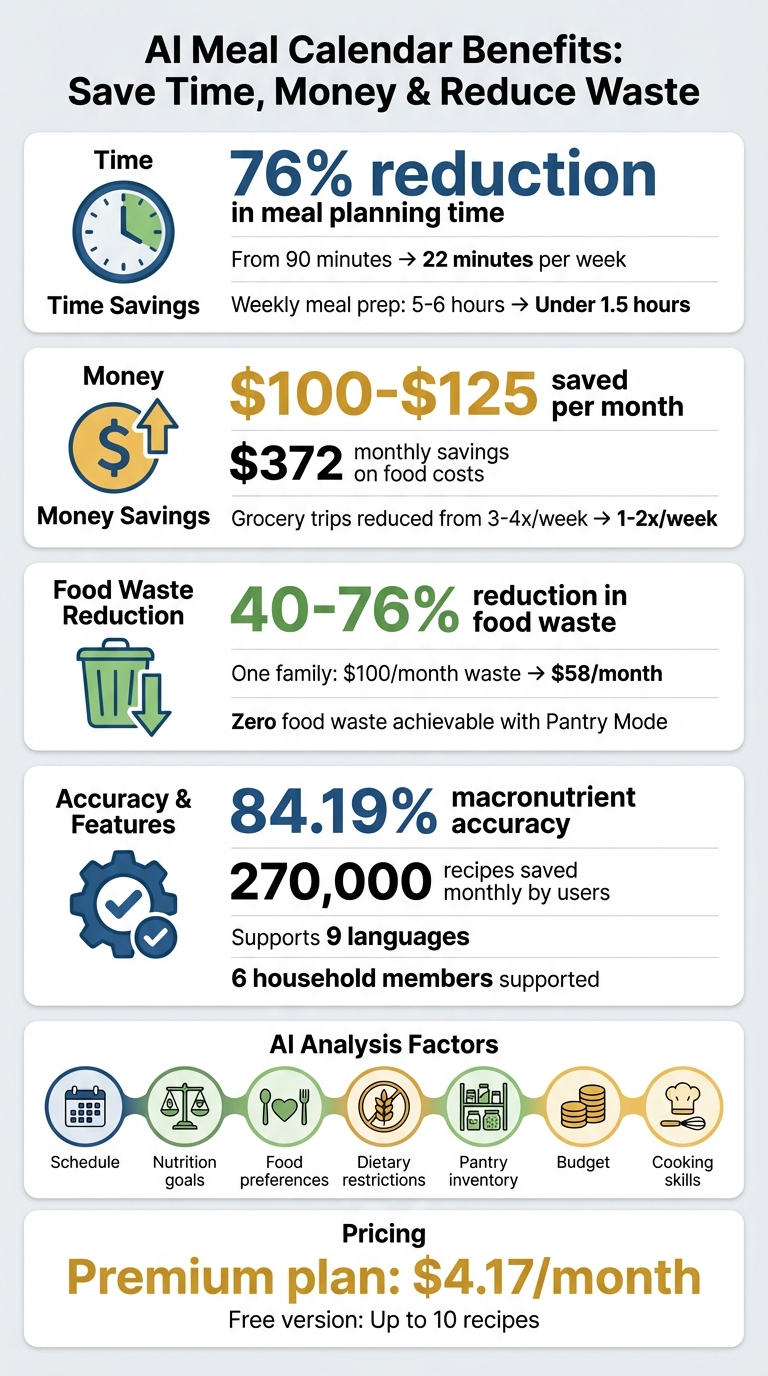
Honeydew AI Meal Calendar Benefits: Time and Money Savings Statistics
Main Features of Honeydew Recipe Manager
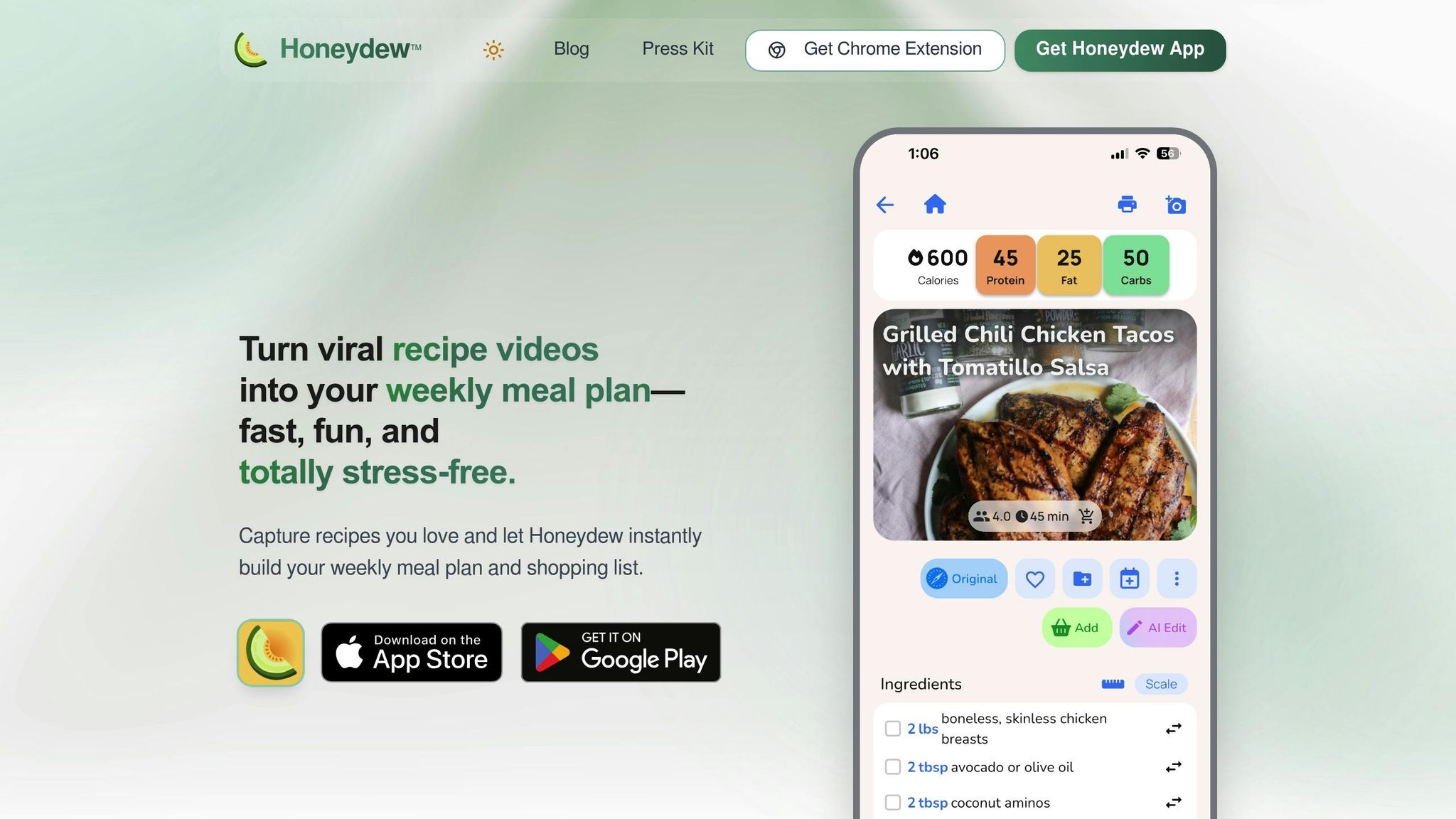
AI-Powered Meal Planning
Honeydew Recipe Manager takes the hassle out of meal planning with its AI-powered system. Instead of spending 90 minutes juggling recipes, schedules, and preferences, this app reduces that effort to just 22 minutes - a time savings of 76%. The AI evaluates seven key factors - your schedule, nutrition goals, food preferences, dietary restrictions, pantry inventory, budget, and cooking skills - to create a well-rounded weekly meal plan.
The app’s drag-and-drop calendar makes it easy to organize meals visually, whether it’s breakfast, lunch, dinner, or snacks. As you move recipes around, the AI adjusts daily nutritional totals in real time, automatically tracking calories, protein, fats, carbs, and fiber.
"Your brain is trying to solve a multi-variable optimization problem every single week. AI checks the family calendar, reviews nutrition, and checks what we have in 3 seconds." – Honeydew Family App
On top of planning, Honeydew simplifies your workflow with features like recipe imports and grocery list automation.
Recipe Import and Grocery List Automation
Importing recipes has never been easier. Honeydew pulls recipes from platforms like TikTok, Instagram, YouTube, websites, and even photos of handwritten cards. The AI extracts all the details - ingredients, measurements, cooking times, and nutritional data - saving you the trouble of manual entry. Users collectively save around 270,000 recipes every month using this feature.
Once your meal plan is ready, the app generates a grocery list sorted by aisle and consolidates duplicate ingredients from different recipes. You can even order everything through Instacart with a single click, which helps avoid impulse purchases. This streamlined approach reduces grocery trips from 3–4 times a week to just 1–2, saving families about $372 per month on food costs.
Smart Substitutions and Pantry Mode
Honeydew’s Pantry Mode takes smart automation a step further. Snap a photo of your fridge or pantry, and the AI identifies what’s available, suggesting recipes that use those ingredients. This feature can cut food waste by up to 40%, which translates to roughly $125 in monthly savings. In a November 2025 trial, CNET editor Corin Cesaric followed this method for a week and achieved zero food waste by relying on the AI’s precise ingredient calculations.
The app also includes an "Ask Honey" assistant for instant recipe tweaks. Just type commands like "make this gluten-free" or "reduce the carbs", and the AI modifies the recipe while updating nutritional info and your grocery list. This is especially helpful for managing allergies or tailoring popular recipes to fit your dietary needs.
"The ingredient substitution feature is a game-changer for my dietary restrictions. I can adapt any recipe easily!" – Emily C., User
How AI Meal Calendars Support Healthy Eating
Automatic Nutrition Tracking
Honeydew's AI takes the guesswork out of nutrition tracking by automatically pulling calorie and macronutrient data from recipes - no matter the source. This eliminates the need for tedious manual entry. As you add recipes to your weekly calendar, the tool updates daily and weekly nutritional totals in real time. This makes it easier to stay on track with your health goals. Impressively, Honeydew achieves a macronutrient accuracy rate of 84.19%, far exceeding what most manual tracking methods can offer.
Customization for Dietary Needs
Whether you're following Keto, Vegan, Paleo, High-Protein, or Gluten-Free diets, Honeydew's AI adapts to your needs. By setting up a dietary profile, the tool filters and suggests recipes that match your preferences. Found a recipe that’s close but not perfect? The "Ask Honey" assistant can tweak it for you. For instance, you can input commands like "make it gluten-free" or "lower the carbs", and the AI will adjust the ingredients and instructions while recalculating the nutritional values.
This feature is a game-changer for families juggling multiple dietary needs. Honeydew supports up to six household members, syncing preferences and allergies across devices. Digital Parenting Expert Abby Brody highlighted its benefits, saying:
"Letting AI help me make the most of what I already have saves our family of four roughly $100 a week".
These personalized adjustments make meal planning not only simpler but also more effective for diverse households.
Reducing Food Waste
Honeydew goes beyond just nutrition - it helps you save money and reduce food waste. The app’s Pantry Mode uses photos of your inventory to suggest recipes that prioritize soon-to-expire ingredients. This approach can cut food waste by up to 40% and save around $125 each month. In one trial, users reported achieving zero food waste with these pantry-based recommendations.
To streamline your shopping, the app also creates aisle-sorted grocery lists, consolidating duplicate items so you only buy what’s necessary. Executive Chef Tatiana Rosana of Para Maria and Peregrine encourages this mindset:
"Treat your leftovers and scraps as ingredients, not trash, and get creative with how you use them".
With these tools, Honeydew not only supports healthier eating habits but also fosters a more efficient and waste-conscious kitchen.
5 AI prompts to make meal planning and grocery shopping easier
How to Create Your First AI Meal Calendar
Getting started with your AI-powered meal calendar in Honeydew is simple and intuitive, thanks to its user-friendly features.
Set Your Preferences and Goals
Begin by opening the Honeydew Recipe Manager and heading to your profile settings. Here, you can define your dietary needs by listing allergies, intolerances, or specific diet types like Keto, Vegan, Paleo, or Gluten-Free. Once that's done, set your nutritional targets - whether it's daily calorie limits or macronutrient goals - by typing or even speaking your preferences. The AI will handle the rest, automatically tracking your daily intake and updating totals as you go.
Import Recipes and Generate a Calendar
Once your preferences are set, it’s time to bring in recipes. You can import them by pasting links from platforms like TikTok, Instagram, YouTube, or Facebook Reels. Alternatively, use the Share button or snap photos of handwritten recipes or screenshots. The AI will extract all the essential details, including ingredients, instructions, and nutritional info. From there, you can either manually drag and drop recipes onto your calendar or let the AI do the heavy lifting. For example, you can simply say, “Plan a week of meals with 1,500 calories a day,” and the app will generate a tailored plan. To minimize food waste, try Pantry Mode - just photograph what’s in your fridge, and the AI will suggest recipes based on those ingredients.
Review, Adjust, and Share
Your meal calendar can be customized at any time. Use the drag-and-drop feature to rearrange meals to better fit your schedule or adjust for nutritional balance. Need to tweak a recipe? Use the “Ask Honey” feature for real-time substitutions, like making a dish gluten-free or lowering its carbohydrate content. The app will automatically update your daily and weekly totals to reflect the changes. For households, upgrading to Honeydew Plus ($4.17/month) unlocks features like sharing meal plans and grocery lists across devices, complete with task assignments to keep everyone on the same page.
Advanced Tips for AI Meal Calendar Planning
Once you've got the basics of meal planning down, these advanced strategies can take your efforts to the next level. Honeydew Recipe Manager offers tools that not only help you save time and money but also reduce waste and make meal prep more exciting by letting you explore flavors from around the world - all while keeping your nutrition in check.
Using Pantry Mode for Zero-Waste Planning
Pantry Mode changes the way you think about meal planning. Instead of asking, "What do I want to eat?" it asks, "What needs to be used?" By snapping a quick photo of your fridge or pantry, the AI identifies your ingredients and suggests recipes that make the most of what you already have. This feature also tracks expiration dates and sends you reminders, ensuring nothing goes to waste. According to user data, AI-powered pantry tools can cut food waste by 65% compared to traditional methods and save families an average of $125 per month by reducing waste and avoiding duplicate purchases.
To maximize this feature:
- Create a "Use-First" bin in your fridge for items nearing expiration.
- Log frozen items with dates in the app to prevent freezer burn.
- Develop versatile "Meal Modules" (like roasted veggies or cooked grains) that can be reused throughout the week.
While Pantry Mode helps reduce waste, the next strategy focuses on making meal prep faster and easier.
Batch Cooking and Scaling Recipes
Batch cooking becomes a breeze with Honeydew's smart serving size scaling. The app automatically adjusts ingredient quantities based on how many portions you need and even handles Imperial–Metric conversions for precision. With just 60–90 minutes of prep time, you can knock out 2–4 meals for the week, cutting down your daily cooking time significantly. The AI can also tweak recipes to make them more suitable for batch cooking, such as modifying them to be freezer-friendly or adjusting cooking techniques for larger quantities.
Here are some tips for smoother batch cooking:
- Use a cooking measurement converter to switch from volume (like cups) to weight (grams) for better consistency.
- Use the "Ask Honey" feature for storage and reheating tips to maintain food quality.
- Let the app sort your grocery list by store section, saving you time during shopping.
Families using AI meal calendars report saving between $100 and $125 per month while slashing weekly meal prep time from 5–6 hours to under 1.5 hours. Once you've streamlined your cooking routine, it's time to expand your palate.
Trying International Recipes with Translation
The Cookbook Translator takes the stress out of trying recipes from around the world. You can import recipes from platforms like TikTok, Instagram, or YouTube, and the AI will automatically translate the ingredients, steps, and measurements into your preferred language. With support for nine languages - including English, French, Spanish, and Simplified Chinese - it even lets you save recipes from authentic blogs written in foreign languages.
For ingredients that aren't easy to find, the "Ask Honey" assistant can suggest pantry-friendly swaps. For example, you can substitute galangal with ginger or kaffir lime leaves with lime zest. The AI can also adapt these recipes to fit your dietary needs, whether you're gluten-free, vegan, or following another plan, while keeping the original flavors intact. Plus, all imported recipes come with automatic calorie and macro calculations, and they stay accessible offline, so you can cook without worrying about losing your connection.
Conclusion: Simplify Meal Planning with AI
Main Benefits Recap
Honeydew brings together time-saving tools and healthy eating strategies in one seamless app. It slashes planning time by up to 76%, reduces food waste by as much as 76%, and achieves an impressive 84.19% macronutrient accuracy - all while saving households between $100 and $125 per month by using ingredients on hand instead of unnecessary grocery trips.
The app’s real magic is how its features work together. Smart grocery lists organize items by store aisle and sync with Instacart for easy delivery. Missing an ingredient? The "Ask Honey" assistant suggests substitutions and instantly recalculates nutrition. From September to November 2025, one family of four cut their takeout by 70%, expanded their recipe rotation from 10 to 35 dishes, and reduced monthly food waste from $100 to $58.
Getting Started with Honeydew Recipe Manager
Getting started is quick and easy. Download the app on iOS or Android, then set your dietary preferences - whether you're tracking macros, avoiding allergens, or following a specific eating plan. The free version offers basic meal planning with up to 10 recipes. For just $4.17 per month, Honeydew Plus unlocks unlimited recipe storage, household sharing for up to six members, and advanced AI tools like Pantry Mode and recipe translation.
"I used to waste so much food. Now with Honeydew's meal planning, I buy exactly what I need and save money!" - Mark T.
With features like snapping a photo of your fridge to discover recipes based on what you already have and offline access to your meal calendar and grocery lists, Honeydew makes meal planning effortless - even in areas with spotty connectivity. Dive in today and see how it can transform your weekly routine.
FAQs
How accurate is the nutrition tracking?
AI-driven nutrition tracking cuts down errors dramatically, boosting the accuracy of calorie and nutrient estimates by more than 50% when compared to manual tracking. This means you get more dependable data to support your meal planning and health objectives.
Can it plan meals for multiple diets in one household?
AI meal planning tools, such as Honeydew Recipe Manager, are designed to simplify creating customized weekly menus for households juggling multiple diets. These tools adapt meal plans to fit individual dietary needs and preferences, ensuring everyone in the household is accommodated without hassle.
What do I need to use Pantry Mode?
To start using Pantry Mode, sign up with your Apple, Google account, or email. Once you're in, snap a photo of your pantry or fridge. The AI will analyze the image, identify the ingredients, and recommend recipes tailored to what you already have on hand.



