AI-Powered Meal Plans: Weekly Prep Made Easy
• Updated
Figuring out meals for the week can be time-consuming and stressful. AI meal-planning apps like Honeydew Recipe Manager simplify this process by creating custom menus, organized grocery lists, and even reducing food waste by up to 40%. Whether you’re managing dietary restrictions, following a specific diet, or just want to save time and money, these tools handle everything from recipe suggestions to Instacart integration for easy shopping.
Key Features of Honeydew Recipe Manager:
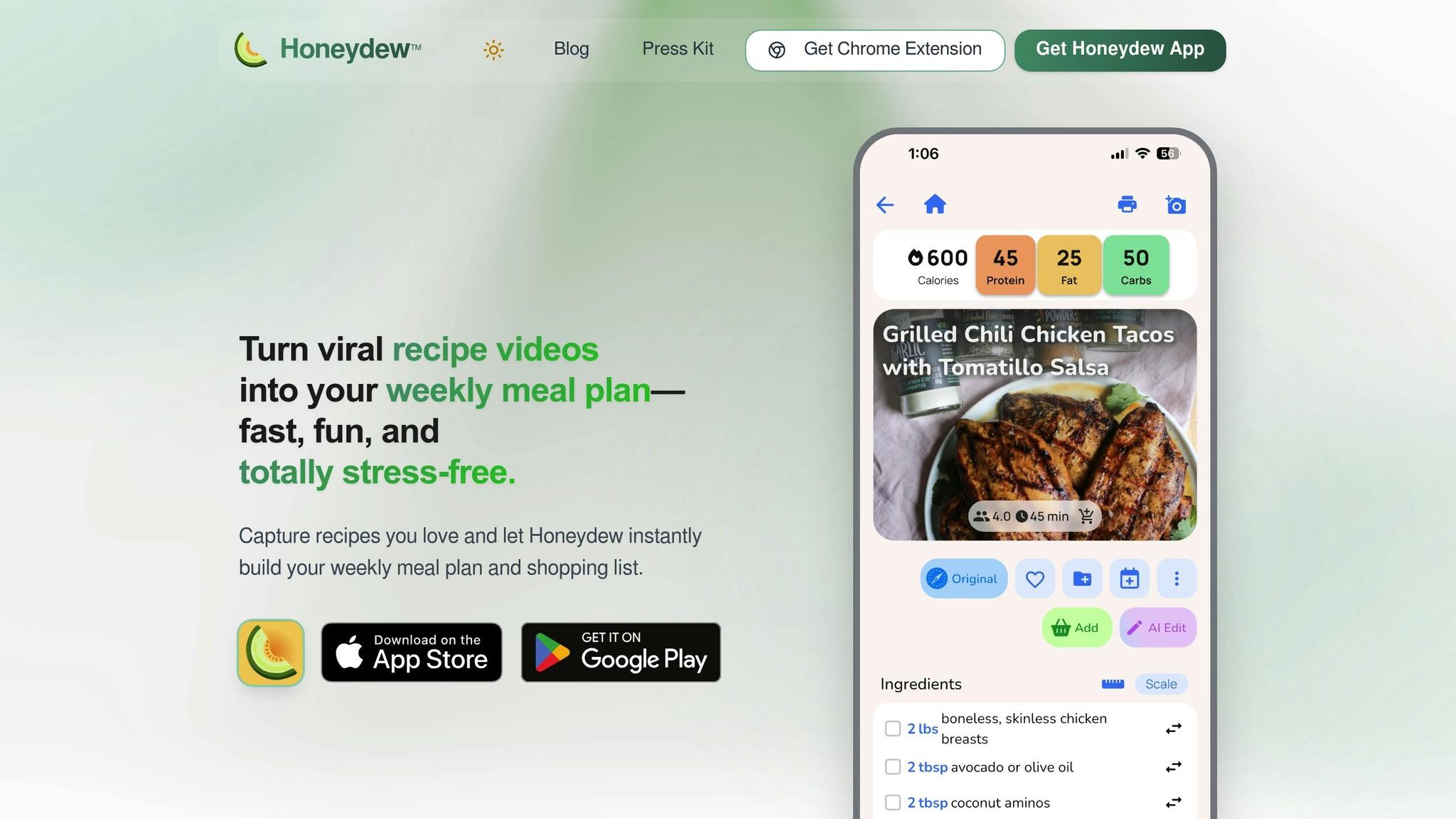
- Custom Meal Plans: Tailored to your diet, household size, and preferences.
- Recipe Import: Add recipes from TikTok, Instagram, blogs, or even handwritten cards.
- Organized Grocery Lists: Sorted by store aisle, with smart substitutions for unavailable items.
- Pantry Mode: Suggests recipes using ingredients you already have.
- Nutrition Tracking: Built-in calorie and macro tracking.
- Household Sharing: Share plans and lists with up to six family members.
With a free version for basic features and a $4.17/month subscription for advanced tools, Honeydew is a practical solution for making meal prep easier, cutting costs, and reducing waste. Users report saving $125/month and enjoying a more efficient meal-planning experience.
How To Use AI To MEAL PLAN! 🤖💻🌮 (with ChatGPT Prompts)
Getting Started with Honeydew Recipe Manager
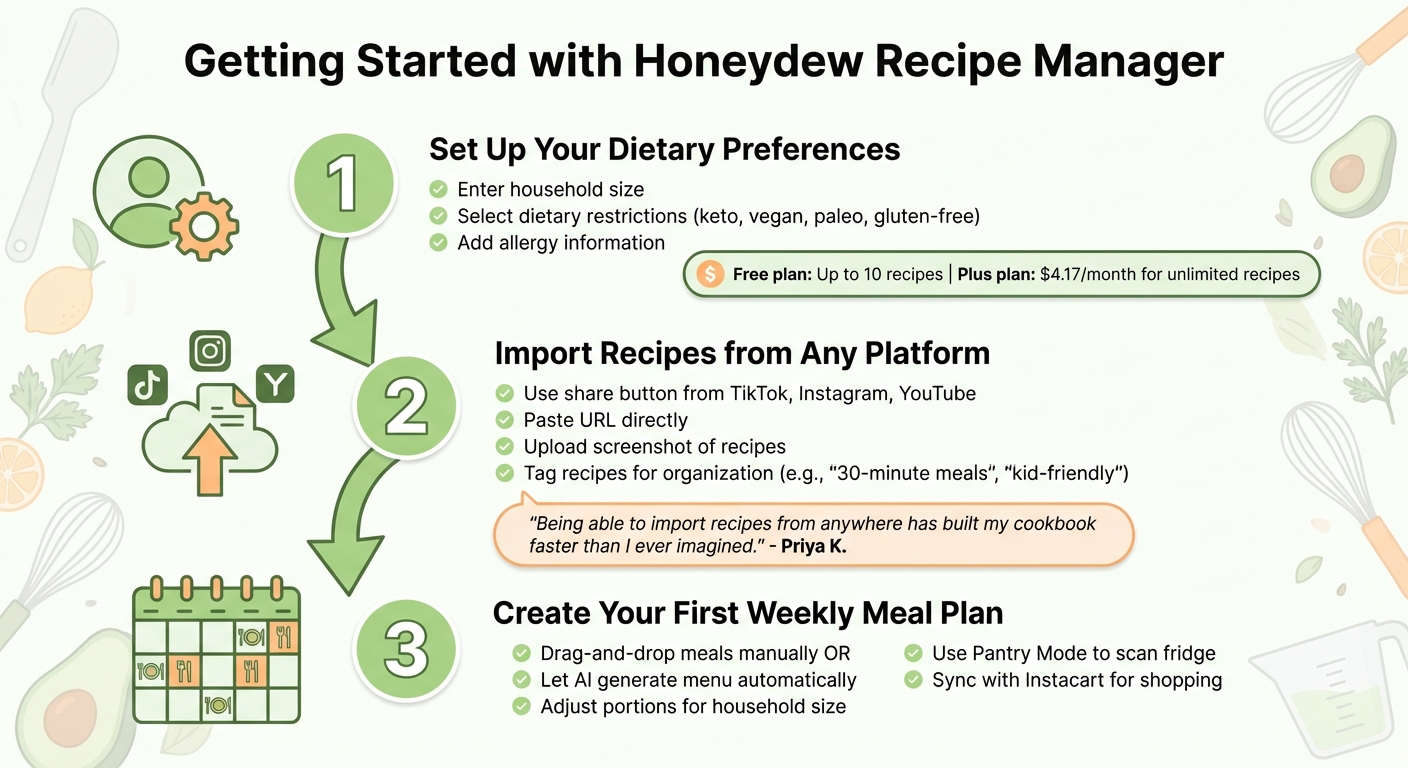
How to Set Up Honeydew Recipe Manager in 3 Steps
Setting up your meal planning system with Honeydew is quick and straightforward. The app guides you through three simple steps: customizing your preferences, building your recipe collection, and creating your first weekly meal plan with AI assistance.
Set Up Your Dietary Preferences
Begin by entering details like your household size, dietary restrictions (such as keto, vegan, paleo, or gluten-free), and any allergies. These settings can be updated anytime to reflect changes in your needs. This information ensures that every meal suggestion aligns with your preferences, so you won’t come across recipes that don’t fit your lifestyle.
The free plan allows you to store up to 10 recipes and includes basic meal planning tools - perfect for trying out the app. If you need more, Honeydew Plus is available for $4.17 per month, offering unlimited recipe storage, advanced AI planning features, and the ability to share with up to six family members.
Import Recipes from Any Platform
Once your preferences are saved, it’s time to start building your recipe collection. Honeydew’s AI makes this easy by pulling ingredients, instructions, and prep times from nearly any source - whether it’s TikTok, Instagram, YouTube, food blogs, or even a handwritten recipe card.
The fastest way to import recipes is by using the share button. Found a recipe on TikTok or Instagram? Just tap "Share", select Honeydew, and the app will automatically add the recipe to your collection. Alternatively, you can paste a URL directly into the app or upload a screenshot of a recipe from an Instagram Story.
"Being able to import recipes from anywhere has built my cookbook faster than I ever imagined." - Priya K.
To keep things organized, you can tag recipes while importing. Labels like "30-minute meals" or "kid-friendly" make it easier to filter and find exactly what you need, whether you're planning for a hectic weekday or a relaxed weekend dinner.
Create Your First Weekly Meal Plan
With your recipes imported, you’re ready to plan your week. Use the drag-and-drop calendar to organize meals manually, or let Honeydew’s AI generate a menu tailored to your preferences. The planner adjusts ingredient quantities based on your household size and can seamlessly convert measurements between imperial and metric units.
The AI uses all the information you’ve provided - dietary preferences, household size, and cooking habits - to create a balanced weekly menu in seconds. Prefer more control? You can assign specific recipes to certain days, and the app will adjust your grocery list automatically.
The drag-and-drop feature makes it easy to rearrange meals if plans change. You can also activate Pantry Mode, which lets you photograph your fridge or scan barcodes. The app will then suggest recipes that use ingredients you already have. Once your weekly plan is finalized, Honeydew organizes your grocery list and syncs with Instacart, making shopping a breeze.
Auto-Generated Grocery Lists and Instacart Integration
After setting up your weekly meal plan, Honeydew takes care of the next step: creating a detailed grocery list. The app pulls ingredient details and quantities directly from your selected recipes, no matter where they’re sourced. For instance, if two recipes call for chicken, Honeydew calculates the total amount needed - say, 2.5 lbs - so you buy just the right quantity.
Grocery Lists Sorted by Store Aisles
Honeydew doesn’t just make a list; it organizes it by store sections like produce, dairy, meat, and pantry. This setup mirrors the way most people shop, helping you move through the store efficiently without doubling back for forgotten items. Plus, you can mark off ingredients you already have at home - like flour or olive oil - to avoid unnecessary purchases.
The app also steps in with smart substitutions if something on your list isn’t available or doesn’t align with your dietary preferences. These suggestions are based on flavors, nutrition, and what you already have stocked. Before heading to the store or placing an order, you can double-check the list to ensure everything is accurate, especially if recipes were imported from less conventional sources like social media.
Seamless Instacart Integration for Grocery Shopping
Once your list is ready, Honeydew simplifies the shopping experience even further. With one tap, you can send your organized list directly to Instacart. From there, you can pick your preferred store, choose delivery or pickup, and complete your order - all without the hassle of manually entering items or juggling multiple apps.
Honeydew also supports collaboration, allowing up to six household members to contribute to the list in real time. This feature helps avoid duplicate purchases and ensures everyone’s needs are included before placing the order. Whether you’re using the free version or the Honeydew Plus subscription (priced at $4.17 per month), the Instacart integration is available. However, advanced features like unlimited recipe storage and enhanced AI substitutions are exclusive to the subscription plan.
Advanced Features for Custom Meal Planning
Honeydew takes meal planning to the next level with tools designed for ultimate personalization. Beyond its streamlined grocery lists, the app offers features that cater to your specific needs and preferences.
Pantry Mode and Ingredient-Based Search
With Pantry Mode, Honeydew makes it easy to transform the contents of your pantry into delicious meals. Simply snap a photo of your pantry, and the app’s AI analyzes your inventory to suggest recipes using what you already have on hand. Additionally, you can search your saved recipes by specific ingredients. For example, type in "chicken thighs" or "bell peppers", and Honeydew will pull up all recipes featuring those items.
"The smart grocery lists save me hundreds of dollars a month. I love how it suggests recipes based on what I already have!" - James L.
Nutrition Tracking and Adjustable Serving Sizes
Honeydew includes a built-in calorie and macro tracker, helping you keep tabs on your daily intake of calories, protein, fat, carbs, and fiber. The app also extracts detailed nutritional information from imported recipes, ensuring you’re always informed about what you’re eating. Need to adjust a recipe for fewer or more people? No problem. Honeydew allows you to scale serving sizes up or down, automatically recalculating ingredient amounts in familiar measurements like cups and pounds. This ensures your portions are always accurate and your meal plan stays on track.
Share Meal Plans with Your Household
Keeping everyone in sync has never been easier. Honeydew enables you to share recipes, meal plans, and grocery lists with up to six family members. Updates happen in real time - if someone adds an item to the shopping list, everyone sees it instantly. The app also includes a note feature for quick messages like "pick up extra milk" or "skip Tuesday’s recipe", eliminating the need for group texts or juggling multiple apps.
"My family of five uses Honeydew for all our meal planning. The household sharing feature keeps everyone organized." - Alex P.
Conclusion: Save Time with AI-Powered Meal Planning
Meal planning doesn’t have to feel like a chore. With Honeydew Recipe Manager, you get an AI-powered assistant that takes care of the heavy lifting - whether it’s creating tailored meal plans or generating perfectly organized grocery lists sorted by store aisle. It simplifies decisions like what’s for dinner, calculates serving sizes, and even tracks what’s already in your pantry.
The time you save quickly adds up. Instead of spending hours scrolling through recipes, jotting down lists, and making multiple trips to the store, you can plan your entire week in just minutes. Plus, it’s not just about convenience - it’s about cutting costs and waste. Honeydew users report reducing food waste by 40% and saving an average of $125 each month. With features like Instacart integration for effortless online shopping and Pantry Mode to make the most of what you already have, meal prep becomes a breeze.
"Honeydew has transformed the way I cook. I'm saving so much time and enjoying new recipes every week!" - Sarah M.
Add to that the app’s household sharing feature, which keeps everyone aligned on meal responsibilities and grocery needs. With over 6,400 reviews and an impressive 4.8/5 star rating on Google Play, Honeydew has become a trusted tool for busy households looking to simplify their lives.
FAQs
How does Honeydew Recipe Manager help reduce food waste?
Honeydew Recipe Manager is designed to tackle food waste by simplifying meal planning and grocery shopping. With this app, you can import recipes straight from social media and instantly generate grocery lists, ensuring you purchase only what’s necessary. Features like ingredient substitution and pantry tracking make it even easier to use what’s already in your kitchen, cutting down on unnecessary trips to the store.
On top of that, the app’s AI-powered meal planner creates customized, balanced weekly menus based on your preferences. This makes meal prep more efficient while helping you avoid overbuying or letting ingredients sit unused.
Can Honeydew handle multiple dietary restrictions at the same time?
Honeydew’s AI is built to handle various dietary restrictions with ease. It can tweak recipes to suit your needs and recommend ingredient swaps that match your preferences. Whether you're steering clear of gluten, cutting out dairy, or sticking to a specific diet, Honeydew makes sure your meals are tasty while staying within your guidelines.
What are the benefits of upgrading to Honeydew Plus?
With Honeydew Plus (just $4.17 per month), meal planning becomes effortless and smarter. This subscription takes the guesswork out of grocery shopping by automatically creating detailed grocery lists the moment you import a recipe. Whether it's a recipe from social media, a screenshot, or even a photo of a dish you loved at a restaurant, Honeydew Plus transforms it into a ready-to-cook plan in no time.
The subscription also features pantry tracking and smart ingredient substitutions, allowing you to craft meals based on what you already have, avoid unnecessary purchases, and minimize food waste. Plus, with its one-tap Instacart integration, you can instantly order everything on your list. Additional tools like nutrition tracking and family sharing make it simple to tailor meal plans to dietary needs and busy schedules. It’s your go-to solution for saving time, managing costs, and streamlining your meal prep routine.



