Best Apps for Monitoring Sous Vide Cooking
• Updated
Sous vide cooking ensures precise temperature control for perfectly cooked meals. But, without proper monitoring, even slight temperature shifts can ruin your food. That's where sous vide apps come in - they help you track, adjust, and perfect your cooking process remotely.
Here’s what you need to know:
- Why It Matters: Apps prevent common errors like overcooked chicken or undercooked salmon by offering real-time temperature tracking and alerts.
- Top Features: Look for apps with live monitoring, customizable notifications, and integrated recipes. Some even include tools like pasteurization calculators and cooking history logs.
- Best Picks:
- Anova Culinary: Advanced control with AI suggestions and remote monitoring.
- PolyScience Toolbox: Ideal for professionals, with detailed data and safety tracking.
- Breville+ Cooking: Beginner-friendly with visual guides for doneness.
- Honeydew Recipe Manager: Organizes recipes and meal plans for sous vide enthusiasts.
Quick Tip: Start with free apps to explore basic features, then upgrade if you need advanced tools like AI-driven recommendations or multi-device management.
PolyScience Sous Vide Toolbox™ App for iOS/iPhone/iPad
Key Features in Sous Vide Monitoring Apps
Modern sous vide apps have transformed how we approach precision cooking, helping to minimize common errors and enhance safety. These apps serve as indispensable tools, offering features that ensure accuracy and convenience in the kitchen.
Real-Time Temperature Tracking
At the heart of any reliable sous vide app is live temperature monitoring. Many top-tier apps display real-time bath temperatures directly on your iOS lock screen using "Live Activities". Even minor temperature shifts - like 0.5°C (0.9°F) - can affect food safety, particularly when working with poultry. Automated tracking significantly reduces missed cooking endpoints by 42% and overall errors by 68%. For dishes involving raw proteins, eggs, or delicate dairy-based sauces, maintaining precision within 1.5°C (2.7°F) is absolutely critical.
Customizable Alerts and Notifications
Push notifications make it easy to keep tabs on your cooking, even from a distance. These alerts notify you when the water reaches the target temperature, so you can add your ingredients at just the right time. They also warn about potential issues, such as low water levels, unsafe temperature changes, or equipment malfunctions that might cause cooking stalls. Some apps even go a step further by providing a "safety window" notification, letting you know how long your food can remain safely in the water bath after the timer has ended.
Recipe Integration and Guides
Beyond monitoring, sous vide apps act as your personal cooking assistant. Built-in recipe libraries feature precise time and temperature recommendations for various cuts and levels of doneness. With one-touch functionality, you can tap a recipe to automatically program your circulator with the ideal settings. Many apps include visual aids like GIFs and short videos to walk you through steps such as vacuum sealing and searing. Additional tools, like pasteurization calculators and ice bath timers, further enhance food safety. Features like "Visual Doneness" allow you to choose exactly how you want your food to look - whether it’s a rare steak or well-done chicken - while automatically adjusting the temperature settings. To top it off, custom cook history and personalized recipes help you replicate your favorite meals with consistent results.
Best Apps for Monitoring Sous Vide Cooking
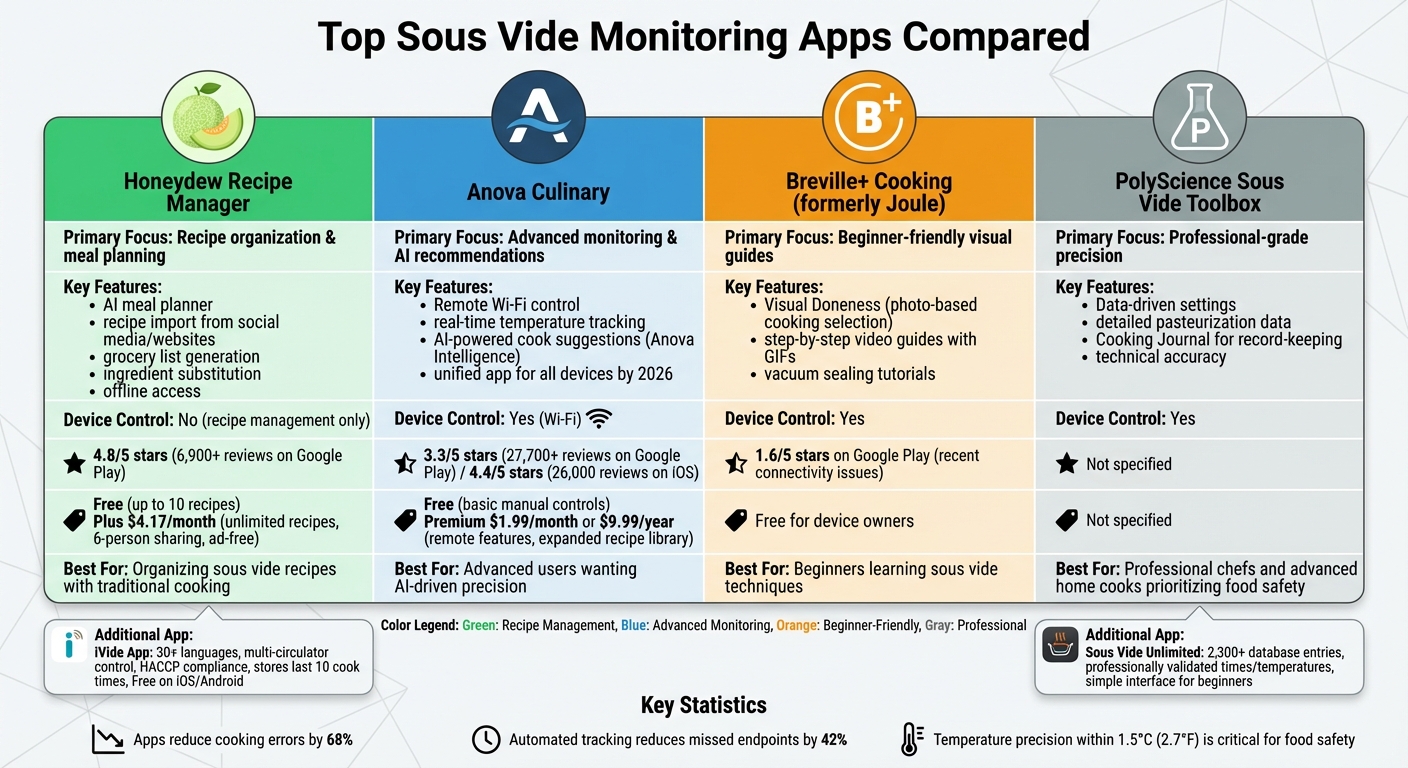
Comparison of Top Sous Vide Monitoring Apps: Features, Pricing, and Ratings
The right app can turn your sous vide experience from guesswork into precision cooking, helping you tailor meals to your exact preferences.
Honeydew Recipe Manager
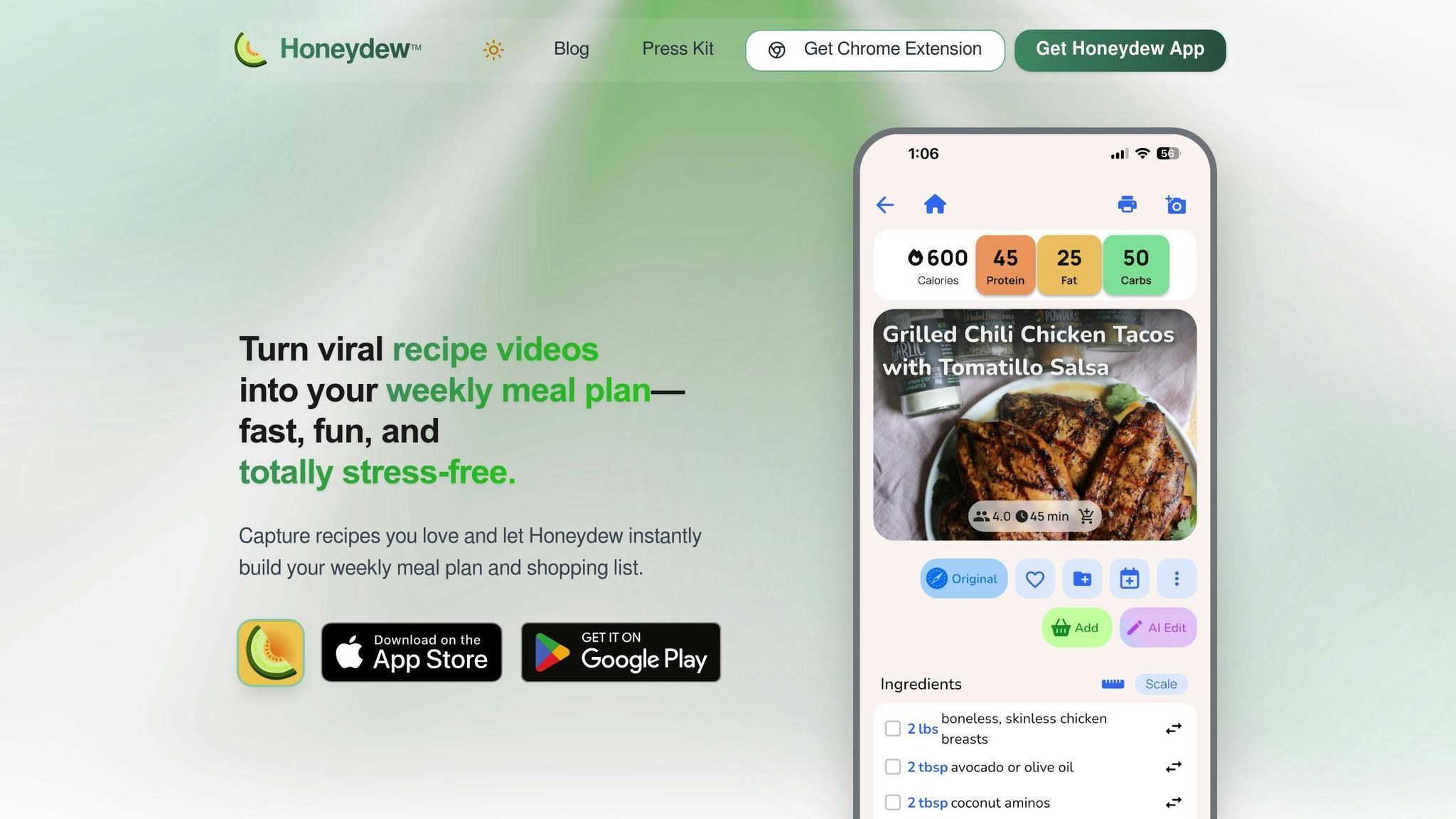
Honeydew Recipe Manager (https://honeydewcook.com) isn't designed to control sous vide devices, but it shines when it comes to organizing recipes and meal plans. This app simplifies meal prep by importing recipes from social media or websites, automatically extracting ingredients, and generating grocery lists. With over 6,900 reviews and a 4.8/5 rating on Google Play, it’s clear users appreciate its features. The AI-powered meal planner can create weekly sous vide meal plans in seconds, and its smart ingredient substitution feature ensures you can adapt recipes even when you're short on specific items. Plus, offline access means you can reference saved recipes even in kitchens with poor connectivity.
The free version allows up to 10 recipe imports and basic meal planning. For $4.17/month, the Honeydew Plus subscription unlocks unlimited recipe storage, household sharing for up to six people, and ad-free guides. It’s ideal for those who want to organize their sous vide recipes alongside traditional ones. However, if you’re looking for apps with advanced device integration, there are other options to consider.
Apps with Advanced Monitoring Tools
For cooks who value real-time precision, these apps go beyond basic temperature tracking to offer more control.
Anova Culinary brings remote Wi-Fi control, real-time temperature tracking, and AI-powered cook setting suggestions to the table. Its Anova Intelligence feature uses AI to recommend optimal settings based on your dish. By 2026, a unified app will manage all Anova devices, from sous vide circulators to ovens. While basic manual controls and recipes are free, the Premium tier ($1.99/month or $9.99/year) adds remote features and an expanded recipe library. Despite its advanced capabilities, the app has a 3.3/5 rating on Google Play from over 27,700 reviews, with some users critical of its shift toward subscription-based features.
PolyScience Sous Vide Toolbox caters to professional chefs and advanced home cooks. It offers precise, data-driven settings and detailed pasteurization data, making it a go-to for those focused on food safety. The built-in Cooking Journal is particularly useful for keeping strict records. Unlike consumer-oriented apps, PolyScience prioritizes technical accuracy over flashy visuals or beginner-friendly guides.
iVide App is a standout for its multilingual support, available in over 30 languages, and its ability to control multiple circulators simultaneously - perfect for batch cooking or catering. The app also stores the last 10 cook times and temperatures, ensuring compliance with HACCP standards. It’s free on both iOS and Android, making it a practical choice for professional kitchens and households needing multilingual functionality.
Apps with Simple and User-Friendly Design
If you prefer an easy-to-navigate app over one packed with advanced features, these options balance simplicity with accuracy.
Breville+ Cooking (formerly Joule) will replace the original Joule app in early 2026 for users in the U.S. and Canada. Its signature feature, Visual Doneness, lets you select a photo showing how you want your steak, chicken, or fish to look, and the app automatically adjusts the time and temperature. Step-by-step video guides, complete with GIFs, are perfect for beginners learning techniques like vacuum sealing and searing. While the app is free for device owners, recent connectivity issues have dropped its rating to 1.6/5 on Google Play.
Sous Vide Unlimited is a straightforward app with a database of over 2,300 entries for various meat cuts, fish, and vegetables. Each entry includes professionally validated times and temperatures, helping users avoid confusion, such as distinguishing between "chuck roast" and "pot roast". Its simple interface makes it a great choice for beginners, offering accurate results without overwhelming them with unnecessary features.
How to Choose the Right Sous Vide Monitoring App
Matching an app’s features to your cooking style is key to getting the most out of your sous vide experience.
Assess Your Cooking Needs
Think about how often you use your sous vide and the level of control you want. If you’re new to sous vide cooking, look for apps that offer guided cooking, video tutorials, or master classes. These tools make it easier to learn the ropes and build confidence in the kitchen.
For seasoned cooks, features like cook graphs, history logs, and precise tracking of variables such as water depth and ambient temperature are incredibly useful. Also, consider how you prefer to monitor your cooking. Wi-Fi-enabled apps let you check progress from anywhere within your home network, while Bluetooth apps have a shorter range. If you prefer hands-on control, choose devices with onboard displays instead of app-only models like the Breville Joule.
Check User Reviews and Ratings
User reviews can provide valuable insight into an app’s performance. For example, the Anova Culinary app has a 4.4/5 rating from 26,000 reviews on iOS. However, some users have reported issues like connectivity bugs and a frustrating 15-character limit for Wi-Fi passwords.
Pay close attention to recurring complaints in reviews. If many users mention connection drops, mandatory account creation, or features hidden behind paywalls, these problems might impact you as well. Look for feedback on features that matter most to you, such as iOS users appreciating "Live Activities", which allows temperature tracking directly from the lock screen.
Consider Compatibility and Cost
Before committing to an app, ensure it’s compatible with your sous vide device and smartphone. Some apps, like the original Joule app, only work with specific hardware generations. Check the app’s OS requirements too - Anova Culinary, for instance, requires iOS 11.0 or later.
Cost is another important factor, especially with the rise of subscription models. For example, Anova Premium costs $9.99 per year or $1.99 per month and includes remote controls, over 1,000 recipes, and AI-powered recommendations. Free tiers often provide basic features like manual temperature control but may limit advanced functions such as multi-device management and notifications. If you want to avoid subscription fees, third-party apps like Drop Kitchen support multiple brands at no cost. Additionally, check if your device offers local network control or LAN mode, which ensures functionality even if the manufacturer’s cloud service becomes unavailable.
"Proprietary apps often lack critical features like offline scheduling... yet they're marketed as 'complete solutions.' In reality, they're feature-constrained gatekeepers." - Clara, Luxury Hotel Logistics Expert
Conclusion
Monitoring apps take the guesswork out of sous vide cooking, turning it into a precise and repeatable process. By incorporating USDA and FDA time-temperature matrices, these tools reduce error risks by 68% and help avoid 91% of common issues, such as rubbery chicken or gray salmon. With features like remote monitoring, push notifications, and visual guides, you can step away from the kitchen while still ensuring your food is both safe and perfectly cooked.
This level of precision elevates everyday meals and simplifies advanced dishes. The right app can drastically shorten the learning curve - what might have taken 18 attempts can now be mastered in just three, thanks to built-in validation that speeds up the process. Tools like cook history logs not only help maintain consistency but also aid in building your intuition for handling more complex proteins.
Start with free options to explore basic features like manual controls and recipe guides. You can always upgrade later if you need advanced perks such as AI-driven recommendations or multi-device management. Focus on apps designed for sensitive proteins like steak, salmon, and chicken breast, where even a small temperature variance of 2.7°F (1.5°C) can make a noticeable difference in texture and safety.
For those combining meal planning with sous vide cooking, the Honeydew Recipe Manager is a game-changer. It allows you to import recipes from websites and social media, create grocery lists, and even generate weekly meal plans using AI. It also supports ingredient substitutions and tracks nutritional information, making it an excellent companion to your monitoring efforts.
Don’t forget to activate push notifications and log details like water depth and ambient temperature. These steps enable stall detection warnings, blending the dependability of technology with your growing culinary skills to deliver consistent, restaurant-quality results at home.
FAQs
Do I need Wi‑Fi, or is Bluetooth enough for sous vide monitoring?
Bluetooth works well for sous vide monitoring if your device stays within roughly 30 feet. On the other hand, Wi-Fi offers a more dependable connection over longer distances and lets you check on your cooking remotely - whether you're in another room or even away from home.
How accurate does sous vide temperature need to be for safe results?
To get the best results and ensure safety, sous vide cooking requires precise temperature control, accurate within about 1.5°C (2.7°F). This level of accuracy is especially critical for poultry and beef. These meats need careful handling when cooked near the "danger zone" - between 54°C and 60°C (129.2°F to 140°F). Staying within this range helps you achieve the perfect doneness while minimizing food safety risks.
Can Honeydew Recipe Manager help plan sous vide meals and grocery lists?
Honeydew Recipe Manager simplifies planning sous vide meals. With this app, you can import recipes, quickly generate grocery lists, and organize weekly meal plans with ease. It even connects with Instacart, making it simple to order ingredients directly, saving you time and effort in the kitchen.



