Best Apps for WiFi Sous Vide Cooking
• Updated
WiFi sous vide cooking has made meal prep easier and more precise by letting you control your device remotely. From adjusting temperatures to accessing recipe libraries, these apps help you achieve perfect results every time. Whether you're a beginner or a pro, there’s an app for your cooking style.
Top Picks for 2026:
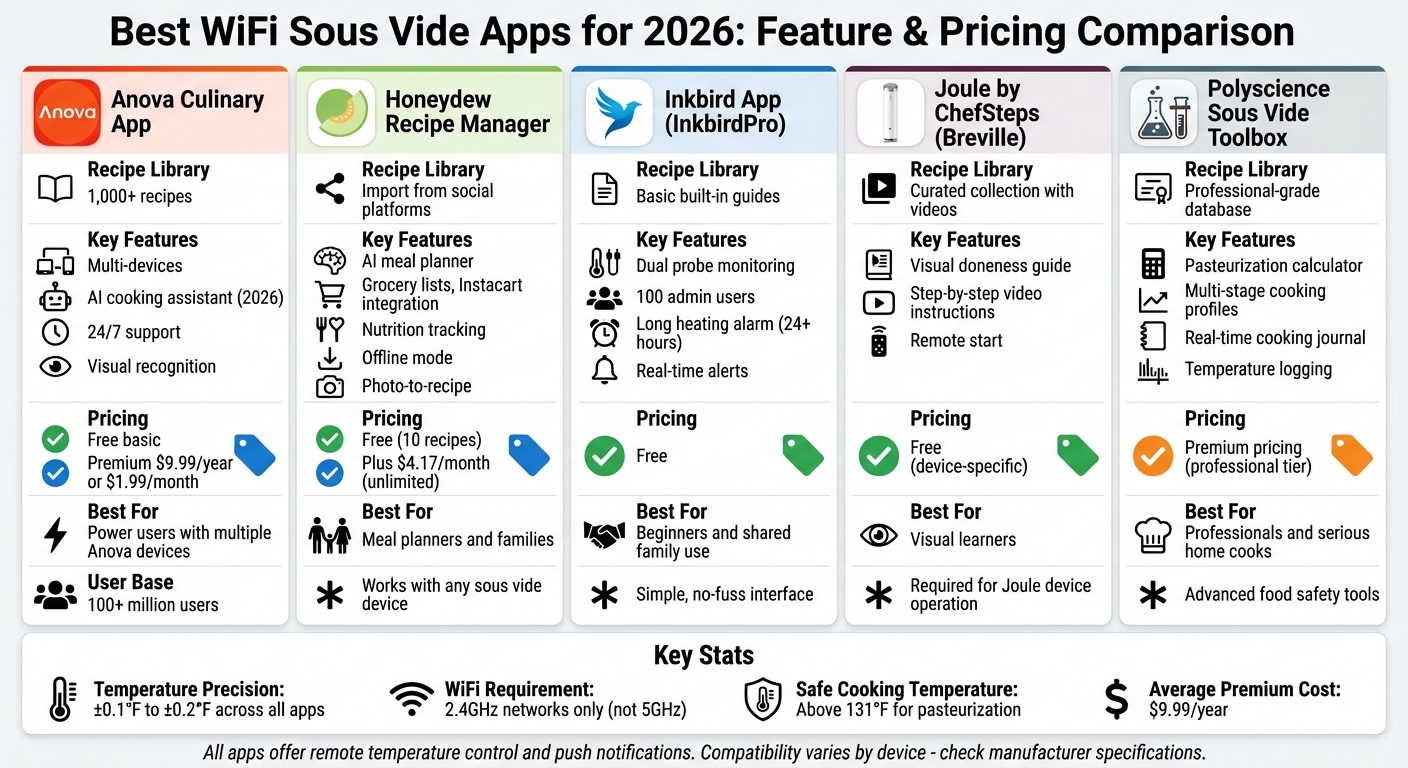
- Anova Culinary App: Offers multi-device control, 1,000+ recipes, and an optional $9.99/year premium plan.
- Honeydew Recipe Manager: Combines meal planning, grocery lists, and recipe imports. Free and $4.17/month plans available.
- Inkbird App: Beginner-friendly with real-time monitoring and alerts. Free to use.
- Joule App: Features visual doneness guides and step-by-step video instructions.
- Polyscience Sous Vide Toolbox: Advanced tools like pasteurization calculators for serious cooks.
Key Features to Look For:
- Remote Control: Adjust settings from anywhere.
- Recipe Libraries: Built-in guides for perfect results.
- Notifications: Alerts for temperature changes or errors.
- Device Compatibility: Ensure the app works with your sous vide machine.
Choosing the right app depends on your needs. For simple controls, try Inkbird. For advanced cooking, Polyscience is a great option. Looking for meal planning? Honeydew has you covered. Always check compatibility and pricing before committing.
Chefman Product Feature | Sous Vide App Welcome Video
Key Features in WiFi Sous Vide Apps
The right app can turn a standard sous vide cooker into a powerful, remote-controlled kitchen companion. Whether you're a beginner or a seasoned pro juggling multiple dishes, these apps offer tools that simplify and enhance your cooking experience.
Remote Temperature Monitoring and Control
With WiFi-enabled sous vide apps, you can manage your cooking sessions from virtually anywhere. These apps let you start, stop, and adjust settings remotely, while providing real-time updates on water temperature, target settings, and remaining cooking time. Many apps ensure precise temperature control, often accurate to within 0.1°F, while advanced models like the KitchenBoss G330 use innovative motor technology to maintain even heat distribution.
"No matter where you are, you can easily set and monitor the WIFI Sous Vide Machine through your phone." - KitchenBoss
Some apps also allow multi-device management, making it easy to control several sous vide circulators from a single interface. For instance, the Inkbird ISV-200W supports up to 100 administrators, making it a great choice for families or small catering teams.
Recipe Integration and Customization
Many sous vide apps come with built-in recipe libraries that automatically adjust settings for consistent results. These guided programs make it easy to perfect dishes like steak or delicate proteins such as salmon. For those seeking variety, premium subscriptions like Anova Premium (offering over 1,000 sous vide recipes for $9.99/year) provide access to extensive recipe collections.
Modern apps often include AI-powered tools that suggest optimal settings based on your ingredients, let you scale recipes for different portions, and even allow you to save custom multi-stage cooking programs. You can also add personal notes to recipes, tailoring them to your preferences for future use.
Notifications and Timers
Smart notifications ensure you're always in the loop. Push alerts let you know when the water reaches the target temperature, so you never miss a step. They also notify you of temperature fluctuations or system errors, giving you the chance to intervene remotely, even if you're not in the kitchen.
Some apps go a step further with count-up timers that track how long food has been held after the initial countdown ends. This feature helps maintain safe cooking temperatures, preventing food from entering the "danger zone" where bacteria can grow. For example, the ThermoWorks ChefAlarm, rated 4.7/5 from 709 reviews, includes both high and low temperature alarms with a loud 92 dB alert.
"ChefAlarm alerts you when something has reached the low temperature you've set, as well as the high temperature... this one feature gives you crucial information to improve your culinary results!" - ThermoWorks
Best Apps for WiFi Sous Vide Cooking
WiFi Sous Vide Apps Comparison: Features, Pricing, and Best Use Cases 2026
Discover the best WiFi sous vide apps designed to simplify your cooking experience with precise temperature control and smart recipe integration. Each app caters to different cooking styles and needs, ensuring there's something for everyone.
Honeydew Recipe Manager
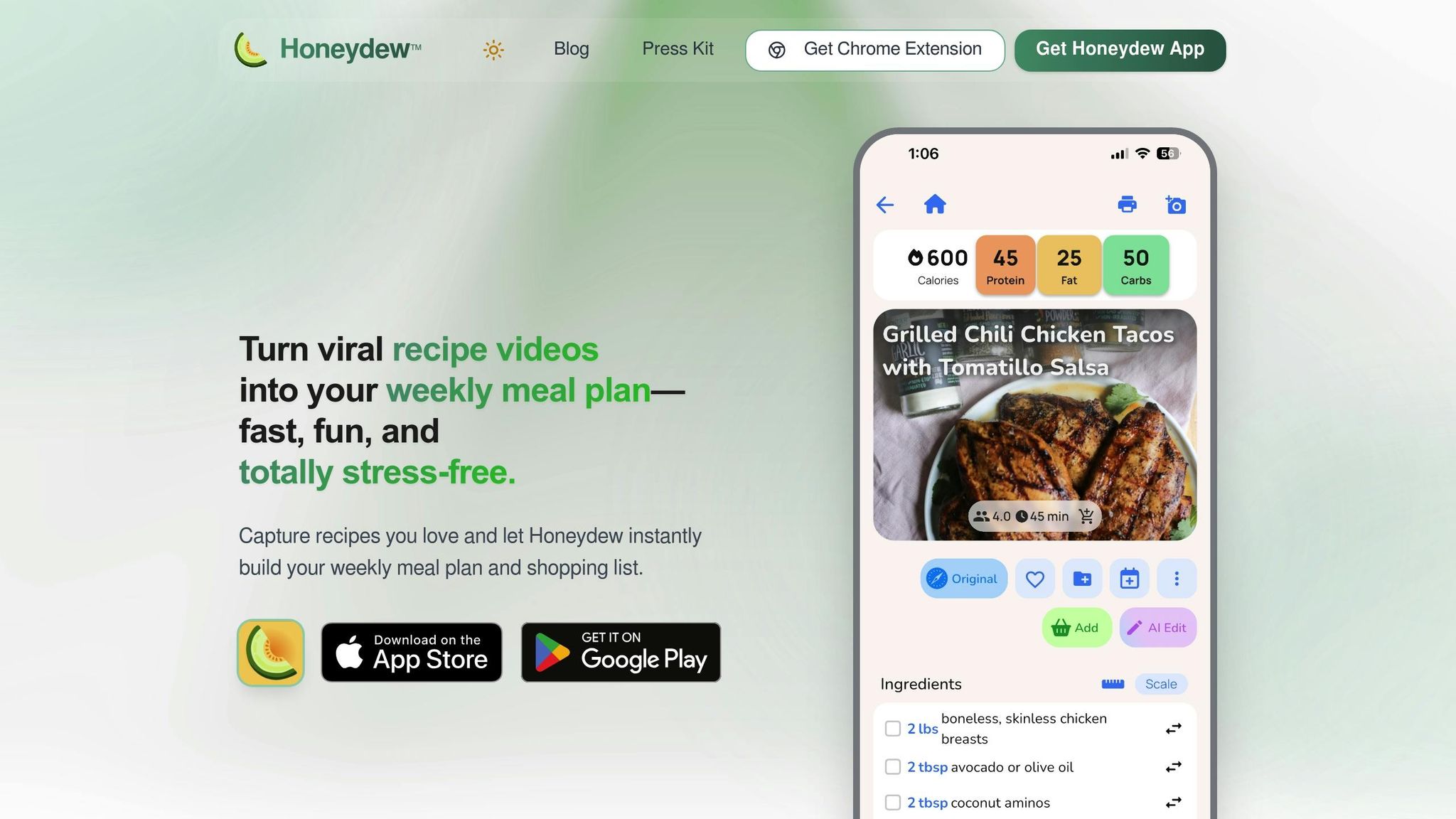
The Honeydew Recipe Manager combines meal planning with sous vide cooking, making it easy to achieve perfect results. It lets you import recipes from popular social platforms, so you can save and cook dishes from your favorite creators.
The app’s AI-driven meal planner generates weekly plans in seconds, a handy feature for scheduling long sous vide sessions. It also creates a sorted grocery list for any recipe, and with Instacart integration, you can order ingredients directly. For those who love precision, Honeydew tracks nutritional details and adjusts ingredient quantities for different serving sizes, with automatic Imperial/Metric conversions. Plus, it works offline and keeps your screen active while cooking. If you’re inspired by a meal, snap a photo, and the app will generate a copycat recipe for you.
Pricing includes a free version with basic features like recipe imports (up to 10 recipes) and meal planning. For $4.17/month, Honeydew Plus offers unlimited recipe storage, advanced AI planning, household sharing for up to six members, and an ad-free experience.
Inkbird App
The InkbirdPro app pairs seamlessly with Inkbird’s WiFi sous vide devices, offering straightforward controls that are ideal for beginners. It focuses on reliable temperature management without unnecessary complexity.
With the app, you can adjust temperatures, monitor cooking progress in real time, and get alerts if the temperature deviates. A standout feature is the long heating alarm, perfect for extended sous vide sessions lasting 24 hours or more. Dual probe monitoring allows you to track both the water bath and food temperatures, ensuring precise results.
| Feature | Capability |
|---|---|
| Remote Control | Start/stop cooking and adjust temperatures via smartphone |
| Multi-User Access | Allows up to 100 administrators for shared use |
| Temperature Alerts | Push notifications for any fluctuations |
| Best For | Beginners and families sharing devices |
Joule: Sous Vide by ChefSteps
The Joule app, now under Breville, is essential for operating Joule sous vide machines. Its user-friendly design guides you through every step of the cooking process, helping you achieve professional-level results.
One of its standout features is the Visual Doneness guide, which shows how your food will look at different levels of doneness before you even start cooking. The app also includes detailed video instructions for preparation, seasoning, and finishing touches. You can even start your sous vide remotely, adding to its convenience.
Polyscience Sous Vide Toolbox
The Polyscience Sous Vide Toolbox is perfect for serious home cooks and professionals who want more than basic temperature control. Its advanced features include a pasteurization calculator to ensure safe cooking times and customizable temperature profiles for multi-stage cooking.
The app also includes a real-time cooking journal that logs your sessions, capturing temperature data, timing, and personal notes. This feature is invaluable for anyone looking to refine their sous vide technique over time.
| App Type | Primary Focus | Best User |
|---|---|---|
| General Apps | Simple, guided recipes | Home cooks |
| Polyscience Toolbox | Advanced precision and documentation | Professionals and recipe developers |
| Key Difference | Basic controls | Pasteurization tools and detailed logs |
Anova Culinary App
The Anova Culinary App is evolving into a unified platform by 2026, designed to control all Anova devices, from sous vide circulators to precision ovens. Even now, the app offers access to a rich library of recipes.
For more advanced features, Anova Premium ($9.99/year or $1.99/month) unlocks over 1,000 sous vide recipes and other perks. The upcoming Anova Intelligence system will take things further, learning your preferences to recommend recipes, settings, and techniques. Expect features like a 24/7 AI cooking assistant and visual recognition technology, along with access to the Anova #foodnerd community.
| Feature | Current App (2025) | 2026 Unified App |
|---|---|---|
| Device Management | Separate apps for different devices | Single app for all Anova devices |
| AI Features | Basic recipe suggestions | Personalized recommendations with Anova Intelligence |
| Recipe Library | 1,000+ recipes (Premium) | Expanded library with community input |
| Multi-Device Control | Focused on one device at a time | Controls multiple units simultaneously |
| Assistant | None | 24/7 AI cooking assistant |
| Free Trial | 14 days | Likely to continue |
How to Choose the Right Sous Vide App
Assess Your Cooking Style and Goals
Your cooking habits should steer your choice of sous vide app. If you prefer simple, no-fuss controls, an app like Inkbird might be a good fit. On the other hand, if you enjoy experimenting with multi-stage recipes, look for apps with advanced features that can handle more complex tasks.
Think about how often you'll need remote monitoring. If you're a fan of the "set-it-and-forget-it" method, apps that let you adjust temperature and time from anywhere can be a lifesaver for busy schedules. Features like cook history can also help you fine-tune your technique and replicate successful recipes. For those who use sous vide frequently, apps that combine recipe management with grocery list creation can make meal prep much smoother.
Lastly, ensure your device can connect seamlessly with the app you choose.
Check Device Compatibility
Many sous vide devices come with proprietary apps designed specifically for their hardware. For instance, Anova devices work with the Anova app, while Besser Vacuum devices are compatible with the Sous Vide Wi-Fi (Vacook) app. Some models, like the Anova Mini, even require their companion app to function. To confirm compatibility, check your user manual for a QR code or model number.
"Access to all features of the App is conditional on the purchase of the device for which the App was designed." - Besser Vacuum Srl
If you plan to use multiple sous vide cookers at the same time, make sure the app supports multi-device connectivity. For example, Anova's premium tier allows you to manage several devices from a single phone. Additionally, keep in mind that most WiFi-enabled sous vide devices connect only to 2.4GHz WiFi networks - not 5GHz bands.
Once you've confirmed compatibility, it's time to weigh the cost and features.
Evaluate Pricing and Features
After narrowing down your options based on features and compatibility, consider the value each app offers. Many apps provide basic controls for free, but advanced features often come with a price tag. For example, Anova users who created accounts before August 21, 2024, are grandfathered in and can access all features for free indefinitely.
"Your Anova devices work without a subscription. You can control temperature, time, and all cooking functions manually or through the free app features to get perfect results, every time." - Anova Culinary
Decide whether you need advanced features like AI-driven cooking suggestions or if basic manual controls are enough for your needs. Some apps, such as iVide and Inkbird, currently offer free downloads with full functionality. If your sous vide device relies entirely on its app for operation, consider the long-term support and pricing model before making your decision.
Conclusion
WiFi sous vide apps have transformed the way we cook at home, offering precision control within ±0.2°F - a leap forward compared to traditional ovens. This accuracy allows you to achieve restaurant-level results while saving time. With platforms like Anova boasting over 100 million users by early 2026, features such as remote monitoring and guided cooking have become staples in modern kitchens.
Choosing the right app comes down to your cooking habits and preferences. If you're looking for device-specific precision, apps like Joule and Anova offer excellent control and access to extensive recipe collections. On the other hand, Honeydew Recipe Manager is a great choice for those who want to integrate sous vide cooking with meal planning, grocery lists, and recipe imports - perfect for busy American households.
Think about how you'll use the app in your daily routine. Features like remote control and real-time notifications are game-changers for preventing overcooking, especially when you're multitasking. Maintaining safe cooking temperatures above 131°F ensures proper pasteurization. Additionally, apps that allow recipe scaling or ingredient substitutions make it easier to tailor sous vide cooking to your family size and pantry staples.
While most apps include free basic controls, premium features like AI-driven recommendations are typically priced at $9.99 per year. Before subscribing, double-check that the app is compatible with your device and supports multiple devices if needed.
FAQs
What should I look for in a WiFi sous vide cooking app?
When choosing a WiFi sous vide app, look for features that simplify cooking and add convenience to your routine. One of the standout features is remote control, which allows you to manage and adjust your sous vide machine from your smartphone or tablet, no matter where you are. This flexibility can be a game-changer for busy schedules.
Apps with recipe integration are also worth considering. These provide step-by-step guidance, precise temperature settings, and accurate cooking times to ensure your dish turns out perfectly. Some even go a step further with meal planning tools, helping you organize weekly menus and instantly generate grocery lists. For added ease, certain apps integrate with delivery services so you can shop for ingredients without leaving home.
Lastly, focus on apps with intuitive interfaces and customizable settings. These features can make your cooking experience smoother and more enjoyable, whether you're a seasoned pro or trying sous vide for the first time.
How do I know if a sous vide app will work with my device?
To determine if a sous vide app works with your device, start by checking your sous vide cooker's specifications. Pay attention to connectivity features like Wi-Fi or Bluetooth. While most modern Wi-Fi-enabled models allow remote control and app integration, software differences can affect compatibility.
For a smoother experience, opt for devices with Wi-Fi connectivity and local network control. These options typically offer more flexibility. However, older Bluetooth models or devices that depend entirely on proprietary cloud services might have limited app support.
If you're uncertain, refer to the manufacturer's user manual or online resources to verify whether the app is compatible with your specific cooker model before buying.
Do sous vide cooking apps cost money to use?
Some sous vide apps come with a subscription or a one-time fee, while others are free to use with optional paid upgrades for extra perks. For instance, you might find apps that offer free access to recipe libraries and basic device controls but charge for advanced features like personalized meal planning or exclusive recipes.
On the flip side, plenty of apps are completely free, giving you access to features like remote control and recipe integration without any added costs. It’s a good idea to review an app’s details to see if there are any fees before you dive in.



