How to Choose a Robotic Cooking Assistant
• Updated
Robotic cooking assistants can simplify meal prep, save time, and deliver precise results. Whether you're looking for basic automation or advanced features, here's how to find the right one:
- Budget: Entry-level models ($149–$500) handle basic tasks, mid-range options ($500–$2,500) offer guided cooking, and high-end systems ($15,000–$100,000+) provide near-complete automation.
- Features: Match the device to your needs - chopping, stirring, kneading, or advanced techniques like sous vide. Look for self-cleaning options, built-in scales, and multi-functional capabilities.
- Space: Measure your kitchen layout to ensure the device fits comfortably. Compact models work better in smaller kitchens.
- Connectivity: Choose Wi-Fi-enabled devices for updates and smart integrations with meal planning apps like Honeydew Recipe Manager.
- Safety & Maintenance: Opt for devices with UL approval, child locks, and dishwasher-safe components for easier upkeep.
- Dietary Needs: Advanced models can suggest recipes, swap ingredients, and support specific diets like keto or vegan.
These assistants are an investment in convenience and efficiency. Pair them with smart tools to elevate your cooking experience.
Chef Robot Ultra Cook: Scam or All-in-One Auto Cooking Machine?
Assess Your Budget and Long-Term Value
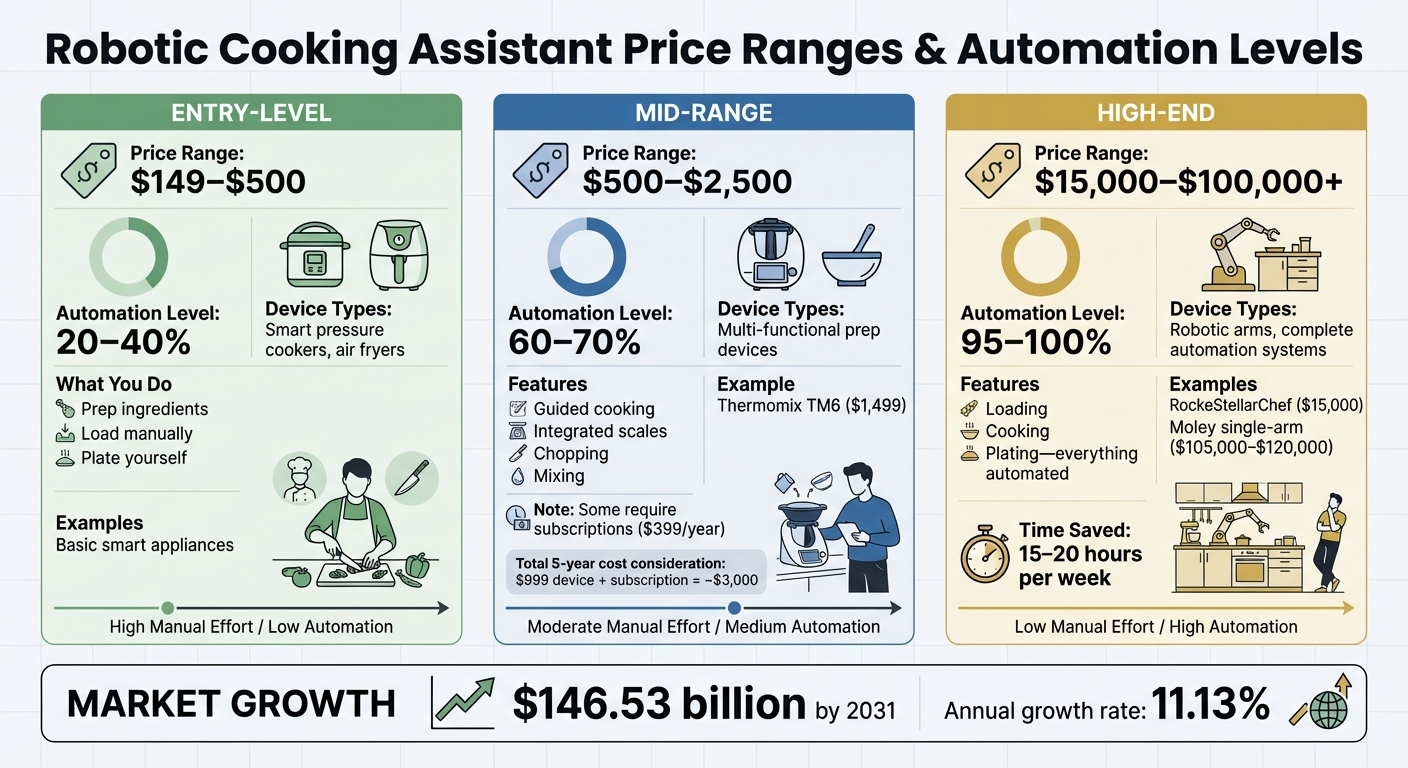
Robotic Cooking Assistant Price Ranges and Automation Levels Comparison
Understanding Price Ranges
Robotic cooking assistants come in three main price categories, each offering varying levels of automation. For starters, entry-level models (ranging from $149 to $500) primarily handle basic tasks like temperature and timing control. These include smart pressure cookers and air fryers, automating about 20–40% of the cooking process. However, you'll still need to prep ingredients, load them manually, and take care of plating yourself.
Mid-range options, priced between $500 and $2,500, step things up with features like guided cooking, integrated scales, and multi-functional prep capabilities (chopping, mixing, etc.). A good example is the Thermomix TM6, which automates 60–70% of tasks for $1,499. Keep in mind that some models may require a subscription - like a $399 annual plan - that can nearly triple the upfront cost of a $999 device over five years.
At the high end, systems priced between $15,000 and $100,000+ offer near-complete automation (95–100%). These advanced robots, equipped with robotic arms, handle everything from loading and cooking to plating. For instance, the RockeStellarChef starts at $15,000, while the Moley single-arm system costs between $105,000 and $120,000. These premium systems can save an estimated 15–20 hours of labor per week. While price is a key factor, the real value lies in how well the system adapts to your evolving cooking needs.
Future-Proofing Your Purchase
The initial cost of a robotic cooking assistant is only part of the equation. Long-term value depends heavily on its ability to stay relevant through updates and new features. With the cooking robot market expected to hit $146.53 billion by 2031, growing at an annual rate of 11.13%, it’s clear that the industry is rapidly expanding. This makes it essential to pick a device that offers regular software updates. Look for models with WiFi connectivity and a proven track record of updates to ensure a lifespan of 5–10 years.
It’s also worth considering devices that use machine learning to adapt to new recipes and cooking techniques. Features like self-cleaning functions and dishwasher-safe components can reduce maintenance costs and improve durability. Additionally, multi-functional systems that consolidate 15–20 separate kitchen tools - such as blenders, scales, and steamers - can deliver even greater long-term value. Lastly, don’t forget to factor in any subscription fees when calculating the total cost of ownership to get a clear picture of your annual expenses.
Evaluate Your Kitchen Space and Layout
A well-planned kitchen layout is key to seamlessly integrating a robotic cooking assistant into your daily routine.
Measuring Available Space
Start by measuring your kitchen’s dimensions, including wall lengths, window and door placements, and countertop height (typically 36 inches). When measuring horizontally, stick to the 36-inch height, as this is standard countertop level. Be precise with the positions of outlets, sinks, and appliances to ensure everything fits without a hitch. If you’re measuring near doors or windows, don’t forget to include the trim in your calculations. Also, note the dimensions of doorways, hallways, and stairwells - this will help avoid delivery headaches when bringing in new appliances.
Kitchen designer Josh Whitley from Brooks Kitchens and Joinery Services emphasizes the importance of thinking practically:
"One common regret during a kitchen renovation is not thinking enough about how the space will actually be used day to day... I often see oversized islands that block the flow of the kitchen, or not enough clear worktop space near the oven or sink".
This advice also applies to robotic assistants. Pay attention to your kitchen’s work triangle - the area between your refrigerator, stove, and sink. Ideally, each side of the triangle should be about 4 feet long for smooth workflow.
| Measurement Type | Recommended Dimension | Purpose |
|---|---|---|
| Work Aisle (Single Cook) | 42 inches | Comfortable movement for one person |
| Work Aisle (Multiple Cooks) | 48 inches | Allows two people to work simultaneously |
| Vertical Clearance | Min. 16 inches | Space between countertop and wall cabinets |
| Parallel Unit Clearance | 47 inches | Room for opening appliance doors and walking |
Careful measurements ensure your robotic assistant not only fits physically but also integrates smoothly into your kitchen’s workflow.
Considering Mobility and Accessibility
Static measurements are just one part of the equation. Think about how your kitchen functions during daily use. The layout influences where you can place a robotic assistant. For example, galley kitchens or compact spaces may require models with a smaller footprint, while L-shaped or U-shaped kitchens offer more flexibility for dedicated zones or islands. If counter space is tight, look for compact models like the ChefRobot Ultracook, which is designed to fit snugly into smaller kitchens.
Mobility features are especially useful if you have pets, kids, or limited counter space. A wheeled kitchen island can hold your robotic assistant, allowing you to move it out of the way when not in use while keeping it accessible for meal prep. Andrew Clarke also suggests using nearby drawers to store the robot’s accessories for easy access.
Finally, make sure your kitchen is ready for the practicalities. Check that floors are level and that door clearances (24 inches for dishwashers, 20 inches for ovens) won’t obstruct your device. Don’t overlook electrical requirements either - standard codes recommend one outlet for every two feet of countertop space. These details ensure your robotic assistant integrates effortlessly into your kitchen.
Match Features to Your Cooking Needs
When choosing a kitchen device, it’s all about matching the features to how you cook now - and how you want to cook in the future. Whether you’re a beginner or a seasoned pro, the right features can make all the difference.
Identifying Core Features
Think about the tasks you do most often. If chopping vegetables is a daily activity, look for models with automated chopping and dicing. For those who frequently stir sauces or whisk batters, opt for devices that handle stirring, mixing, kneading, and whisking automatically.
If you’re new to cooking, a device with a large touchscreen and step-by-step guidance can be a game-changer. For instance, the ChefRobot Ultracook has a 7-inch touchscreen with over 15 integrated functions, replacing several countertop gadgets. Consumer Reports testers found it performed well with smoothies and oatmeal, though pasta and proteins required a bit more attention.
For experienced cooks, precision and versatility are key. Look for models with features like wide temperature ranges (up to 320°F), modes for sous vide and fermentation, and high-speed motors (up to 6,000 RPM) for blending. These advanced capabilities provide the flexibility to tackle more complex recipes. The TOKIT Cooking Robot, for example, combines 21 kitchen tools and includes a double-layer steamer, allowing you to prepare three dishes at once. As TOKIT explains:
The versatility of the TOKIT Cooking Robot not only saves space in the kitchen by replacing a variety of gadgets, but it also enhances your ability to experiment with a wide range of cooking techniques.
Capacity is another important factor. A 3- to 3.5-liter bowl is typically sufficient for most families, but larger households or those who batch-cook may prefer a 4-liter model like the ChefRobot Max. Don’t overlook practical features like self-cleaning modes, dishwasher-safe parts, overheat protection, and child locks - they make daily use much easier and safer.
Customizing for Dietary Preferences
Beyond the basics, consider how the device can support your dietary needs. For keto, vegan, or allergen-free diets, look for models with recipe filters. Many modern devices use AI to suggest personalized recipes based on your nutritional goals and available ingredients. Platforms like DishGen have already generated over 1 million recipes tailored to individual preferences.
Some advanced models even allow real-time ingredient substitutions, letting you swap out allergens or tweak nutritional macros as you go. Built-in scales can also help ensure precise measurements, which is crucial for tracking macros or avoiding cross-contamination. Certain apps can scan barcodes to flag hidden allergens or animal-derived ingredients like dairy, eggs, nuts, or gluten.
For health-focused cooks, precision temperature controls and gentle cooking modes like steaming can help preserve nutrients better than high-heat methods. Devices like the Suvie 3.0+ take it a step further with sous-vide capabilities and a "Cool-to-Cook" feature that keeps ingredients fresh until you’re ready to start cooking. These advanced options are becoming more common as technology evolves.
Before committing to a purchase, explore the manufacturer’s app to see if its recipe library aligns with your dietary needs. After all, the goal is to save time - not spend it endlessly searching for recipes that work for you.
Integrate with Smart Meal Planning Tools
Pairing your robotic assistant with smart meal planning tools can transform how you prepare meals. These tools take the guesswork out of cooking by turning recipe ideas into actionable meal plans. Integration allows you to import, organize, and execute recipes effortlessly, eliminating the need for manual data entry. This connection also strengthens the functionality of your overall smart kitchen setup.
Honeydew Recipe Manager: Your Cooking Ally
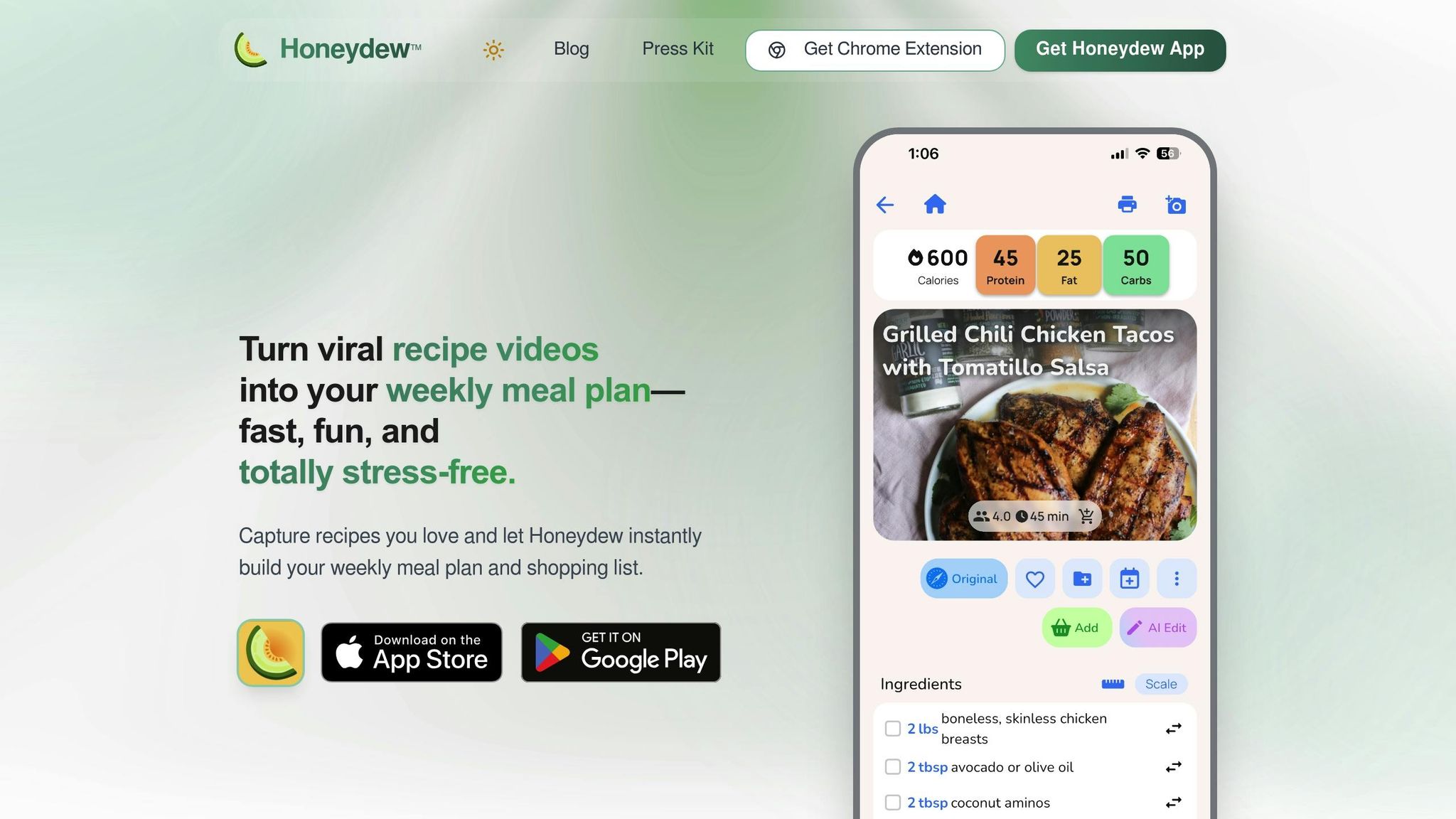
The Honeydew Recipe Manager is a game-changer for anyone looking to streamline their cooking process. It simplifies everything from organizing recipes to planning grocery trips. With its automation capabilities, Honeydew works hand-in-hand with your robotic assistant to make meal preparation easier. The app pulls recipes from various online platforms and converts unstructured data - like captions or blog posts - into structured formats. It breaks recipes into ingredients, measurements, and step-by-step instructions that your robotic assistant can follow.
Honeydew also features an AI-powered meal planner that creates weekly menus in seconds, tailored to your dietary needs and family preferences. It even generates grocery lists sorted by store sections and integrates with Instacart for direct ordering. Users love its convenience, as highlighted by Priya K., who shares:
"Being able to import recipes from anywhere has built my cookbook faster than I ever imagined".
Additional features make cooking even smoother. The "No screen lock" option ensures recipes stay visible without constant interaction - a lifesaver when your hands are messy. Plus, smart ingredient substitutions allow you to tweak recipes based on dietary restrictions or what you have on hand. You can also share meal plans and grocery lists with up to six household members, keeping everyone on the same page in real time. Honeydew offers a free version with up to 10 recipe imports, while the premium Honeydew Plus plan costs $4.17/month and includes unlimited storage and advanced AI tools.
On top of meal planning, integrating your robotic assistant with other smart devices can enhance your overall kitchen experience.
Enhancing Connectivity for a Smarter Kitchen
While meal planning apps simplify recipe management, ensuring your robotic assistant connects seamlessly with other smart kitchen devices is equally important. Wi‑Fi-enabled devices let you control cooking remotely, receive notifications when meals are ready, and access firmware updates for improved performance.
Opt for devices that support open ecosystems rather than proprietary ones. Open systems give you the flexibility to use multiple platforms and apps instead of being tied to a single brand. This adaptability ensures your smart kitchen remains compatible with future tools and technologies. Before buying, confirm that the manufacturer's app works on both iOS and Android, and check user reviews to gauge app reliability and connectivity.
With the right tools and integrations, your smart kitchen can become a hub of efficiency and convenience.
Prioritize Safety, Maintenance, and User Reviews
Safety Features to Look For
When choosing a robotic kitchen assistant, safety should always come first. Ensure the device has UL approval and uses FDA-approved food contact materials. These certifications confirm the appliance meets strict household safety standards.
Temperature control is another critical factor. Models with PID temperature control or AI-driven thermal detection can maintain consistent cooking temperatures, reducing the risk of overheating and ensuring food quality. If you're planning to prep meals in advance, look for features like "Cool-to-Cook" technology, which keeps raw ingredients below 41°F until it's time to cook. For instance, Suvie's refrigeration system achieves this safe temperature in under two hours.
Advanced sensors are also worth considering. These can detect potential malfunctions early on, helping avoid accidents. For Wi-Fi-enabled models, check for encrypted communications (e.g., RSA public/private keys) to secure remote controls and data sharing. Additional safety features, like cool-down alerts, can prevent cleaning heating elements before they've cooled completely, further enhancing user safety.
Once safety is covered, it's time to evaluate how easy the device is to maintain.
Ease of Cleaning and Maintenance
A robotic assistant that’s hard to clean will quickly become more hassle than help. Look for models with dishwasher-safe components, such as stainless steel pans, roasting racks, or mixing bowls. Some devices even offer self-cleaning cycles, using high-pressure or heated cleaning to minimize manual effort.
Before you buy, take a look at the manufacturer's manual to understand the recommended maintenance routine. Daily tasks might include wiping down food contact surfaces and checking sensors, while monthly upkeep could involve cleaning cooling fans and vents. Regular maintenance can cut equipment failures by up to 40%. Simple designs make a difference too - touchscreens are easier to clean than physical buttons, and larger bowls (like 3-liter models) allow for easier manual scrubbing.
Learning from User Reviews
While specs and features are important, real user feedback often paints a clearer picture. Customer reviews can reveal how a product performs in everyday use. As ChefRobot puts it:
Customer reviews and ratings can be incredibly helpful when choosing a robot chef. These provide insights into the real‑world performance and reliability of a product.
Focus on trends in the reviews. If multiple users praise or criticize the same aspect, it’s likely a reliable indicator of the product’s strengths or weaknesses. Pay attention to comments about durability, ease of cleaning, and how well manufacturers handle warranty claims.
For even deeper insights, check out specialized cooking forums. Long-term owners often provide detailed feedback on topics like noise levels during operation, data privacy concerns for smart devices, and app reliability.
| Review Focus Area | What to Look For |
|---|---|
| Durability | Performance after extended use (6+ months) |
| Cleaning | Ease of disassembly and dishwasher compatibility |
| Noise | Comments on operating volume during tasks like grinding or mixing |
| Support | Manufacturer response times for technical issues |
Conclusion and Final Checklist
Finding the right robotic cooking assistant means considering your budget, kitchen space, and cooking habits. From entry-level models priced around $380 to premium options nearing $1,500, there's something for every household. These devices aren’t just gadgets - they're investments in saving time and enhancing your cooking experience. ChefRobot highlights how these tools can simplify meal prep while inspiring creativity in the kitchen.
Before making your decision, check that the device's footprint (approximately 14×17 inches and weighing around 20 lbs) fits comfortably on your countertop. Also, verify that your electrical setup can handle the power requirements, especially for models with features like built-in refrigeration or high-wattage motors.
Once you've narrowed down your options, consider pairing your robotic assistant with the Honeydew Recipe Manager. This app streamlines recipe planning and grocery shopping by letting you import recipes from social media, generate grocery lists, and even order ingredients through Instacart. Together, they create a seamless workflow from planning to cooking.
Final Checklist for Choosing the Right Assistant
To ensure you've covered all the bases, use this checklist as a guide:
| Category | What to Verify |
|---|---|
| Budget | Make sure the price includes essential accessories like steamer trays, whisks, and spatulas. |
| Space | Confirm you have enough countertop space, with 15–18 inches of clearance for steam release, and a stable surface to support the device. |
| Capacity | Choose a bowl size that suits your household: 2.2L for couples, 3.5–4.7L for families, or 6L for larger groups. |
| Features | Match the device’s capabilities to your needs, from basic chopping to advanced functions like sous vide or fermentation. |
| Safety | Look for UL approval, FDA-approved materials, overheat protection, and child lock features. |
| Maintenance | Check for self-cleaning modes and dishwasher-safe components for easier upkeep. |
| Connectivity | Ensure compatibility with your Wi-Fi network and confirm the device supports updates via iOS/Android apps. |
| Interface | Opt for a user-friendly interface, such as a 7-inch touchscreen, to simplify operation. |
Take the time to measure your space, test the device’s interface (if possible), and read user reviews to confirm it meets your expectations. With the right robotic assistant and tools like Honeydew Recipe Manager, you can transform cooking into an efficient and enjoyable part of your day. From discovering recipes to completing grocery shopping, this combination ensures a smooth and stress-free experience in the kitchen.
FAQs
What should I look for when choosing a robotic cooking assistant?
When picking a robotic cooking assistant, it's all about finding the right match for your kitchen and lifestyle. Start by considering performance and versatility. A device with a motor of at least 800 watts and a variety of attachments can handle tasks like chopping, kneading, blending, and even cooking. This kind of multitasking gadget can free up counter space by replacing several single-use appliances.
Think about ease of cleaning too. Models with dishwasher-safe parts and straightforward controls can make your daily cooking routine much simpler. Capacity and size are also key - choose something that fits your kitchen layout and can handle the portion sizes you typically prepare. Lastly, take a close look at your budget and cooking habits to find a balance between functionality, price, and convenience.
For those who want extra help with meal prep, the Honeydew Recipe Manager is a game-changer. It lets you import recipes from social media, create grocery lists with a click, and even order ingredients through Instacart. Plus, features like ingredient substitutions and nutrition tracking make it a handy tool for simplifying your cooking routine.
How can I choose the right size and capacity for a robotic cooking assistant in my kitchen?
When choosing a robotic cooking assistant, the first step is to assess the space you have in your kitchen. Look at both your countertop and storage areas to make sure the device will fit comfortably without making your kitchen feel cramped.
Next, think about your cooking routines and the number of people you typically cook for. If you’re cooking for just one or two people or only preparing meals occasionally, a smaller, more compact model might be all you need. On the other hand, if you’re cooking for a larger family or prepping meals often, a larger-capacity model could be a better fit.
Finding the right balance between your available space and cooking needs will help you choose a robotic cooking assistant that makes your life easier without creating unnecessary clutter.
What should I consider for safety and maintenance when choosing a robotic cooking assistant?
When it comes to robotic cooking assistants, safety and proper upkeep are crucial for smooth operation and longevity. Here are some practical tips to keep in mind:
Safety First
- Place the device on a stable, level surface with adequate ventilation.
- Keep it away from flammable materials or heat sources to avoid potential fire hazards.
- Ensure hot surfaces are out of children’s reach to prevent burns.
- Always unplug the device before cleaning to eliminate electrical risks.
- Regularly inspect cords and plugs for signs of wear or damage to prevent electrical issues.
Maintenance Matters
- Stick to the manufacturer's cleaning instructions to avoid damaging the device.
- Never immerse cords or plugs in liquids - this can lead to serious malfunctions or safety hazards.
- Use only recommended accessories to ensure compatibility and performance.
- Periodically check all components to confirm they’re in good condition and functioning properly.
By following these steps, you can help your robotic cooking assistant perform at its best while reducing the chances of accidents or breakdowns.



