Dynamic Portions: How to Avoid Leftovers
• Updated
Cooking too much food often leads to waste. In fact, about 21% of purchased food in the U.S. is wasted, costing households an average of $1,800 annually. Dynamic portion control helps you cook the right amount by tailoring meals to your household's needs. Here's how to reduce food waste with smart meal planning and save money:
- Understand your household's needs: Consider factors like age, activity level, and eating habits to determine portion sizes.
- Track your leftovers: Monitor which meals result in waste to adjust portion sizes accordingly.
- Use digital tools: Apps like Honeydew Recipe Manager can scale recipes, create precise grocery lists, and suggest meals based on what you already have.
- Practice portion control in the kitchen: Use the Plate Method for balanced meals and measuring tools for accuracy.
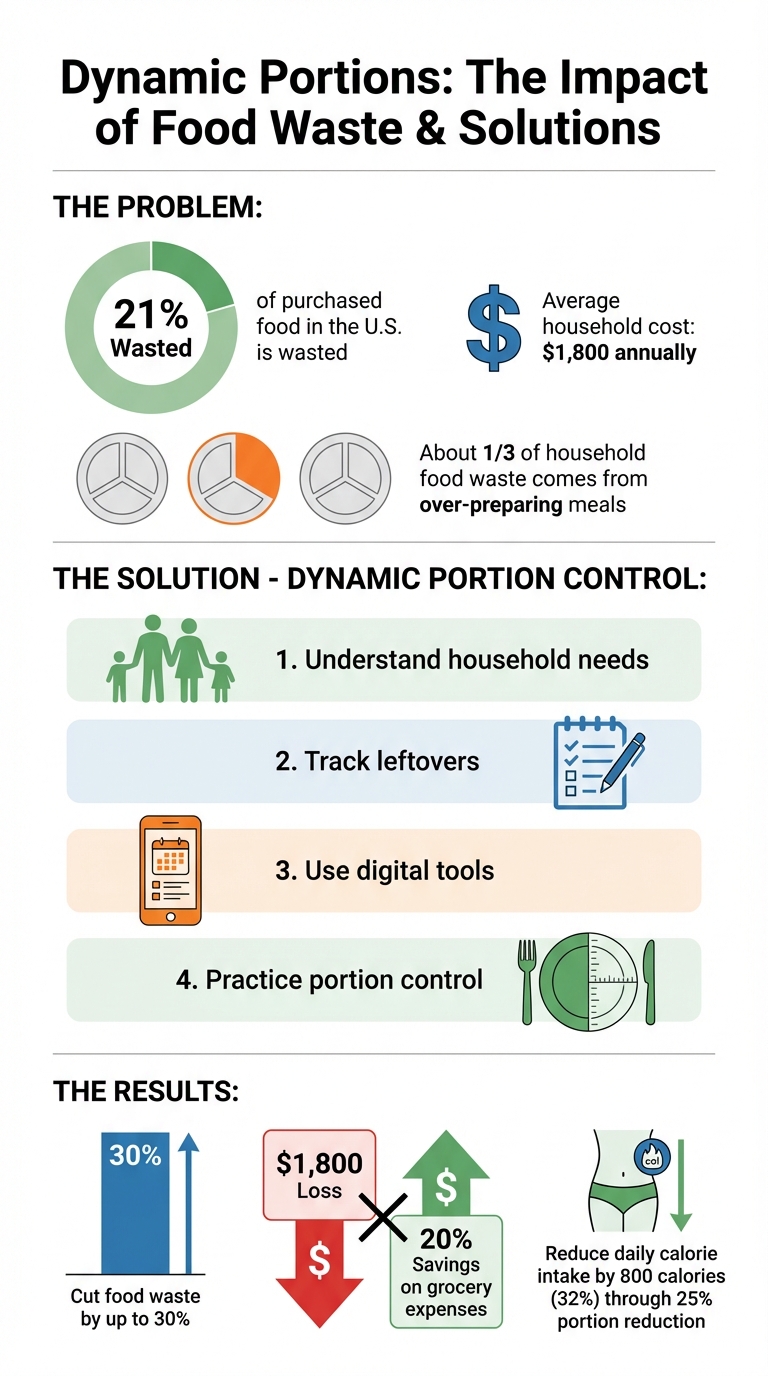
Food Waste Statistics and Dynamic Portion Control Benefits
The Perfect Plate: How To Portion Your Meals!
Assess Your Household's Portion Needs
Understanding your household's food requirements is key to avoiding waste and ensuring everyone gets the nutrition they need. Think about who you're cooking for - a family with two teenagers who play sports will require different portions than a couple with desk jobs. Factors like age, gender, and activity level all play a role in determining nutritional needs.
The National Institute of Diabetes and Digestive and Kidney Diseases highlights this with an example: a 150-pound woman who is mostly sedentary will need fewer calories than a woman of the same size who exercises regularly. Tools like MyFitnessPal can help you figure out your baseline needs. These apps allow you to input personal details and calculate daily calorie targets tailored to your lifestyle. As nutrition expert Samantha Cassetty explains:
"Knowing how many calories you need each day is a powerful first step".
By starting with this information, you can better align your weekly meal planning and portion sizes with your household's actual needs.
Calculate Daily Calorie and Nutrition Requirements
The first step is to determine individual calorie needs. Start by calculating the Basal Metabolic Rate (BMR) using the Mifflin-St Jeor equation, and then adjust for activity level to find your Total Daily Energy Expenditure (TDEE). For example, MyFitnessPal offers a straightforward guide that factors in age, sex, height, weight, and activity level to deliver personalized daily targets. Once you have these numbers, you can distribute calories across meals to suit your family’s eating habits. This approach makes it easier to scale recipes and avoid over- or under-preparing food.
Review Past Meals and Leftover Patterns
Another practical way to refine portion sizes is by looking at your meal history. Track your meals for a week, noting how much food is cooked, eaten, and left over. This can reveal patterns - certain dishes might consistently result in leftovers. Whether you jot this down in a notebook or use a digital app, identifying meals that regularly produce excess can help you adjust portion sizes moving forward.
Interestingly, a study from the Harvard T.H. Chan School of Public Health found that households that implemented meal tracking and portion adjustments saw a noticeable drop in food waste. Many of these families also reported saving money as a bonus. By understanding your household's eating habits, you can fine-tune your meal planning to match actual consumption.
Scale Recipes with Digital Tools
If you’ve figured out your household’s portion needs, the next logical step is adjusting recipes to match them. Digital tools make this process seamless by recalculating ingredient amounts for your desired serving size. This way, you only buy and cook exactly what you need.
Scale Recipes with Honeydew Recipe Manager
The Honeydew Recipe Manager takes the guesswork out of recipe scaling. You can import recipes from platforms like TikTok, Instagram, or YouTube, and the app automatically extracts the ingredients and steps. Let’s say the recipe serves six, but you’re cooking for four - just adjust the serving size, and Honeydew recalculates everything for you. For instance, 1.5 pounds of ground beef becomes 1 pound, and 3 cups of rice are reduced to 2 cups.
Honeydew also handles conversions between Imperial and Metric units, so if a recipe lists 250 grams of flour, it’ll translate that to about 2 cups for U.S. users. Once your recipe is scaled, the app generates a detailed grocery list with exact quantities. Items are even organized by store aisle, and you can sync the list with Instacart for delivery. This ensures you’re buying only what you need - no more, no less.
Use AI to Calculate Portion Sizes
Honeydew’s AI goes a step further by tailoring recipes to your household’s needs. It factors in your family size, dietary preferences, calorie goals, and even what’s already in your pantry. For example, if you’re cooking a stir-fry for four, the AI might recommend 6 ounces of protein per adult serving, automatically adjusting the recipe to reflect that.
Studies back up the benefits of portion control. Research shows that reducing portion sizes by 25% and incorporating lower-calorie foods can cut daily intake by 800 calories (about 32%). Honeydew’s AI helps you achieve this by personalizing portions to meet your nutritional goals while reducing waste. Its Pantry Mode feature even scans your fridge, suggesting recipes based on ingredients you already have. This not only minimizes food waste but also ensures you use up items before they expire.
With smart scaling and AI-driven recommendations, you can cook with precision and confidence, ensuring every meal is perfectly portioned.
Apply Portion Control Methods in Daily Cooking
Once you've adjusted your recipes digitally, it's time to bring those portion control strategies into the kitchen. A few simple habits can help you stick to the right amounts and avoid over-preparing meals. Here’s how to put these techniques into practice.
Follow the Plate Method for Visual Portioning
The Plate Method is a straightforward way to create balanced meals without relying on measuring tools. Here’s the breakdown:
- Fill half your plate with non-starchy vegetables like spinach, broccoli, or bell peppers.
- Reserve one quarter for protein options such as chicken, tofu, fish, or beans.
- Use the remaining quarter for carbohydrates like rice, pasta, or potatoes.
This method not only ensures proper portion sizes but also promotes nutritional balance.
"The plate method is a visual system that helps you build balanced meals that fit your calorie needs without measuring." - VitaLibrary
Interestingly, the size of your plate can influence how much you eat. Research suggests that smaller plates make portions feel more substantial, which can help curb overeating. Stick to a 9-inch plate and start by serving vegetables first to naturally limit the space for proteins and starches.
Measure Ingredients for Precision
While the Plate Method is great for visual guidance, using measuring tools ensures accuracy. Overestimating ingredients or using the wrong ingredient substitutions can lead to unnecessary leftovers. Keep measuring cups, spoons, and a kitchen scale handy to maintain consistency. For instance, a standard serving of dried pasta is about 2.6 ounces (75g), but many people unknowingly serve closer to 4 ounces.
Pay close attention to calorie-dense ingredients like fats. A single tablespoon of oil contains roughly 120 calories, so pouring directly from the bottle can easily lead to excess. Use a teaspoon or an oil spray bottle for better control. For a couple of weeks, weigh common items like rice, pasta, and nuts to train your eye to recognize proper serving sizes.
Adjust Servings with Recipe Apps
Recipe apps make portion control even easier by helping you scale ingredients precisely to match your needs. Tools like Honeydew Recipe Manager allow you to adjust servings with a simple slider. The app recalculates ingredient quantities instantly and even updates your grocery list, so you only buy what’s necessary.
Did you know that cooking too much food contributes to about one-third of household food waste? By using smart apps, you can refine your portions, eliminate guesswork, and reduce leftovers - all while sticking to your meal plan.
Track Results and Improve Over Time
Getting portion sizes just right isn’t a one-and-done deal - it’s an ongoing process. By keeping tabs on your results and making small tweaks, you can fine-tune your cooking while cutting down on food waste.
Record How Much Food Gets Eaten
Start by tracking what actually gets eaten versus what ends up in the trash. A simple way to do this? Snap photos of plates before and after meals. Over time, a weekly log can uncover patterns - like certain dishes consistently leaving leftovers. These patterns, combined with AI meal planning and pantry tracking, give you a clear roadmap for adjusting recipes. Considering that about one-third of household food waste comes from over-preparing, these small insights can make a big difference.
Conclusion
Dynamic portion control focuses on preparing just the right amount of food for your household. By understanding your family's portion needs, using digital tools to scale recipes, and keeping track of what gets eaten, you can cut food waste by as much as 30% and save approximately 20% on grocery expenses.
Smart digital tools make this process even simpler. For instance, Honeydew Recipe Manager can scale recipes, create precise grocery lists, and even generate meal plans based on what you already have at home. Its Pantry Mode feature provides instant recipe ideas using your fridge inventory, ensuring you cook only what’s necessary.
"Dynamic portion control not only helps in reducing waste but also enhances the cooking experience by making it more efficient and tailored to individual needs." - Jane Doe, Nutrition Expert, Food Waste Reduction Alliance
Start small - try methods like the Plate Method or use a recipe-scaling app - and adjust as you go. Over time, you’ll find a system that works for you, reducing waste and simplifying meal prep. Beyond saving money, you’ll also be making a positive impact by lowering methane emissions from food waste in landfills.
FAQs
How do I portion meals when my family has different appetites?
To cater to different appetites, opt for recipes that can be easily adjusted in size. Estimate portions based on individual needs, using simple visual guides like a palm-sized portion for proteins and filling half the plate with vegetables. Instead of preparing separate meals, tweak serving sizes for each person. This method ensures everyone gets the right amount while cutting down on food waste and leftovers.
What’s the fastest way to scale a recipe to my exact serving size?
Scaling a recipe has never been easier than with a recipe scaling tool. These tools adjust ingredient amounts automatically based on the number of servings you need. All you have to do is enter the original serving size and your desired servings, and the tool does the math for you in seconds. It’s a huge time-saver and ensures precise measurements, so you don’t have to worry about making errors with manual calculations.
How can I track leftovers without adding extra work?
Tracking leftovers doesn't have to be a headache. Tools like Honeydew Recipe Manager make it easy by combining meal planning with a real-time inventory of your pantry, fridge, and freezer. This way, you can instantly spot what’s available and plan meals that use up leftovers before they go to waste. Another simple trick? Label your containers with the date and arrange them neatly - this keeps everything organized and ensures nothing gets overlooked.



