Energy Tracking in Smart Kitchens: FAQs
• Updated
Energy tracking in smart kitchens helps you monitor how much electricity your appliances are using, saving money and reducing waste. By using sensors, AI, and data dashboards, these systems provide real-time insights into energy consumption, helping you identify inefficiencies, cut costs, and even prevent appliance issues.
Key Takeaways:
- Save Money: Reduce energy bills by 8–15% on average by identifying power-hungry appliances and "vampire loads."
- Extend Appliance Life: Spot unusual energy patterns to address issues before costly repairs.
- Eco-Friendly Choices: Minimize unnecessary energy use and lower your carbon footprint.
- Smart Tools: Systems like Sense Energy Monitor or Emporia Vue 2 track usage with high precision, starting at $65.
Whether you're managing a busy kitchen or just want to lower your bills, energy tracking tools make it easy to take control of your electricity use.
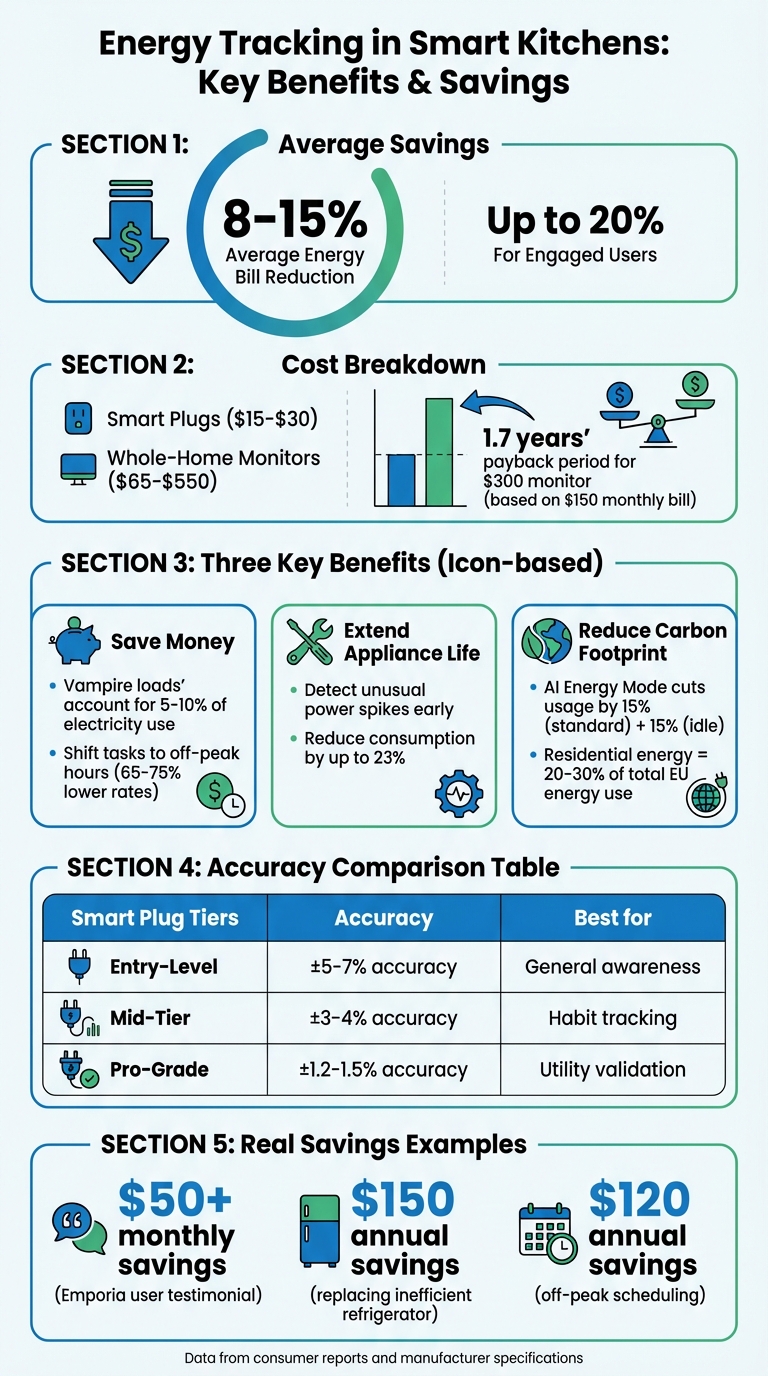
Smart Kitchen Energy Tracking Benefits and Savings Statistics
How Energy Tracking Works in Smart Kitchens
Main Components of Energy Tracking Systems
Energy tracking in smart kitchens revolves around three interconnected components. It starts with hardware, typically made up of Current Transformer (CT) clamps. These clamps attach to your electrical panel's main power feeds or individual circuit breakers, measuring electricity flow by detecting the magnetic fields generated by the current . Next is the processing unit, which could be a local hub or a cloud-based platform. This unit uses AI algorithms to analyze the data collected by the hardware. Finally, the analyzed results are presented through a mobile app or web dashboard, offering real-time wattage readings, historical usage trends, and cost breakdowns.
Take the Sense Energy Monitor, for instance - it samples data at an impressive 1 MHz, far outpacing the typical 15-minute intervals used by utility meters. More affordable options, like the Emporia Vue 2, start at $65 for whole-home monitoring or $200 if you want to track up to 16 individual circuits. Together, these components work to pinpoint and monitor key appliances in your kitchen with impressive precision.
Which Devices Get Monitored in Smart Kitchens
Energy tracking systems typically focus on the big players in your kitchen - appliances like refrigerators, ovens, dishwashers, and microwaves. Refrigerators are often the first to be identified by AI-based systems due to their distinct energy patterns, created by frequent on-off cycling. Smaller appliances, such as coffee makers, can also be tracked using smart plugs, which range in price from $15 to $30 each . Once the system identifies an appliance, it begins analyzing its unique energy signature.
How Data Gets Collected and Analyzed
The magic of these systems lies in their ability to transform raw electrical signals into actionable insights. Each appliance has a distinct power consumption pattern, or electrical signature. For example, a toaster shows a steady energy draw, while a CFL bulb creates a brief spike when it powers on. Advanced systems rely on machine learning to recognize these unique patterns and separate them from the overall household energy use.
"Sense is trying to separate the 'voices' of each individual device in your home from the 'noise' of all the other activity in your home, and then recognizing patterns in these 'voices' to help determine what they might be." - Sense Team
The data collected is either processed locally or sent to cloud servers via Wi-Fi. From there, it’s displayed on your dashboard, where you can see real-time wattage updates, historical trends, and costs translated into dollars. This clarity can highlight inefficiencies - like an older fridge in your garage that might be adding over $100 to your annual electricity bill. Consumer-grade monitors achieve an accuracy of ±1–5%, giving you reliable insights into your kitchen's energy use.
Smart Home Energy Monitor: 4 Year Review!
Benefits of Energy Tracking in Smart Kitchens
Energy tracking brings together three key benefits that transform your kitchen into a smarter, more efficient space: cutting costs, extending the life of appliances, and reducing your environmental footprint.
Lowering Energy Costs
Energy tracking systems help you see exactly where your money is going each month. For instance, one Emporia Energy user discovered through tracking that their upstairs AC and garage refrigerator were responsible for 40% of their energy usage. This insight led to immediate action and savings. Another user reported saving over $50 per month, with a return on investment in just 10 minutes.
The savings can be substantial. Homeowners can often reduce energy bills by 15–25% with effective monitoring. For example, a $300 whole-house monitor can pay for itself in just 1.7 years if your monthly electric bill is around $150. These systems also help identify "energy vampires" - devices that drain power even in standby mode. These sneaky culprits can account for 5–10% of your electricity use. Installing smart plugs, which cost between $15 and $30, can completely cut power to these devices when they’re not in use.
Real-time data also allows you to shift energy-heavy tasks to off-peak hours when electricity rates are lower. For example, running your dishwasher at night instead of during peak hours can lead to noticeable savings. Additionally, tracking systems show the exact cost of using each appliance, making it easier to choose energy-efficient options like an air fryer instead of a full-size oven for smaller meals.
Extending Equipment Lifespan
Energy tracking systems can also spot early signs of appliance issues. For example, if your refrigerator’s compressor starts cycling excessively, the system will flag unusual power spikes before the unit fails completely. As Palmetto explains:
"If the compressor in your refrigerator is starting to go bad, your monitor may detect it using more power than expected... This allows you to proactively check on that appliance and get it serviced before it becomes a bigger deal"
This kind of predictive maintenance can help you tackle small problems before they turn into expensive repairs. For instance, a refrigerator working too hard might just need a coil cleaning or refrigerant check to restore its efficiency. By identifying inefficient appliances, energy monitoring can reduce overall consumption by up to 23%.
Reducing Your Carbon Footprint
Energy tracking doesn’t just save you money - it also supports environmentally conscious choices. By identifying standby power usage and inefficiencies, these systems help you minimize unnecessary energy consumption. For instance, Samsung’s AI Energy Mode for its Bespoke Refrigerator line, introduced in April 2024, uses machine learning to optimize compressor speeds and defrost cycles. This innovation cuts energy use by 15% during standard operation and another 15% when the refrigerator isn’t being opened.
The benefits extend to homes with solar panels as well. Energy dashboards make it easier to schedule high-energy tasks during peak solar production, ensuring you rely more on self-generated power than the grid. As Toby Morrison of MakeMyHouseGreen points out:
"Energy monitoring isn't just nice to have - it's becoming an essential tool for managing costs and energy use responsibly"
Since residential energy accounts for 20–30% of total energy use in the EU, even small adjustments in your kitchen can have a noticeable impact on the planet.
Common Challenges with Energy Tracking Systems
Energy tracking systems can be incredibly helpful, but getting them to work seamlessly often comes with its fair share of challenges. From devices that don’t play nicely together to concerns about data security, there are several hurdles you might encounter.
Device Compatibility Problems
One of the biggest headaches is getting kitchen devices from different manufacturers to communicate. Many brands use their own protocols - like Wi-Fi, Bluetooth, or Zigbee - which means your smart refrigerator might need extra steps to connect to your energy monitor. On top of that, smart plugs can deliver wildly inaccurate readings when used with certain appliances. For example, entry-level plugs often show errors ranging from 30% to 200% when monitoring devices like dimmers or fans, which distort electrical currents in ways these plugs aren’t designed to handle.
Even when devices connect successfully, there’s no guarantee they’ll show up on your dashboard unless they meet specific tagging requirements. Platforms like Home Assistant require sensors to have attributes such as device_class: energy or state_class: total_increasing. Accuracy can also degrade over time - consumer-grade smart plugs show a median error of 11.3% after six months, which can increase to 22% after firmware updates.
Here’s a quick breakdown of how different smart plug tiers perform:
| Plug Tier | Accuracy (Resistive Load) | Accuracy (Electronic Load) | Best Use Case |
|---|---|---|---|
| Entry-Level (Kasa KP115) | ±5–7% | ±9–14% | General awareness |
| Mid-Tier (Wemo Insight) | ±3–4% | ±6–8% | Habit tracking |
| Pro-Grade (Shelly 3EM) | ±1.2–1.5% | ±2–3.5% | Utility bill validation |
To maintain accuracy, it’s a good idea to test high-impact devices quarterly using a 100W load for 30 minutes. This simple step can help identify errors before they throw off your energy calculations.
While compatibility issues are frustrating, data security poses an even greater concern.
Data Security and Privacy Issues
IoT kitchen devices often come with significant security risks. In October 2025, cybersecurity researcher Michael Groberman uncovered four major vulnerabilities in Gardyn smart garden devices. These included hardcoded admin credentials and command injection risks, which affected about 138,000 units. These flaws could have allowed hackers to access personal details like names, addresses, and even plant photos - all without user interaction. Gardyn responded with mandatory firmware and app updates.
The risks aren’t hypothetical. Devices that transmit data without encryption are vulnerable to man-in-the-middle attacks, and hardcoded passwords that can’t be changed leave systems permanently exposed. Some manufacturers also share your usage patterns with third parties, which means advertisers could gain insights into your daily routines.
To protect your data:
- Change default credentials immediately after installing your energy monitor.
- Ensure your devices connect to a secure home Wi-Fi network with a strong password.
- Regularly check app settings to verify that only authorized users can access your data.
As BC Hydro explains:
"Only the energy monitor registered to the meter at your home will display your energy use information, and only you and people you authorize will be able to see your real-time electricity use".
Fortunately, newer systems are adopting "edge computing", where data is processed locally on your device instead of being sent to cloud servers. This keeps your energy patterns closer to home.
Once you’ve tackled compatibility and security, the next hurdle is installation.
Setup and Installation Requirements
The complexity of installation depends on the type of system you’re using. Smart plugs are straightforward - just plug them in and connect through an app. However, whole-home monitors often require professional installation, which can cost $100–$200.
Even after the hardware is set up, technical challenges remain. Configuring third-party devices may involve retrieving local keys and manually entering IP addresses. Your home Wi-Fi network can handle about 25 smart plugs before bandwidth issues arise. If a sensor only reports instantaneous power (Watts) instead of total energy (kWh), you’ll need to use software tools like the "Riemann sum integral" to make the data usable.
To avoid connectivity issues, keep energy monitors within 32–35 feet of your smart meter and away from kitchen electronics. If interference persists, consider adding signal boosters.
Getting Started with Energy Tracking in Your Kitchen
If you're considering tracking energy use in your kitchen, here's how to get started and make the most of it.
Selecting the Right System
The first step is choosing a system that matches your goals and budget. Options include whole-home monitors, circuit-level systems, or plug-load devices. Each serves a different purpose:
- Smart plugs are the most affordable option, usually costing less than $30. They're ideal for small appliances like coffee makers and toasters but won't work for larger 220V appliances like ovens or electric ranges, which require circuit-level solutions.
- Whole-home monitors provide a broader view of energy use. Prices range from $70 to $550, depending on features. For example, the Emporia Vue 3 starts at $70 and can be expanded with up to 16 circuit sensors. High-end systems like Sense (around $299) use AI to recognize appliances by their unique electrical patterns, though they may take weeks to identify all devices accurately.
Before buying, check that the system integrates with your smart home platforms, such as Home Assistant, Apple HomeKit, or Amazon Alexa. If your home uses solar panels, consider solar-ready monitors that track both energy production and consumption. Also, look for rebates or incentives that can help offset costs.
| Monitor Type | Best For | Installation | Approx. Cost |
|---|---|---|---|
| Smart Plug | Small appliances (e.g., toasters) | DIY (Plug-in) | <$30 |
| Circuit-Level | Specific circuits or appliances | Professional | $150 - $200 |
| Whole-Home | Entire house or solar integration | Professional | $300 - $550 |
Once you've selected a system, it's time to set it up and start tracking.
Installing and Connecting Your Devices
Installing a smart plug is straightforward: plug it into an outlet, connect it to your Wi-Fi through the app, and then plug your appliance into the smart plug. You'll be able to monitor energy use almost immediately.
Whole-home monitors, however, are more complex. They use current transformer (CT) sensors that clamp onto your home's main service wires inside the electrical panel. Always turn off the main breaker before working on the panel, and if you're not comfortable with high-voltage wiring, hire a professional electrician. For Wi-Fi connectivity, ensure the antenna is outside the metal panel by threading it through a knockout hole.
Some systems with AI learning may take a few days to recognize your appliances. Assign clear names to devices in the app to make tracking easier. For example, in 2024, an Ohio homeowner used a Sense monitor to discover an old refrigerator was consuming double the expected electricity, costing an extra $150 annually. Replacing it with an Energy Star model significantly reduced energy use.
Using Energy Data to Cook More Efficiently
Once your system is up and running, you can use the data to make smarter energy choices in the kitchen. Start by identifying your "always-on" power consumption - this is the baseline usage from devices that draw power even when not in active use. These "vampire loads" can add $50 to $75 annually to your energy bill.
For example, a case study found that tracking a space heater with a smart plug led to a 50% reduction in energy costs. You can also shift energy-intensive tasks, like running a dishwasher, to off-peak hours when electricity rates are lower. A family in Minnesota saved an estimated $120 annually by programming their appliances to run during low-demand times.
Real-time data can also help you compare appliances. For instance, air fryers or toaster ovens often use less energy than conventional ovens for small meals. If your fridge cycles too often or consumes more power than expected, check the door seals or clean the coils to improve efficiency.
Set up alerts for unusual activity. For example, some smart refrigerators can notify you if the door is left open, preventing energy waste. Integrating your monitor with platforms like Amazon Alexa or Google Home can also provide voice alerts for appliance activity or unexpected energy spikes.
"Seeing your power consumption in real-time changes how you think about energy use. When you can instantly spot spikes in electricity usage, you'll naturally start identifying power-hungry appliances and changing wasteful habits."
– Toby Morrison, Business & Finance Operations, MakeMyHouseGreen
On average, energy monitors can help homeowners reduce electric bills by 8% to 10%, with engaged users potentially saving up to 20%. For a household with a $150 monthly bill, a $300 whole-home monitor could pay for itself in less than two years.
Conclusion
Real-time energy tracking gives you a clear picture of how much power your appliances are using. Instead of being caught off guard by a high utility bill, you can pinpoint which devices are driving up costs and make adjustments on the spot.
This kind of monitoring can save you 10–15% on energy costs and even extend the life of your appliances by catching problems early. For instance, if your refrigerator’s compressor is running longer than it should, you can address the issue before it leads to an expensive repair. Small changes, like air-drying dishes or running the dishwasher during off-peak hours - when electricity rates can drop by 65–75% - can add even more savings.
On average, households save 8–10%, but those who actively engage with their energy data can slash costs by as much as 20%. For a family with a $150 monthly bill, investing in a $300 whole-home energy monitor can pay off in under two years. It’s not just about cutting costs - it’s also about keeping your appliances in better shape for longer.
"You can't manage what you don't measure. Start measuring, and start saving."
– Marcus Vance, Senior Systems Engineer, EnergyBS
Beyond saving money and protecting your appliances, energy tracking helps reduce carbon emissions. Smart energy monitoring can cut overall energy use by up to 23%, shrinking your carbon footprint while putting extra cash back in your pocket. Whether you start with a $15 smart plug or go for a whole-home system, these tools can change the way you manage energy in your kitchen.
The best part? This technology is affordable, easy to use, and works for any budget. If you’re ready to take charge of your kitchen’s energy use, the tools are already out there. With clear data at your fingertips, you can make your kitchen more efficient every single day.



