Hands-Free Cooking with AI Assistants
• Updated
AI cooking assistants are transforming how we cook, offering step-by-step guidance, managing timers, suggesting ingredient swaps, and even creating meal plans. These tools save time, reduce food waste, and simplify meal prep, making them indispensable for busy households. Here's what you need to know:
- Hands-Free Recipe Guidance: AI tools like "Cooking Coach" provide clear instructions, ingredient adjustments, and substitutions on command.
- Smart Device Integration: From preheating ovens to setting multiple timers, these assistants work seamlessly with smart appliances.
- Privacy and Speed: On-device processing ensures fast responses and keeps your data secure.
- Meal Planning Made Simple: Apps like Honeydew create grocery lists, track pantry items, and generate nutrition-focused meal plans.
Whether you're following a complex recipe or improvising with what's in your fridge, these assistants streamline cooking tasks, making the process more efficient and enjoyable.
AI Cooking Copilot 🤖🤝👨🍳 Making Cooking Fun Again for Me with ChatGPT Advanced Voice Mode
How AI Voice Assistants Work in the Kitchen
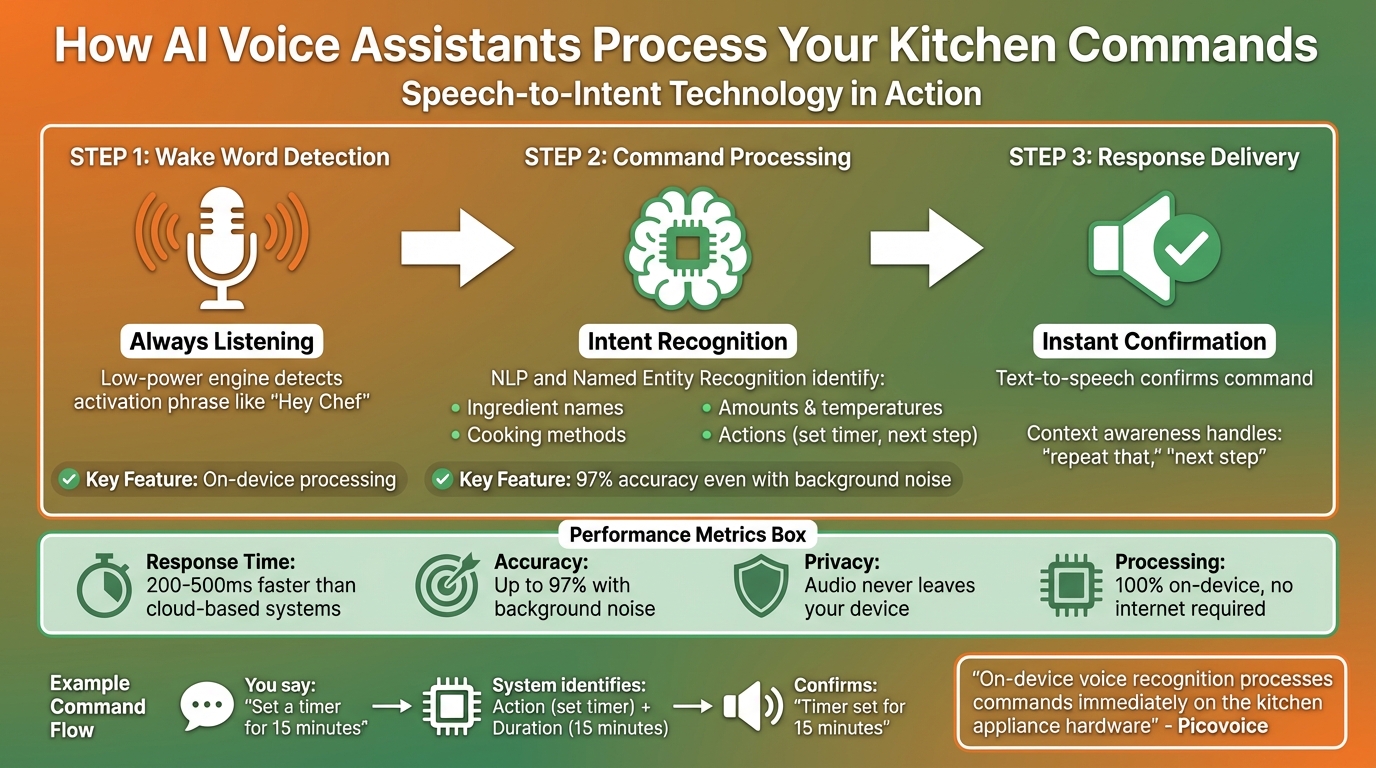
How AI Voice Assistants Process Kitchen Commands in 3 Steps
Every time you say something like "Hey, what's next?" to an AI assistant, a fascinating process kicks into gear. These assistants use a technology called speech-to-intent, which skips the usual step of converting speech into text. Instead, it directly translates your spoken words into structured data. For example, if you say, "Set a timer for 15 minutes", the system instantly identifies the action (set a timer) and the duration (15 minutes). This method reduces response time by 200–500 milliseconds compared to cloud-based systems and achieves up to 97% accuracy, even with background noise like a running faucet or a noisy kitchen fan.
Here’s how it works: First, the assistant’s low-power engine is always listening for an activation phrase, like "Hey Chef." Once it hears the phrase, it uses Natural Language Processing (NLP) and Named Entity Recognition to identify essential details - like ingredient names, amounts, temperatures, or cooking methods. Finally, a text-to-speech response confirms the command. The system's context awareness is particularly handy, allowing it to follow relative commands like "repeat that" or "next step" without requiring you to specify the exact step you’re referring to.
Picovoice describes this process as follows:
"On-device voice recognition processes commands immediately on the kitchen appliance hardware. Wake word detection, speech recognition, and voice synthesis all happen locally without network delays".
Because this processing happens entirely on your device, your audio never leaves it - addressing privacy concerns while delivering lightning-fast responses. This setup forms the backbone of the many kitchen tasks these assistants can manage.
Voice Commands for Cooking Tasks
AI voice assistants can handle an impressive range of kitchen-related tasks. For recipe navigation, you can say commands like "next step", "repeat that", or "go back." Timers are a breeze, too - set multiple timers ("set a 12-minute timer for pasta"), check how much time is left, or stop alarms. For ingredient-related questions, you can ask for quantities ("how much sugar?") or even request substitutions ("what can I use instead of buttermilk?"). Advanced assistants can even control smart appliances, letting you preheat ovens, switch cooking modes (like bake or convection), or turn devices on and off.
Some systems, like Microsoft Copilot, take things further. They can create recipes tailored to your pantry items, dietary needs (like vegan or keto), and available time. These tools can handle complex instructions, such as recognizing cooking modes (e.g., convection bake), ingredient weights (like 3 pounds of chicken), and time settings, then executing the appropriate actions.
Device Integration and Compatibility
AI assistants don’t just process commands - they also integrate with a variety of kitchen devices. They connect via smart speakers, smartphones, tablets, and increasingly, directly within smart appliances. Using Wi-Fi or Bluetooth, these assistants can communicate with devices like ovens, microwaves, and sous-vide machines through specialized APIs. For instance, the Alexa Cooking API can manage cooking times, adjust temperatures, and even monitor the internal temperature of food.
There are two ways these systems process commands: cloud-based and on-device. Cloud-based systems, like traditional Google Assistant or Alexa, send your audio to external servers for processing. While this approach works across many devices, it adds a delay of 1–2 seconds per command. On-device systems, on the other hand, handle everything locally using hardware like Raspberry Pi or ARM processors. This approach provides almost instant responses and keeps your audio private, with no internet connection required.
For the best results, place your device 6–18 inches from your workspace and away from noisy appliances. These systems also support multiple languages, including English, Spanish, French, German, Italian, Japanese, Korean, Portuguese, and Mandarin Chinese.
Setting Up Your Hands-Free Cooking Environment
Device Placement and Setup
Getting your device in the right spot makes a big difference when it comes to voice recognition. For smartphones or tablets, aim to place them 6–8 inches from your mouth. Laptops or desktops should sit a bit farther, about 12–18 inches away for the best results.
Keep your device away from noisy appliances like dishwashers, ventilation hoods, or TVs to cut down on background noise. Closing windows and doors can also help reduce external sounds. Make sure the microphone is unobstructed - avoid cluttered setups or placing the device near surfaces that create echoes, like tile backsplashes.
A strong Wi-Fi connection is key for quick recipe searches and smooth voice commands. If your kitchen is out of your router’s range, a Wi-Fi extender can help avoid frustrating delays. Spend a couple of minutes testing your connection, wake word response, and device placement to ensure everything runs smoothly. These small adjustments set the stage for a hassle-free, hands-free cooking experience.
Customizing AI Assistant Settings
Once your device is in the perfect spot, tweak its settings to fit your cooking style. Start by enabling a feature like "Cook Mode" (or "Start Cooking") in your recipe app. This mode simplifies the display by showing one step at a time in large, easy-to-read fonts, prevents the screen from dimming, and keeps it active while you cook.
Creating a voice profile can improve recognition accuracy, even in a noisy kitchen. Many systems also let you switch between languages like English, Spanish, French, and more, and some even allow you to customize the assistant’s voice for a more personal touch.
To make things even easier, link your favorite recipe apps to your smart speaker through the assistant’s mobile app. For instance, Google Home or Alexa might require you to enable specific skills like "Cooking Helper", "Tasty", or "Allrecipes" for guided, step-by-step instructions. If you use apps like Honeydew Recipe Manager, you can import recipes from Instagram and TikTok and send them directly to your smart display using features like "Send to Device." This setup ensures you can browse recipes during the day and have them ready to go when it’s time to start cooking.
Key Features of AI Assistants for Hands-Free Cooking
Recipe Navigation and Step-by-Step Guidance
Voice-controlled navigation makes it easy to follow recipes without ever touching your device. By using simple commands like "Ok Google, start cooking" or "Hey Chef", you can move through recipes completely hands-free. For instance, Google Assistant offers access to over 5 million recipes from publishers such as The New York Times and Food Network - all without lifting a finger.
What sets advanced assistants apart is their ability to provide clear, single-step instructions and even sensory cues. Imagine being told when your onions are perfectly golden. These assistants also remember where you left off, so if you're interrupted, you can jump right back into the process.
"Voice interfaces excel at initiating actions, but they fail at maintaining state. A good cooking assistant doesn't just tell you what's next - it anticipates what you'll need next, and guards against the mistakes fatigue invites."
– Dr. Lena Torres, Human-Computer Interaction Researcher, MIT Media Lab
Beyond navigation, these tools are also improving ingredient management to handle substitutions on the fly.
Ingredient Substitution and Recipe Adaptation
AI assistants make it easier to adapt recipes by suggesting ingredient substitutions when you're missing something or need to account for dietary needs. They use an "Intelligent Recipe State" to track your progress and understand which ingredient you're referring to when you ask for alternatives. Whether you're out of butter or need a dairy-free option, the assistant recalculates portions and suggests substitutes with prompts like "serves two" or "nut-free".
Apps like Honeydew Recipe Manager take this a step further. Not only do they suggest smart substitutions, but they also let you search for recipes based on the ingredients you already have. Plus, the AI assistant in the app offers instant tips and edits while keeping the screen active - perfect for messy hands.
These assistants don't just help with ingredients; they also manage timing with precision, keeping your dishes on track.
Timer and Reminder Management
Voice-activated timers are a lifesaver when your hands are covered in flour or oil. AI assistants can automatically set timers based on cues in recipes, like "simmer for 20 minutes", and even handle multiple timers at once - all without requiring you to touch your device. This feature ensures every dish is perfectly timed while maintaining a hands-free experience.
You can assign unique names to timers, like "onion sauté" or "pasta boil", to keep everything organized. Some advanced assistants even calculate backward from your target mealtime, coordinating multiple dishes so everything finishes at the same time.
However, standard voice assistants often struggle with conditional instructions like "add lemon zest when the mixture cools", correctly interpreting only 38% of such clauses. To avoid confusion, scan your recipe for phrases like "once reduced" or "while that cooks" - areas where advanced AI assistants excel in managing timing relationships.
"In professional kitchens, we use timed checklists - not voice prompts - because timing isn't sequential; it's relational. AI timers that model those relationships... mirror how chefs actually think."
– Chef Marcus Bell, James Beard Award–winning instructor, Culinary Institute of America
Improving Meal Planning with AI Tools
Importing Recipes and Creating Grocery Lists
Honeydew Recipe Manager takes the hassle out of meal planning by seamlessly connecting recipe discovery with hands-free cooking. You can easily import recipes by pasting a URL or using a share button from social media or food blogs. The AI does the heavy lifting, pulling in ingredients, measurements, instructions, cook times, and even nutritional details. It can even extract information from videos or photos of handwritten notes, making it incredibly versatile for all kinds of recipes.
Once your recipes are uploaded, Honeydew automatically creates grocery lists, neatly organized by store aisle. Its Pantry Mode is a game-changer - it tracks what you already have in your fridge or pantry and suggests recipes that use those ingredients. Missing items are flagged, making shopping and meal prep more efficient. This feature not only saves time but also helps cut down on food waste by up to 40%, which translates to an average savings of $125 per month.
"Letting AI help me make the most of what I already have saves our family of four roughly $100 a week." – Abby Brody, Digital Parenting Expert
For added convenience, grocery lists sync with Instacart for easy delivery or pickup. You can also share meal plans and lists with up to six family members, keeping everyone on the same page. In a November 2025 test, CNET editor Corin Cesaric followed an AI-generated meal plan for a week and successfully achieved zero food waste using Pantry Mode's suggestions.
AI Meal Plans and Nutrition Tracking
Honeydew doesn’t just stop at creating grocery lists - it also simplifies meal planning with built-in nutrition tracking. In just seconds, the AI generates complete weekly meal plans, calculating daily and weekly totals for calories, protein, fat, carbohydrates, and fiber. With an impressive 84.19% macronutrient accuracy compared to the 35–40% accuracy of manual tracking, it significantly cuts down meal prep time from 5–6 hours to under 1.5 hours per week.
Whether you're aiming for high-protein meals or managing heart-healthy sodium levels, Honeydew lets you set specific nutritional goals. The AI suggests recipes that match those goals and even adjusts ingredient quantities as needed. Its drag-and-drop calendar makes meal planning flexible, with nutritional totals updated in real time. If a recipe overshoots your calorie limit, the AI quickly recommends ingredient swaps to keep you on track.
Honeydew also integrates with voice assistants like Alexa, offering step-by-step, hands-free cooking instructions. Recipes are available offline on both iOS and Android, so you’re never left without guidance. These features collectively enable Honeydew users to save and organize over 270,000 recipes each month.
Practical Tips for Hands-Free Cooking Success
Once you've set up your device correctly, these tips can help you get the most out of your voice assistant in the often chaotic environment of a kitchen.
Managing Background Noise and Clear Communication
One of the biggest challenges for voice assistants in the kitchen is dealing with background noise. Sounds from dishwashers, mixers, or ventilation fans can reduce the accuracy of speech recognition by up to 30%. To improve performance, revisit the earlier advice on device placement to minimize noise interference. Closing windows or doors can also help create a quieter environment.
For Google Assistant users, adjusting the "Hey Google" sensitivity setting in the Google Home app can make it easier for the device to catch your commands in noisy settings. Many devices are equipped with multiple microphones designed to filter out ambient noise and focus on your voice. Keeping your device firmware and apps updated is another key step - updates often include improved noise-cancellation algorithms, which can increase accuracy by up to 25%.
"In general, noise is very difficult for speech systems to handle and requires various methods to reduce." – Team SoundHound
Speak naturally rather than shouting, as raising your voice can create echoes and actually lower recognition accuracy. Be specific with your commands; for example, saying "Set my oven to 350 degrees" instead of "Turn on the oven" can boost response accuracy by nearly 40%. Over time, regular use helps the device adapt to your voice, improving accuracy by an additional 25%.
Troubleshooting Command Recognition Issues
If your voice assistant struggles with understanding commands, there are a few quick fixes to try. First, check your Wi-Fi connection - a steady signal (ideally above 10 Mbps) is crucial to avoid delays or misinterpretations. Outdated software is another common issue; updating your device can improve recognition by up to 50%.
| Troubleshooting Step | Target Issue | Expected Improvement |
|---|---|---|
| Software Updates | Recognition Algorithms | Up to 50% performance boost |
| Noise Reduction | Comprehension | Up to 30% accuracy gain |
| Precise Keywords | Response Rate | Nearly 40% improvement |
Using clear, concise commands like "Set my oven to 350 degrees" can make a big difference. If the assistant has trouble with measurements, try spelling out numbers (e.g., "two cups" instead of "2 cups"). For browser-based cooking apps, ensure microphone permissions are enabled. And when all else fails, restarting the device can often resolve temporary glitches.
Once you've fine-tuned command recognition, you're ready to take on more complex cooking tasks with your AI assistant. This includes using AI for family meal planning to coordinate schedules and dietary needs.
Balancing Multiple Tasks with AI Assistance
With your assistant reliably understanding commands, you can manage multiple kitchen tasks more efficiently. Assign unique names to timers, such as "10-minute pasta" and "20-minute sauce", to avoid confusion. Use simple navigation commands like "Next step", "Repeat", or "Previous step" to move through recipes smoothly without losing your place. If your recipe app includes a "Cook Mode", enable it to keep the screen active and display instructions clearly.
Before diving into messy food prep, take a moment to test your Wi-Fi connection and smart speaker responsiveness to avoid mid-recipe hiccups. Position mobile devices 6–18 inches away from your workspace, and if you're using multiple smart speakers, keep them at least 8 feet apart to prevent accidental activations.
These strategies make it easier to stay organized and focus on what really matters - creating a delicious meal.
Conclusion: Transform Your Cooking Routine with AI Assistants
AI assistants are changing the way we approach cooking, making it easier to juggle digital recipes and kitchen tasks. With simple voice commands like "next step" or "repeat", you can keep your hands free to focus on cooking, creating a smoother and more enjoyable experience. And the numbers back it up: ingredient extraction is 94% accurate, commands process in just 2.3 seconds, and 87% of users report being satisfied with the experience.
Rachel M., a busy home cook, shared how this technology has simplified her life:
"This AI cooking assistant changed my weekday dinners. I just tell it what I have in my fridge, and it suggests tasty, quick meals. Lifesaver for busy parents!"
Beyond convenience, AI assistants help reduce food waste and cut costs by making the most of the ingredients you already have. Tools like the Honeydew Recipe Manager take things further by importing recipes directly from platforms like TikTok, Instagram, and YouTube Shorts. They even auto-generate grocery lists sorted by store sections and offer one-tap Instacart delivery. Designed with U.S. kitchens in mind, it uses familiar measurements like cups and tablespoons, supports Fahrenheit temperatures, and allows unlimited recipe storage and household sharing.
From managing dietary preferences and picky eaters to scaling recipes and speeding up prep time, these assistants handle the details so you can focus on enjoying the process. With accessible and affordable options available now, AI-powered tools are ready to enhance every part of your cooking routine.
FAQs
Do I need internet for hands-free cooking?
You can enjoy hands-free cooking without an internet connection as long as your device is updated and switched to manual (offline) mode. Keep in mind, though, that features like guided recipes and AI assistance won't work when offline.
How do I make voice commands work in a noisy kitchen?
To make voice commands work better in a noisy kitchen, start by tweaking your assistant's sensitivity settings to minimize accidental activations. Place the microphone closer to where you'll be working, and consider investing in high-quality audio gear to improve sound clarity. Using on-device voice AI technology can also make a big difference, as it reduces delays and boosts responsiveness, even in loud settings. With the right setup, you can keep your cooking hands-free and efficient, no matter the background noise.
Can Honeydew Recipe Manager create meal plans from what I already have?
Honeydew Recipe Manager can take stock of the ingredients in your pantry and recommend recipes that match what you already have. This feature helps you cut down on food waste and stretch your budget by using up items you already own.



