How AI Helps Plan Sustainable Grocery Trips
• Updated
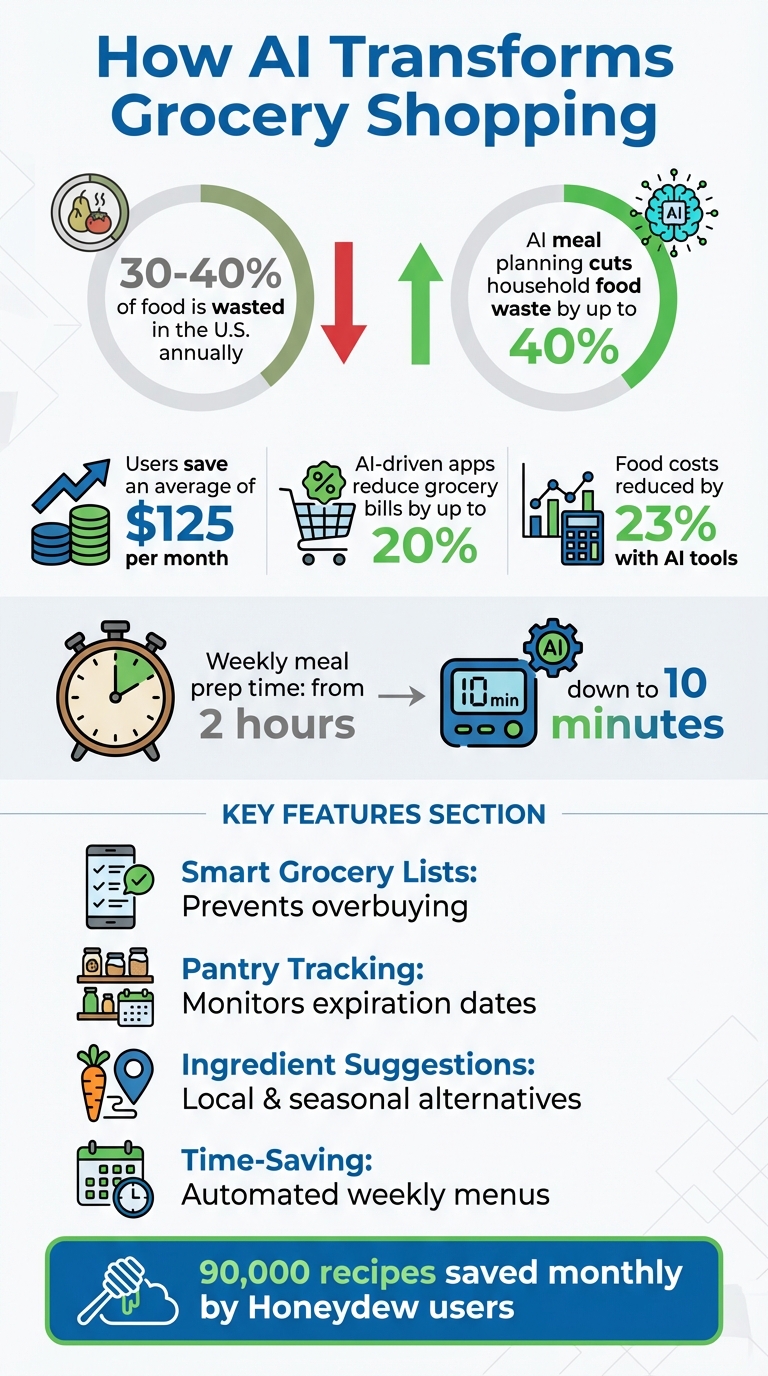
AI-powered tools are changing how we shop for groceries, helping households save money and reduce food waste. With nearly 30–40% of purchased food wasted in the U.S. annually, tools like Honeydew Recipe Manager simplify meal planning and grocery shopping. Here's how they work:
- Smart Grocery Lists: AI creates accurate shopping lists based on meal plans and pantry inventory, preventing overbuying and saving users up to $125 monthly.
- Pantry Tracking: Features like "Pantry Mode" scan receipts or photos to track expiration dates and suggest recipes using existing ingredients.
- Ingredient Suggestions: AI recommends local, in-season, or alternative ingredients to minimize waste and cut costs.
- Time-Saving Meal Plans: Automated weekly menus reduce planning time from hours to minutes, while also learning user preferences over time.
Honeydew also integrates with platforms like Instacart for seamless online orders and supports household sharing to keep everyone aligned. By reducing food waste and optimizing shopping habits, AI tools offer a practical way to shop smarter and save money.
How AI Meal Planning Reduces Food Waste and Saves Money
I asked AI to meal plan for me… Here’s how it went with ChatGPT Prompts
How AI Reduces Waste and Improves Grocery Shopping
AI-powered tools take the guesswork out of grocery shopping by cross-referencing meal plans with pantry inventories. Instead of manually jotting down a shopping list and risking errors, these tools ensure you purchase only what’s necessary. Let’s dive into how AI transforms your shopping experience.
Creating Accurate Grocery Lists to Prevent Food Waste
AI meal planning tools can cut household food waste by as much as 40%. By generating grocery lists tailored to your weekly meal plans, they eliminate the need for guesswork while shopping.
Take Honeydew's Pantry Mode, for example. This feature scans receipts and pantry photos to track expiration dates and create shopping lists based on what’s missing. The results are impressive: users report saving an average of $125 per month - sometimes even more - by avoiding unnecessary purchases.
"I used to waste so much food. Now with Honeydew's meal planning, I buy exactly what I need and save money!" - Mark T., Honeydew User
Another advantage? The AI consolidates duplicate ingredients across recipes. If three meals require onions, it calculates the total amount needed and lists it once, preventing overbuying.
Choosing Local and Seasonal Ingredients
AI tools don’t just help with quantity; they also encourage smarter choices. When recipes include out-of-season produce that requires long-distance shipping, the AI suggests local alternatives. This reduces transport emissions and often lowers costs.
These tools also make use of what you already have. For instance, if a recipe calls for Greek yogurt but you’ve got sour cream in the fridge, the AI may suggest using it instead. This feature ensures ingredients are used before they spoil, saving you money and reducing waste. Many users praise this functionality as a game-changer for minimizing food waste.
Tracking Your Progress Over Time
AI doesn’t stop at individual shopping trips - it continuously improves your grocery routine. Tools like Honeydew analyze your purchase history, meal plans, and pantry inventory to predict future needs and automate list creation.
The results speak for themselves: users have reported cutting food costs by 23%, while AI-driven grocery apps can lower overall bills by up to 20%. Plus, automated meal planning slashes weekly prep time from two hours to just 10 minutes by learning your preferences and suggesting efficient meal sequences. The combination of time savings, reduced costs, and less waste makes AI a powerful ally in building a more efficient and sustainable shopping routine.
Step 1: Getting Started with Honeydew Recipe Manager
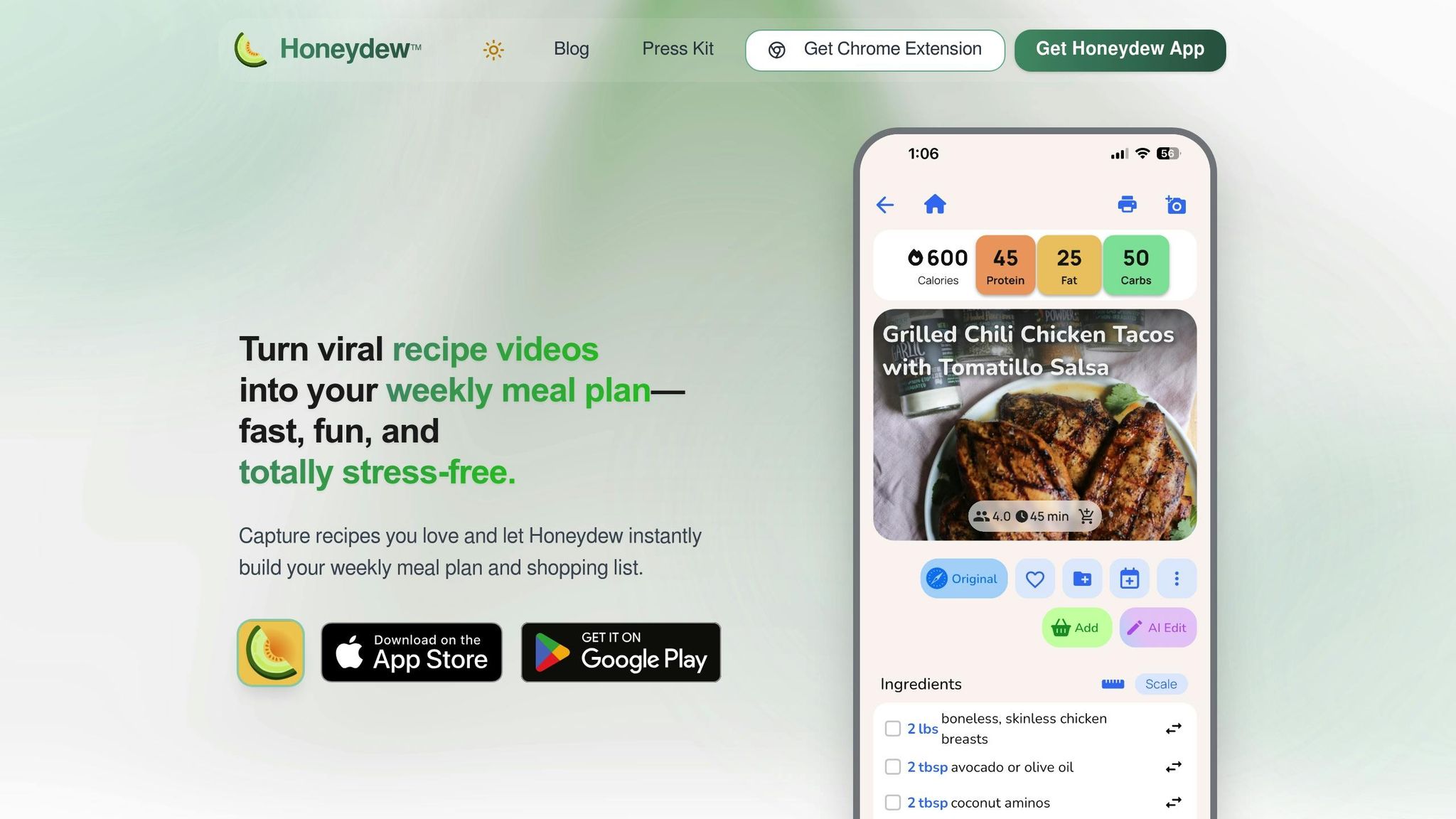
You can download Honeydew Recipe Manager for free on iOS (requires iOS 17.0+) and Android. The basic features, like smart grocery lists and pantry tracking, don’t require a credit card.
After installation, set up your profile by adding key details such as your family size and dietary preferences. This helps the AI create meal plans tailored to your needs, scale ingredients appropriately, and even reduce food waste. Once your profile is ready, customize your meal preferences to build a grocery strategy that works for you.
Setting Your Preferences for Meal Planning
Personalization is the core of the setup process. Enter your dietary preferences - whether you’re keto, vegan, paleo, high-protein, or gluten-free - and the AI will filter recipes and adjust ingredient quantities accordingly.
The app supports household sharing, letting multiple users sync meal plans and grocery lists in real time. This feature helps avoid duplicate purchases and keeps everyone on the same page. You can also switch between measurement units effortlessly.
Activate Pantry Mode to make use of the ingredients you already have. The AI scans images of your pantry items, identifies them, and prioritizes recipes that include those ingredients. This feature could help reduce food waste by as much as 40%.
Using AI to Create Weekly Meal Plans
With your preferences in place, the AI meal planner generates a complete weekly menu in seconds. It cleverly chooses recipes that reuse ingredients across multiple meals. For example, if you have leftover cilantro from Monday’s dinner, the AI might suggest another dish later in the week that uses it, cutting down on waste.
You can easily rearrange your weekly menu by dragging and dropping recipes onto a digital calendar. Over time, the AI learns your habits, and users have reported cutting their weekly meal prep time from two hours to just 10 minutes. This system makes meal planning almost effortless and sets you up for the next step: importing and fine-tuning recipes.
Another handy feature is Ask Honey, which instantly adjusts recipes to match your dietary needs. It can substitute ingredients and tweak cooking instructions as needed, giving you the flexibility to adapt meals while keeping your grocery list accurate. Once you’re comfortable with the basics, you can start importing your favorite recipes to refine your menu even further.
| Feature | Free Plan | Honeydew Plus ($4.17/mo) |
|---|---|---|
| Recipe Storage | Limited (up to 10 imports) | Unlimited |
| AI Recipe Import | URL only | URL, Photo, Social Media, Screenshots |
| Household Sharing | Not included | Up to 6 members |
| Pantry Mode | Included | Included |
| Nutrition Tracking | Included | Included |
| Ads | Ad-supported | Ad-free |
Step 2: Importing and Adjusting Recipes
Once your profile and preferences are set, it’s time to start building your recipe collection. Honeydew makes this process super easy, letting you grab recipes from social media or even photos. No need to manually type out ingredients or instructions - the app’s AI takes care of that for you.
Importing Recipes from Social Media or Photos
The quickest way to save a recipe is by using the share button on your favorite social media platforms. Found something that looks delicious? Just hit the share icon, select Honeydew, and let the AI transform the post into an organized recipe with clear, step-by-step instructions.
You can also snap a photo of a recipe card or a dish, and the app’s Copycat Recipe Generator will do the rest. It analyzes the image and creates a home-cook-friendly version, complete with ingredients and instructions. In fact, Honeydew users collectively save about 90,000 recipes every month using these tools. Plus, the app integrates seamlessly with popular recipe sites like Epicurious, Allrecipes, and Bon Appétit for direct imports.
"Honeydew saves all the recipes in one convenient place with the directions and ingredients. It is so easy to use and organized! Now I can cook all of the recipes I want to try that I find while doomscrolling!" - Libbyblox, App Store User
Once your recipes are imported, you can fine-tune them with Honeydew’s AI-powered features.
Swapping Ingredients for Better Options
After importing your recipes, you can tweak them to align with local and sustainable choices. The Ask Honey AI assistant makes substitutions simple. For example, you can type something like "replace beef with local chicken" or "use seasonal vegetables instead", and the app will instantly update the recipe and your grocery list.
Using Pantry Mode, the app also checks what you already have at home and suggests swaps to help you use up ingredients and avoid waste. It’s an easy way to prioritize seasonal and local produce while keeping your grocery shopping efficient.
"The ingredient substitution feature is a game-changer for my dietary restrictions. I can adapt any recipe easily!" - Emily C., Honeydew User
Adjusting Serving Sizes to Match Your Needs
Honeydew’s smart scaling tool simplifies adjusting serving sizes. Need to cut a recipe for four down to two portions? The app recalculates all ingredient measurements instantly, so you don’t end up with extra food you don’t need.
The tool also lets you toggle between Imperial and Metric measurements, with every change syncing directly to your grocery list. For more complex changes - like converting a recipe to gluten-free or halving a tricky baking recipe - you can ask the AI assistant for help. These precise adjustments not only reduce waste but also align your shopping habits with your sustainability goals.
Step 3: Creating and Using Your Grocery Lists
Now that your recipes are ready and tailored to your needs, it’s time to turn your meal plan into a practical shopping list. Honeydew simplifies this process by organizing your groceries into a clear, easy-to-follow guide. By consolidating quantities and sorting items efficiently, Honeydew helps you stick to your list, cutting down on unnecessary purchases and minimizing food waste.
Generating Organized Grocery Lists
Honeydew takes your weekly meal plan and automatically creates a detailed shopping list. It combines duplicate ingredients and organizes everything by store aisle, so you can move through the grocery store without doubling back. Research shows that using AI-powered grocery apps can reduce household grocery expenses by as much as 20% by syncing pantry inventory with shopping lists.
Using Pantry Mode to Check What You Already Have
With Pantry Mode, you can snap a photo of your fridge or pantry, and Honeydew’s AI will scan the image to identify what you already have. It then removes these items from your shopping list, ensuring you don’t buy duplicates. This feature also lets you search for recipes based on your current ingredients, helping you make the most of what’s already in your kitchen. Studies indicate that AI-driven meal planning can lower food waste by up to 40% and save users about $125 per month.
"The smart grocery lists save me hundreds of dollars a month. I love how it suggests recipes based on what I already have!" - James L.
Ordering Groceries Online with Instacart
Honeydew’s integration with Instacart makes online grocery shopping seamless. Once your list is ready, you can send it directly to Instacart, saving an average of 7 minutes. The AI has already calculated quantities and excluded items you own, so all that’s left is to review your order. You can even set substitution preferences for out-of-stock items. Instacart shoppers find suitable replacements 95% of the time. For example, you can specify frozen vegetables as a backup when fresh ones aren’t available, ensuring your meal plan stays on track with minimal hassle.
Step 4: Building Better Shopping Habits Over Time
Once you've streamlined your grocery lists, the next step is to work on developing shopping habits that stick. It's not just about making one-time changes; it's about creating a routine that evolves with you. Honeydew's AI takes a deep dive into your purchase history, meal plans, and pantry inventory to highlight patterns in spending and waste. This ongoing tracking turns short-term efforts into lasting habits.
Reviewing Your Waste Reduction Data
Honeydew's AI-generated reports provide a clear picture of how much food waste you've reduced and how much money you've saved. The app also tracks your daily nutrition - calories, protein, fat, carbs, and fiber - so you can see if your shopping habits align with your health goals. Reviewing these reports regularly can reveal trends, like which ingredients you tend to overbuy or which recipes produce too many leftovers. By combining these insights with your improved meal planning and precise grocery lists, you'll be better equipped to maintain your progress over time.
"The calorie and macro calculator has helped me stick to my health goals while still enjoying great meals." - Michael B.
Sharing Recipes and Lists with Your Household
When everyone in your household is on the same page, it's easier to avoid duplicate purchases and unnecessary waste. Honeydew Plus allows up to six family members to collaborate on meal plans and grocery lists, updating them in real time. A shared digital list eliminates confusion about who’s buying what. You can even leave notes for each other using features like the iOS PencilKit notepad or home group widgets, making communication seamless. Plus, with aisle-sorted lists, family members can divide and conquer the store, saving time and effort. These tools make it simple to keep your household organized and your shopping routine efficient.
"My family of five uses Honeydew for all our meal planning. The household sharing feature keeps everyone organized." - Alex P.
Continuing to Improve Your Shopping Routine
Smart shopping is a continuous process. Regularly updating your digital inventory allows the AI to track expiration dates and suggest recipes that use ingredients before they spoil. You can also use the portion adjustment feature to scale recipes to your household size, cutting down on leftovers that might otherwise go to waste. As you add more recipes from platforms like TikTok or Instagram, the AI learns your preferences and suggests meals tailored to your pantry. This feedback loop ensures your shopping stays efficient and waste-free. With Honeydew users saving around 90,000 recipes every month, there's no shortage of inspiration for smarter, more sustainable shopping.
Conclusion
AI-driven meal planning is transforming grocery shopping into a more efficient and sustainable process. By generating accurate shopping lists, monitoring pantry supplies, and suggesting recipes based on what you already have, tools like Honeydew Recipe Manager ensure you buy only what’s necessary. Research highlights that this approach can reduce food waste by up to 40% and cut monthly grocery expenses by as much as 20%.
This shift isn't just about convenience - it’s about fostering habits that are good for both your finances and the planet. Features like Pantry Mode help you check what’s already in your fridge, adjust portion sizes for your household, and swap in-season ingredients seamlessly. These small actions add up, creating lasting improvements in both sustainability and budgeting.
As you continue to use AI tools, they get smarter. By importing recipes and tracking what’s in your pantry, the AI refines its suggestions over time. This means your shopping becomes increasingly streamlined, reducing the stress of meal planning and helping you make better choices week after week.
Why not start today? Try one feature - whether it’s generating a grocery list or planning meals with what’s already in your pantry. These small steps can lead to big changes, helping you build a more sustainable and efficient shopping routine.
FAQs
How can AI help cut down on food waste when grocery shopping?
AI is changing the way we approach meal planning and grocery shopping, making it easier to cut down on food waste. Tools like Honeydew Recipe Manager take stock of the ingredients you already have at home and suggest recipes that incorporate them. This helps you avoid buying unnecessary items and ensures that what’s in your pantry gets used before it goes bad.
These apps also simplify grocery shopping by creating precise shopping lists tailored to your planned meals. They even factor in what’s already in your pantry, so you’re not accidentally buying duplicates. On top of that, AI can keep track of ingredient expiration dates and send you reminders, giving you a heads-up to use items before they spoil.
By aligning your shopping habits with what you actually need and encouraging the use of leftovers or soon-to-expire ingredients, AI makes your trips to the grocery store more efficient and helps you waste less food.
How can AI meal planning apps help save money on groceries?
AI-powered meal planning apps are a great way to cut down on grocery bills while catering to your dietary needs and budget. These apps craft meal plans that focus only on the ingredients you need, helping you avoid impulse buys and overstocking. The result? Less waste and more control over your spending.
Take Honeydew, for example. This app goes beyond basic planning by analyzing the ingredients you already have at home. It suggests recipes that use what’s on hand and even connects with services like Instacart for easy shopping. With handy tools like automatic meal planning and ingredient swaps, these apps streamline meal prep and make grocery shopping more efficient, saving you both time and money.
How does Honeydew Recipe Manager support sustainable grocery shopping?
Honeydew Recipe Manager simplifies your shopping experience by generating smart grocery lists straight from your meal plans. This helps you purchase only the essentials, cutting down on unnecessary items and preventing overstocking. Plus, it offers ingredient substitution suggestions, making it easier to use what’s already in your kitchen and minimize food waste.
The app also allows you to import recipes from social media or websites, helping you organize and plan meals effortlessly. This not only saves time but also supports a more mindful and efficient approach to shopping and cooking.



