How to Import Recipes with Metadata from Social Media
• Updated
Tired of pausing videos or scrolling through endless captions to find recipes? Honeydew Recipe Manager simplifies saving and organizing recipes from TikTok, Instagram, and more. It extracts key details like ingredients, instructions, cooking times, and nutritional info, turning chaotic posts into clear, digital recipe cards.
Here’s what you can do with Honeydew:
- Save recipes effortlessly: Import directly from social media links or screenshots.
- Organize your recipes: Edit ingredient lists, convert units, and categorize by meal type or dietary needs.
- Plan meals easily: Generate grocery lists, track nutrition, and sync with family members.
- Cook hands-free: Use voice commands and keep your screen on while cooking.
The free app works across iOS, Android, and more, with a premium option ($4.17/month) for advanced features like unlimited storage and AI-powered meal planning. Start saving time, reducing food waste, and making cooking stress-free.
Tools and Requirements
To start importing recipes, you'll need to install Honeydew Recipe Manager and have access to your favorite social media platforms. Once you've got these covered, you're all set to configure Honeydew and begin saving recipes effortlessly.
Setting Up Honeydew Recipe Manager
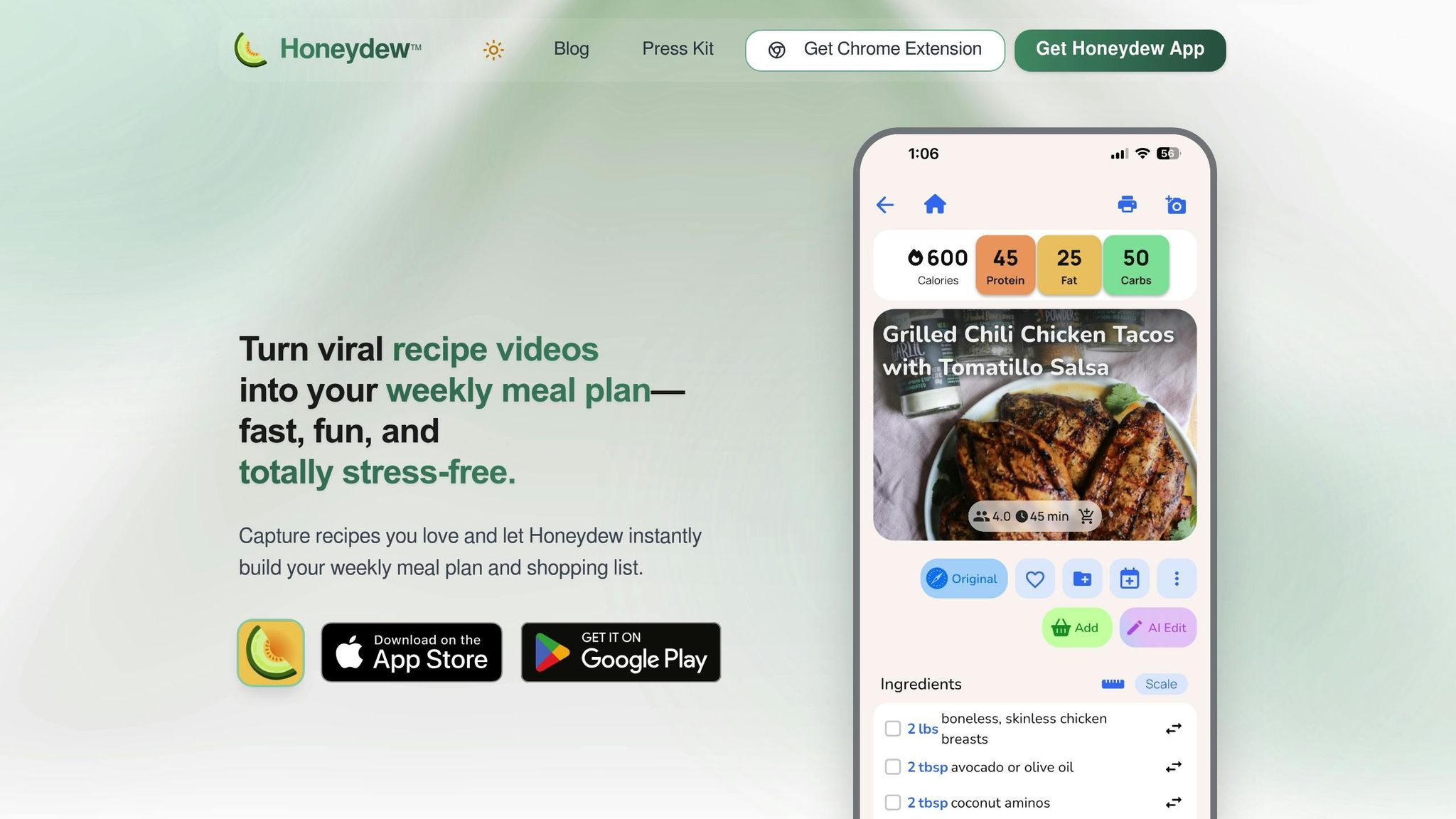
Honeydew Recipe Manager works across multiple platforms, including iOS, iPadOS, macOS, Apple Vision, and Android. The app is free to download, with an optional premium upgrade offering more features and storage options.
You can grab the app from the Apple App Store or Google Play Store without needing a credit card. The free version includes basic tools for importing recipes and meal planning. It lets you save recipes from platforms like TikTok, Instagram, YouTube, and Facebook, organizing them neatly in your own digital cookbook.
For those who want more, there's Honeydew Plus. This premium subscription costs $4.17 per month and unlocks unlimited recipe storage, the ability to share with up to six family members, and advanced features like importing recipes from photos or screenshots. This is perfect for digitizing pages from cookbooks or preserving handwritten family recipes. Fun fact: users collectively save around 270,000 recipes every month using Honeydew.
Finding Recipes on Social Media
After installing the app, head to your favorite social media platform to find recipes. On TikTok or Instagram, you can either select Honeydew from the share menu or copy the post link and paste it into the app. Honeydew's AI then works its magic, extracting all the details you need - ingredients, step-by-step instructions, measurements, cooking times, and even nutritional info.
This streamlined process turns messy social media posts into polished, easy-to-follow recipe cards, ready for use in your kitchen.
How to Import Recipes from Social Media
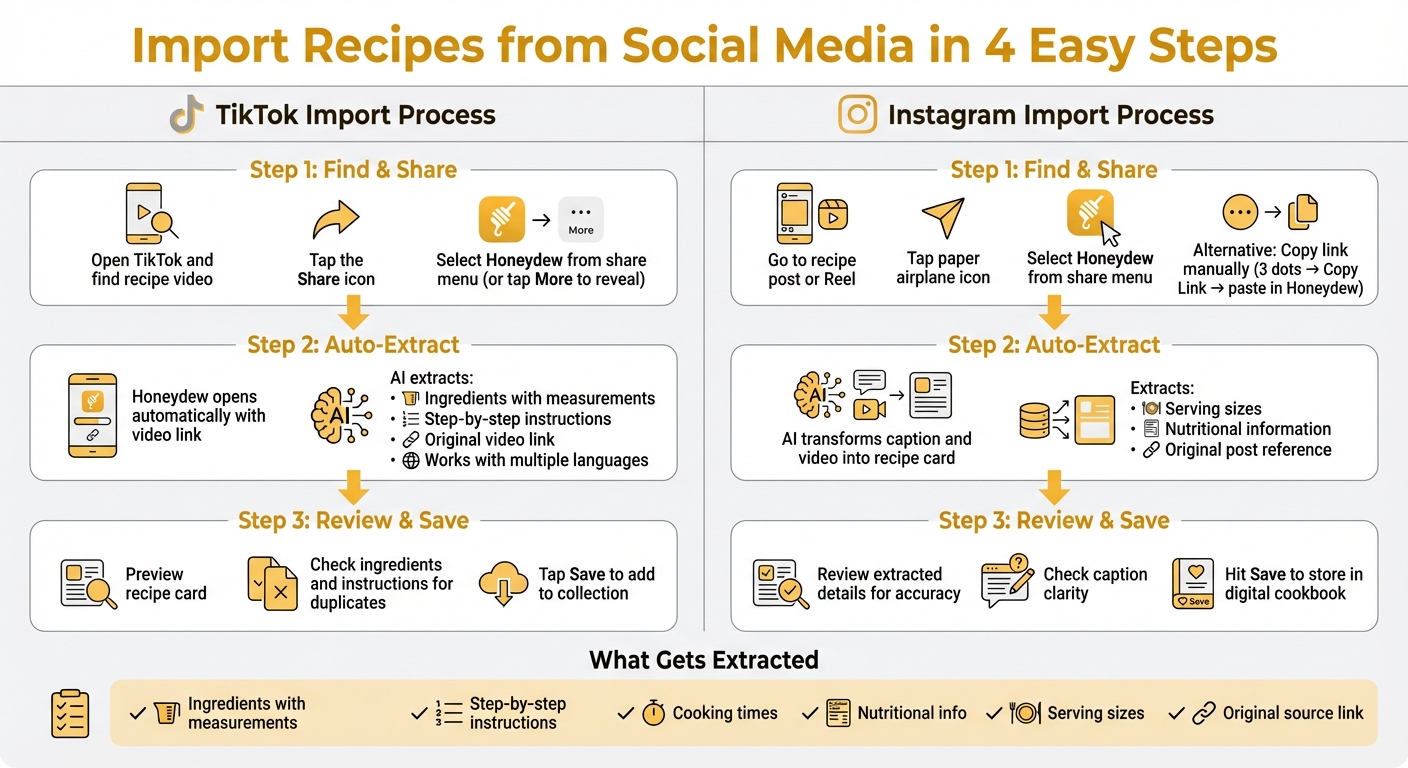
How to Import Recipes from Social Media Using Honeydew Recipe Manager
Using the Honeydew Recipe Manager, you can easily bring recipes from social media into your digital cookbook. The app’s process ensures that all the important details are preserved, including ingredients, instructions, and source links. Here’s how you can do it.
Importing from TikTok

Start by opening TikTok and finding the recipe video you want to save. Tap the Share icon, then choose Honeydew from the options. If you don’t see it right away, tap More to reveal additional apps. Once selected, Honeydew will open automatically with the video link ready to process.
The app’s AI will extract all the key details, including ingredients (with measurements), step-by-step instructions, and the original video link. Even if the video is in another language, Honeydew can recognize and convert the ingredient details. After the extraction, you’ll see a preview of the recipe card. Double-check the ingredients and instructions for any duplicates or formatting issues, then tap Save to add it to your collection.
This same process works for importing recipes from Instagram.
Importing from Instagram
To save a recipe from Instagram, go to the post or Reel that features the recipe. Tap the paper airplane icon under the post, then select Honeydew from the share menu. If Honeydew doesn’t appear, you can manually copy the link by tapping the three dots menu and selecting Copy Link, then pasting it into the Honeydew app.
Honeydew’s AI will transform the caption and video content into a complete recipe card, including serving sizes, nutritional information, and a reference to the original post. Before saving, review the extracted details to ensure everything is accurate, especially since captions might prioritize engagement over clarity. Once satisfied, hit Save to store the recipe in your digital cookbook.
Editing and Organizing Your Recipes
Editing Recipe Metadata
Fine-tuning your recipes has never been easier. With Honeydew Recipe Manager, you can manually adjust everything from ingredient order to serving sizes, cooking times, and measurements. Need a quick fix? Use the app’s AI assistant, "Honey", to handle edits for you. Instead of painstakingly updating each field, simply ask Honey to make changes like "convert this to metric" or "make it gluten-free." It’s perfect for dealing with vague terms like "a pinch" or "to taste" often found in social media recipes.
Scaling recipes is also a breeze. If you’re cooking for six instead of four, Honeydew recalculates ingredient amounts automatically. Plus, switching between Imperial and Metric units is as simple as tapping a button, making it ideal for recipes from around the globe.
Once your edits are done, these tools ensure your recipes are ready to use, exactly how you need them.
Using Smart Recipe Features
After saving your edited recipe, Honeydew’s smart tools help you make the most of it. The app creates aisle-sorted grocery lists from your recipes, grouping ingredients by store sections to save you time and effort at the store.
"The smart grocery lists save me hundreds of dollars a month. I love how it suggests recipes based on what I already have!" – James L.
Missing an ingredient? Honeydew suggests substitutions based on what’s already in your pantry. You can even snap a photo of your fridge using Pantry Mode, and the app will recommend recipes from your saved collection that match your available ingredients.
For those keeping an eye on nutrition, Honeydew automatically calculates calories and macros for every recipe you import - no manual tracking required. To stay organized, the app uses AI to sort recipes into categories like "Quick & Easy", "Vegetarian", or "Family Favorite." You can also create custom folders or tags for specific cuisines, meal types, or dietary needs. And with household sharing for up to six members, everyone can access the collection and collaborate on meal planning in real time.
Fixing Common Import Problems
Fixing Missing or Incomplete Data
Sometimes, social media imports might leave out key details or display formatting issues. If this happens, you can fix it manually using the built-in editor. With this tool, you can reorder items, tweak measurements, and fill in any missing steps. Starting with Version 1.3, full reordering capabilities are available, making it easier to organize your recipes. For a quicker solution, you can also ask Honey to adjust the missing details for you.
If a social media link doesn’t work, Honeydew Plus users have another option: the photo import feature. Simply take a screenshot or photo, and the app will extract and organize the recipe data for you. This feature is especially handy for TikTok videos, where recipe instructions can flash by too quickly to catch manually.
For persistent issues, Honeydew Plus support is available to help. Premium members can even send in the problematic URL for manual extraction by the team. You can also reach out directly to lead developer Chris H. for assistance. Once the issue is resolved, you’ll be ready to access your recipes seamlessly wherever you cook.
Setting Up Offline Access
Honeydew allows you to use your entire recipe library offline once you’ve saved it to your collection. Whether you’re cooking in a remote area or just want to avoid relying on Wi-Fi or cellular data, your recipes will always be at your fingertips.
To make cooking even smoother, the app includes a screen-on mode. This feature keeps your phone screen from locking while you’re in the middle of a recipe. Make sure to enable this setting before you start cooking to avoid interruptions and keep your recipes visible throughout the process.
Conclusion and Next Steps
Key Takeaways
This guide highlights how preserving recipe metadata can transform your approach to meal planning and cooking. By importing recipes with full metadata, your digital cookbook becomes a powerhouse of organization - automatically sorting ingredients, instructions, cooking times, and even nutritional details. No more endless scrolling or manual note-taking.
Once your recipes are imported, smart tools like grocery lists and meal calendars immediately step in to make life easier. Grocery lists organize items by store aisle, meal calendars map out your week, and pantry mode helps you use up ingredients you already have. As one user, Mark T., put it:
"I used to waste so much food. Now with Honeydew's meal planning, I buy exactly what I need and save money!"
On top of convenience, AI-driven meal planning can cut household food waste by up to 40% and save about $125 each month. These tools don’t just simplify your routine - they can have a real financial impact.
More Features to Try
Ready to take things further? Once you're comfortable importing recipes, try the AI meal planner to create weekly menus in seconds, tailored to your preferences and dietary needs. Use the household sharing feature to sync meal plans and grocery lists with up to six family members. Pantry mode is another game-changer - snap a photo of your fridge, and you'll get recipe suggestions based on what you already have.
For even more convenience, the Instacart integration lets you order all your ingredients with a single click. And for hands-free cooking, enable the no screen lock feature and use voice commands via Alexa or Google Assistant to follow recipes without touching your device.
Honeydew Recipe Manager has earned a stellar 4.8/5-star rating on the Apple App Store from 728 reviews. It’s celebrated for turning chaotic cooking routines into an organized system. Start with the free version to explore basic features, or upgrade to Honeydew Plus for just $4.17/month to unlock unlimited recipe storage and advanced AI tools.
FAQs
Will my recipes keep the original source link?
When you import recipes into Honeydew Recipe Manager, the app keeps the original source link intact. It also saves essential details like the source URL, ingredients, and instructions, helping you keep your recipes well-organized and comprehensive.
How can I fix missing ingredients or steps after import?
If you notice missing ingredients or steps after importing a recipe into Honeydew Recipe Manager, don't worry - you can easily fix it. Honeydew allows you to manually edit recipes, so you can add or adjust ingredients, instructions, photos, or notes. This feature ensures your recipes are accurate and complete, even if the import process left out some details.
Can I use my saved recipes offline while cooking?
Yes, you can access your saved recipes offline while cooking. Just use an app like Honeydew Recipe Manager to save and organize your recipes. Once saved, you’ll have offline access, so you can follow the instructions without worrying about an internet connection.



