How to Import Recipes for Shared Collections
• Updated
Shared recipe collections simplify meal planning by organizing recipes in one place for the whole family. Using apps like Honeydew Recipe Manager, you can save recipes from TikTok, Instagram, YouTube, websites, or even handwritten notes. Honeydew’s features include:
- AI-powered recipe imports: Extract ingredients, instructions, and cooking steps from links, photos, or videos.
- Shared collections: Collaborate with up to six family members for $39.99/year.
- Automatic grocery lists: Combine ingredients from recipes and organize them by store sections.
- Customizable settings: Adjust units, language, and dietary preferences for U.S. households.
The app streamlines meal planning, grocery shopping, and recipe organization. Whether you're saving trendy social media dishes or family favorites, Honeydew helps keep everything organized and accessible.
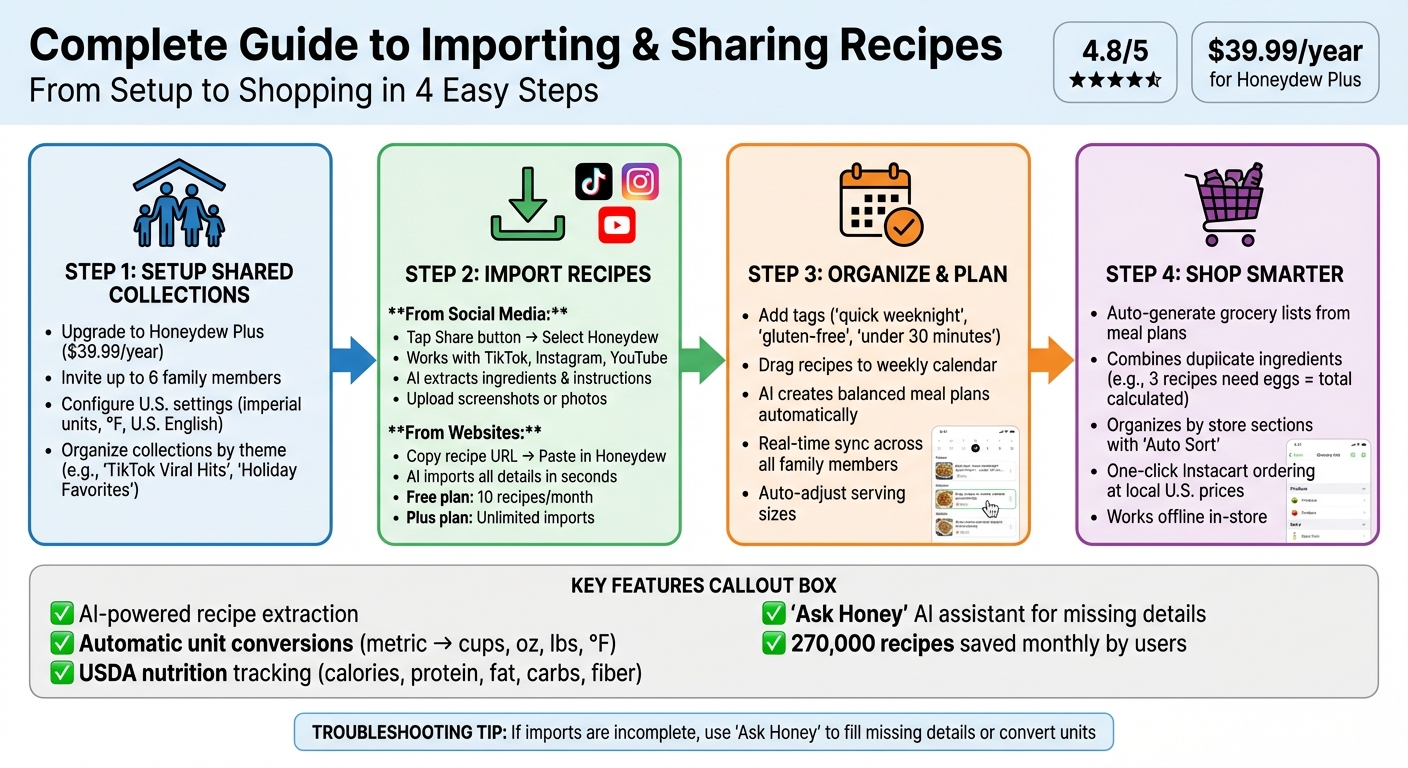
How to Import and Share Recipes in Honeydew Recipe Manager: Complete Setup Guide
Setting Up Shared Collections
Easily set up shared collections and invite your family to collaborate on meal planning and recipes in just a few minutes.
How to Organize Your Collections
Organizing your recipe collections by theme can make meal planning a breeze. For instance, you might create a collection like "TikTok Viral Hits" for trending social media recipes, "Holiday Favorites" for Thanksgiving and Christmas dishes, or "Quick Weeknight Dinners" for those hectic evenings. Some families prefer to group recipes by cuisine - like Italian, Mexican, or Thai - while others sort them into categories such as breakfast, lunch, or dinner.
To keep things consistent, use standardized naming conventions (e.g., "GF" for gluten-free recipes). Honeydew’s AI can even suggest tags and categories for imported recipes, helping you maintain order as your library grows.
Once your collections are organized, it’s time to invite your family to join the shared workspace.
Adding Family Members in Honeydew
To share collections with your family, upgrade to Honeydew Plus for $39.99 per year. This plan lets you invite up to six family members to collaborate. With the household sharing feature, everyone can sync meal plans, grocery lists, and recipe collections in real time. After upgrading, go to the household settings and send email invitations. Each invitee will receive a link to join your shared workspace.
"Share your recipes, meal plans, and grocery lists with up to 6 family members. Everyone can contribute to meal planning and see real-time updates to shared lists." - Honeydew Recipe Manager
You can customize privacy settings, too. Choose whether collections are visible only to you or shared with the entire household. Once shared, any family member can add recipes, vote on meal ideas, and update the grocery list. To make shopping easier, enable the "Auto Sort" feature in settings. This groups identical ingredients from multiple recipes into one list for the whole family.
Finally, make sure your settings align with U.S. preferences for a seamless experience.
Configuring U.S. Settings
Ensure the app is tailored to U.S. measurements and language. In the settings menu, switch to imperial units like cups, ounces, pounds, and °F instead of metric. Set the language to U.S. English so ingredients appear as "cilantro" instead of "coriander" and "zucchini" instead of "courgette." This keeps things consistent, especially when importing recipes from international sources.
Honeydew simplifies conversions for you, automatically adjusting metric measurements like 250ml to 1 cup or 180°C to 350°F. The app also uses USDA databases to calculate nutritional information - calories, protein, fat, carbs, and fiber - for every recipe you import. If your family tracks nutrition, don’t forget to enable calorie tracking in the settings.
Importing Recipes from Social Media
Now that your shared collections are ready, you can start pulling recipes straight from your social media feeds. Platforms like TikTok, Instagram, and YouTube are treasure troves of inspiration, offering everything from viral cooking hacks to quick and easy dinner ideas.
Here’s how you can save your favorite social media recipes effortlessly:
Using the Share Button
Found a recipe video on TikTok or Instagram that you want to try? Simply tap the Share button and select Honeydew from the menu. The app’s AI will automatically extract all the essential details - ingredients, instructions, and cooking steps - saving you the hassle of pausing and jotting everything down. This works for both videos and text-based posts, so you can save recipes without missing a beat.
Once shared, you can choose which collection to save the recipe in. For instance, create a folder like "TikTok Viral Hits" to keep things organized. If you’re on the Honeydew Plus plan for $4.17/month, you’ll enjoy unlimited recipe imports. The free version, however, limits you to 10 recipe saves.
Filling in Missing Recipe Details
Social media recipes don’t always include everything you need, like specific cooking temperatures or times. No worries - just open the imported recipe in Honeydew and tap the AI Assistant (known as "Honey"). It can fill in missing details, such as baking temperatures or even gluten-free adjustments, making the recipe more complete. You can also add your own notes if you make any tweaks or substitutions.
Importing from Screenshots and Photos
If you’ve taken a screenshot of a recipe before it disappears from your feed, Honeydew has you covered. Upload the image using the app’s photo import feature, and the AI will extract the text, turning it into a neatly formatted recipe. This feature works just as well for handwritten recipe cards or printed recipes from magazines - just snap a photo, and Honeydew will take care of the rest. Be sure to review the imported recipe to ensure everything looks accurate.
Importing Recipes from Websites
Honeydew Recipe Manager makes it easy to bring recipes from your favorite websites or food blogs directly into your shared collections - no need for tedious manual copying.
Copying Recipes from Recipe Sites
To import a recipe, simply copy the recipe's URL, open Honeydew Recipe Manager, tap the import button, and paste the link. The app's AI will handle the rest, pulling in all the key details like ingredients, instructions, and cooking times and adding them to your selected collection within seconds. If you're on mobile, you can also use the browser's Share button and select Honeydew Recipe Manager for a seamless import.
"Our AI automatically extracts ingredients, instructions, and cooking details, saving them to your recipe collection in seconds." - Honeydew
With the free plan, you can import up to 10 recipes per month. For those who need more, the Honeydew Plus plan, priced at $4.17 per month, offers unlimited imports. Once your recipes are imported, you can tweak the format to match your kitchen preferences.
Adjusting Imported Recipe Formats
Honeydew's AI simplifies the process of converting measurements. Metric units like grams and milliliters are automatically switched to cups, ounces, and pounds. Similarly, temperatures in Celsius are converted to Fahrenheit, ensuring your oven settings are always accurate.
Need to adjust servings? The app recalculates ingredient quantities for you. If a recipe includes vague instructions, just tap "Ask Honey" for clarification. You can even ask the AI to modify recipes to meet specific dietary needs, such as creating gluten-free or dairy-free versions.
Working with Imported Recipes
Once you've saved your recipes, it's time to turn your collection into a practical tool for daily cooking. This app makes it easy to find recipes, plan meals with your family, and shop smarter.
Tagging and Finding Recipes
Adding tags to your recipes is a game-changer when it comes to keeping things organized. By tagging your recipes with labels like "quick weeknight," "gluten-free," "under 30 minutes," or "kid-friendly," you can quickly locate exactly what you need. You can even assign multiple tags to a single recipe so it shows up in different categories - think "Asian cuisine" and "high-protein" for the same dish.
The search tool takes it a step further by letting you look across tags, ingredients, and recipe titles. Got chicken thighs in the fridge? Just type "chicken", and every recipe that fits will pop up. The tagging system ensures recipes can belong to several groups without creating duplicates.
Once you've tagged your recipes, you're ready to dive into collaborative meal planning.
Building Weekly Meal Plans Together
With your recipes neatly organized, you can drag and drop them onto a shared weekly calendar, scheduling meals for specific days and times. Prefer to leave the planning to the app? The AI can create balanced meal plans for you automatically. Once a recipe is added to the calendar, everyone in your shared group can see the updated schedule in real time.
"I used to waste so much food. Now with Honeydew's meal planning, I buy exactly what I need and save money!" - Mark T.
The app syncs instantly, so if your partner adds dinner for Tuesday while you're setting up Thursday’s lunch, everyone stays on the same page. You can even adjust serving sizes directly in the meal plan, and the app recalculates ingredient quantities for you.
Creating Grocery Lists and Ordering
Honeydew simplifies grocery shopping by combining all the ingredients from your meal plan into one list. It totals duplicate items (like eggs or flour) and organizes everything by store section, making shopping quick and efficient. If three recipes call for eggs, for example, the app calculates the total amount you need so there’s no guesswork.
"The smart grocery lists save me hundreds of dollars a month." - James L.
For even more convenience, tap the Instacart button to order your groceries at local U.S. prices. Before checking out, you can swipe away items you already have at home. The app also works offline, so even if your cell signal drops in the store, your list is still accessible. Use the "Auto Sort" feature to organize items by aisle, or switch to "Pantry Mode" to snap a picture of your fridge. The AI can then suggest recipes based on what you already have or highlight what’s missing from your list.
Fixing Common Import Problems
Sometimes, recipe imports might miss details or mix up units. Luckily, the Honeydew Recipe Manager provides several tools to address these hiccups quickly.
Correcting Incomplete Imports
If a recipe imports with missing or incorrect information, you can either manually edit it or turn to the "Ask Honey" AI assistant. Simply tap "Edit" to fix errors directly.
The "Ask Honey" assistant is particularly handy for tasks like converting units, filling in missing details, or tailoring recipes to dietary preferences. For example, you can ask it to "convert this to US units" or "add the missing baking time." Want a dish to be gluten-free or dairy-free? Just ask, and it will adjust the ingredients accordingly. You can also use the smart serving size scaling feature to switch between units as needed.
However, keep in mind that the AI isn't perfect. Some users have noted occasional errors, like misreading quantities or duplicating ingredients. It's a good idea to review any changes manually to ensure accuracy. Once you've made corrections, double-check your shared collection settings to ensure all family members can view the updated recipe.
Managing Shared Collection Permissions
Even with accurate imports, syncing issues can sometimes disrupt collaboration. If someone in your household can't see a newly imported recipe, it might be a permissions issue. Ensure everyone who needs access is added to the shared collection and has the correct permissions. You can easily adjust settings to give users either editing or view-only access. By addressing these settings, you can ensure a smooth and hassle-free experience for everyone involved.
Conclusion
Bring recipes together with ease. With Honeydew Recipe Manager, you can import recipes from just about anywhere - TikTok, Instagram, YouTube, websites, or even snapshots of handwritten notes. The app automatically pulls in ingredients, instructions, and cooking details, making it a go-to tool for users who save around 270,000 recipes every month.
Sharing and collaboration make it even better. Families can work together to create meal plans and order ingredients with a single click. Features like automatic unit conversions (to cups and ounces), °F temperature settings, and nutrition tracking are designed to fit the needs of U.S. households.
"My family of five uses Honeydew for all our meal planning. The household sharing feature keeps everyone organized." - Alex P., User
Honeydew simplifies everything from recipe import to meal prep. With a stellar 4.8/5 star rating on both the Apple App Store and Google Play, it’s clear the app is a favorite for organizing and planning meals. While you might occasionally need to tweak AI-imported details or adjust permissions, these minor tasks are quick and easy to handle.
Whether you’re digitizing cherished family recipes, planning weeknight dinners, or coordinating meals with your household, Honeydew transforms scattered recipes into a practical, shared digital cookbook. It’s your all-in-one solution for turning meal planning into a seamless experience.
FAQs
How can I share a recipe collection with my family using Honeydew?
Sharing a recipe collection with your family in Honeydew is simple. Here’s how you can do it:
- Open the recipe collection you’d like to share.
- Tap the Share button located at the bottom of your screen.
- Choose your family members from your phone's contact list.
- Send the invitation, and they’ll get a text with a link to join the collection.
Once they accept the invitation and open the link in the Honeydew app, the shared collection will sync automatically. This includes any updates to recipes, meal plans, or grocery lists you make in the future. Just ensure everyone has granted Honeydew access to their contacts for a smooth sharing process!
How does AI-powered recipe importing work in Honeydew, and what are the benefits?
With Honeydew's AI recipe importing, saving recipes has never been easier. Whether it's from social media, a website, or even a screenshot, the AI quickly organizes them into a neat, searchable format, so you can find what you need whenever you need it.
But it doesn't stop there. This feature creates detailed grocery lists with exact ingredient amounts, suggests clever substitutions, and even lets you order everything you need in just one click through Instacart. It’s a game-changer for meal planning - saving you time, cutting down on food waste, and making cooking a lot more fun and stress-free.
What happens if Honeydew can't find all the details when importing a recipe from social media?
Honeydew leverages its built-in AI to pull detailed information from shared links, videos, or screenshots. It smartly identifies key elements like ingredients, measurements, and instructions to generate a draft recipe for you.
If any information is incomplete - such as missing quantities or steps - the AI leaves those sections blank, giving you the flexibility to fill them in yourself. This way, you can always save a fully editable recipe to your collection, even when the original source lacks certain details.



