How IoT Hubs Improve Meal Planning
• Updated
IoT hubs simplify meal planning by connecting smart appliances, apps, and grocery services into one system. Here's how they help:
- Save time: AI-powered tools cut meal planning from hours to minutes. They suggest recipes, generate shopping lists, and even sync with your pantry inventory.
- Reduce food waste: Alerts for expiring items and recipe suggestions based on what’s available can save families up to $125/month.
- Hands-free convenience: Use voice assistants for recipe navigation and real-time grocery list updates.
- Automated cooking: Smart appliances receive precise settings directly from your IoT hub, making cooking easier and more accurate.
- Streamlined grocery shopping: Sync your fridge's inventory with apps to avoid buying duplicates and create efficient shopping lists.
- Personalized meal plans: AI tailors suggestions based on dietary needs, pantry contents, and shopping habits.
Platforms like Honeydew Recipe Manager integrate seamlessly with IoT hubs, offering features like recipe imports, Instacart integration, and household sharing for collaborative meal planning. Whether it’s automating tasks or keeping your kitchen connected, IoT hubs make meal prep faster, smarter, and less stressful.
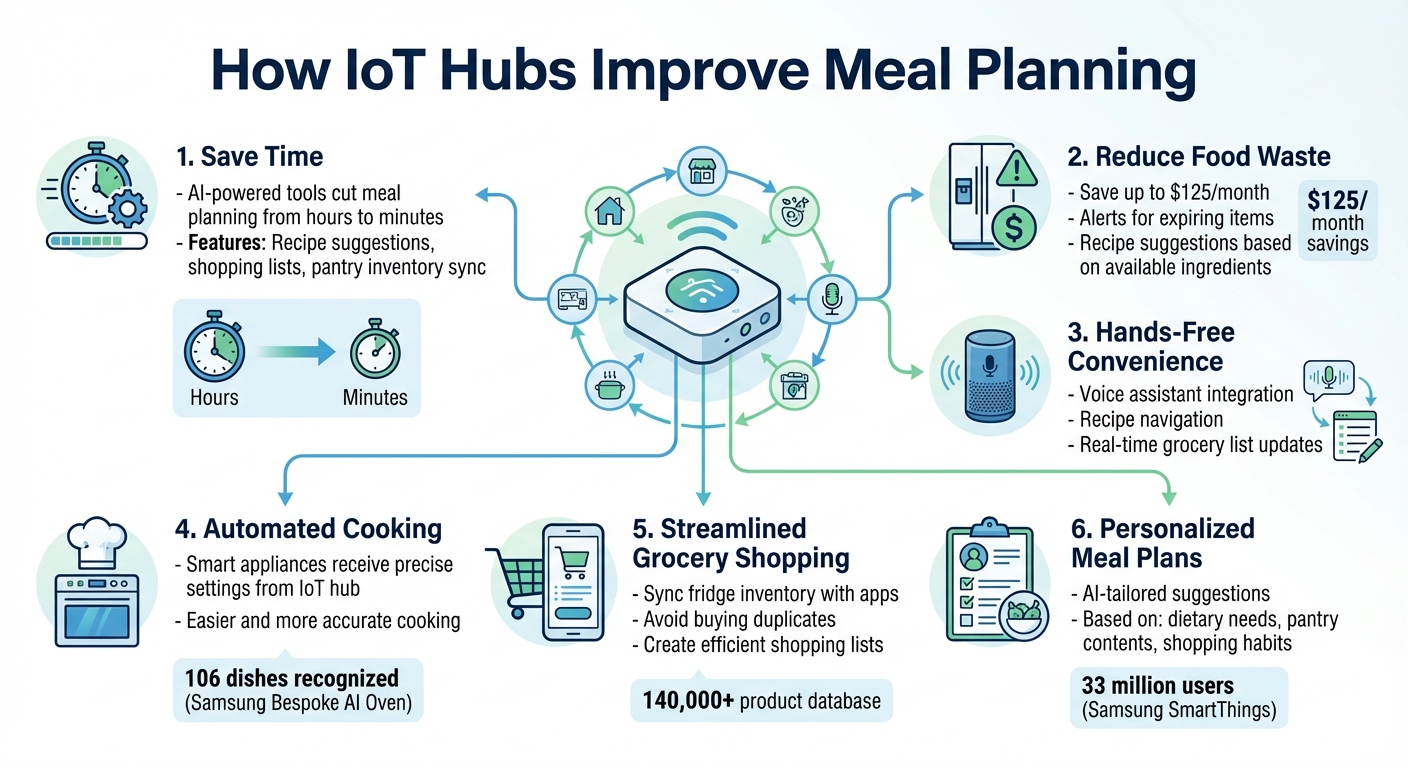
6 Ways IoT Hubs Transform Meal Planning: Time Savings and Key Benefits
Smart Kitchen Tour: FULLY Automated!
What Are IoT Hubs and How Do They Work?
Imagine an IoT hub as the command center for your smart kitchen. It brings all your connected devices under one roof, letting you manage everything through a single interface. Instead of juggling multiple apps, you get one centralized dashboard to monitor appliances, check recipes, and even handle grocery lists. This streamlined control is what makes smart kitchens more efficient and user-friendly.
One of the standout features of an IoT hub is its ability to automate tasks. For instance, when you pick a recipe, the hub doesn’t just display instructions - it can send precise cooking settings, like temperatures and modes, directly to your smart oven. This level of automation minimizes manual adjustments and reduces the chances of mistakes, making cooking smoother and more enjoyable.
Modern IoT hubs often come with advanced features like touchscreen controls and voice integration. Take Samsung's Family Hub+, for example - it boasts a 32-inch display that acts as a central control panel for meal prep and more.
Key Features of IoT Hubs for Meal Planning
The core of an IoT hub’s functionality lies in its ability to connect devices and simplify tasks. These hubs use technologies like Natural Language Processing (NLP) to turn unstructured recipe content from websites or videos into digital formats and organized shopping lists. Smart ovens equipped with computer vision, such as Samsung’s Bespoke AI Oven, take it a step further by recognizing up to 106 dishes (80 in U.S. models) and automatically adjusting cooking settings.
Real-time synchronization is another key feature. For example, when one family member updates the grocery list on the refrigerator, the changes instantly appear on all connected devices. Samsung's AI Vision Inside technology enhances this by recognizing up to 33 types of food - like fruits and vegetables - as they’re added to or removed from the fridge.
Meal planning gets even easier with automation. Smart fridges can sync their inventory data with recipe platforms to suggest meals based on what’s available and what’s nearing expiration. They can also generate shopping lists for missing ingredients and even map those items to a database of over 140,000 products for easier shopping. These features make meal prep more efficient and set the stage for seamless kitchen integrations.
Examples of IoT Hub Integration in the Kitchen
Some refrigerators, like Samsung’s Family Hub, double as IoT hubs by using the SmartThings platform to manage other devices throughout your home. The SmartThings Food service offers a "Cook with your ingredients" feature that filters recipes based on what’s already in your pantry.
"Families around the world embraced smarter cooking and streamlined meal planning with Samsung's Family Hub."
– John Herrington, Senior Vice President, General Manager of Home Appliances, Samsung Electronics
IoT hubs are also becoming multitasking powerhouses. Many now include entertainment features, such as dedicated YouTube apps and picture-in-picture streaming, so you can watch cooking videos while following a recipe or adjusting appliance settings. Some hubs even integrate with health platforms, using metrics like Body Mass Index (BMI) and activity data to recommend meals tailored to your nutritional needs.
For those using apps like Honeydew Recipe Manager (https://honeydewcook.com), the integration is seamless. The app can import recipes from social media and instantly create grocery lists, working hand-in-hand with IoT hubs to simplify meal planning even further.
Connecting Smart Appliances to Your IoT Hub
Compatibility and Setup Requirements
Before connecting your smart appliances, it’s essential to confirm their compatibility with your IoT hub. Look for labels like "Built-In Wi-Fi" - these devices can connect directly. If the label says "Optional Wi-Fi," you’ll need to purchase extra hardware, such as a Connect Module, to enable the connection.
Your home network setup plays a crucial role in ensuring smooth connectivity. Many smart kitchen appliances, like refrigerators, operate exclusively on 2.4 GHz Wi-Fi networks and won’t work with 5 GHz bands. Also, make sure your router's SSID (network name) uses only alphanumeric characters and standard symbols. Special characters can disrupt the setup process.
For your control device, ensure it meets these minimum requirements: 2 GB of RAM, Android 6.0 or iOS 10.0 (or newer), and Bluetooth 4.0 or higher for initial pairing. Additionally, place your appliances in areas where they receive at least three Wi-Fi signal bars on their status display for optimal performance.
Pay attention to protocol labels like Z-Wave or Zigbee QR codes on your appliances. These indicate the use of mesh networking, which requires a compatible hub to relay signals. Also, check whether your devices are compatible with popular platforms like Samsung SmartThings or GE SmartHQ. For voice control, look for certifications such as "Works with Alexa" or "Works with Google Assistant."
With the right appliances and setup, your IoT hub can transform your kitchen into a smart, automated space.
How Smart Appliances Automate Cooking Tasks
Once your devices are connected, your IoT hub can take over and streamline your cooking process. Integrated with tools like Honeydew Recipe Manager (https://honeydewcook.com), your hub assigns a unique Device ID to each appliance. This allows the hub to send precise instructions to specific devices. For instance, when you select a recipe in your hub or the Honeydew app, the system can instantly send the exact cooking settings - like food weight, volume, and target internal temperature - straight to your smart oven.
The use of Device Twins ensures your commands are synchronized with your appliance’s performance. For example, if you set your oven to preheat to 375°F, the Device Twin confirms the oven receives the command and notifies you once it reaches the desired temperature. This two-way communication eliminates the guesswork and the need for manual monitoring.
IoT hubs can also handle routine maintenance and supply tracking. For example, they can monitor water filter usage or dishwasher detergent levels and automatically reorder supplies when they run low. Safety features are built into the system, too. You’ll receive push notifications if your refrigerator door is left open or if you forget to turn off your oven. These automated features work quietly in the background, letting you focus on preparing meals with greater ease and confidence.
Integrating Recipe Platforms and Grocery Lists
Importing Recipes and Creating Grocery Lists
IoT hubs make meal planning a breeze by automating recipe management and grocery organization. With Honeydew Recipe Manager, you can import recipes from platforms like TikTok, Instagram, YouTube, or any website directly into your IoT hub. Once imported, the app generates a neatly organized grocery list, sorted by store sections, and updates it automatically as your IoT hub syncs changes over time.
Setting up your recipe platform with your IoT hub is straightforward. By entering your Honeydew API token in your hub's settings, you can sync meal plans and enable voice-activated updates to your grocery list. This integration allows your hub to display meal plans on a central calendar and lets you add items to your shopping list using simple voice commands.
Using AI for Personalized Meal Plans
Honeydew uses AI to tailor weekly meal plans based on your dietary preferences and the ingredients you already have at home. When linked to your IoT hub, these customized plans are displayed on devices like your smart refrigerator or kitchen screen, making it easy to check them at a glance.
The app’s AI also connects ingredients to an extensive database of store products. This ensures that when your IoT hub suggests recipes based on what’s in your pantry, it accounts for regional product differences and your usual shopping patterns.
Smart Inventory Tracking and Grocery Ordering
IoT hubs equipped with smart cameras can track up to 33 different food items as they are added to or removed from your refrigerator. Paired with Honeydew’s Instacart integration, you can quickly order any missing ingredients with just a tap. The hub cross-references your pantry inventory with recipe requirements, automatically identifying what needs to be purchased.
For added convenience, you can enable location-based reminders. As you approach your grocery store, your hub sends a notification with your shopping list, ensuring you never forget essential items. These features create a seamless experience, setting the stage for even more advanced smart kitchen tools in the future.
Controlling Kitchen Devices Through IoT Hubs
IoT hubs do more than just manage recipes and track inventory - they bring all your kitchen devices under one roof, making your cooking experience smoother and more efficient.
Using Voice Assistants for Hands-Free Control
Voice assistants like Alexa and Google Assistant transform your IoT hub into a hands-free control station. Imagine you're in the middle of cooking and need to start your coffee maker - just say, "Alexa, turn on my coffee maker", and you're good to go. Want to use your smart microwave? A simple "Alexa, start the popcorn maker" gets the job done without lifting a finger.
To make this magic happen, you’ll need to activate your appliance’s skill in the Alexa or Google Home app and connect it to its cloud account. Once linked, your hub can handle more complex commands, like asking for the food's weight during defrosting. For safety, some devices may still require a final "Start" confirmation.
Centralized Management for Easier Cooking
IoT hubs simplify your kitchen routine by centralizing control of multiple devices. Take the GE Profile Kitchen Hub, for example - it lets you manage ventilation, lighting, and appliances from its touchscreen or through Google Assistant.
You can also create automated routines through your hub’s app. Want coffee ready every weekday morning? Set up a routine to brew it automatically. Heading home and need the oven preheated? Schedule an evening sequence to handle it. These features streamline your cooking process and make meal prep more convenient than ever.
Improving Meal Planning and Kitchen Efficiency
Analyzing Usage Data for Better Meal Planning
Your IoT hub gathers valuable insights into how you use your kitchen. For instance, Samsung's SmartThings app - used by over 33 million people - combines meal planning with appliance integration to make everyday cooking more seamless. Tools like Mealie go a step further by using sensors to track your recipe preferences, the types of meals you prepare most often, and how frequently you rely on gadgets like air fryers or instant pots.
This information allows AI platforms to tailor suggestions to your household's needs. They consider your dietary preferences, restrictions, and even the contents of your pantry to create practical weekly meal plans. Plus, your hub can sync recipe details with your devices, automatically adjusting appliance settings to match your cooking needs.
For a fully connected experience, apps like Honeydew Recipe Manager (https://honeydewcook.com) use this data to organize recipes, generate shopping lists, and simplify meal planning. It's all about making your kitchen smarter and your life easier.
When things don't go as planned, troubleshooting becomes essential for keeping everything running smoothly.
Troubleshooting and Maintaining IoT Hub Connectivity
Connectivity issues are bound to pop up, but they’re usually straightforward to resolve. If a device stops responding, start by checking your manufacturer's support page for any system maintenance updates that might temporarily affect functionality. Ensure all your devices are linked to the same manufacturer account - like SmartThings - so they can sync correctly across mobile apps and kitchen panels.
"Not all smart home tech works well together (at least not yet), so make sure your hub is compatible with any devices you already own." - Asurion
Your hub’s app is a handy tool for monitoring all connected devices in one place. It makes it easier to pinpoint which gadget has lost connection. If a device disconnects unexpectedly, double-check its compatibility and ensure its software is up to date.
While resolving these hiccups is important, protecting your network is equally critical.
Protecting Data Privacy and Security
Securing your IoT hub safeguards both your personal information and your smart kitchen devices. Start by changing default router credentials and enabling WPA3 encryption. Use unique, strong passwords for each device and enable multi-factor authentication whenever it’s available.
Consider setting up a dedicated guest network or VLAN for your smart kitchen appliances. Disable any unused features, like remote management or FTP access, to reduce potential entry points for hackers. Automatic firmware updates are another essential layer of protection - activate them on all devices, or check for updates manually if needed.
"The key to privacy in the Internet-of-Things (IoT) world is your router." - Federal Trade Commission
With 52% of companies reporting cyberattacks through IoT devices, taking these precautions seriously ensures your smart kitchen stays secure and your family’s data remains safe.
Conclusion
IoT hubs have transformed meal planning, cutting down the time from hours to just minutes by seamlessly connecting smart appliances, recipe platforms, and grocery services. With simple voice commands, you can adjust oven temperatures or add items to your shopping list. Meanwhile, features like automated inventory tracking and AI-driven personalization help you make the most of your ingredients and offer meal suggestions tailored to your preferences.
One platform that brings all these features together is Honeydew Recipe Manager (https://honeydewcook.com). This tool allows you to import recipes from any website or social media platform, create grocery lists instantly, and order ingredients via Instacart - all while your IoT hub keeps your appliances working in harmony. Its AI meal planner, smart substitution options, and household sharing features make collaborative meal planning a breeze for the whole family.
Ready to upgrade your kitchen routine? Start by digitizing your go-to recipes and keeping track of pantry essentials. Connect a couple of smart devices to experience how automation can streamline your day-to-day cooking. As your system grows, you’ll see just how much time and effort an integrated smart kitchen can save every week.
FAQs
How can IoT hubs help reduce food waste during meal planning?
IoT hubs are transforming meal planning by seamlessly connecting your kitchen appliances with meal-planning apps. These smart systems keep tabs on the real-time inventory of your fridge and pantry, even notifying you when certain items are close to expiring. This means you can prioritize recipes that use those ingredients, turning what might have gone to waste into tasty, home-cooked meals.
Another handy feature is the creation of automated grocery lists. These lists combine overlapping ingredients for multiple recipes, ensuring you only buy what’s necessary. This not only cuts back on over-purchasing but also helps you make the most out of the food you already have. By simplifying inventory management, suggesting recipes, and organizing your shopping, IoT hubs can potentially save households hundreds of dollars each year - all while encouraging smarter and more sustainable eating habits.
How do voice assistants make meal planning easier in smart kitchens?
Voice assistants can turn your kitchen into a hands-free, efficient hub of activity. With just a few voice commands, you can preheat the oven, start the coffee maker, set timers, or control other smart appliances - all without lifting a finger. This is a game-changer when your hands are full or covered in flour. Plus, they help you stay on top of things by adding items to your shopping list, setting reminders, or even suggesting recipes based on what you already have in your pantry.
When connected to an IoT hub, voice assistants elevate meal planning to a whole new level. Imagine asking for a recipe, having a grocery list created automatically, or scheduling ingredient deliveries - all without stepping out of the kitchen. With smart apps like Honeydew Recipe Manager, they can read recipes aloud, update your pantry inventory, and even help you plan meals, making the entire cooking and shopping experience easier and more streamlined.
Here’s why they’re a must-have in the kitchen:
- Hands-free convenience: Perfect for multitasking when your hands are busy or messy.
- Improved organization: Create lists, set reminders, and stay on top of tasks with simple voice commands.
- Tailored recipe guidance: Get recipe suggestions based on the ingredients you already have.
- Smart integration: Sync with IoT hubs and apps for hassle-free meal planning and cooking.
How do IoT hubs create meal plans tailored to my dietary needs?
IoT hubs make meal planning a breeze by connecting your health data, pantry inventory, and smart appliances to create tailored meal plans. These systems can sync with devices like glucose monitors or nutrition apps to help you manage allergens, monitor sodium or sugar intake, and balance nutrients based on your dietary choices, whether you're following a keto plan, vegan diet, or something else. Recipes are automatically adjusted, swapping out restricted ingredients for alternatives that fit your needs.
With real-time pantry tracking - using tools like barcode scanners or RFID tags - IoT hubs can suggest meals based on what’s already in your kitchen. Missing ingredients? No problem. These hubs can generate grocery lists in familiar U.S. measurements like cups, ounces, and degrees Fahrenheit. Some even integrate with grocery delivery services like Instacart, making it easy to restock your kitchen.
Beyond planning, IoT hubs can also streamline cooking. They control smart appliances, preheating your oven or setting up your slow cooker to align with your meal plan. This seamless integration ensures your cooking process is efficient, personalized, and perfectly aligned with your health goals and daily schedule.



