Top Maintenance Tips for Smart Appliances
• Updated
Maintaining smart appliances keeps them running efficiently, extends their lifespan, and prevents costly repairs. Here’s what you need to know:
- Clean Regularly: Wipe down exteriors after use, clean filters monthly, and use self-cleaning cycles properly.
- Use Self-Cleaning Correctly: Empty appliances before cycles, clean spills manually, and follow manufacturer guidelines.
- Check Filters: Clean or replace filters on dishwashers, dryers, and HVAC systems to ensure optimal performance.
- Update Software: Keep firmware up to date to fix bugs and improve functionality.
- Troubleshoot Common Issues: Reset appliances for connectivity problems, check for firmware updates, and consult error codes.
Key Stats:
- Smart appliances with Wi-Fi face more issues (87 problems per 100 units) than traditional models (63 per 100).
- Regular maintenance can extend appliance lifespans by 40–50%.
- Neglected appliances may increase energy bills by 20–30%.
Maintenance Checklist for Smart Appliances
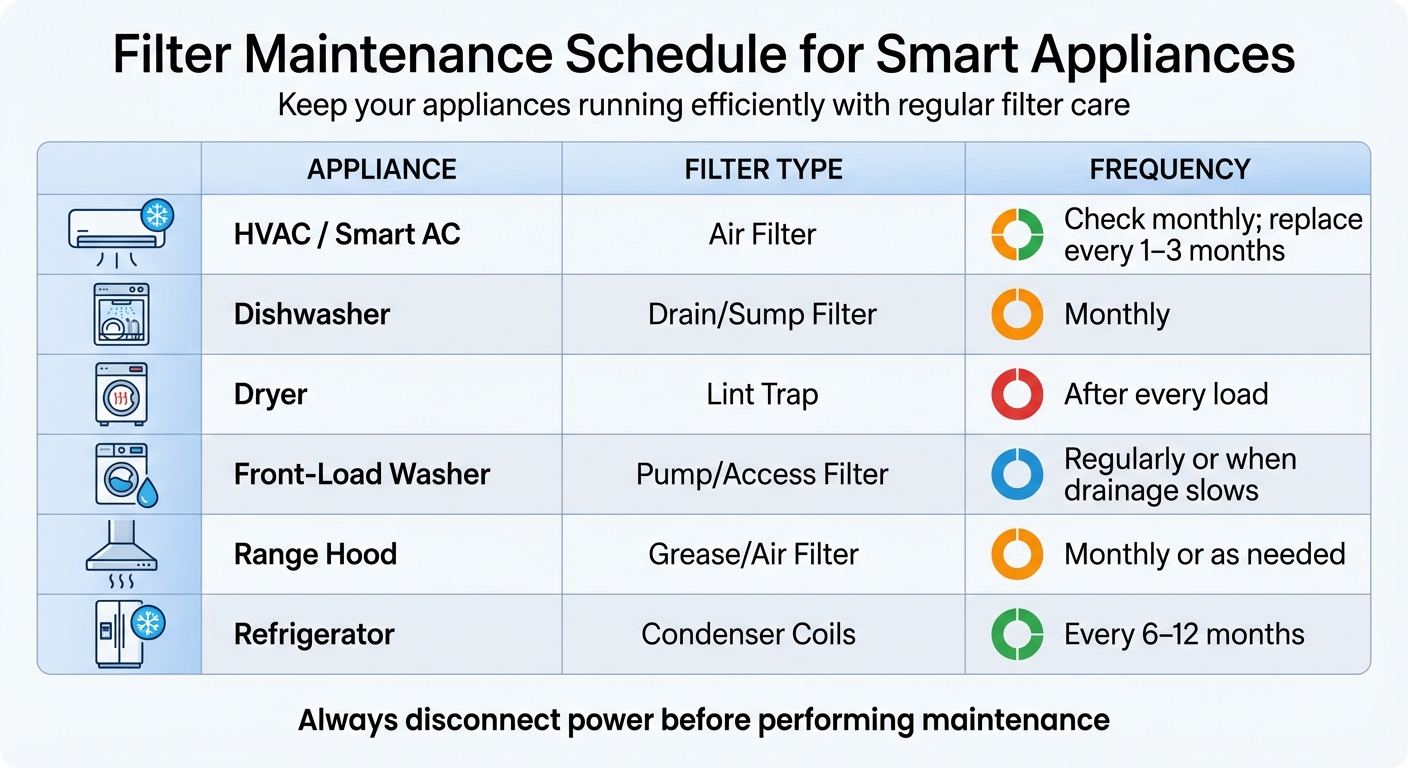
Smart Appliance Filter Maintenance Schedule by Appliance Type
Keeping smart appliances in top shape requires regular care and attention to specific areas.
Clean External Surfaces Properly
After each use, wipe down the exterior to avoid stains or discoloration. Always unplug the appliance and let it cool before cleaning. Since smart appliances house delicate electronics, handle them gently.
For the main body, use a soft cloth dampened with a mild soap and water solution. When cleaning control panels or touchscreens, stick to water on a slightly damp cloth - wring it out well to prevent excess moisture. Avoid abrasive tools like metal scouring pads or harsh cleaners, as these can scratch glass surfaces or harm protective coatings. For removable parts like drain trays or crumb trays, wash them by hand with warm, soapy water and ensure they are completely dry before reattaching.
Don't forget to use self-cleaning cycles to keep the interior in good condition.
Use Self-Cleaning Cycles Correctly
For smart washing machines, run the "Tub Clean" cycle monthly to clear out grime and prevent odors. Make sure the appliance is empty before starting the cycle, and leave the door open afterward to air dry. To further reduce odor buildup, manually dry the door gasket, drum, and glass with a towel. After every regular wash, wipe away visible water from the drum and gaskets, and periodically clean the detergent dispenser by removing it and scrubbing both the tray and its slot with a soft brush.
Pairing this routine with regular filter maintenance ensures the appliance stays efficient.
Check and Replace Filters
Filters play a crucial role in maintaining appliance performance. Clean the dryer's lint trap after every load to reduce fire risks and maintain airflow. Dishwasher filters, located at the bottom of the tub, should be cleaned monthly with warm, soapy water. For front-load washers, open the bottom access door, place a shallow pan to catch water, unscrew the pump filter, clean out debris, and tighten it securely.
HVAC filters should be inspected every month and replaced every 1 to 3 months. If the filter looks dark or blocks light, it’s time for a replacement. Range hood grease filters need monthly cleaning or more frequent attention if heavily used. Refrigerator condenser coils should be cleaned every 6 to 12 months to maintain efficiency. Always disconnect power by unplugging or turning off the circuit breaker before performing any maintenance.
| Appliance | Filter Type | Maintenance Frequency |
|---|---|---|
| HVAC / Smart AC | Air Filter | Check monthly; replace every 1–3 months |
| Dishwasher | Drain/Sump Filter | Monthly |
| Dryer | Lint Trap | After every load |
| Front-Load Washer | Pump/Access Filter | Regularly or when drainage slows |
| Range Hood | Grease/Air Filter | Monthly or as needed |
| Refrigerator | Condenser Coils | Every 6–12 months |
Update Software and Firmware
Smart appliances often notify you via their connected app when maintenance is needed, such as replacing a filter or running a cleaning cycle. To keep these features running smoothly, regularly check for software and firmware updates. These updates not only enhance functionality but also address potential security issues. Most updates can be installed directly through the app, ensuring features like remote monitoring, voice control, and automated cycles work seamlessly. Keeping your appliance's software up to date is key to maintaining its performance and security.
Troubleshooting Common Problems
Even the most reliable smart appliances can run into problems now and then. Thankfully, many issues - especially those involving connectivity or software - can often be fixed with some straightforward troubleshooting. Addressing these problems promptly can help maintain the efficiency of features like self-cleaning cycles.
Fix Connectivity Issues
Did you know that about 80% of connectivity problems with smart appliances stem from router settings, not the appliances themselves? A quick fix is to unplug the appliance for 30–60 seconds to reset its connection. It's also worth double-checking that your router is set to broadcast on the 2.4 GHz band, as this is typically what smart appliances prefer.
If your appliance shows up as offline, try clearing the app cache on Android devices or reinstalling the app if you're using iOS. Sometimes, the issue isn't even on your end - check the manufacturer's service status page to see if their cloud services, like Samsung SmartThings or LG ThinQ, are experiencing outages. Signal strength can also be a factor; physical barriers like concrete walls or metal can weaken Wi-Fi. A Wi-Fi extender, which costs between $50 and $200, can help boost the signal.
Here’s a quick reference for common error codes related to connectivity:
| Brand | Error Code | Meaning |
|---|---|---|
| Samsung | AP | Wi-Fi connection failed; reconnect via app |
| LG | WiFi Error | Cannot connect to network; check 2.4 GHz band |
| GE | E19 | Cloud service connection failed; check internet |
| Whirlpool | Connection Error | Lost network connection; power cycle needed |
| Bosch | E:15 | Home Connect service unavailable; retry connection |
If you've tried all these steps and still can't connect, it might be time to move on to troubleshooting self-cleaning cycle errors.
Handle Self-Cleaning Cycle Errors
When a self-cleaning cycle won’t start, the issue could be as simple as the door not being securely latched. Many appliances have sensors that prevent the cycle from running if the door seal isn’t tight. Also, features like Child Lock, Control Lock, or Sabbath Mode might block the cycle from starting, so make sure these are turned off.
If the cycle starts but then stops unexpectedly, unplug the appliance for about 60 seconds or flip the circuit breaker off for a minute to reset the control board. Another key step is to check for firmware updates via the manufacturer’s app. Outdated firmware can cause interruptions, but be careful not to unplug the appliance during an update - this could cause permanent damage, which might cost $150–$300 to repair.
If resets and firmware updates don’t solve the problem, it’s probably time to call in a professional.
Know When to Get Professional Help
Some issues just can’t be fixed with a quick reset. If you’re dealing with repeated firmware failures, unresponsive touchscreens, or appliances that freeze after multiple resets, it’s time to document any error codes and consult a technician. Problems like a faulty Wi-Fi module or a malfunctioning control board usually require professional repair, which can cost between $150 and $400.
For appliances that won’t power on at all, check for a tripped circuit breaker or a blown fuse. When contacting support, having the appliance’s brand and model number handy can save time and help you get the assistance you need.
Using Smart Appliances with Meal Planning
Smart appliances do more than just clean themselves - they can make meal planning a breeze. Keeping these appliances in good condition ensures they perform at their best, helping you save time, reduce waste, and simplify your cooking process. When paired with meal planning tools, smart appliances unlock features that take your kitchen game to the next level.
Make the Most of Smart Cooking Features
Imagine preheating your oven from your smartphone while you finish chopping vegetables. With smart ovens and ranges, this is entirely possible. Apps like SmartHQ, SmartThings, and ThinQ - available on both iOS and Android - allow you to control your appliances remotely. Some models even let you send multi-step recipe instructions directly from your device, automatically switching between functions like baking and broiling without needing manual input.
Scan-to-Cook technology takes the guesswork out of frozen meals. By scanning the barcode on the packaging, your appliance adjusts settings for optimal results. Whirlpool's FrozenBake™ Technology goes a step further by skipping the preheat process for select frozen foods, saving even more time. And smart refrigerators? With internal cameras, you can check your fridge’s contents while at the store, avoiding duplicate purchases and staying on track with your meal plan.
Hands full? No problem. Voice assistants like Alexa and Google Assistant let you adjust settings hands-free. Whirlpool describes this functionality perfectly:
"Using your device, you can send multiple-step recipe instructions to your smart range or oven, so you can focus on the task at hand".
These features create a seamless kitchen experience, especially when combined with tools like the Honeydew Recipe Manager.
Pair Honeydew Recipe Manager with Your Smart Appliances
If you’re looking to elevate your meal planning even further, Honeydew Recipe Manager is a game-changer. This app integrates smart appliance control with AI-powered meal planning, making your kitchen routine smoother than ever. It pulls recipes from TikTok, Instagram, YouTube, and even photos of handwritten notes. With over 100,000 downloads, a 4.8-star rating from nearly 6,940 reviews, and users saving around 270,000 recipes monthly, it’s clear why Honeydew is a favorite.
Here’s how it works: Import a recipe into Honeydew from social media, and the app generates a grocery list sorted by store aisle for easy shopping. Missing an ingredient? No problem - Honeydew’s AI suggests substitutes based on what your smart fridge’s camera detects. You can even use the app to preheat your oven while reviewing your meal plan.
Honeydew also supports household sharing, allowing up to six family members to sync grocery lists and meal plans, ensuring no one buys the same items twice. Plus, with Instacart integration, you can order groceries with a single click. The app offers a free version with essential features, while Honeydew Plus - at $4.17 per month - includes unlimited recipe storage, advanced AI planning, and more.
As one user, James L., shared:
"The smart grocery lists save me hundreds of dollars a month. I love how it suggests recipes based on what I already have!"
Conclusion
Keeping smart appliances in top shape requires consistent care. Simple tasks like running regular cleaning cycles, maintaining gaskets, and replacing filters can go a long way in preventing common issues. In fact, regular maintenance can extend an appliance's lifespan by 40–50% and significantly cut repair costs, offering a return on investment of 300–400%. Plus, dedicating a few minutes to upkeep can prevent up to 85% of common failures.
Taking care of the digital side is just as important. Updating firmware ensures your appliances stay connected and function smoothly, while surge protectors shield sensitive electronics from voltage spikes. As Bill Scott, General Manager at Smart Climate Solutions, points out, service calls jump by 40% during summer months. By staying proactive with maintenance, you can avoid emergency repairs and reduce energy bills - neglected appliances can increase household energy costs by 20–30%. Combining digital updates with physical maintenance creates a well-rounded care routine.
For an even more seamless experience, pairing well-maintained appliances with tools like the Honeydew Recipe Manager can enhance functionality. Features like remote preheating and real-time updates simplify meal prep while helping you manage appliance performance. Together, routine upkeep and smart tools make everyday tasks easier and more efficient.
FAQs
What’s the fastest maintenance routine I can do weekly?
Keeping your smart appliances in good condition doesn't have to take long. For those with self-cleaning features, a simple weekly routine can make all the difference.
Start by running the self-cleaning cycle. Before activating it, remove any items inside the appliance and fill the refill tank with filtered water if required. Once the cycle is running, take a soft, slightly damp cloth and gently wipe down the exterior surfaces to clear away smudges or fingerprints.
This straightforward process takes just about 5 minutes but goes a long way in maintaining your appliances' performance and appearance.
How do I know if a filter needs cleaning or replacement?
To keep your appliances running smoothly, it's important to stay on top of filter maintenance. Start by checking for visible dirt, blockages, or a drop in performance - these are clear signs a filter might need cleaning or replacing.
For air purifiers, clean the pre-filter every month and pay attention to maintenance alerts, such as an "F0" code. When it comes to refrigerators or dishwashers, regularly inspect and clean door seals and filters to ensure optimal operation. As for air filters, plan to replace them every 6 to 12 months, or sooner if the appliance manual or performance suggests otherwise. Regular upkeep goes a long way in extending the life of your appliances!
When should I stop troubleshooting and call a technician?
If you're dealing with hardware issues like tangled or complex wiring, persistent connectivity problems, or anything that feels out of your depth, it’s time to call a technician. This is especially important after you've gone through the basics - like resetting devices, double-checking connections, or updating the firmware - without success. For your safety and to ensure everything is handled properly, leaving advanced fixes to a professional is the smartest move.



