How Meal Planning Apps Preserve Family Recipes
• Updated
Family recipes hold memories and traditions, but they can easily get lost or damaged over time. Honeydew Recipe Manager helps digitize, organize, and share these recipes to keep them safe and accessible for generations. Here's how:
- Digitize Recipes: Snap photos of handwritten cards or import from websites and social media using Optical Character Recognition (OCR).
- Organize Collections: Group recipes by family member, cuisine, or occasion with folders and tags.
- Share with Family: Up to six relatives can access and edit shared collections in real time.
- Meal Planning Made Easy: Add recipes to weekly plans, generate grocery lists, and order ingredients via Instacart.
- Adapt Recipes for Modern Needs: Adjust serving sizes, swap ingredients, and track nutrition effortlessly.
Whether using the free or paid plan, Honeydew ensures your family's culinary legacy remains intact while making it part of your everyday life.
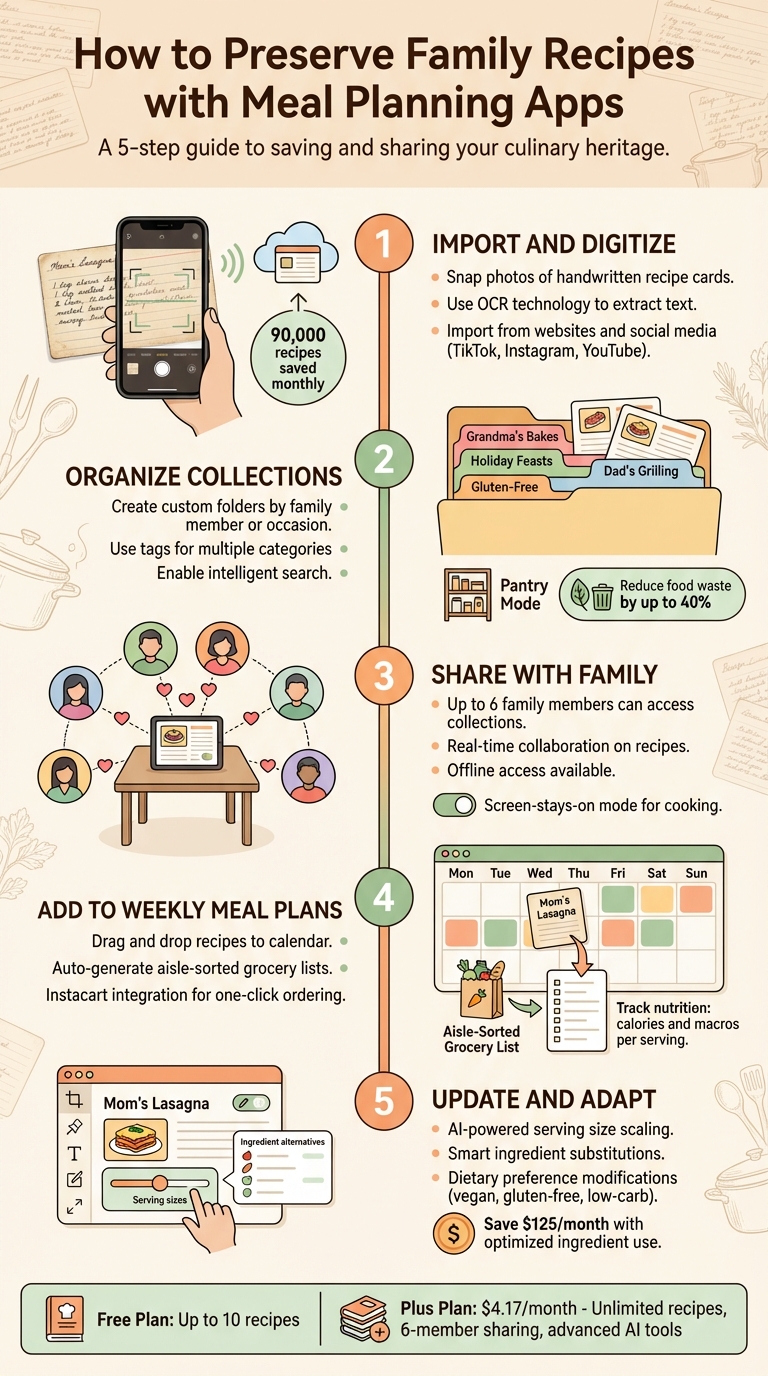
5 Steps to Digitize and Preserve Family Recipes with Meal Planning Apps
5 Best Apps Organize Recipe On Android | Digitize Your Kitchen (2026)
Benefits of Using Meal Planning Apps for Family Recipes
Turning your family's recipes into a digital format can completely change how you preserve, share, and use these cherished dishes in your daily life. Honeydew Recipe Manager tackles the common headaches of misplaced recipe cards and scattered cookbooks, making it easier to keep family traditions alive while seamlessly integrating them into meal planning. Here's how Honeydew helps protect, share, and use your family recipes in meaningful ways.
Protecting Your Family's Recipes from Loss
Handwritten recipe cards are fragile - they can fade, get stained, or even disappear during a move. Worse, a fire or flood could wipe out generations of family recipes stored in a single box. Honeydew solves this problem by storing recipes in the cloud, ensuring they’re safe and accessible from any device. When you upload a photo of a handwritten recipe, the app’s OCR technology extracts the text while keeping the original image intact. This means you can preserve Grandma’s handwriting while also having a searchable, editable version for cooking.
Honeydew users collectively save about 90,000 recipes every month, safeguarding their family’s culinary legacy. The app also includes offline access, so you can cook from your recipes even without an internet connection. And with the screen-stays-on mode, your device won’t go to sleep mid-recipe, even if your hands are covered in flour.
Making Recipe Sharing Easy for Families
Staying connected to family food traditions has never been simpler, even when loved ones are far apart. Honeydew’s household sharing feature lets up to six family members access the same recipe collections, meal plans, and grocery lists in real time. If your sister in California adds her version of Mom’s lasagna, your brother in Texas sees it instantly. Everyone can contribute their favorites, add notes like “Uncle Joe swears by extra oregano,” and even collaborate on holiday meal planning no matter where they are.
"For Christmas, I created a digital family cookbook... and shared it with all 15 family members. Everyone added their specialties. Best gift ever!" - Michael, Recipe Notes User
This collaborative setup allows recipes to grow and adapt as family members tweak and refine them. Plus, you can easily import recipes from platforms like TikTok, Instagram, YouTube, or any website, blending modern favorites with traditional family dishes.
Adding Family Recipes to Weekly Meal Plans
Honeydew doesn’t just preserve your family recipes - it makes them part of your everyday meals. Grandma’s chicken soup doesn’t have to be reserved for special occasions anymore. The app creates aisle-sorted grocery lists from your chosen recipes, and with Instacart integration, you can order all the ingredients with a single click.
AI-powered tools also bring convenience to the table. They can adjust serving sizes, suggest ingredient swaps, and help reduce food waste, making it easier - and more budget-friendly - to cook family recipes regularly instead of letting ingredients go unused. This way, you can keep traditions alive while adapting them to modern life.
Step 1: Import and Digitize Family Recipes
Using Honeydew's Smart Import Features
Turning your treasured family recipes into digital formats with Honeydew is a breeze. Have a handwritten recipe card from your grandmother or a favorite page from an old cookbook? Just snap a photo using your phone. Honeydew’s AI, powered by Optical Character Recognition (OCR), will scan the text and transform it into a clean, digital recipe with neatly organized ingredients and step-by-step instructions.
If the recipe you want is on social media, the process is even quicker. Whether it’s from TikTok, Instagram Reels, Facebook Reels, or YouTube, simply tap the share button or paste the recipe’s URL into Honeydew to import it instantly.
"I love being able to snap a photo of a recipe and have it automatically imported. So convenient!" - Jessica W., Honeydew User
It’s worth noting that importing photos and screenshots requires a Honeydew Plus subscription, which costs $4.17 per month. However, basic URL imports are available in the free version. Once a recipe is imported, double-check the text to ensure ingredient amounts and instructions are accurate. Afterward, you can tweak serving sizes to suit your needs.
Adjusting Serving Sizes and Measurements
After digitizing your recipes, Honeydew makes them adaptable for today’s cooking needs. Its serving size scaling tool lets you adjust ingredient quantities with ease. For instance, if a recipe meant for 12 servings needs to be scaled down to 4, simply update the serving size, and the ingredient amounts will automatically recalculate.
Switching between Imperial and Metric measurements is just as simple. With one tap, you can convert grams and liters into cups and tablespoons - or vice versa - allowing you to follow original recipes or adapt them to your preferred measurement system without doing any math yourself.
Step 2: Organize Recipes into Family Collections
Creating Custom Recipe Collections
Once you've digitized your recipes, the next step is organizing them into meaningful categories. This makes it easier to find your favorite family dishes whenever you need them. Use Folders and Tags to group recipes by contributor (like "Grandma's Classics") or by occasion (such as "Thanksgiving Favorites").
Tags are especially helpful because they allow a single recipe to belong to multiple categories. For example, your grandmother's lasagna could be tagged as both "Italian" and "Grandma's Recipes." With everything neatly categorized, you can use intelligent search tools to quickly locate the recipe you're craving.
"Honeydew saves all the recipes in one convenient place with the directions and ingredients. It is so easy to use and organized!" – Libbyblox, User Review
For even more flexibility, consider upgrading to Honeydew Plus. It offers unlimited storage and enhanced sharing options, making it perfect for growing collections.
Using Search and Pantry Mode to Find Recipes
Honeydew doesn't just help you stay organized - it makes finding recipes a breeze. Type in an ingredient, tag, or cuisine type, and the app instantly displays matching recipes, complete with images to help you recognize your favorites. If you've used tags like "Grandma's Recipes" or "Keto", you can pull up all relevant dishes in seconds.
For those moments when you're staring at your pantry wondering what to cook, Pantry Mode is a game-changer. Snap a photo of your pantry or fridge, and the AI identifies recipes based on what you already have. This feature not only saves time but also helps reduce food waste by up to 40%. Got leftover chicken and veggies? Pantry Mode will match you with a recipe that turns those extras into a delicious family meal.
Step 3: Share Recipes with Family Members
Setting Up Household Sharing
With Honeydew Recipe Manager, sharing your family recipes is simple and collaborative. The household sharing feature allows up to six family members to view and edit your recipe collection. By enabling sharing in the settings and sending out invitations, everyone can access the same recipes, meal plans, and grocery lists in real time once they accept the invitation. It’s like having a shared digital cookbook that stays updated and organized for the entire family.
"My family of five uses Honeydew for all our meal planning. The household sharing feature keeps everyone organized." – Alex P.
In January 2026, Honeydew rolled out Version 1.7.0, which introduced a Notepad PencilKit for jotting down quick cooking notes like "double the garlic" or "we're out of paprika." Plus, an iOS Widget now offers handy reminders right from your home screen.
Using Offline Access and Screen-Stays-On Mode
Honeydew Recipe Manager goes beyond sharing to ensure you’re never without your recipes. The offline access feature keeps your collection available even in areas with poor or no internet connection. This is perfect for those moments when you're cooking at a remote cabin or just dealing with spotty Wi-Fi.
Additionally, the "No screen lock while cooking" mode is a lifesaver in the kitchen. It prevents your device from locking while you’re following a recipe, so you don’t have to fumble with messy hands to unlock your phone. Whether you're cooking solo or as a group, this feature ensures a smooth, uninterrupted experience.
Step 4: Add Recipes to Weekly Meal Plans
Adding Family Recipes to Weekly Plans
Once your family recipes are organized and shared, it’s time to bring them into your weekly meal planning. With Honeydew Recipe Manager, this step is effortless. You can open a recipe - say, Grandma’s lasagna - tap "Add to Plan," choose a date (MM/DD/YYYY), and adjust the servings as needed. The app schedules the meal and even suggests sides that pair well with it.
Honeydew’s AI helps fill in the rest of your week by using your saved recipes and dietary preferences. You can easily drag and drop meals onto specific days using the calendar view. Plus, the AI prioritizes your go-to family favorites while still giving you the option to tweak the plan manually. This feature takes the guesswork out of meal planning, making it easier for busy households to stay organized and stress-free.
Creating Grocery Lists and Ordering Ingredients
After finalizing your weekly meal plan, Honeydew automatically generates a detailed grocery list based on the recipes you’ve scheduled. The app organizes the list by store sections - starting with produce (e.g., 2 lbs of tomatoes), then moving to dairy, and finally pantry staples. You can even customize the list by selecting specific date ranges and checking off items you already have at home.
"The smart grocery lists save me hundreds of dollars a month. I love how it suggests recipes based on what I already have!" – James L.
Honeydew’s Instacart integration takes convenience to the next level. Once your grocery list is ready, tap "Order via Instacart" to sync the items directly. For instance, the ingredients for Grandma’s lasagna might cost $12.50. The system handles substitutions for out-of-stock items and lets you schedule delivery - like having everything arrive by 6 PM the same day.
Tracking Nutrition and Substituting Ingredients
Honeydew doesn’t just help with planning; it also tracks nutritional information. You’ll see per-serving details like 650 calories and 25g of protein, along with weekly macro summaries in an easy-to-read format. If you need to make changes, the Substitute feature is just a tap away. The AI recommends ingredient swaps, recalculates the nutrition, and updates your grocery list automatically.
This substitution tool is perfect for adapting old recipes to fit modern dietary needs. For example, you can replace wheat flour with almond flour in a 1:1 ratio. The app suggests alternatives tailored to dietary preferences, whether you’re cooking vegan, gluten-free, or anything else. This allows cherished family recipes to evolve while keeping their essence intact. According to experts, families using features like pantry integration and smart substitutions can cut food waste by up to 30%.
Step 5: Update and Adapt Recipes Over Time
Editing Recipes with AI Assistance
Honeydew's AI cooking assistant makes updating recipes effortless. Imagine scaling Aunt Marie's chicken soup from 4 servings to 12 for a big family gathering. The AI automatically adjusts ingredient quantities - like increasing 1.5 cups of broth to 4.5 cups - and even updates cooking times to match the new serving size.
When certain ingredients aren’t available, the assistant steps in with smart suggestions. For instance, if tamarind paste is missing from your pantry, it might recommend a mix of lime juice and brown sugar to replicate the flavor. You can tweak recipes directly in the app, and the AI will instantly update your grocery list and nutritional details. This combination of scaling and substitutions ensures recipes stay true to their roots while adapting to what’s on hand.
Modifying Recipes for Dietary Preferences
Beyond scaling, Honeydew adapts recipes to suit various dietary needs. With the Smart Ingredient Substitutions feature, the AI analyzes your recipe and suggests changes for gluten-free, low-carb, or vegan diets. It can even detect hidden allergens like gluten and offer swaps that maintain the original dish’s texture and flavor.
"The ingredient substitution feature is a game-changer for my dietary restrictions. I can adapt any recipe easily!" – Emily C.
The app also includes a calorie and macro calculator that shows how each change impacts the nutritional profile. This makes it easier to align cherished family dishes with modern health goals while keeping their essence alive. Studies show that AI-powered meal planning tools can cut household food waste by up to 40% and save families around $125 per month by optimizing ingredient use. This way, beloved recipes remain both practical and enjoyable for everyone, no matter their dietary preferences.
Honeydew Free vs. Plus for Family Recipe Preservation
When incorporating family recipes into your weekly meal plans, picking the right subscription can make a big difference. Honeydew offers two options tailored to different needs: Free and Plus.
The Free plan is perfect for beginners looking to digitize a handful of cherished recipes. It includes smart recipe imports from URLs (up to 10 recipes), basic meal planning tools, and automated grocery lists. This plan is a great starting point for preserving a few family favorites.
For families aiming to build a larger digital archive, the Plus plan - at $4.17 per month - offers a more comprehensive solution. It removes the 10-recipe limit and expands import capabilities to include photos, screenshots, and even social media. Using built-in AI, it can extract ingredients and instructions automatically, making it especially useful for digitizing old handwritten recipe cards .
The Plus plan also enhances collaboration, allowing up to six family members to share meal plans, grocery lists, and recipe collections. Advanced features include a copycat recipe generator, recipe translation for international dishes, and smart ingredient substitutions. Plus, it’s ad-free, includes priority support, and integrates with Instacart for one-click grocery delivery.
"Being able to import recipes from anywhere has built my cookbook faster than I ever imagined." – Priya K.
| Feature | Honeydew Free | Honeydew Plus |
|---|---|---|
| Recipe Storage | Limited (up to 10 imports) | Unlimited |
| Import Sources | URLs and web links | URLs, Photos, Screenshots, Social Media |
| Family Sharing | Basic tools | Shared collections for up to 6 members |
| AI Capabilities | Basic meal planning | Copycat generator, translation, smart substitutions |
| User Experience | Standard with ads | Ad-free with priority support |
| Grocery Integration | Basic lists | Instacart one-click delivery integration |
Honeydew processes around 270,000 recipes every month. For families serious about preserving their culinary traditions, the Plus plan’s unlimited storage and advanced tools make it a practical choice. Whether you’re just starting or building a legacy, there’s a plan to suit your needs.
Conclusion
Family recipes are more than instructions for meals - they're a bridge to the past, carrying memories and traditions through generations. Honeydew Recipe Manager ensures these treasures are safe from wear and tear by digitizing your handwritten recipes with precision, preserving every detail for the future.
But it’s not just about preservation. Honeydew makes these recipes a vibrant part of everyday life. Through household sharing, up to six family members can access, edit, and add to a shared collection, creating a living archive of family favorites. Together, users save approximately 90,000 recipes each month, keeping culinary traditions alive and well.
Whether you’re capturing a few beloved recipes with the Free plan or opting for Plus to unlock unlimited storage and advanced AI tools, the key is to start now. Those delicate recipe cards tucked away in drawers won’t last forever, but their digital counterparts can be enjoyed and shared for generations to come.
Start preserving your family’s recipes and their legacy today with Honeydew Recipe Manager.
FAQs
How does Honeydew Recipe Manager keep my family recipes safe and private?
Honeydew Recipe Manager prioritizes the security and privacy of your treasured family recipes. By using cloud storage, the app ensures your recipes are safely backed up and accessible only to those you authorize. Features like family sharing let you securely share recipes with loved ones while keeping them protected from any unwanted access.
While the app doesn’t go into detail about its encryption methods, it adheres to standard industry practices to keep your data safe. This means your family recipes stay private and secure, allowing you to focus on preserving and enjoying your culinary heritage without worry.
Can Honeydew's OCR technology scan handwritten recipes with unique handwriting or illustrations?
Honeydew's OCR technology specializes in scanning and digitizing handwritten recipes with precision. However, its accuracy hinges on the clarity and neatness of the handwriting. Recipes written in clean, structured text deliver the best outcomes. While the tool can process various handwriting styles, overly decorative text or detailed illustrations might need some manual tweaking after scanning.
To get the best results, make sure the recipe is well-lit and free from smudges or distortions during the scanning process.
What’s the difference between the Honeydew Free and Plus plans for saving family recipes?
The Honeydew Free plan lets you save up to 10 recipes, which is ideal if you're just starting out or only need it occasionally. For those looking for more features, the Plus plan costs $39.99 per year and includes unlimited recipe storage, family sharing, and grocery delivery integration - making it easier to organize recipes and streamline meal planning for your household.



