How to Plan Meals for Multiple Diets with AI
• Updated
Managing meals for a household with different diets - like keto, vegan, or gluten-free - can be overwhelming. AI tools like Honeydew Recipe Manager make this process faster and easier by automating meal planning, recipe customization, and grocery list creation. Here's what you can achieve with AI-powered meal planning:
- Save 50 minutes per week on planning and reduce food waste by up to 40%.
- Cut grocery expenses by $125 per month with smart ingredient tracking and substitutions.
- Create personalized meal plans for diverse dietary needs, including gluten-free, keto, and vegan.
Honeydew stands out with features like recipe imports from social media, AI-driven ingredient swaps, household sharing, and automatic grocery lists. Whether you're managing allergies, health goals, or tight schedules, AI simplifies meal planning, so you spend less time stressing and more time enjoying meals with your family.
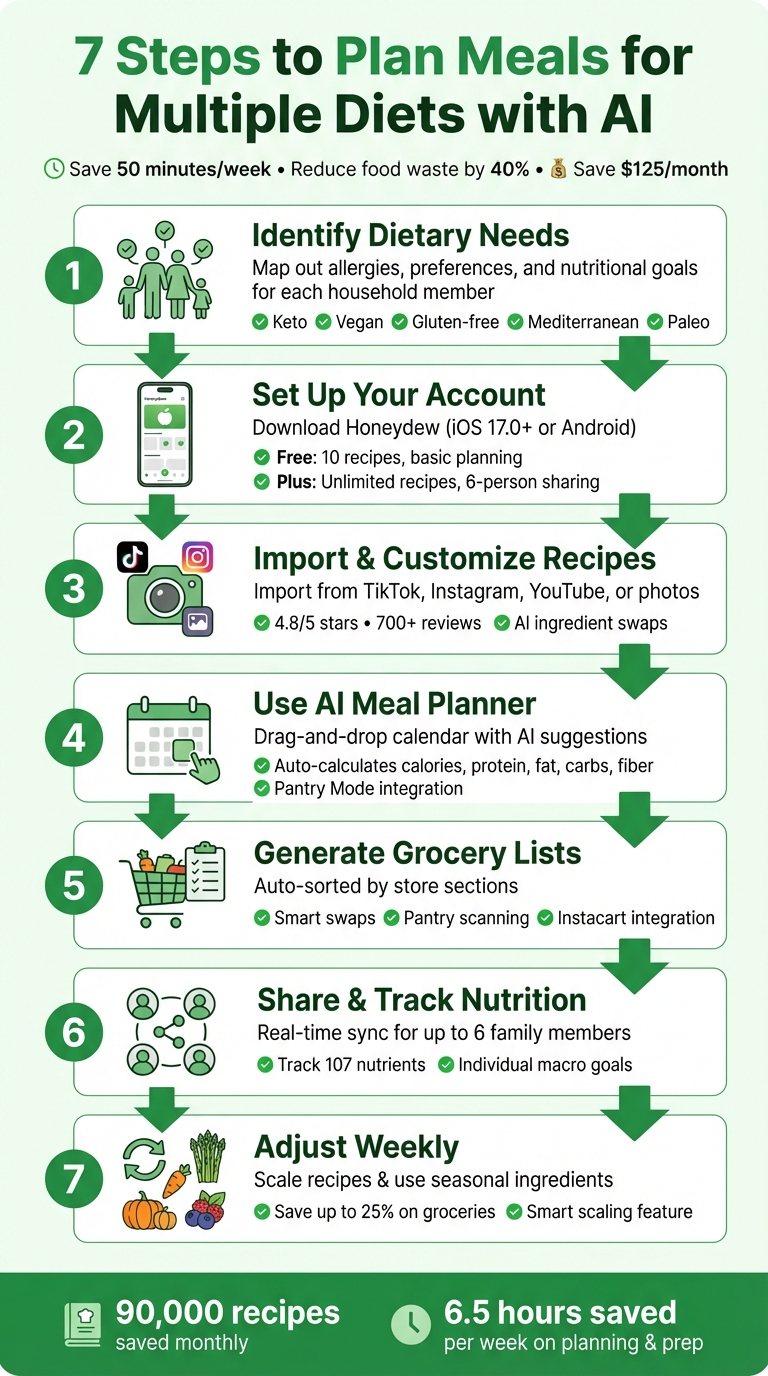
7-Step AI Meal Planning Process for Multiple Diets
Using Artificial Intelligence to Meal Plan
Step 1: Identify Dietary Needs in Your Household
Before diving into AI-powered meal planning, it’s crucial to map out exactly who eats what in your household. This means getting into the nitty-gritty - don’t stop at “Mom’s vegan” or “Dad follows keto.” You’ll need to document allergies, dietary preferences, dislikes, and nutritional goals. Without this groundwork, even the smartest meal planning tool won’t deliver the results you’re hoping for. A detailed profile helps the AI create meal plans that are tailored to your household’s specific needs.
Common Dietary Restrictions Explained
To build an accurate dietary profile, it helps to understand some of the most common dietary restrictions:
- Keto: A high-fat, low-carb diet that typically limits net carbs to 20–50 grams per day. It’s designed to help control appetite and maintain steady energy levels.
- Vegan: Excludes all animal-based products like meat, dairy, eggs, and even honey.
- Gluten-free: Essential for those with celiac disease or gluten sensitivity, this diet eliminates wheat, barley, rye, and their derivatives.
- Mediterranean: Focuses on heart-healthy foods like olive oil, fish, legumes, and whole grains.
- Paleo: Centers on whole, unprocessed foods while avoiding grains, legumes, and refined sugars.
Modern meal planners can also accommodate a variety of allergies and ingredient dislikes, making customization even easier.
Create a Household Dietary Profile
Start by conducting a household audit. Sit down with each family member and ask them to share details like their food allergies, dislikes, and nutritional objectives. For those with fitness or weight goals, document macro and calorie targets - including specific ratios of protein, carbs, and fats.
Don’t forget practical considerations, such as the size of your household, available cooking time, skill levels, and the appliances you have on hand. When you’re ready to input this information into an AI tool, use clear and detailed prompts. For example, you could say: “Create a low-carb meal plan that avoids seafood due to allergies and includes kid-friendly snacks.” The more precise your input, the better the AI will be at creating meal plans that suit your household’s needs.
Step 2: Set Up Your Honeydew Recipe Manager Account
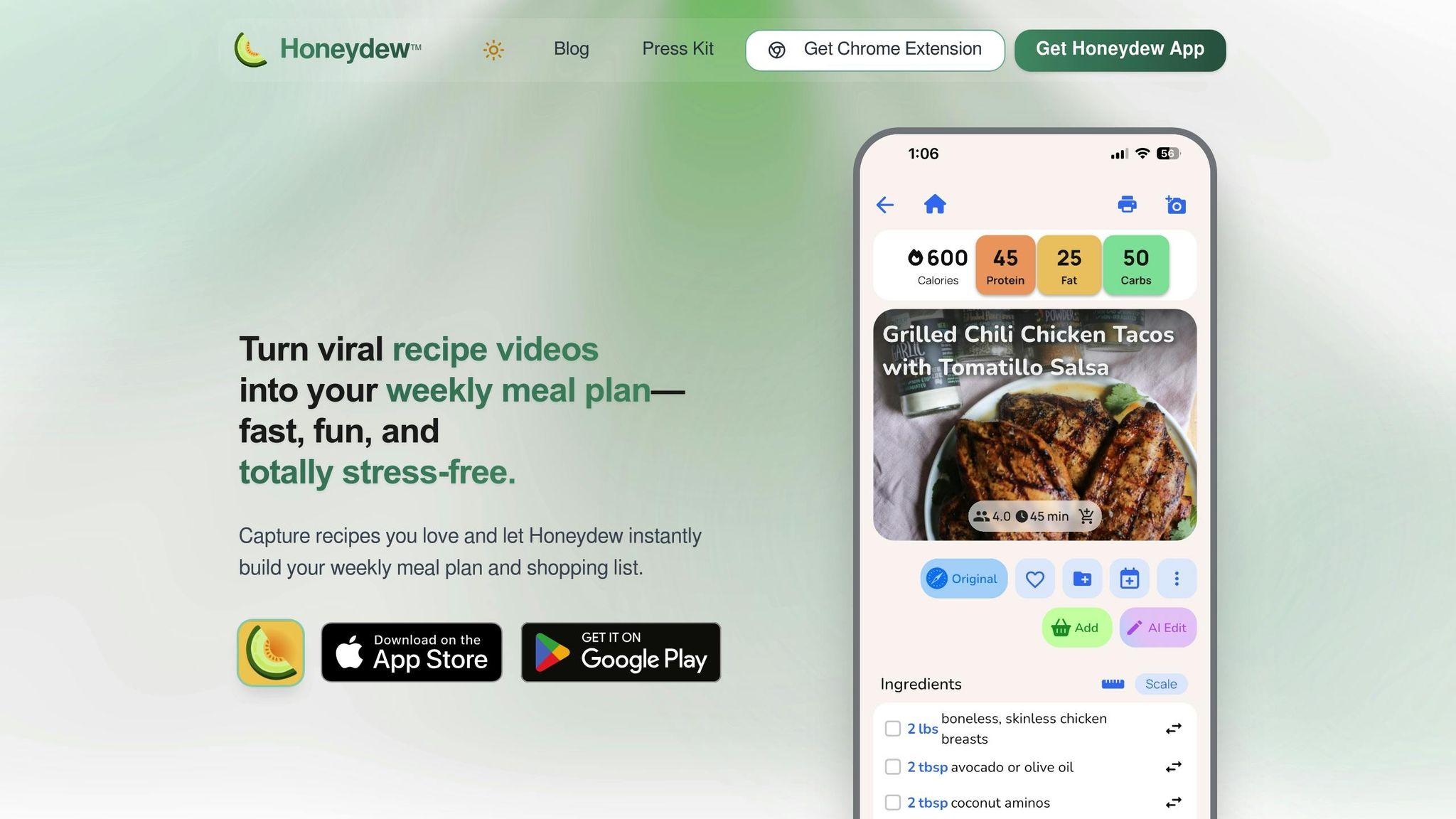
Start by downloading Honeydew - it's free and available for iOS (17.0+) and Android. The setup is quick, taking just a few minutes. The free plan covers essentials like smart AI recipe imports (up to 10 recipes), basic meal planning, grocery lists, and a calorie calculator. For those needing more advanced tools, Honeydew Plus offers unlimited recipe storage, household sharing, and detailed meal planning capabilities.
Customize Dietary Preferences in the App
After installation, tailor the app to your household's dietary needs. Using the dietary restrictions you outlined in Step 1, adjust the settings to reflect your preferences. Honeydew supports a wide range of profiles, including Keto, Vegan, Paleo, high-protein, and gluten-free, with over 200 options to fine-tune your meal planning. Additionally, the app’s "Ask Honey" AI assistant is a powerful tool - it can instantly modify recipes, such as swapping regular pasta for gluten-free alternatives, making real-time adjustments easier than ever.
Key Features for Multi-Diet Planning
Honeydew is built to handle diverse dietary needs within a household. The household sharing feature lets up to six family members sync recipes, meal plans, and grocery lists, with real-time updates for any changes. The AI recipe capture tool is another standout - it extracts ingredients and instructions from various sources, including social media platforms, website links, cookbook photos, and even handwritten notes. With tens of thousands of recipes processed monthly, finding inspiration is effortless.
Other helpful features include:
- Smart ingredient substitutions: Get suggestions for allergen-friendly or diet-specific alternatives.
- Nutrition tracking: Automatically calculates calories and macros for every meal.
- Drag-and-drop calendar: Makes organizing meals for different family members simple and intuitive.
"My family of five uses Honeydew for all our meal planning. The household sharing feature keeps everyone organized." - Alex P., Honeydew User
The app’s Pantry Mode is another game-changer. It tracks what you already have at home and suggests recipes based on your inventory, helping reduce food waste. Research shows that this feature can cut household food waste by up to 40% and save around $125 per month. And if you're cooking for different serving sizes, the scaling converter adjusts ingredient quantities instantly, supporting both Imperial and Metric measurements.
Once your preferences are set and your meal plans are in place, you're ready to import and customize recipes for your multi-diet calendar seamlessly.
Step 3: Import and Customize Recipes for Multiple Diets
Start building your recipe collection with ease. Honeydew makes it simple to gather recipes, whether you're scrolling through social media or digitizing handwritten favorites.
Import Recipes from Social Media
Honeydew allows you to pull recipes directly from platforms like TikTok, Instagram Reels, YouTube (including Shorts), and Facebook Reels. See a recipe video you love? Just tap Share, select Honeydew, or paste the URL into the app. The AI will instantly extract ingredients, step-by-step directions, and cooking instructions, organizing everything into a neat digital recipe format.
You can also digitize physical recipes using the app's photo capture feature. Snap a picture of a recipe card, a page from a cookbook, handwritten notes, or even a restaurant dish you want to recreate. The app transforms these into structured recipes you can use anytime. With a 4.8/5 star rating from over 700 users on the Apple App Store, Honeydew’s reliability speaks for itself. However, it’s a good idea to double-check the imported recipes for occasional errors or duplicate ingredients.
"Being able to import recipes from anywhere has built my cookbook faster than I ever imagined." - Priya K.
Once imported, you can fine-tune recipes to suit your household’s preferences or dietary requirements.
Customize Recipes with Ingredient Substitutions
After importing, you can adjust recipes to fit specific dietary needs. The "Ask Honey" AI assistant makes this process seamless. Want to make a recipe gluten-free or vegan? Just ask, and the AI will create a modified version while keeping the original intact. This is especially helpful when balancing different dietary needs - like providing dairy-free options for one person and high-protein meals for another.
The app’s smart substitution feature also automatically suggests diet-friendly or allergen-free alternatives. For instance, if a recipe uses regular flour but you need a gluten-free option, or if it calls for butter and you’re cooking vegan, Honeydew provides instant swaps. For more complex recipes, you can ask the AI assistant for a detailed list of substitutions, removing all the guesswork.
Step 4: Use the AI Meal Planner for Multi-Diet Calendars
With the dietary profiles you’ve already set up, Honeydew’s AI meal planner simplifies the process of managing multiple diets. It takes the stress out of planning meals for a household with diverse dietary needs, ensuring everyone stays happy and well-fed. Ready to organize your recipes into a seamless weekly plan? Here's how the AI meal planner transforms your recipes into a balanced calendar.
Create a Weekly Meal Calendar
The drag-and-drop calendar makes it easy to visually plan your week. Simply drag recipes onto specific days, and you'll immediately see if your meals meet variety and balance goals. Whether you're planning for a vegan teenager, a gluten-free spouse, or a keto-focused parent, the AI keeps everything aligned.
Need some inspiration? Use the "Ask Honey" AI assistant to create meal plans based on specific prompts. Just type in keywords like "Quick & Easy", "Vegetarian", or "Family Favorite", and the AI will fill your calendar with recipes that match. It even calculates daily nutritional details - calories, protein, fat, carbs, and fiber - so you can ensure every diet is covered.
To make things even easier, turn on Pantry Mode by snapping a photo of your fridge and pantry. The AI will suggest recipes using what you already have, cutting down on shopping trips and food waste. Plus, with one-click Instacart integration, you can order all the ingredients you need, including diet-specific substitutes like almond flour for keto or nutritional yeast for vegan meals.
"Honeydew has made meal planning fun again. The interface is intuitive and the suggestions are spot on!" - David K., Verified User
Once your calendar is set, you can fine-tune it to fit even the busiest schedules.
Optimize Meal Plans for Busy Schedules
When weeknights are packed, efficiency is key. Filter recipes using "Quick & Easy" tags or request meals with prep times under 30 minutes. You can also find batch-cooking options to prepare 2–4 meals in just 60–90 minutes. On average, households save 6.5 hours per week on planning, shopping, and meal prep.
The AI also tailors suggestions to your favorite appliances, like slow cookers or air fryers, which can cut down on active cooking time while you focus on other tasks. Save your favorite time-efficient recipes in your digital cookbook, and the AI will prioritize them when you're crunched for time.
Step 5: Generate Grocery Lists and Manage Substitutions
With your meal calendar ready, it’s time to gather everything you need - without the hassle of manual lists or forgotten ingredients. Honeydew’s AI simplifies this process by turning your meal plan into a streamlined, shareable grocery list that works for all dietary preferences in your home.
Auto-Generate Grocery Lists
Click "Generate Grocery List" and watch as the AI compiles all your ingredients, neatly sorted by store sections like produce, dairy, pantry, and meat. This makes navigating the aisles a breeze, whether you're shopping for vegan, gluten-free, or keto-friendly meals.
Honeydew also makes teamwork seamless. Share your grocery list with family members so everyone can pitch in. For instance, if your teenager remembers they’re out of almond milk for their smoothies, they can add it instantly. Or, your partner can check off items like gluten-free pasta as they shop.
"I used to waste so much food. Now with Honeydew's meal planning, I buy exactly what I need and save money!" - Mark T., Honeydew User
Handle Smart Swaps and Update Your Pantry
Before heading to the store, activate Pantry Mode by taking a quick photo of your fridge and pantry. The AI scans your current inventory and automatically removes items you already have from the shopping list. To keep your pantry up-to-date, scan receipts after shopping, ensuring you avoid buying duplicates.
If an ingredient is unavailable or pricey, Honeydew’s "smart swaps" feature offers suitable alternatives without compromising flavor. For example, if tamarind paste is out of stock, the AI might suggest lime juice and brown sugar as a replacement. These swaps cater to all diets - whether it’s almond flour for keto recipes or oat milk for vegan meals.
Enable "Auto Sort" in settings to always have your grocery lists arranged by store section, saving you even more time during shopping trips. With your lists polished and substitutions handled, you’ll be ready to share meal plans and track nutrition effortlessly with your household.
Step 6: Share Meal Plans and Track Nutrition
Once your meal calendar and grocery list are ready, the next step is keeping everyone in the household on the same page - especially when juggling vegan, keto, and gluten-free diets. Honeydew makes this process seamless with its built-in collaboration tools and nutrition tracking that works for the whole family.
Collaborate with Household Members
Honeydew's Household Sharing feature allows up to six family members to stay updated in real time. You can invite others to join through the app's settings, making it easy for everyone to contribute.
This feature simplifies coordination. Family members can drag and drop recipes onto the shared calendar, make edits to meal slots, or instantly add items to the grocery list. For instance, if your teenager remembers they need coconut aminos for their keto stir-fry, they can add it right away, and the update syncs across all devices. This real-time collaboration helps avoid miscommunication and ensures everyone's dietary preferences are accounted for.
Track Calories and Macros
Honeydew takes the guesswork out of nutrition by automatically calculating calories, protein, fat, carbs, and fiber for every recipe. This feature is available on both the Free Plan and Honeydew Plus, so it’s accessible no matter your budget. Each family member can track their own macro goals while staying aligned with the shared meal plan.
For example, if you're following a 1,800-calorie keto diet and your partner is on a 2,200-calorie vegan plan, Honeydew provides a detailed nutritional breakdown for each meal. You can adjust portions or make ingredient swaps to meet your goals without cooking completely separate meals. As you tweak recipes, the macro calculator updates instantly, giving you a clear view of whether you're staying on track.
"The calorie and macro calculator has helped me stick to my health goals while still enjoying great meals." - Michael B.
Step 7: Adjust and Scale Plans Weekly
Meal plans need to work with your ever-changing schedule. With Honeydew Recipe Manager's user-friendly tools, you can tweak your plans without starting from scratch each week. The drag-and-drop calendar makes rescheduling meals a breeze - just drag Wednesday's keto dinner to Friday, and your grocery list updates automatically to reflect the change [24, 3].
Another way to keep your plans fresh? Incorporate seasonal ingredients.
Adapt Plans for Seasonal Ingredients
Seasonal produce isn’t just tastier - it’s often more affordable and nutrient-packed. Honeydew’s AI scans for fresh, in-season ingredients like Meyer lemons, yuzu, or truffles and suggests recipes featuring these items. When reviewing your weekly meal plan, keep an eye out for these AI-recommended recipes. By focusing on seasonal ingredients, you could save up to 25% on groceries.
Need to make big changes to your plan? The bulk editing feature lets you swap an entire week’s menu, shift recipes across multiple days, or even remove specific meal categories like breakfast or lunch. After making adjustments, use the "Reset List" or "Sync" function to ensure your grocery list reflects the updated plan [24, 3].
Once you’ve refreshed your plan with seasonal items, fine-tune portion sizes to match your household’s needs.
Adjust Recipes for Varying Household Sizes
Whether you’re hosting guests or cooking for fewer people, Honeydew’s smart scaling feature adjusts ingredient amounts in seconds. Decide if the change is permanent or just for one occasion. For ongoing adjustments, scale recipes directly in your Recipe Book. For one-time events, make changes in the Planner to avoid altering your saved recipes [26, 27].
After scaling, the app updates your grocery list with precise quantities, so you only buy what you need. To ensure accuracy, pay attention to the difference between "yield" (the total recipe output) and "serving" (the portion per person). This attention to detail helps reduce waste and keeps your budget on track.
Conclusion
Honeydew simplifies meal planning for households juggling various dietary preferences, all through an AI-driven platform. Whether you're pulling recipes straight from TikTok or Instagram, or needing help with ingredient swaps, Honeydew takes care of it. It even creates grocery lists sorted by store aisles and meal calendars tailored to keto, vegan, gluten-free, or other dietary needs.
On average, users save about $125 per month on groceries and reduce their weekly planning time from nearly an hour to just seconds. With around 90,000 recipes saved by users each month, it's clear that Honeydew has become a go-to tool for busy families.
"Honeydew has transformed my cooking. I'm saving so much time and enjoying new recipes every week!" - Sarah M.
The platform doesn’t just save time - it lightens the mental load of meal preparation. It syncs up to six household members, offers recipe ideas based on what you already have in your pantry, and tracks up to 107 nutrients automatically. This means you can focus on cooking and enjoying meals together, without the hassle of manually crunching numbers or juggling multiple dietary needs.
FAQs
How can Honeydew help plan meals for households with different dietary needs?
Honeydew makes meal planning a breeze, even for households juggling different dietary needs, thanks to its AI-powered tools. Whether you're cooking for vegans, keto enthusiasts, or someone with gluten-free restrictions, Honeydew tailors recipes to meet everyone's preferences. It even offers ingredient swaps to match specific diets.
The platform goes beyond just recipes. You can pull in recipes from social media, create grocery lists, and organize weekly meals - all in one convenient spot. Plus, its collaborative features keep everyone in the household on the same page, making it easier to manage multiple diets while cutting down on time and hassle.
What are the advantages of using AI for meal planning with Honeydew?
Using AI, Honeydew transforms meal planning into a faster and simpler process, especially for households juggling different dietary needs. It handles tasks like crafting customized meal plans, creating well-organized grocery lists, and even syncing with grocery delivery services. The result? Less time spent planning and more time enjoying meals, minus the stress.
Honeydew’s AI goes a step further by importing recipes from social media, offering ingredient substitutions, and tweaking meals based on what’s already in your pantry. This not only helps cut down on food waste but also ensures your meals fit specific diets like vegan, keto, or gluten-free. It even adjusts portion sizes and tracks nutritional information, making it easier to hit your health goals or cater to family preferences.
In short, Honeydew takes the hassle out of managing multiple diets, making meal planning smooth, efficient, and surprisingly enjoyable.
Can Honeydew help me save money on groceries and cut down on food waste?
Honeydew is built to help you cut down on spending and minimize food waste by generating precise grocery lists based on your recipes and pantry stock. It automatically leaves out items you already have and even suggests ingredient swaps to avoid overbuying and letting food go to waste.
By simplifying meal planning and shopping, Honeydew ensures you buy just what you need, keeping your grocery trips both budget-friendly and better for the planet.



