5 Privacy Tips for Smart Kitchen Appliances
• Updated
Smart kitchen appliances are convenient, but they come with privacy risks. These devices collect data, are vulnerable to cyberattacks, and can expose your home network if not secured properly. Protecting your privacy doesn’t have to be complicated - here are five steps to secure your connected kitchen:
- Use strong, unique passwords for each device and enable multi-factor authentication.
- Set up a separate WiFi network for your smart appliances to isolate them from sensitive devices.
- Keep firmware and apps updated to fix security flaws and improve performance.
- Adjust privacy settings to limit data collection and disable unnecessary features.
- Monitor network activity and unplug devices you’re not using to reduce risks.
Taking these precautions helps safeguard your personal data while still enjoying the benefits of smart appliances. Let’s dive into how you can put these tips into action.
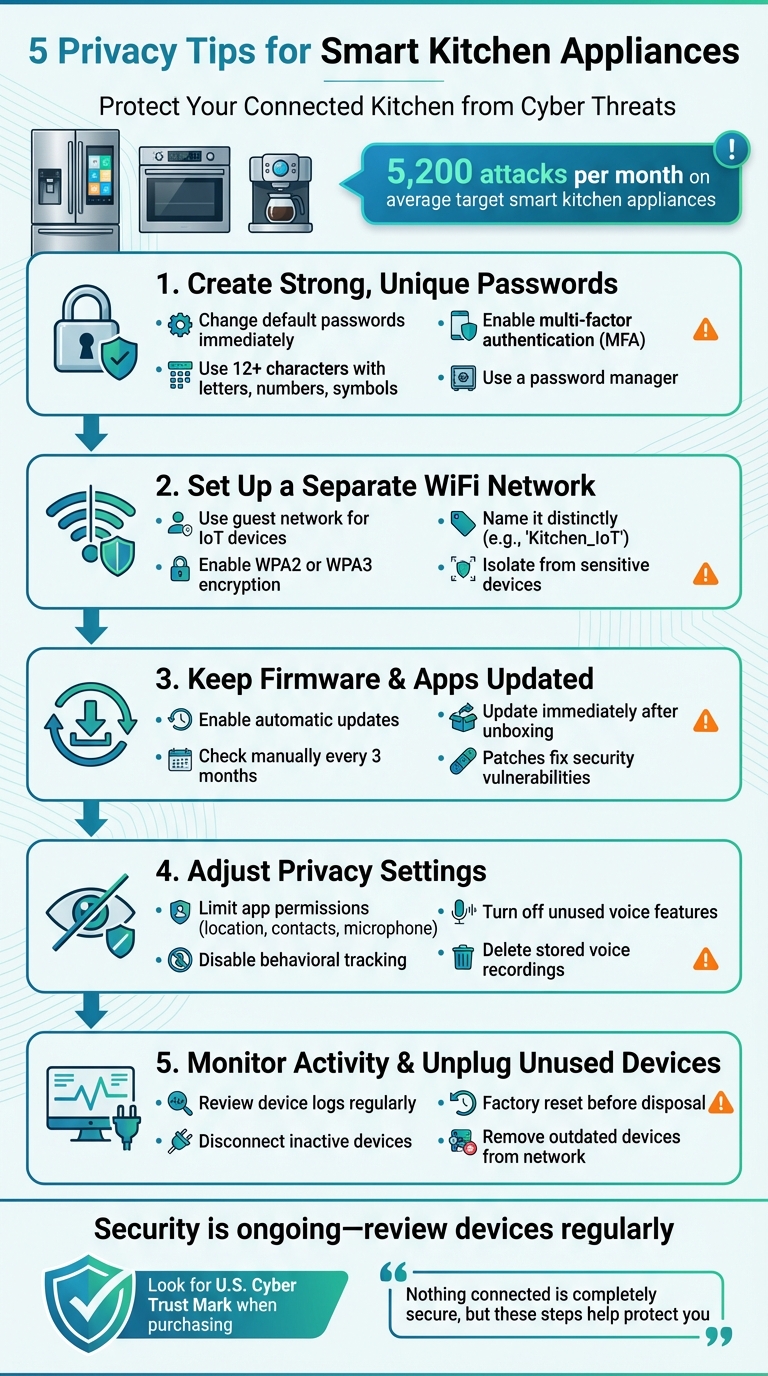
5 Essential Privacy Tips for Securing Smart Kitchen Appliances
HOW TO SECURE SMART APPLIANCES IN 2025 - Home Networks 101
1. Create Strong, Unique Passwords for Each Appliance
Many smart appliances come with default passwords that are easy to find online. As the University of California, Berkeley points out:
"If you keep the default password for your IoT device, anyone with Google access can look it up."
Using the same password across devices opens the door to attacks like credential stuffing. Julie Haney, a Computer Scientist and Cybersecurity Researcher at NIST, emphasizes:
"Do not reuse your passwords! Many attacks on smart home devices... have been linked back to reused passwords. If you use the same password in multiple places and one is compromised, it creates vulnerability elsewhere."
To protect your smart appliances, change default passwords right away. Create passwords that are at least 12 characters long, mixing letters, numbers, and symbols. A password manager can help you keep track of them, and enabling multi-factor authentication (MFA) adds another layer of security.
Take the time to review your devices regularly. Update any older appliances that might still have weak or outdated passwords. For an extra layer of protection, consider placing these devices on a separate network. This approach helps contain potential vulnerabilities and keeps your smart kitchen more secure.
2. Set Up a Separate WiFi Network for Kitchen Devices
Using your router's guest network is a smart way to keep your kitchen appliances separated from devices that store sensitive information. This setup acts as a protective wall between your Internet of Things (IoT) gadgets and devices like computers, smartphones, and network-attached storage systems.
According to Symantec's 2019 Internet Security Threat Report, smart kitchen appliances face an average of 5,200 attacks per month. When these devices share your main network, a single breach could potentially expose your other connected devices to hackers. Sandeep Harpalani, Vice President of Product Management at Netgear, explains the importance of this separation:
"By setting up a guest network, it allows them to access the internet but does not allow them to access any of the devices on the main network. It's two separate WiFi networks that don't talk to each other."
Here’s how to set it up: Log in to your router’s dashboard (usually at 192.168.1.1 or 192.168.0.1), and enable the guest network feature. Give it a distinct name, like "Kitchen_IoT", and secure it with a strong password that’s different from your main network. Make sure to enable WPA2 or WPA3 encryption for added security.
Once the guest network is ready, connect your smart appliances to it. These devices will still function as usual via their cloud services, but if one gets compromised, the threat won’t spread to critical devices like your laptop, phone, or storage systems.
3. Keep Firmware and Apps Updated
Smart kitchen appliances, like any connected device, need regular software updates. These updates are crucial for fixing security vulnerabilities that hackers might exploit. Steve Blair, Privacy and Security Test Program Leader at Consumer Reports, highlights the risk:
"The problem isn't primarily that a criminal is going to harm your appliance. But once they've got control of the appliance, they can probe your WiFi network and attempt to infiltrate other, more sensitive devices in your home."
Beyond security, unpatched devices can also become part of botnets - groups of compromised devices used in large-scale cyberattacks. Updates don’t just protect; they can also improve how your appliance performs. For example, companies like GE Appliances and Samsung have added new features to their products through remote firmware updates.
To stay ahead, make sure your devices are always updated. Most appliances allow you to enable auto-updates through their settings or companion apps. Cody Feng, Test Engineer for Privacy and Security at Consumer Reports, emphasizes the importance:
"Automatic updates can shorten the amount of time that devices remain vulnerable to unpatched security flaws"
. If your device doesn’t support auto-updates, make it a habit to manually check for updates every three months - or right after unboxing, since the firmware might already be outdated.
4. Adjust Privacy Settings to Minimize Data Collection
Smart kitchen appliances often come with default settings that favor data sharing and location tracking. These settings are typically configured to benefit the manufacturer, prioritizing data collection over your privacy. However, you can take control of these settings through the device itself or its companion app.
Start by reviewing app permissions on your smartphone. Open the companion app for each appliance and limit access to sensitive features like location, contacts, and the microphone. Julie Haney, a Computer Scientist and Cybersecurity Researcher at NIST, explains:
"Ideally, the manufacturer is opting you in to strong privacy settings by default. But if you can control these settings, such as how long your video or audio will be saved or whether you can prevent your information from being sent to the manufacturer, adjust them to your comfort level."
Another step is to turn off behavioral tracking. Look for toggles in your device settings labeled "Usage Statistics", "Usage & Diagnostics", or "Experience Improvement". These features often track details like how frequently you open your fridge or use your oven - data manufacturers might collect. If your appliance includes a voice assistant, delete stored voice recordings and consider changing the default "wake word". Small changes like these help reduce unnecessary data collection.
Lastly, disable features you don’t use. Turn off voice-activated purchasing (or set up a PIN for purchases), remote access capabilities, and any third-party app connections you don’t need. If a feature seems unnecessary or raises concerns, it’s best to switch it off. These adjustments can go a long way in protecting your privacy.
5. Track Network Activity and Unplug Unused Devices
Your router's web interface is one of the most effective tools for keeping an eye on your network activity. By accessing your router's admin settings, you can see a list of connected devices. Make it a habit to review your device logs for any unfamiliar IP addresses or access attempts during odd hours - these could be warning signs of a potential security issue.
Keeping tabs on your network performance can also help you spot unusual activity. For instance, if your smart oven starts behaving oddly or your internet speed suddenly drops for no clear reason, it might indicate a security breach. These scenarios underline the importance of staying vigilant.
Disconnect devices you’re not using. If a device hasn’t been in use for a while, disconnect it from your WiFi. As Consumer Reports explains:
"If a device isn't connected to the Internet, there's no snooping and no hacking".
This simple action can completely eliminate potential risks. For devices that don’t need constant connectivity - like certain smart appliances - consider skipping the WiFi connection altogether, especially if the "smart" features don’t add much value to your daily routine. Microsoft also points out that devices offline are not vulnerable to cyberattacks.
Finally, always factory reset devices before selling or disposing of them. This ensures all personal data and network credentials are wiped clean. Additionally, older devices should be permanently disconnected from your network since outdated security protocols can leave your system exposed.
Conclusion
Smart kitchen appliances make life easier, but they also introduce security challenges that demand attention. The five strategies shared here - using strong passwords, setting up a separate WiFi network, keeping firmware updated, adjusting privacy settings, and monitoring network activity - work together to safeguard your personal data while you enjoy the perks of connected technology.
Security isn’t a one-and-done task. New vulnerabilities pop up regularly, as Cody Feng reminds us:
"There is no perfect smart device that is secure forever".
Staying proactive by reviewing devices and applying updates promptly is key to keeping your connected kitchen secure over time. A little effort upfront - like enabling automatic updates or routinely checking for unused features and third-party app access - pays off in the long run. For future purchases, keep an eye out for the U.S. Cyber Trust Mark, which will help you identify products that meet federal cybersecurity standards.
Even small devices, like a smart coffeemaker, can become gateways for hackers to access sensitive data on your network. Taking these precautions now protects more than just your kitchen - it safeguards your entire home. Julie Haney, a Computer Scientist and Cybersecurity Researcher at NIST, puts it well:
"While nothing connected to the internet is completely secure, there are steps you can take to help protect yourself while still enjoying these products".
FAQs
What’s the best way to create strong passwords for smart kitchen devices?
Protecting your smart kitchen devices starts with creating strong, secure passwords. Aim for passwords that are long, unique, and hard to predict. A good password combines uppercase and lowercase letters, numbers, and special characters. Steer clear of using obvious details like birthdays, pet names, or common words.
When setting up your devices, always replace the default passwords provided by the manufacturer. Default passwords are often easy targets for hackers. To make managing multiple strong passwords easier, consider using a password manager. These tools can generate complex passwords and keep them securely stored. Just ensure your master password is both secure and something you won’t forget.
By following these steps, you’ll add an important layer of protection to your smart kitchen appliances, keeping them safe from potential cyber risks.
Why is it important to use a separate WiFi network for smart kitchen devices?
Setting up a separate WiFi network for your smart kitchen devices can add an extra layer of protection to your home. By keeping these devices on a different network from your primary one, you reduce the chances of cyberattacks spreading to personal devices like your phone or computer. This separation helps protect sensitive information such as passwords, financial details, and other private data.
Smart appliances often come with fewer built-in security measures, making them easier targets for potential threats. By using a dedicated network, even if one device gets compromised, your main network - and everything connected to it - stays safe. It’s a straightforward way to enjoy the perks of smart technology without compromising your digital security.
Why is it important to keep the firmware and apps on smart devices updated?
Keeping your smart devices updated is essential for safeguarding your personal information. These updates often come with security patches designed to fix weaknesses that hackers might use to steal your data or harm your device.
Beyond security, updates can boost your device’s performance, introduce new features, and ensure it works smoothly with other technologies. By keeping your smart kitchen appliances current, you’re not just protecting your data - you’re also making sure you’re enjoying their full potential.



