Recipe Importing: TikTok to Grocery List
• Updated
TikTok recipes are fun to watch, but turning them into actual meals can be tricky. The Honeydew Recipe Manager app solves this by letting you import TikTok recipe links, automatically extracting ingredients, steps, and even creating grocery lists. Here's what you can do with it:
- Import TikTok Recipes: Paste a TikTok link, and the app converts the video into a detailed recipe with ingredients and instructions.
- Meal Planning Made Easy: Organize recipes into a weekly plan and generate a consolidated grocery list.
- Save Time and Money: Users report saving up to 1.5 hours weekly on meal prep and reducing food waste by up to 40%.
- Instacart Integration: Order your groceries directly through the app with one click.
- AI Customization: Adjust recipes for dietary needs, calculate nutrition, or suggest meals based on what’s in your pantry.
Whether you're managing meals for yourself or a household, Honeydew makes it simple to turn TikTok inspiration into organized meal plans and efficient shopping lists. Download it for free on iOS or Android and start saving time and money today.
Why Import TikTok Recipes to Honeydew Recipe Manager
Importing TikTok recipes into the Honeydew Recipe Manager makes it easier to turn viral food trends into meals you can actually enjoy. With AI-powered extraction, the app converts TikTok video links into detailed recipes, complete with ingredient lists and step-by-step instructions - no need to manually type anything out. Forget about juggling screenshots or trying to remember ingredient amounts; everything is stored and organized in one place. This feature lays the groundwork for a streamlined meal planning process.
Honeydew doesn’t just stop at recipe storage. It integrates TikTok recipes directly into your weekly meal planning. You can import multiple recipes, consolidate them into a single grocery list, and even cross-check it with what you already have at home to avoid redundant purchases. With Instacart integration, you can send your shopping list for delivery or pickup in just one click, making the entire process even smoother.
AI-Powered Meal Planning
Honeydew’s AI assistant, Honey, takes meal planning to the next level. You can ask Honey to tweak recipes instantly - whether you need to make a dish gluten-free or swap out dairy for plant-based alternatives, the app adjusts both the recipe instructions and your grocery list. The Pantry Mode feature allows you to snap a photo of your fridge or pantry, enabling the AI to suggest recipes based on what you already have. This not only saves time but also helps reduce food waste.
The app also calculates calories and macronutrients (protein, fat, carbs, fiber) for every imported recipe with an impressive 84.19% accuracy. That’s a huge improvement over the 35–40% accuracy typically seen with manual calculations.
Save Time and Reduce Food Waste
Meal planning can be a time-consuming task, often taking 5–6 hours a week. Honeydew simplifies this process, cutting the time down to less than 1.5 hours. By automating recipe entry, integrating pantry inventories, and streamlining grocery shopping, the app makes meal prep more efficient.
Honeydew also helps households cut food waste by up to 76%, which translates to savings of $100–$125 a month. In November 2025, CNET editor Corin Cesaric tested a Honeydew-generated meal plan for a week and reported zero food waste thanks to the app’s precise inventory tracking and shopping suggestions. Digital parenting expert Abby Brody shared a similar experience:
"Letting AI help me make the most of what I already have saves our family of four roughly $100 a week".
What You Need Before You Start
Before diving into TikTok-inspired meal planning, make sure you’ve got the right tools lined up. To get started, you’ll need the Honeydew Recipe Manager app, a TikTok recipe link, and - if you’re planning to collaborate on meals - family sharing set up.
Download Honeydew Recipe Manager
Grab the Honeydew Recipe Manager app from either the iOS App Store or Google Play Store. The Free Plan lets you import up to 10 recipes, create meal plans, and generate grocery lists. If you want unlimited recipe storage and household sharing, you can upgrade to Honeydew Plus for $4.17 per month. The app is well-loved, holding a 4.8/5 star rating on the Apple App Store with 728 ratings. Every month, users save around 270,000 recipes through its import feature.
Save or Copy TikTok Recipe Links
Once you’ve found a TikTok recipe you want to save, tap the "Share" icon (the arrow on the right side of the video screen). From there, select "Copy Link" to copy the recipe URL to your clipboard. If you prefer a faster option, use the Honeydew icon in TikTok’s share menu for a one-tap import. You can even bookmark multiple recipes for batch importing. With your recipe link ready, you’re all set to move forward.
Set Up Family Sharing (Optional)
If you’re organizing meals for a household, family sharing can be a game-changer. With Household Sharing, up to six family members can access a shared digital cookbook, meal plans, and grocery lists. This feature ensures everyone stays on the same page, with instant updates across devices. Keep in mind that family sharing requires a Honeydew Plus subscription.
With these basics in place, you’ll be ready to transform TikTok recipes into organized meal plans and grocery lists effortlessly.
How to Import TikTok Recipes
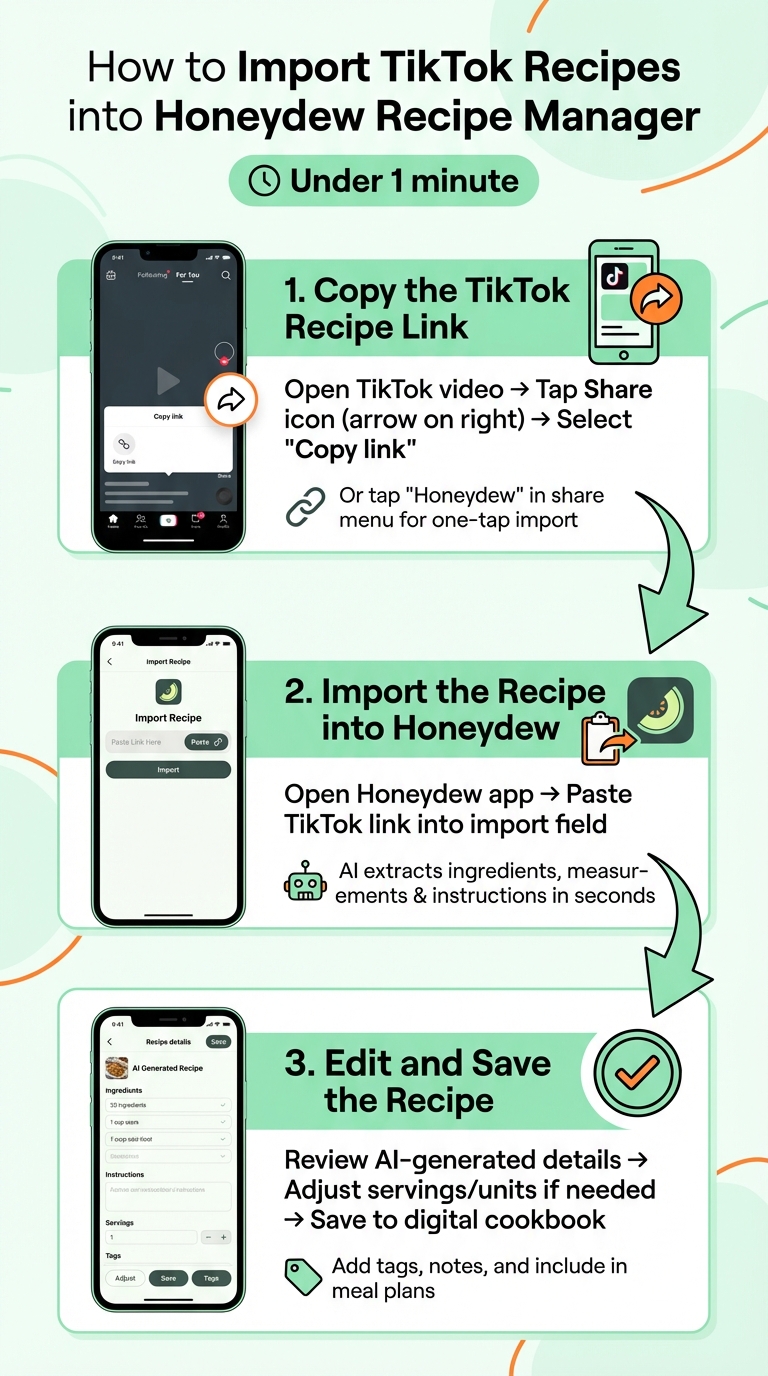
How to Import TikTok Recipes to Honeydew in 3 Easy Steps
Transforming your favorite TikTok cooking videos into structured recipes for meal planning and grocery lists is easier than you think. With the Honeydew Recipe Manager, you can do it in under a minute. The app’s AI pulls out ingredients, instructions, and cooking details directly from the video. Here’s how you can get started:
Copy the TikTok Recipe Link
First, make sure you’ve got the recipe link ready to go. Open the TikTok video you want to save, tap the Share icon (the arrow on the right side of the screen), and choose Copy link. If you’ve added Honeydew to your device’s share sheet, you can skip this step by tapping Honeydew directly from the share menu for a one-tap import.
Import the Recipe into Honeydew
Next, open the Honeydew app and paste the TikTok video link into the import field. The app’s AI will quickly analyze the video, pulling out ingredients, measurements, and step-by-step instructions. In just a few seconds, everything will be neatly organized into a digital recipe format, complete with nutritional information. Once the recipe is imported, take a moment to review the details before saving.
Edit and Save the Recipe
It’s a good idea to double-check the AI-generated results before finalizing your recipe. Some users have reported occasional inaccuracies, like duplicated ingredients or incorrect quantities. You can manually adjust these details, use the app’s ingredient portion converter to scale serving sizes, or switch between Imperial and Metric units. Add personal notes if needed, and when everything looks good, save the recipe to your digital cookbook. From there, you can tag it, search by ingredient, and seamlessly include it in meal plans or grocery lists.
Creating Grocery Lists from Imported Recipes
Once you've imported your TikTok recipes into Honeydew, the next step is creating a grocery list that works for you. Just drag your selected recipes onto your meal plan, and the app will automatically generate a detailed grocery list with all the ingredients you'll need. Before heading to the store, you can remove items you already have in your pantry, helping you avoid unnecessary purchases. On average, this feature can save you $125 per month by cutting down on overbuying.
Auto-Sorted Grocery Lists
Honeydew takes the hassle out of shopping by organizing your list for maximum convenience. Using AI, it sorts your items by store aisle or section, grouping similar products like produce, dairy, and canned goods together. No more wandering aimlessly through the store or doubling back for forgotten items. To make sure this feature works smoothly, turn on "Auto Sort" in the app settings. This ensures that ingredients from multiple recipes are neatly arranged by store aisle. Plus, the app stays accessible while you shop, even if you're in a store with poor reception.
Smart Ingredient Substitutions
If you're running low on something, Honeydew’s AI assistant has you covered. It suggests ingredient swaps based on allergies, dietary needs, or what you already have at home. This means fewer last-minute trips to the store and more flexibility in your cooking.
"The ingredient substitution feature is a game-changer for my dietary restrictions. I can adapt any recipe easily!" - Emily C.
Before you shop, you can use Pantry Mode to take a quick photo of your fridge. The app’s AI will identify what’s already stocked and automatically remove those items from your grocery list. These personalized substitutions help keep your list relevant and efficient.
Instacart Integration for Online Ordering
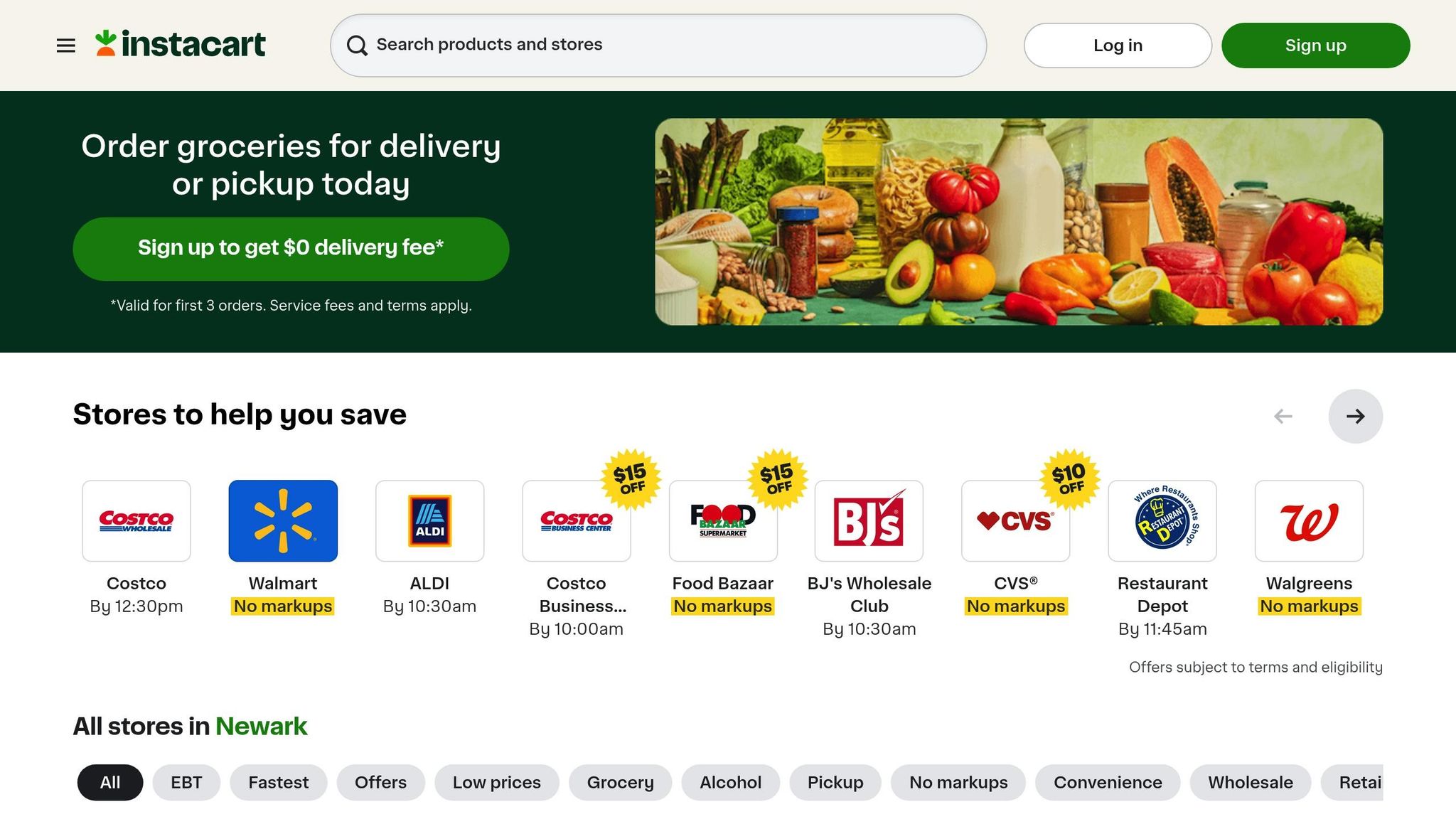
Don’t feel like going to the store? Honeydew makes it easy to transfer your entire grocery list to Instacart for delivery. This saves you the trip and brings everything you need right to your door. You can also share your list with up to six family members for seamless coordination. And if you do decide to shop in person, the app works offline, so you won’t lose access to your list even in areas with poor cell service.
Troubleshooting Common Issues
Even with Honeydew's smart AI, you might encounter a few bumps when importing recipes from Instagram and TikTok. Fortunately, most of these are easy to resolve.
Issues with Parsing Links
If a TikTok link doesn’t import properly, it’s often because of how the recipe is presented in the video. The AI works best with clear ingredient lists or text overlays. When a video only shows the cooking process without written details, it struggles to pull the necessary information. A simple fix? Take a screenshot of the ingredient list displayed in the video and use Honeydew Plus to import it. The app can read text from images and turn it into a structured recipe. Also, make sure you’re using the latest version of the app - version 1.7.2 specifically improved the "Share Button" feature for TikTok and other platforms. For any gaps, you can always make manual edits to fine-tune your recipe.
Dealing with Missing Ingredients
Sometimes, imported recipes might miss a few ingredients. That’s where Honeydew's Smart Ingredient Substitutions can help. The AI suggests alternatives based on your dietary needs or what’s already in your pantry. If you notice something missing, you can easily add it manually through the recipe editor. This flexibility ensures your recipes are complete and tailored to your preferences.
Accessing Recipes Offline
Once you’ve imported your TikTok recipes, they sync to the cloud and become available offline. Just make sure to open the app and sync your recipes while connected to the internet. After that, you can access your digital cookbook anywhere - even in places with spotty service, like certain grocery stores or your kitchen. The app also features a "no screen lock" option, so your recipe stays visible while you cook, no matter how messy your hands get. These offline capabilities make cooking and meal prep hassle-free.
From TikTok to Weekly Meal Planning
Honeydew takes the excitement of discovering recipes on TikTok and turns it into a practical, time-saving meal planning system. By streamlining the process, it helps you go from inspiration to a fully organized weekly plan that saves both time and money.
Batch Import Multiple Recipes
Imagine building your own digital cookbook in minutes. With Honeydew, you can batch import TikTok recipes effortlessly. Just use the in-app share option or paste video URLs directly into the app, and the AI will handle the rest. It extracts everything you need - ingredients, instructions, and cooking details - and saves them to your digital cookbook. This means you can collect enough meal ideas for an entire week in just a few minutes instead of spending hours scrolling and bookmarking.
Generate an AI Meal Plan
Once your recipes are saved, Honeydew’s AI steps in to create a customized weekly meal plan. You can drag and drop recipes onto the meal planning calendar or let the "Ask Honey" assistant take care of it for you. The AI tailors the plan based on your dietary preferences - whether you’re Keto, Vegan, Paleo, or managing food allergies - and ensures meals align with your calorie and macronutrient goals.
For an extra layer of convenience, you can use Pantry Mode. Snap a photo of your fridge or pantry, and the AI will prioritize recipes that use the ingredients you already have. This feature alone can cut meal planning time from the usual 5–6 hours per week to less than 1.5 hours.
"Letting AI help me make the most of what I already have saves our family of four roughly $100 a week".
Master Grocery List and Nutrition Tracking
With your meal plan ready, Honeydew simplifies shopping by creating a master grocery list. The app consolidates ingredients from your weekly plan, organizes them by store aisle, and even calculates exact quantities to avoid overbuying. It also checks what you already have in your pantry, preventing duplicate purchases.
As you add recipes to your calendar, the app updates daily and weekly nutrition totals for calories, protein, fat, carbohydrates, and fiber in real time. Once your list is finalized, you can export it to Instacart with a single click for delivery or pickup.
CNET editor Corin Cesaric tested this system in November 2025 and reported achieving zero food waste. She avoided the usual $125 monthly food loss that many U.S. households face.
Conclusion
Gone are the days of messy screenshots and endless scrolling to find that TikTok recipe you wanted to try. With Honeydew Recipe Manager, you can turn social media inspiration into real meals effortlessly. Import recipes with a single tap, get grocery lists sorted by aisle, and even create meal plans tailored to your diet and budget - all in one place. It’s a simple way to transform trending TikTok ideas into delicious, practical meals.
Thousands of users are already simplifying their cooking routines with Honeydew. The app not only helps reduce food waste but also saves money by keeping your meal planning organized. From scattered ideas to a smart, cohesive plan, Honeydew makes it easier to stay on top of your kitchen game.
Honeydew takes it a step further by offering features like batch recipe imports, Pantry Mode for cooking with what you already have, and even one-click grocery ordering through Instacart. The free version lets you try up to 10 recipe imports, while Honeydew Plus - just $4.17 per month - gives you unlimited recipe storage and household sharing for up to six family members.
"Honeydew has transformed the way I cook. I'm saving so much time and enjoying new recipes every week!" – Sarah M., Verified User
Ready to master digital recipe organization and your kitchen running smoothly? Download Honeydew Recipe Manager on iOS or Android and start building your digital cookbook today.
FAQs
How accurate are TikTok recipe imports, and what should I double-check?
When using TikTok recipe imports, it's smart to verify ingredient quantities, cooking times, and instructions before adding them to your meal plan. This extra step helps you spot any mistakes or inconsistencies in the recipe, ensuring everything turns out just right.
Can I import TikTok recipes that don’t show ingredients as on-screen text?
Yes, it’s possible to import TikTok recipes even if the ingredient list isn’t displayed on-screen. You can rely on AI tools to identify and fill in the missing details. Alternatively, check the recipe’s caption or any linked website for the full ingredient list. Apps like Honeydew Recipe Manager simplify this process by allowing you to import recipes and instantly generate grocery lists from them.
Will my grocery list merge duplicate ingredients and adjust quantities automatically?
Honeydew Recipe Manager takes care of combining duplicate ingredients and adjusting their quantities when generating grocery lists from your imported recipes. This feature keeps your list tidy and precise, making your shopping experience easier and more efficient.



