How Smart Kitchens Save Time with Voice Commands
• Updated
Voice-controlled kitchens simplify cooking, cleaning, and managing daily routines. By using smart appliances with voice assistants like Alexa, Google Assistant, or Apple HomeKit, you can save time, reduce effort, and improve convenience. Here’s how voice commands transform your kitchen:
- Preheat ovens, adjust temperatures, and set timers hands-free, keeping your workflow uninterrupted.
- Check fridge inventory or add items to shopping lists without opening the door, cutting down on food waste.
- Start and monitor dishwashers or other appliances remotely, making cleanup easy.
- Use tools like Honeydew Recipe Manager to import recipes, create grocery lists, and plan meals seamlessly.
Smart kitchens also enhance multitasking and accessibility, allowing you to manage multiple tasks at once or assist those with limited mobility. With just a few steps - choosing compatible devices, connecting them to Wi-Fi, and customizing commands - you can create a kitchen that works for you.
Key Benefits:
- Save up to 8 hours per month with connected appliances.
- Reduce food waste by up to 30% using smart fridges and meal planners.
- Streamline routines like coffee brewing, dinner prep, and cleanup with simple voice commands.
Smart kitchens are more than a trend - they’re a practical way to save time and simplify your life.
The Smart Kitchen: Voice-Activated Siemens Appliances | Andrew James #HomeConnectChallenge

How to Set Up Voice-Controlled Appliances
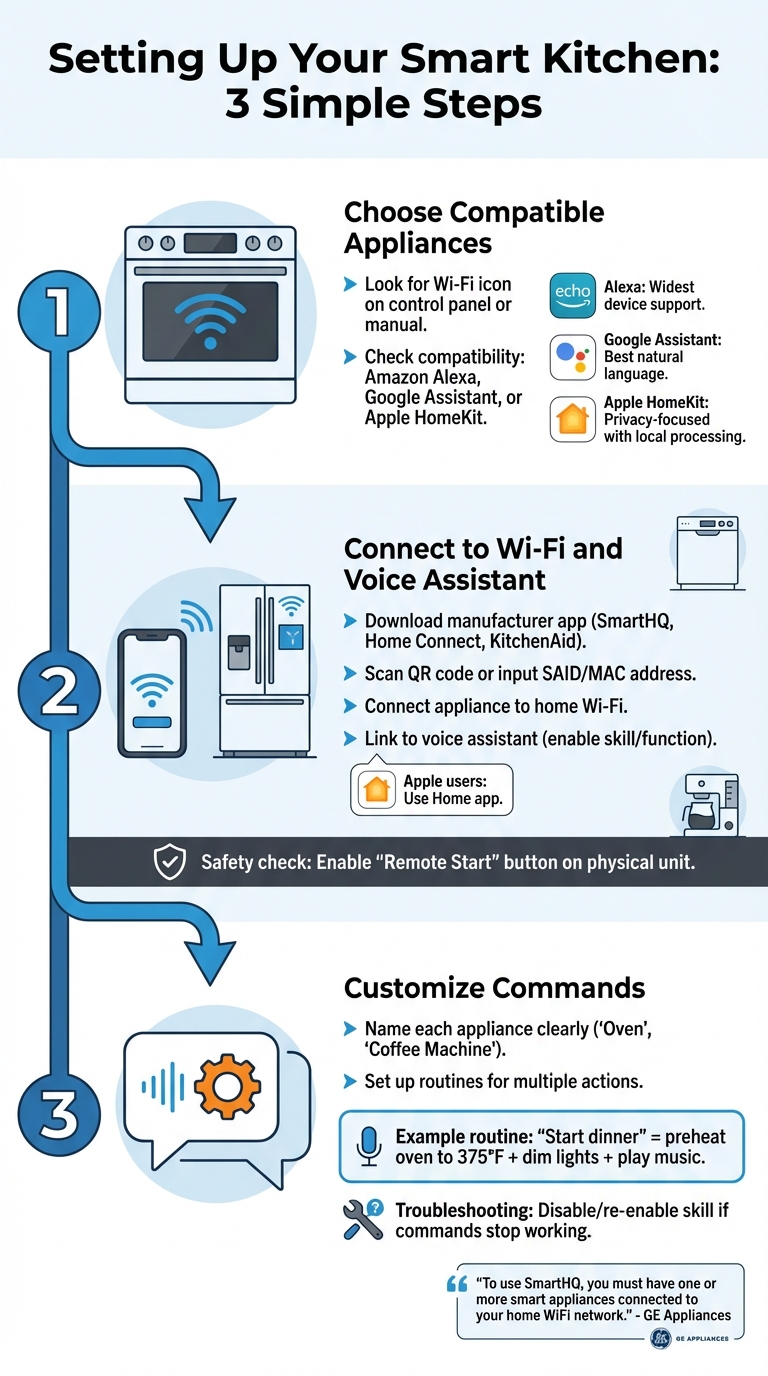
How to Set Up Voice-Controlled Kitchen Appliances in 3 Steps
Getting your smart kitchen up and running is easier than it sounds. It comes down to three main steps: picking the right appliances, connecting them to your home network, and setting up custom commands to match your daily routine. Here's how to integrate voice-controlled devices smoothly into your smart kitchen setup.
Choosing Compatible Appliances
Start by checking if your appliance is voice-enabled. Look for a Wi-Fi icon or a note about compatibility on the control panel or in the manual. Major brands now offer models that work with Amazon Alexa, Google Assistant, or Apple HomeKit. Each platform has its perks: Alexa supports the widest range of devices, Google Assistant shines with its natural language abilities, and Apple HomeKit focuses on privacy with local data processing.
Connecting to Wi-Fi and Voice Assistants
First, download the manufacturer's app, like SmartHQ, Home Connect, or the KitchenAid app, and create an account. You'll then need to scan a QR code or input the appliance's SAID and MAC address, which you can find on a sticker or display screen. After connecting the appliance to your Wi-Fi, link it to your chosen voice assistant by enabling the relevant skill or function in the assistant's app. For Apple users, this step happens through the Home app.
"To use SmartHQ, you must have one or more smart appliances connected to your home WiFi network." - GE Appliances
Once connected, double-check that the appliance is safe to activate remotely. For example, many ovens require you to press a "Remote Enable" or "Remote Start" button on the physical unit before voice commands will work. This safety feature helps prevent accidental activations.
Customizing Commands and Preferences
To make things run smoothly, give each appliance a clear, unique name - like "Oven" or "Coffee Machine" - in the manufacturer's app. This makes it easier for your voice assistant to recognize them. You can also set up routines to combine multiple actions into a single command. For instance, saying "Alexa, start dinner" could preheat your oven to 375°F, dim the kitchen lights, and play your favorite cooking playlist. These routines are easy to configure in the routines section of your assistant's app.
Customizing commands not only makes your interactions more personal but also saves time by cutting down on repetitive tasks. If a command suddenly stops working, a quick fix is to disable and re-enable the appliance's skill in your assistant's app.
Voice Commands That Save Time in the Kitchen
With a smart kitchen setup, voice commands can make meal prep and cleanup feel effortless. These commands let you handle multiple tasks at once, saving both time and energy. Here’s how voice control can simplify common kitchen activities.
Preheating the Oven
Preheating your oven has never been easier. Just say, "Alexa, tell my oven to start fast preheat", or "Hey Google, preheat the oven to 350 degrees." The oven starts warming up while you focus on chopping, mixing, or other prep work - no need to pause and press buttons.
"Voice start is real, practical, and safer than ad-hoc hacks when you own a connected model and arm the remote switch each session." – Mo Maruf, Founder, Smart Kitchen Reality
Most voice-enabled ovens offer a variety of modes, including bake, convection bake, roast, air fry, and keep warm. However, for safety reasons, high-heat functions like broil are usually restricted, and open-flame gas cooktops cannot be ignited remotely.
Adjusting Cook Times and Temperatures
Need to tweak your cooking settings mid-meal? Voice control makes it simple. Say, "Alexa, tell my oven to add ten minutes", or "Hey Google, increase the oven temperature by 25 degrees." You can also ask, "Alexa, when will dinner be ready?" or "Hey Google, how much time is left?" After giving a command, it’s a good habit to glance at the oven display to confirm the changes.
Checking Inventory with Smart Refrigerators
Smart refrigerators with internal cameras and voice functionality take the guesswork out of meal planning. You can ask, "Do I have any eggs left?" or "What’s the expiration date on the milk?" without even opening the fridge. Want a visual? Say, "Show me what’s inside the fridge", and view a live feed on your smart display or phone.
Running low on something? Just say, "Add butter to my shopping list." These features not only make grocery planning and pantry tracking easier but can also cut down food waste by up to 30%. Some smart fridges can even suggest recipes based on what you already have in stock. This integration works best when paired with AI-driven ingredient prep to further streamline your cooking routine.
Starting and Monitoring Dishwashers
Cleanup is easier with voice-activated dishwashers. After loading, just say, "Alexa, tell my dishwasher to start", or "Hey Google, run the dishwasher on eco mode." Make sure the remote start feature is enabled, similar to ovens. While the cycle is running, you can ask for updates like how much time remains.
Some advanced models even notify you when the cycle is complete or supplies like rinse aid are running low. Premium brands, such as Thermador, go a step further by automatically reordering items like dishwasher tabs when needed.
Using Honeydew Recipe Manager for Meal Planning
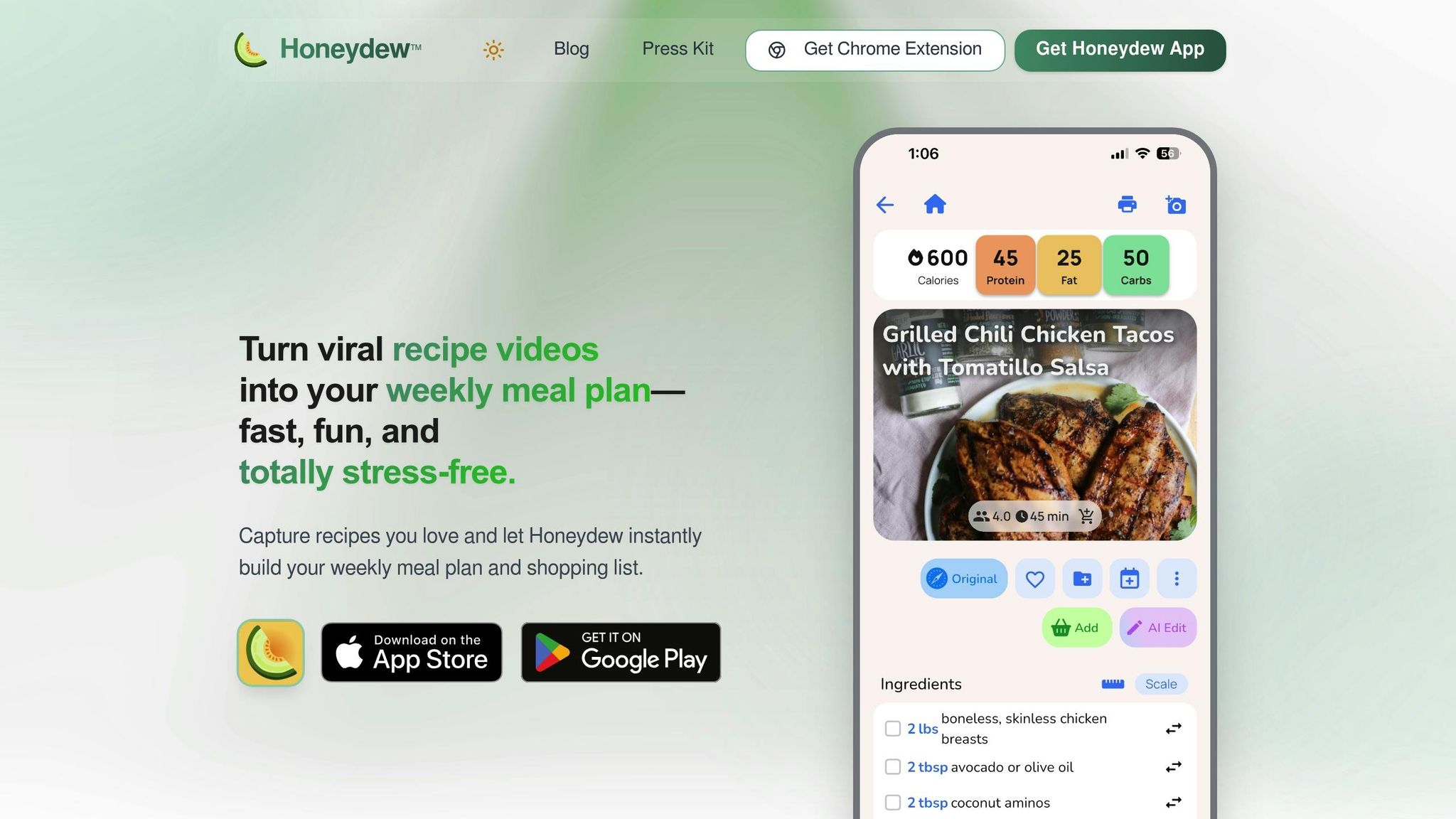
A voice-controlled kitchen becomes even more effective when paired with smart tools for meal planning. Honeydew Recipe Manager works seamlessly with your voice assistants to handle everything from finding recipes to arranging grocery deliveries. It simplifies your cooking process while helping you save time and money. Let's dive into three standout features that make Honeydew a must-have for your smart kitchen setup.
Importing Recipes Without Lifting a Finger
Found a recipe you love while scrolling through TikTok, Instagram, YouTube, or Facebook? Just share the link with the app, and Honeydew’s AI will extract all the key details - ingredients, measurements, cook times, and nutritional info - into a neat, editable recipe card. Got a handwritten recipe? Snap a photo, and the app transforms it into a structured digital format.
Once your recipes are imported, sync them with Alexa for hands-free guidance while cooking. This feature is a lifesaver when your hands are messy - whether you’re kneading dough or handling raw meat. Just say, "Alexa, open my Honeydew recipe", and follow the step-by-step instructions without ever touching your screen.
Building Grocery Lists in Seconds
Shopping for ingredients has never been easier. With Honeydew, you can drag recipes onto your meal calendar and instantly create a grocery list that’s sorted by aisle and combines duplicate items. This means no more wandering around the store or buying unnecessary extras. Plus, with one click, you can send the list to Instacart for delivery - no need to manually input anything. Want to double-check your list while shopping? Just ask your voice assistant to read it out loud.
Honeydew users report saving about $125 per month by cutting down on food waste and keeping their grocery spending in check. That’s more money in your pocket and less food in the trash.
Smart Meal Planning and Nutrition Tracking
Honeydew’s AI takes meal planning to the next level by analyzing what’s in your pantry and tailoring weekly plans to your dietary needs. The "Pantry Mode" feature lets you photograph your fridge, and the app suggests recipes based on what you already have. This clever approach can reduce household food waste by as much as 40%.
The app also calculates nutritional values for your meals and offers ingredient swaps to accommodate dietary restrictions. As one user, Emily C., shared:
"The ingredient substitution feature is a game-changer for my dietary restrictions. I can adapt any recipe easily!"
Honeydew supports up to six family members, syncing meal plans and grocery lists across everyone’s devices in real time. Best of all, the app is free to download on both iOS and Android. These features ensure your meal planning stays as smooth and efficient as the rest of your smart kitchen setup.
Daily Routines That Save Time with Voice Commands
Morning Coffee and Breakfast Prep
Imagine starting your day with just a simple voice command - "Good Morning." With that, your coffee maker begins brewing, your smart blinds open, and your kitchen lights adjust automatically. No more fumbling with switches or buttons; everything works together seamlessly.
If you use a smart coffee machine, you can even customize your brew. Try saying, "Alexa, tell my Coffee Machine to prepare a large, strong espresso". Just make sure to include a 55-second wait time in your routine to let the machine complete its rinsing cycle before brewing. For those with traditional coffee makers, pairing it with a smart plug is a game-changer. You can turn it on remotely and even get alerts if it's accidentally left on.
While your coffee is brewing, voice commands can also guide you through breakfast preparation. Skills like "Cook Perfect Eggs" provide step-by-step instructions, so you can focus on cracking eggs or flipping pancakes without needing to check a recipe. Wondering if you're out of milk or eggs? Just ask, "Alexa, what's on my shopping list?". You can even preheat a smart oven while getting ready, ensuring it's hot and ready when you step into the kitchen.
This efficiency carries over to dinner prep, making even the busiest times of the day more manageable.
Streamlining Dinner Prep
Dinner time can be chaotic, but voice commands help you stay organized and keep your kitchen running smoothly. Instead of dealing with messy knobs, you can preheat your oven to 375°F or adjust burner intensity with a quick command. As KS Renovation Group highlights:
"The ability to control your environment vocally means fewer surface contaminations, reduced cross-contamination risks, and a kitchen that meets higher hygiene standards naturally".
Managing multiple dishes? Use named timers to avoid confusion. Say, "Set a pasta timer for 12 minutes" and "Set a roast timer for 45 minutes", and your voice assistant will keep track of everything. Need help with ingredient swaps, unit conversions, or recipe alternatives? Just ask, and you'll get answers without pausing your cooking. Smart faucets also speed things up by dispensing exact amounts of water on command, like "dispense two cups".
When dinner is done, voice commands ensure cleanup is just as easy.
End-of-Day Cleanup
Your cleanup routine can also run on autopilot. A single "Cleanup" command can start your dishwasher, turn off the range hood, and dim under-cabinet lights. You can even control dishwasher settings by saying, "Alexa, set my dishwasher to Eco mode", or check its status with, "Is the dishwasher running?". For late-night cycles, many smart dishwashers offer a "Quiet Mode" option to keep noise levels down.
Finally, wrap up your day with a "Bedtime" routine. This command powers down appliances like ovens and coffee machines, activates ventilation system locks, and ensures everything is safely secured for the night. This automated approach not only saves time but also provides peace of mind, knowing your kitchen is ready for the next day.
Conclusion
Voice-controlled kitchens can save a surprising amount of time. A 2019 study by GE Appliances found that users who take full advantage of connected appliance features can save up to 8 hours per month - that’s nearly an entire workday freed up every month.
This time-saving potential grows even more when paired with smart meal-planning tools. For instance, voice assistants handle tasks like preheating the oven or setting timers, while tools like the Honeydew Recipe Manager (https://honeydewcook.com) simplify meal prep in powerful ways. With just a voice command, you can import recipes from TikTok, Instagram, or any website, instantly generate a grocery list organized by store sections, and even get a weekly menu tailored to your needs. Plus, smart ingredient substitutions mean fewer last-minute grocery runs.
Voice integration also boosts hygiene and accessibility in the kitchen. By using voice commands, you can avoid touching surfaces while cooking, keeping things cleaner and more convenient. As Kimberly Quevedo from Coldwell Banker puts it:
"Voice-activated kitchen appliances can update your cooking space into an intelligent command center".
FAQs
Which kitchen appliances should be voice-controlled first?
Ovens and ranges are ideal candidates for integrating voice control. With this feature, you can enjoy hands-free cooking, allowing you to focus on precision and making meal preparation smoother and more efficient. What's more, they can easily sync with smart-home systems, adding an extra layer of convenience to your kitchen routine.
How do I safely set up voice control for my oven or dishwasher?
To set up voice control for your oven or dishwasher safely:
- Check compatibility: Make sure your appliance supports a voice assistant like Alexa or Google Home and is connected to Wi-Fi.
- Link to the assistant: Use the manufacturer’s app to connect the appliance to your chosen voice assistant, following the provided setup instructions.
- Follow safety precautions: Enable remote control only after completing the setup and ensure the appliance is in a secure location.
- Adjust privacy settings: Review and configure privacy options to keep your data secure.
These steps help ensure your appliance operates safely and securely with voice control.
How can Honeydew Recipe Manager speed up meal planning with voice commands?
Honeydew Recipe Manager simplifies meal planning by incorporating voice commands, allowing users to manage everything hands-free. With this app, you can quickly import recipes, create meal plans, and generate grocery lists without lifting a finger. It also lets you organize weekly meals, adjust serving sizes, and add ingredients to your shopping list effortlessly.
What sets it apart is its AI-powered suggestions and automatic grocery list creation, which streamline the entire process. This means less time spent planning and more time enjoying your meals.



