How Smart Ovens Sync Recipes with Apps
• Updated
Smart ovens are reshaping home cooking by syncing with recipe apps like Honeydew Recipe Manager, enabling precise, automated control over temperature, cooking modes, and timers. Here's how they work:
- App Integration: Recipe apps send settings directly to ovens, eliminating manual inputs and reducing errors.
- Advanced Features: Built-in cameras, voice control, and AI-powered tools enhance cooking convenience.
- Grocery Syncing: Apps connect with grocery services to streamline ingredient shopping.
- Setup: Pairing ovens with apps involves Wi-Fi, app downloads, and simple configuration.
Smart ovens simplify cooking, save time, and improve consistency, making them a practical tool for modern kitchens.
How to Pair GE Smart Oven with SmartHQ App
Setting Up Your Smart Oven and App
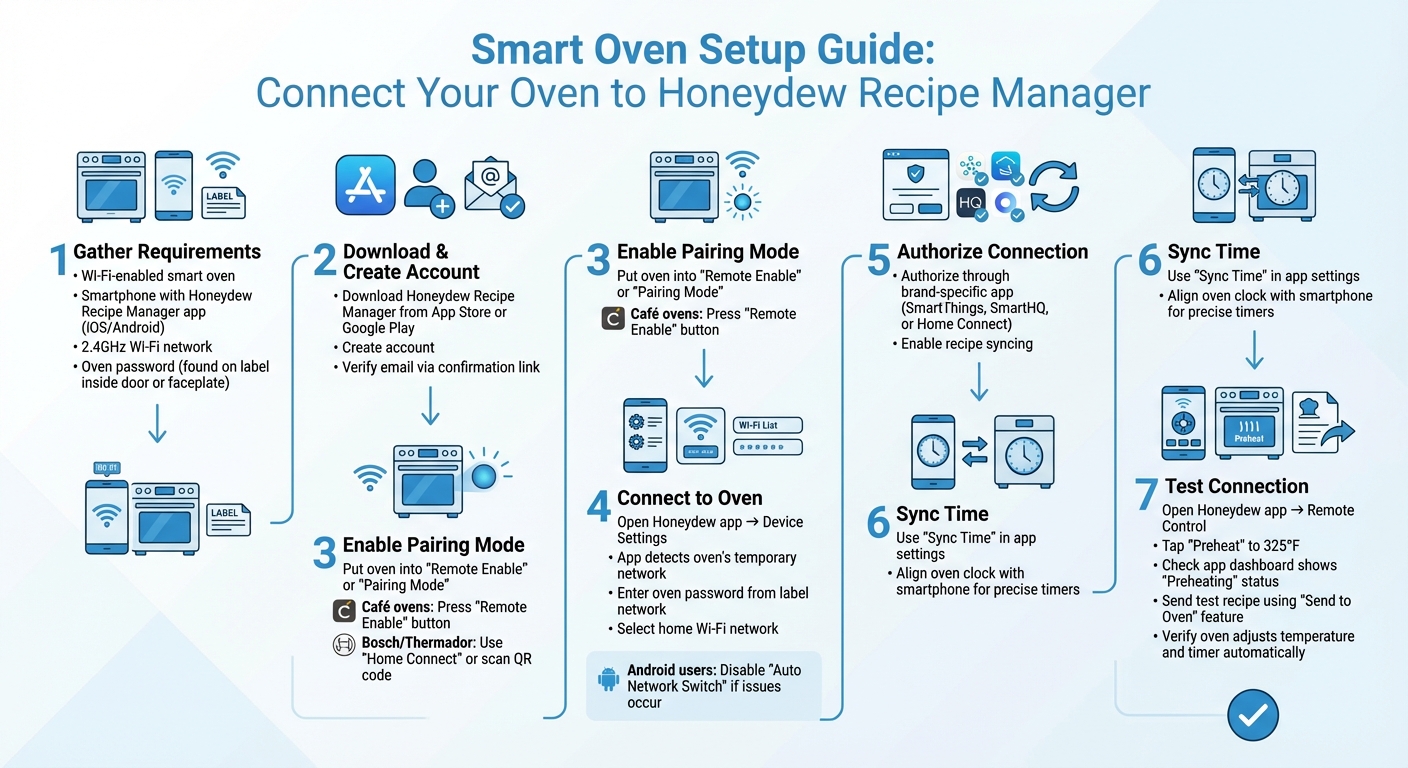
How to Set Up Your Smart Oven with Honeydew Recipe Manager App
Ready to get your smart oven up and running with the Honeydew Recipe Manager? Here's a straightforward guide to help you connect your oven and start cooking smarter. You'll need a smart oven with Wi-Fi, a smartphone with the Honeydew Recipe Manager app (available on the Apple App Store or Google Play), and a steady 2.4GHz Wi-Fi network. Most smart appliances require the 2.4GHz band for setup, so double-check your network. Don’t forget your oven’s password, which is typically on the label inside the oven door or on the side of the faceplate.
What You'll Need
Before diving in, make sure you have everything ready:
- A Wi-Fi-enabled smart oven.
- A smartphone with the Honeydew Recipe Manager app installed (find it on the Apple App Store or Google Play).
- Access to a stable 2.4GHz Wi-Fi network (this is required for most smart appliances during setup).
- Your oven’s password, located on its information label (check inside the oven door or the side of the faceplate).
How to Set Up the App
Connecting your oven to Honeydew Recipe Manager is simple. Start by downloading the app and creating an account. Verify your email through the confirmation link sent to your inbox. Once your account is ready, put your oven into "Remote Enable" or "Pairing Mode." This typically involves holding specific buttons until the Wi-Fi icon starts flashing. For Café ovens, press the "Remote Enable" button or knob. Bosch and Thermador models may have a "Home Connect" option or a QR code to scan.
When your oven is in pairing mode, open the Honeydew app and navigate to device settings. The app will detect your oven's temporary network. Enter the oven's password from the label, then select your home Wi-Fi network to complete the connection. If you’re using an Android device and run into issues, disable the "Auto Network Switch" feature. After pairing, authorize the connection through your oven’s brand-specific app (like SmartThings, SmartHQ, or Home Connect) to enable recipe syncing. Finally, use the "Sync Time" option in the app settings to align your oven’s clock with your smartphone for precise timers.
Testing Your Connection
Make sure everything is working by performing a quick preheat test. Open the Honeydew Recipe Manager app, access the remote control feature for your oven, and tap "Preheat" to 325°F. Your oven should respond right away, and the app dashboard will show the status as "Preheating." For a full test, pick a recipe in the app and use the "Send to Oven" feature. The oven should automatically adjust to the correct temperature and timer, and its display should reflect the instructions from your phone. If everything syncs perfectly, you're all set to enjoy a seamless cooking experience with recipe syncing.
Using Recipe Syncing While Cooking
Once your smart oven is connected, the Honeydew Recipe Manager takes over to simplify your cooking process. Using AI, the app extracts key cooking details - like temperature, heating modes, and cooking times - from a variety of recipe sources, including TikTok videos, Instagram posts, and traditional websites. With 72,000 monthly recipes saved by users, Honeydew has honed its ability to convert diverse recipe formats into precise instructions for your oven. This integration makes your smart oven even smarter, enhancing your cooking experience. Ready to send recipes straight to your oven? Here’s how.
Sending Recipes to Your Oven
Pick a recipe from your Honeydew library and hit the "Send to Oven" button. Before sending, you can use the Dynamic Portions feature to adjust cooking times and temperatures based on the number of servings you need. The app then sends these customized instructions through your smart home platform. Once transmitted, your oven's display will show the settings, and you’ll need to confirm them on the oven panel. Remember, many ovens require you to enable "Remote Start" on the controls for safety reasons before you can begin.
Monitoring Your Food
Keep an eye on your cooking progress without hovering over the oven. The app features a blue progress bar showing the remaining time and sends push notifications for key updates, like when preheating is done or when the timer ends. If your smart oven includes an HD camera designed to handle high temperatures (up to 500°F), you can even watch live footage of your food as it cooks. Advanced sensors ensure temperature stability within ±0.5°F, and temperature graphs in the app let you track any fluctuations. Need to make adjustments? You can tweak settings - like raising the temperature or extending the cooking time - straight from your phone. The app's "Control" tab gives you full access to these features, so your meal turns out just the way you want. For complex recipes with multiple steps, the AI assistant is there to guide you.
Getting AI Cooking Help
Honeydew’s AI assistant is like having a personal chef on call. It provides real-time tips and troubleshooting directly through the app. Wondering if you should cover your casserole with foil or how to tell if your roast is done? Just ask, and you’ll get instant, tailored advice. Missing an ingredient? The AI can suggest substitutions. It even supports voice commands via Alexa or Google Assistant for hands-free help. For recipes with multiple stages, like searing a steak before finishing it at a lower temperature, the AI handles the transitions automatically, using predictive models to perfect timing and temperature adjustments. This level of smart assistance has earned Honeydew a 4.8/5-star rating on iOS and Android platforms.
Fixing Common Problems
Even with everything set up correctly, syncing issues might still pop up between Honeydew Recipe Manager and your smart oven. Here’s how to tackle the most frequent problems.
Connection Problems
Wi‑Fi hiccups are a common culprit. If your oven connects to a 2.4GHz network but your router defaults to 5GHz, this mismatch can cause trouble. You might need to separate the Wi‑Fi bands on your router. Physical barriers can also create Wi‑Fi dead zones - try moving your router closer to the oven or use a Wi‑Fi extender. If your oven shows a Wi‑Fi icon with an exclamation point, it’s a clear sign the connection is lost.
Another thing to check is app permissions. Honeydew Recipe Manager depends on Bluetooth and Location services (especially for Android users) to stay connected. Double-check these settings on your phone. If recipes aren’t syncing, restarting the app and logging back in often fixes the issue.
Still stuck? Device compatibility might be the issue.
Device Compatibility
Using outdated software can throw a wrench into syncing. Make sure both the Honeydew app and your oven’s firmware are updated to the latest versions. You can usually find firmware updates under "Device Info" or "Settings" in your oven’s app. Running old firmware is one of the quickest ways to cause compatibility issues.
If updating doesn’t help, it may be time to reset your devices.
Restarting and Resetting Devices
Start with a soft reset - it’s simple and doesn’t erase your settings. Unplug your oven for 30–60 seconds and your router for about three minutes before plugging them back in. This can clear minor glitches.
Here’s a quick breakdown of reset options:
| Reset Type | Action | Impact | Best For |
|---|---|---|---|
| Soft Reset | Unplug for 30–60 seconds | Keeps your settings intact | Fixing unresponsive screens or Wi‑Fi drops |
| Factory Reset | Use "Remove Device" in app/menu | Erases all stored settings | Persistent syncing issues or selling the oven |
If all else fails, a factory reset might be necessary. Use the "Remove Device" option in the Honeydew app or your oven’s menu. While this wipes all settings and requires a fresh setup, it’s often the best way to resolve stubborn syncing errors. For tech-savvy users, assigning a static IP address to your oven through your router can help prevent recurring disconnections caused by dynamic IP conflicts.
More Features in Honeydew Recipe Manager
Honeydew Recipe Manager doesn’t just sync recipes; it elevates your cooking experience with tools designed for meal planning, ingredient customization, and seamless family collaboration.
Meal Planning and Grocery Lists
Honeydew’s meal planner makes organizing your week a breeze. Simply drag and drop recipes onto a digital calendar, and the app takes care of the rest. It even offers smart suggestions based on what’s already in your pantry, helping you cut down on food waste. Once your plan is set, Honeydew generates a detailed shopping list with exact ingredient quantities for each recipe. And with its Instacart integration, you can send your list for delivery with a single click.
Mark T. shares, “I used to waste so much food. Now, Honeydew lets me buy exactly what I need, saving money and reducing waste.”
Ingredient Swaps and Nutrition Tracking
The "Ask Honey" AI assistant is like having a culinary expert on call. Whether you’re out of an ingredient or need to tweak a recipe for dietary needs - like gluten-free, keto, or vegan - this feature suggests substitutions instantly. You can even customize recipes in real time, such as creating a dairy-free version, while keeping the original intact for future use.
Another standout tool is Pantry Mode, where you can snap a photo of your fridge, and Honeydew will identify ingredients and suggest recipes based on what you have. On top of that, Honeydew tracks calories and macronutrients (protein, fat, carbs, and fiber) for every recipe. The latest update (version 1.6.7) has made calorie counting more accurate and improved macro analysis.
"The ingredient substitution feature is a game-changer for my dietary restrictions. I can adapt any recipe easily!" - Emily C.
These tools make it simple to adjust recipes to your preferences while keeping everything organized and efficient.
Sharing with Family
For households, Honeydew’s sharing feature is a lifesaver. Up to six family members can access shared meal plans and grocery lists in real time. Everyone stays on the same page, whether they’re planning meals or sending recipe settings to a smart oven from their own device.
Alex P. explains, “My family of five uses Honeydew for all our meal planning. The household sharing feature keeps everyone organized.”
This collaborative system ensures the right ingredients and quantities are purchased and simplifies the process of managing smart oven settings. Note: Household sharing is available with a Honeydew Plus subscription.
Conclusion
What You've Learned
Syncing recipes from the Honeydew Recipe Manager to your smart oven takes the hassle out of cooking. No more manual inputs or second-guessing - Honeydew sends exact cooking times, temperatures, and settings directly to your oven. Plus, built-in sensors adjust heat automatically to ensure your meals turn out just right every time. You can even track the cooking process through real-time updates on your smartphone.
This connection between your phone and oven builds on the setup guide, making your cooking sessions smoother and more reliable. It’s not just about convenience - this integration adds an extra layer of safety and helps cut down on energy use. Left the oven on? No problem. You can turn it off remotely. Features like automatic shut-off also help conserve energy. Combined with Honeydew's other tools, like meal planning, grocery lists, and AI-powered ingredient swaps, you get a well-rounded system that saves both time and resources.
"Smart ovens are designed to help you cook more efficiently and confidently, whether preparing a weeknight meal or hosting a holiday gathering." - Mountain High Appliance
Ready to explore these automated features?
Getting Started
Now’s the time to put your smart oven and Honeydew Recipe Manager to the test. Start by downloading the Honeydew app for free on iOS or Android. It lets you import recipes from TikTok, Instagram, YouTube, or practically any website. With a stellar 4.8/5 rating, users are already experiencing faster, more consistent cooking.
To get started, connect your smart oven to the same Wi-Fi network as your phone - just follow the setup steps outlined earlier. Once connected, send over your first recipe and see how effortless automated cooking can be. For even more features, consider Honeydew Plus. It offers unlimited recipe storage, household sharing for up to six people, and advanced AI tools to take the stress out of meal planning. Try syncing your oven with Honeydew today, and watch how it transforms your cooking routine from start to finish.
FAQs
Which smart ovens can sync with Honeydew Recipe Manager?
Currently, there's no detailed information on which smart ovens are compatible with Honeydew Recipe Manager. To ensure the best experience, review your smart oven's compatibility with third-party recipe apps or refer to the manufacturer's instructions for guidance.
Why does setup require a 2.4GHz Wi‑Fi network?
Many smart ovens, such as the Anova Precision Oven, are designed to work with a 2.4GHz Wi‑Fi network during setup. This frequency is preferred because it provides reliable connectivity and ensures smooth communication with the accompanying app. Plus, 2.4GHz networks are commonly supported, reducing the chances of connection problems while using the oven.
Is it safe to start or stop the oven from my phone?
Yes, controlling your oven remotely from your phone is safe, provided the remote control or remote enable feature is activated. These features come with built-in safety measures, like automatic shutdown if the oven door is opened or if it runs for a set amount of time, ensuring secure operation at all times.



