Top Features of Collaborative Grocery Apps
• Updated
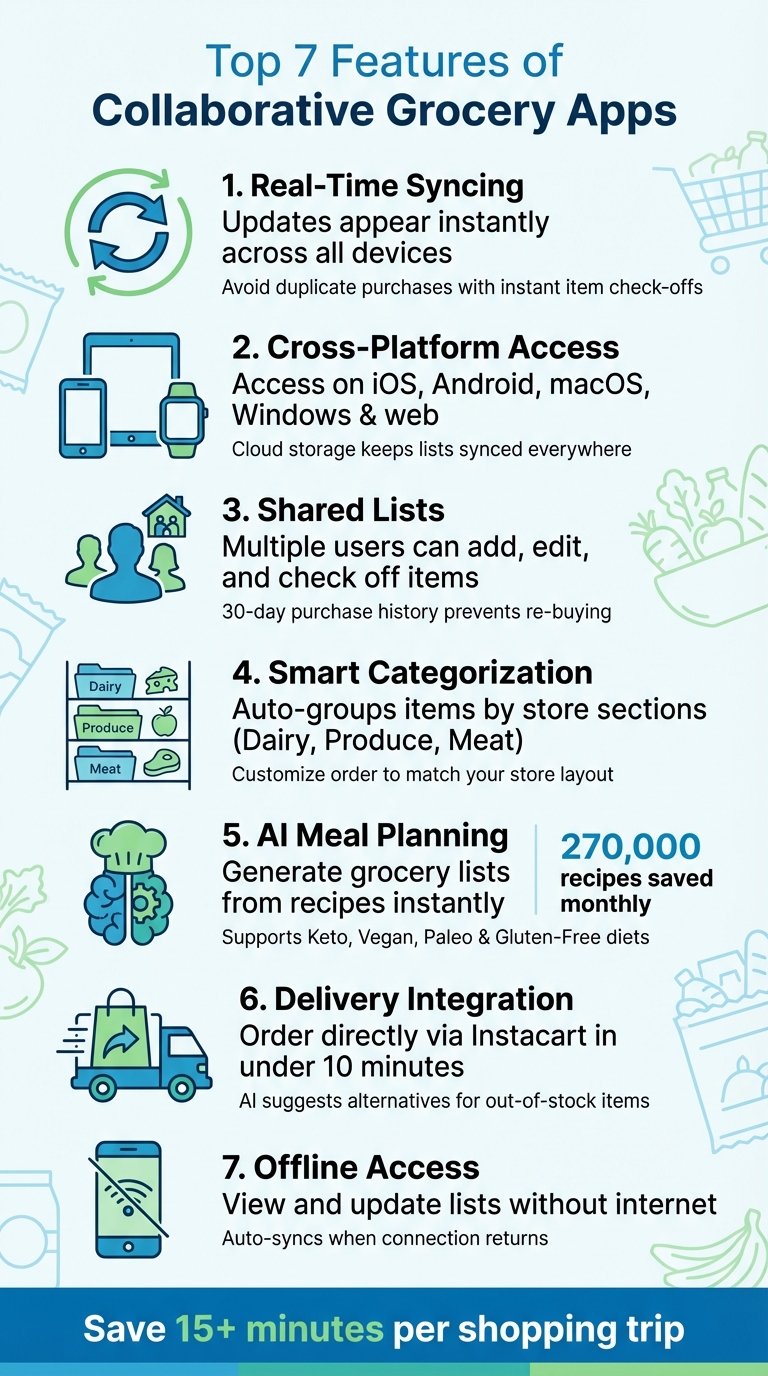
Collaborative grocery apps simplify household shopping by keeping everyone on the same page with shared, real-time lists. These apps eliminate miscommunications, reduce duplicate purchases, and streamline trips to the store. Key features include:
- Real-Time Syncing: Updates appear instantly across all devices, ensuring everyone sees the latest list.
- Cross-Platform Access: Use the app on smartphones, tablets, laptops, or even smartwatches for convenience.
- Shared Lists: Multiple users can add, edit, or check off items, promoting accountability and reducing errors.
- Smart Categorization: Items are automatically grouped by store sections, saving time during shopping.
- AI Meal Planning: Generate grocery lists directly from recipes and optimize based on household needs.
- Delivery Integration: Order groceries directly from the app via services like Instacart.
- Offline Access: View and update lists even without an internet connection.
These features make grocery management easier, faster, and more organized for families and roommates. Whether you’re meal planning, shopping in-store, or ordering delivery, these apps have you covered.
7 Essential Features of Collaborative Grocery Apps
Ultimate Shopping List in Google Keep (so easy to use!)

1. Real-Time List Updates
Imagine this: a family member adds "milk" to the grocery list, and within seconds, it pops up on everyone’s devices. This near-instant synchronization is powered by cloud technology, ensuring updates are reflected everywhere right away. No more second-guessing if someone remembered to add eggs or grabbed the bread.
The system also helps avoid duplicate purchases. As soon as one person checks off an item, like "apples", it’s marked as done across all devices. This instant feedback keeps everyone on the same page, making shared shopping lists much easier to manage.
Even those last-minute additions are hassle-free. If you're at the store and someone suddenly remembers pasta sauce, they can add it to the list, and you’ll see the update in real time. Many apps even send push notifications when changes are made, so you’re always in the loop.
Updates work seamlessly across multiple platforms - whether you’re using a web browser, a desktop app, or a voice assistant. No matter how you add or check items, the changes sync across the entire system instantly.
To get the most out of these features, make sure app notifications are turned on. This way, you’ll know right away when someone updates the list. Many apps also include a "hide crossed-off items" option that clears completed tasks from view, keeping the list neat and focused. These real-time updates not only simplify shopping but also set the stage for advanced features like dynamic notifications and smart categorization.
2. Cross-Platform Syncing
Collaborative grocery apps make it easy to keep your shopping lists updated across all your devices - whether you're using a laptop, tablet, or smartphone. Thanks to cloud storage, your account serves as a central hub, allowing you to access your lists from anywhere without worrying about losing them. This syncing not only keeps everything accurate but also enables smarter, more convenient features.
Each device plays its part. You can use a larger screen, like a laptop or tablet, for detailed meal planning, while your smartphone is perfect for quick edits or checking items off in the store. Some apps even work with smartwatches, like the Apple Watch, so you can mark items as bought right from your wrist - keeping your hands free for the cart or bags.
These apps are designed to work seamlessly across platforms, supporting iOS, Android, macOS, Windows, and even web browsers. To get the most out of this feature, make sure everyone in your household is signed into the same shared account. That way, everyone has access to the latest version of the list, no matter what device they’re using.
Cross-platform syncing not only simplifies your shopping but also lays the groundwork for even more advanced tools and features.
3. Shared Grocery Lists with Family and Friends
Using a shared grocery list can make managing household shopping so much easier. When everyone in the house has access to a single, centralized list, it’s a lot harder to forget important items. Plus, it encourages everyone to stay on the same page, cutting down on those pesky shopping mistakes.
One of the best parts? Real-time updates. If someone checks an item off the list, everyone else instantly knows it’s been taken care of. Some apps even keep a 30-day purchase history, so you can double-check if something was already bought before adding it again.
These apps also come with transparency tools that show who added or purchased an item, which helps keep everyone accountable. And for those picky about brands or sizes, you can attach photos of product packaging to make sure the right product ends up in the cart.
"The text that said 'Can you pick up shampoo?' on Tuesday will be forgotten by the time you're at the store on Saturday." – Shelby Brown, Editor, CNET
Getting everyone set up is simple, too. Many apps let you add household members with a quick QR code scan - no need to mess with manual invites. For example, Honeydew Recipe Manager allows you to share lists and recipes with up to six family members. It even creates a combined grocery list automatically when you’re planning meals, saving you time and effort.
4. Smart Categorization of Items
A jumbled grocery list can turn a quick shopping trip into a frustrating maze, forcing you to crisscross the store multiple times. Smart categorization solves this by automatically grouping your items into sections like Dairy, Produce, Meat, and Frozen Foods as you add them. This feature not only saves time but also lays the groundwork for personal tweaks to match your shopping habits.
Want to make it even better? You can reorder these categories to reflect your store’s layout. For instance, if your local store places "Produce" near the entrance and "Frozen Foods" toward the end, you can arrange your list accordingly. This way, you’ll follow a natural flow through the aisles instead of doubling back unnecessarily.
"AnyList suggests common grocery items as you type, and your items are automatically grouped into categories like Dairy, Produce, and Meat to make your trip through the store a breeze." – AnyList
Some apps take it a step further, allowing you to customize categories based on your preferences and even assign items to specific stores. This means you can filter your list to show only what’s relevant for a particular location. To simplify things even more, you can mark frequently purchased items as "Favorites", so they’re grouped automatically in future lists.
This smart organization ties seamlessly into features like real-time updates and cross-platform syncing, creating a smooth shopping experience. For example, Honeydew Recipe Manager takes this concept up a notch by generating categorized grocery lists directly from your meal plans. Ingredients are grouped logically, helping you navigate the store efficiently while keeping your shopping stress-free.
5. AI-Driven Meal Planning and Grocery List Creation
AI has taken the hassle out of weekly meal planning and grocery shopping. Gone are the days of spending hours hunting for recipes and jotting down ingredients. With AI-powered tools, you can create personalized meal plans in seconds, tailored to your household's dietary preferences. Whether you're into Keto, Vegan, Paleo, or Gluten-Free diets, these apps filter recipes to suit your needs and automatically generate a detailed shopping list with everything required.
What makes this even better is the efficiency and precision AI brings to the table. It scales ingredient quantities based on your household size, suggests smart substitutions for unavailable items, and prioritizes recipes that use what’s already in your pantry. This not only saves time but also reduces food waste and prevents duplicate purchases.
Take Honeydew Recipe Manager, for example. This app processes around 270,000 recipe saves every month, showing just how many people rely on AI to simplify their cooking routines. Honeydew’s AI can extract recipe details directly from social media posts, instantly adding them to your collection. It also organizes grocery lists by store sections, making shopping trips quicker and more organized.
"Our AI automatically extracts ingredients, instructions, and cooking details, saving them to your recipe collection in seconds." – Honeydew
On top of that, these tools foster collaboration within households. Honeydew allows up to six members to sync meal plans, vote on recipes, and update grocery lists in real time. Its AI assistant, "Ask Honey", even tweaks recipes based on feedback and preferences, acting as your personal cooking partner. It’s like having a smart sous-chef always ready to help.
6. Integration with Delivery Services
Taking smart grocery management to the next level, integration with delivery services transforms meal planning into a smooth, end-to-end process. Picture this: with just one click, you can turn your entire meal plan into a delivery order. Apps like Honeydew Recipe Manager make this possible by directly connecting with platforms like Instacart, allowing you to place an order in mere minutes. It’s the perfect bridge between planning and getting groceries to your doorstep.
When you import recipes from TikTok, Instagram, or any website, the app does the heavy lifting. It pulls the ingredients, organizes them into a neat, structured list, and even combines duplicates to show you exactly what you need. Once your list is good to go, you can send it straight to Instacart - no extra steps required.
But it doesn’t stop there. If you’ve been tracking your pantry, the app refines your order by removing items you already have in stock. This smart syncing not only saves you money but also helps cut down on food waste. And if something’s out of stock? No problem. Integrated AI steps in to suggest alternatives based on your dietary preferences and past purchases, so you’re not left scrambling for substitutions.
To make things even more efficient, the app organizes your list by store sections, matching how delivery services operate. This means a faster, more accurate shopping experience. You can review and tweak the details before finalizing your order, and with these tools, the entire process takes less than 10 minutes. It’s grocery shopping, simplified.
7. Offline Access and Usability
Ever walked into a large grocery store, only to find your cellular service vanish the moment you step inside? Thick walls and metal roofs can create frustrating dead zones, leaving you disconnected. That’s where offline access becomes your best friend. With this feature, you can still view your grocery list, check off items, adjust quantities, and even add notes - all without an internet connection.
Here’s how it works: apps with offline support save your list locally on your device. Any changes you make while offline are automatically synced as soon as you reconnect to the internet. So, whether you’re in the middle of a signal dead zone or just prefer to shop without distractions, your list stays up to date.
Want to make sure your app is ready for offline use? It’s easy to test. Before heading out, switch your phone to Airplane Mode and try accessing your list. See if you can open it, add items, or mark things as purchased. If everything works, you’re good to go. It’s also a smart move to open the app while still on Wi-Fi at home to ensure all updates from collaborators are downloaded before you leave.
Offline access keeps your shopping trip stress-free, even in areas with poor signal. It’s a reliable way to maintain control over your list and keep your focus on the task at hand - getting everything you need without missing a beat.
How These Features Improve Grocery Shopping
These shared features take grocery shopping to a whole new level, making it more efficient and less stressful. Miscommunication often leads to duplicate purchases or forgotten items, but real-time list updates solve this problem. When someone adds or removes an item, the entire group sees the change instantly. Plus, marking items as "purchased" keeps everyone in the loop, avoiding those frustrating moments when two people buy the same thing.
"Family List has been a game-changer for our household. No more duplicate purchases, no more forgotten items. My teenagers can add what they need, and whoever's at the store can grab it." – Sarah M.
Shared lists also make sure essentials are accounted for as soon as they start running low. With real-time syncing, you can save at least 15 minutes per shopping trip and even update the list hands-free using voice assistants . This level of convenience sets the stage for smarter tools like AI-driven meal planning.
By combining real-time updates with organized categorization, AI-driven meal planning simplifies the shopping process even further. When meal planning is uncoordinated, it often leads to confusion. AI tools eliminate this by consolidating ingredients from all recipes into a single, well-organized list. Take the Honeydew Recipe Manager, for example - it turns meal plans into shoppable lists with just one click on Instacart. This method not only helps avoid overbuying and cuts down on food waste but also keeps everyone informed about the week’s meals.
Another standout feature is the transparency in showing who added or checked off items. This fosters accountability and ensures better coordination, reducing the chances of mistakes when picking products. Together, these tools create a streamlined and well-organized grocery shopping experience.
Conclusion
Collaborative grocery apps are reshaping how households approach shopping by distributing the responsibility of maintaining the list among all members. This approach reduces the chances of forgotten items, avoids buying duplicates, and takes much of the stress out of meal planning and grocery trips. These tools don’t just make shopping easier - they create a more efficient and shared way to manage groceries.
The time saved is a game-changer. Features like smart aisle categorization cut down on unnecessary backtracking in the store, while location-based reminders ensure you won’t have to make that dreaded second trip for forgotten essentials like milk. Pair these with AI-powered meal planning - such as the functionality offered by Honeydew Recipe Manager - and you can turn recipes into tidy shopping lists, seamlessly order ingredients through Instacart, and keep everyone in your household on the same page.
"Honestly, this app changed our lives as we no longer have the frustrations of having to discuss what items we need, we just maintain it as we go." – Robhem
FAQs
How do shared grocery apps help avoid buying the same items twice?
Shared grocery apps make life easier by using a real-time synced list to prevent duplicate purchases. The moment someone marks an item as bought, the update is immediately visible to everyone sharing the list. This way, everyone knows what's already been picked up, avoiding the hassle of re-buying or accidentally adding the same items again.
These apps are a game-changer for households or groups, keeping everyone coordinated and making shopping smoother and more efficient.
Can I use a shared grocery app without an internet connection?
Many shared grocery apps let you access and update your lists even without an internet connection. Any updates you make while offline will sync automatically once you're back online. This feature is super handy for keeping tabs on your shopping needs, whether you're at home or stuck in a store with spotty signal.
How does AI-powered meal planning work in grocery apps?
AI-powered meal planning takes the hassle out of grocery shopping and meal prep by analyzing what’s in your pantry, your dietary needs, and your favorite recipes. It builds a virtual pantry by tracking what you already have - using tools like barcode scanning or manual input - and even notifies you when items are running low or about to expire. From there, it suggests recipes tailored to your available ingredients, dietary restrictions, and cooking schedule.
These tools go a step further by creating a weekly meal plan and a smart grocery list, organizing items by store sections to make shopping quicker and more efficient. In apps with collaborative features, meal plans update in real time as family members add or modify meals, keeping everyone on the same page. With extras like ingredient substitutions, nutrition tracking, and one-click grocery ordering through services like Instacart, these apps help minimize food waste and make meal planning easier for the entire household.



