How to Use AI for Social Media Recipe Insights
• Updated
Finding recipes on social media can be time-consuming. AI tools like Honeydew Recipe Manager simplify this process by transforming saved TikTok, Instagram, or YouTube recipe videos into organized, searchable cards. These tools extract ingredients, steps, and nutrition info automatically, saving you from manual transcription.
Here’s how AI makes it easier to manage recipes:
- Import recipes quickly: Share a video link or upload a screenshot, and AI generates a recipe card.
- Organize and search: Sort recipes by cuisine, cooking time, or dietary needs.
- Save time meal planning: AI suggests meal plans, scales portions, and creates grocery lists.
- Track engagement: AI analyzes trends, like popular ingredients or cooking styles, to inspire your next meal.
With over 18,000 users, Honeydew Recipe Manager is a user-friendly tool for turning social media recipes into actionable meal plans while reducing decision fatigue and food waste.
How to Import Recipes from Social Media Using AI
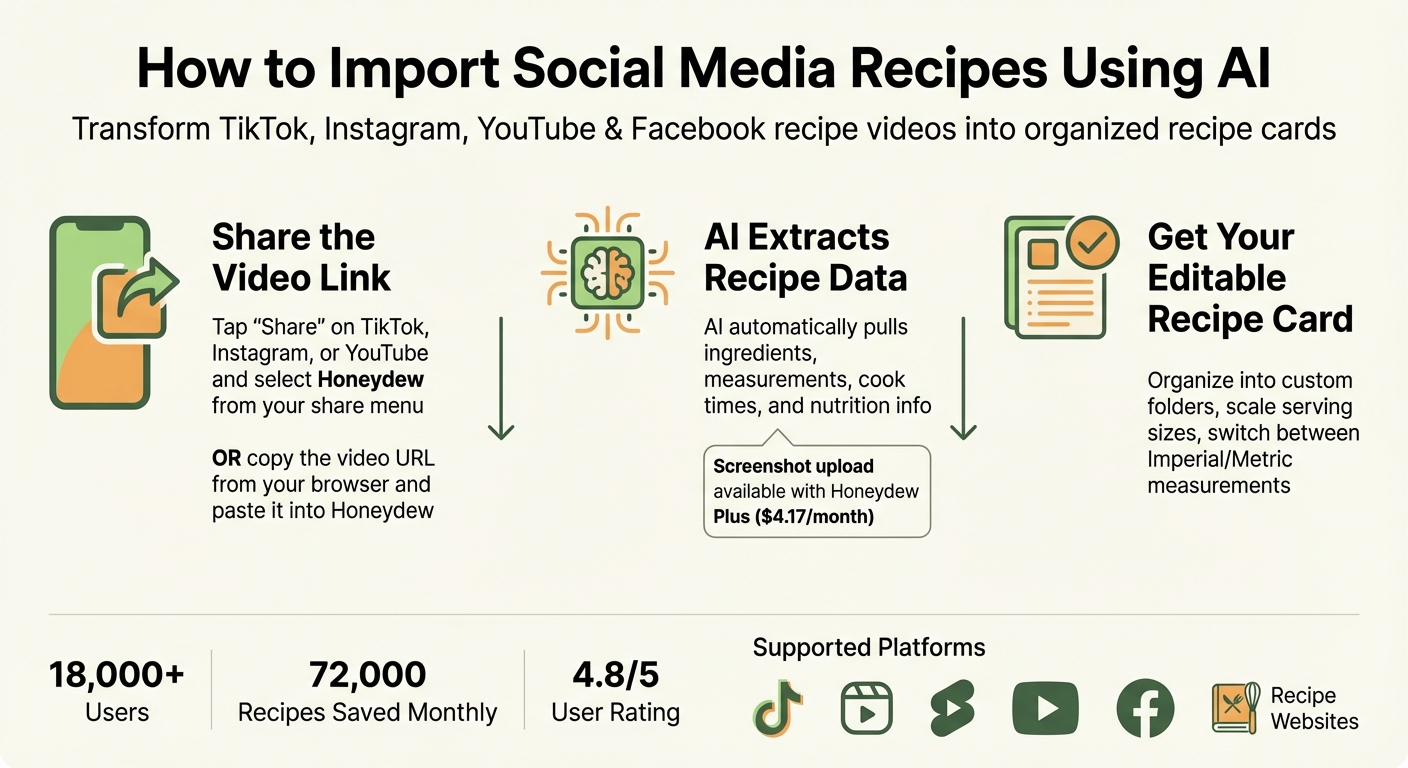
How to Import Social Media Recipes Using AI in 3 Simple Steps
Honeydew Recipe Manager makes it easy to transform social media recipe videos into searchable, organized recipe cards. Whether you're browsing TikTok, Instagram Reels, YouTube Shorts, or Facebook Reels (plus select recipe websites), Honeydew has you covered. With over 18,000 users saving around 72,000 recipes every month, it’s quickly become a go-to tool for grabbing viral food content.
The app’s AI is designed to pull out the essentials: accurate measurements, cook times, and nutrition details like calories and macros. It eliminates distractions like ads and lengthy introductions, leaving you with just the recipe. As Maya R., a verified Honeydew user, puts it:
"I just share the Reel link and suddenly I have a clean ingredient list and instructions without the 10-page blog story. It's like magic for anyone who spends way too much time on food-tok."
This process ensures you get all the details you need without the fluff.
Step-by-Step Recipe Import Process
Importing recipes with Honeydew is straightforward. If you’re sharing directly from TikTok, Instagram, or YouTube, just tap "Share" on the video and select Honeydew from your share menu. The AI will instantly process the content and create an editable recipe card. Prefer to do it manually? Copy the video URL from your browser or app and paste it into Honeydew.
For recipes shared as images - like text in a video frame or an Instagram infographic - you can take a screenshot and upload it. If you’re subscribed to Honeydew Plus ($4.17/month), the AI scanner will convert the image into a structured recipe card in seconds. Alex D., another verified user, shares:
"The AI scanner turns my random screenshots into actual meals in seconds."
Once imported, recipes are saved as editable cards that can be organized into custom folders by cuisine, dietary preferences, or meal type. The app also lets you scale serving sizes and switch between Imperial and Metric measurements, making it simple to adjust portions to fit your needs. This seamless process not only saves time but also sets the stage for more efficient meal planning and data-driven insights.
Using AI to Extract and Organize Recipe Information
Honeydew Recipe Manager uses advanced AI to turn recipe videos into structured, easy-to-use data. It begins by extracting transcripts from platforms like TikTok, Instagram Reels, and YouTube, analyzing spoken instructions with precision. Through natural language processing (NLP), the AI organizes this text into clear categories, separating ingredients, measurements, and cooking methods.
For videos with text overlays, the app employs optical character recognition (OCR) to read text from video frames or Instagram infographics. By combining video, image, and text data through multi-modal analysis, the AI identifies cooking techniques and even timestamps instructions. This allows users to jump directly to specific moments in a video where techniques are demonstrated. The resulting structured data provides a foundation for deeper analysis and personalized meal planning.
Once the information is extracted, it’s formatted into editable recipe cards. These cards include essential details like titles, prep times, serving sizes, and nutritional information. Honeydew Recipe Manager also calculates calories and macros - covering protein, fat, carbs, and fiber - based on the ingredients and serving sizes. As Michael B., a verified Honeydew user, shares:
"The calorie and macro calculator has helped me stick to my health goals while still enjoying great meals."
AI Features for Recipe Data Extraction
While the basic features organize recipes into editable cards, the Honeydew Plus subscription ($4.17/month) takes it a step further with tools designed for professional-level recipe management. One standout feature is the Copycat Recipe Generator, which allows users to snap a photo of a restaurant dish and receive a customized home-cooked version with ingredients and instructions. The Auto Calorie and Macro Calculator simplifies nutrition tracking by automatically estimating protein, fat, carbs, and fiber.
Other helpful tools include ingredient scaling, which adjusts quantities and converts between Imperial and Metric measurements - perfect for international recipes or larger gatherings. The app also suggests smart substitutions, offering alternatives for missing ingredients or dietary preferences, such as dairy-free or keto-friendly options. These features transform raw social media content into practical, tailored cooking resources that fit your needs. With recipes efficiently extracted and organized, you can focus on creating meals while considering your audience’s preferences.
Analyzing Audience Preferences and Engagement Data
AI takes the guesswork out of understanding audience preferences by tracking likes, shares, comments, views, and overall reach. Instead of manually scrolling through TikTok, Instagram Reels, or YouTube Shorts, AI dives deep into engagement data to uncover trends in popular ingredients, cooking styles, and diet preferences - saving you 10–15 minutes per recipe search.
But it doesn’t stop at surface-level metrics. Large Visual Memory Models (LVMM) analyze millions of hours of video content, identifying specific elements like ingredients, cooking methods, and even editing styles that resonate with viewers. For instance, AI can determine if your audience prefers fast-paced cuts over longer, detailed tutorials. It also scans comment sections to gauge sentiment, identifying what viewers love - or don’t - about a recipe or cooking approach. Malena Roche, Senior Strategy and Insights Consultant at Battenhall, highlights this capability:
"I've found AI really useful within social listening, particularly for sentiment analysis... I can tell ChatGPT to focus on the aspect: negative for athleisure, positive for Farm Rio."
AI tools also automatically categorize recipes into themes like "quick meals", "vegan", or "desserts", helping you identify which categories are driving the most engagement, saves, and shares. By spotting fast-growing channels or emerging visual styles, AI allows you to stay ahead of the curve and catch trends before they become mainstream. These insights provide a solid foundation for deeper analysis of social media trends.
Extracting Social Media Trends
AI takes raw engagement data and turns it into actionable insights, pinpointing the elements that make recipe videos go viral. It examines everything from video hooks and pacing to sound design and editing techniques that boost likes and shares. Even spoken content is searchable - AI transcribes audio to identify ingredients, substitutions, or dietary notes that might not be included in the video title or description.
By focusing on per-follower engagement, AI identifies content that truly connects with audiences. It highlights posts that perform significantly above or below average, revealing unique factors - like a particular ingredient or a trending audio clip - that drive engagement. Gemma Persello, Senior Social Media Strategist at Magnetic Creative, shares her perspective:
"Sometimes a post might go viral because it tapped into a meme or trend we didn't plan for. Other times, we might notice over several months that recipe videos on Instagram consistently perform best."
These insights are more than just interesting - they’re practical. For example, Honeydew Recipe Manager uses AI to organize trending recipes based on popularity, ingredients, and cooking styles. With a 4.8/5 user rating from over 18,000 users, the app allows you to import recipes from any social platform and automatically structures them into meal plans tailored to your needs. It’s a seamless way to turn data into delicious, usable meal ideas.
Applying Recipe Insights to Meal Planning
Transforming viral social media recipes into practical, editable formats has never been easier. With Honeydew Recipe Manager, you can convert trending recipes into structured recipe cards that include all the essentials - ingredients, measurements, cooking times, and even nutrition details. Thanks to its AI, this process is automated, eliminating the need for manual transcription. These well-organized recipe cards serve as the foundation for creating tailored meal plans.
Once imported, these recipes integrate seamlessly into AI-driven meal calendars. The system generates weekly menus tailored to your dietary preferences - whether you're following keto, low FODMAP, or high-protein guidelines. By organizing popular recipes into a cohesive schedule, Honeydew saves you hours of meal-planning effort. And if you want even more control, advanced customization options allow you to fine-tune your plans further.
The app doesn’t stop there. It suggests ingredient swaps to accommodate allergies or dietary restrictions, scales recipes to match your desired serving sizes, and instantly updates ingredient quantities and grocery lists. Using natural language processing (NLP) and computer vision, Honeydew categorizes recipes by cuisine, cooking method, and dietary suitability, making them easy to search and incorporate into your plans. With over 23,456 users rating it 4.8/5, the app saves approximately 90,000 recipes each month. Users report that it cuts decision fatigue by up to 70% and saves them around 5 hours per week.
Customizing Meal Plans with AI
Beyond automating schedules, Honeydew takes personalization to the next level. Its AI crafts meal plans based on your calorie and macronutrient goals - like a 40% carbs, 30% protein, and 30% fat breakdown - ensuring that recipes align with your nutritional needs. If your diet is lacking in a specific area, such as protein, the system identifies the gap and suggests recipe adjustments to keep you on track. This dynamic scaling improves portion accuracy by 25–40% compared to manual estimates.
Grocery planning becomes effortless with Honeydew’s automation tools. Once your meal plan is finalized, the app generates aisle-sorted grocery lists that sync with your pantry inventory, preventing duplicate purchases and cutting down on food waste. Its "Pantry Mode" lets you take photos of your fridge or pantry, enabling the AI to identify what you already have and what’s missing for your chosen recipes. By prioritizing recipes that use ingredients you already own, households can save up to $125 per month and reduce food waste by as much as 40%.
For even more control, users can manually exclude ingredients they already have when adding items to their grocery cart. And with its Instacart integration, Honeydew makes it incredibly convenient to turn a viral TikTok recipe into a fully stocked kitchen - ingredients delivered with a single click. As registered dietitian Liz Weiss explains:
"AI is inspiration. The apps are for the math".
Tracking and Refining Your Meal Planning Strategy
With AI-driven tools, meal planning becomes an evolving process, adapting to your cooking habits, ingredient usage, and nutritional goals. Honeydew Recipe Manager takes this a step further by offering built-in nutrition and macro tracking. It automatically calculates calories and macros, giving you a clear picture of how your meals align with your health objectives. For instance, if you're consistently missing your protein target or consuming too many carbs, you can easily tweak your plans to stay on track. This seamless tracking pairs perfectly with Pantry Mode, a feature designed to make the most of your ingredients.
Pantry Mode is a game-changer for reducing food waste and simplifying meal decisions. By simply snapping a photo of your fridge or pantry, the AI identifies available ingredients and recommends recipes that prioritize perishables before they expire. This approach not only saves money but also takes the guesswork out of meal prep when your fridge looks chaotic.
Keeping everyone in the household on the same page is another key benefit. Honeydew's real-time synchronization allows up to six users to share meal plans and grocery lists, eliminating duplicate purchases and miscommunication. With over 18,000 downloads and a stellar 4.8/5 rating from more than 1,000 users, the app has earned its place as a reliable tool for streamlining weekly routines.
Advanced Features for Continuous Improvement
Honeydew goes beyond basic meal planning with advanced features that refine and expand your cooking experience. The cookbook translator, for example, lets you digitize and organize recipes from around the world with a single tap, making it easier than ever to explore global cuisines. If you're unsure what to make, the AI assistant chat interface can turn vague meal ideas into structured recipes through a conversational approach.
Additional tools ensure convenience during meal prep. Offline access to pantry lists and recipes means you're not reliant on an internet connection, and the no screen lock feature allows uninterrupted use while cooking. For those aiming to establish a regular routine, the Smart Sunday Reset automates grocery list creation, sorting items by store aisle to simplify your shopping trips.
For just $4.17 per month, Honeydew Plus unlocks these advanced features, turning meal planning from a tedious task into an intuitive system that gets better the more you use it.
Conclusion
AI is reshaping how we discover, save, and prepare recipes from social media. Instead of painstakingly scrolling through saved videos or typing out ingredients, AI can instantly transform video content into neat, editable recipe cards. No more wading through endless blog posts or intrusive ads - this technology streamlines the process.
The Honeydew Recipe Manager brings all these AI advancements together in one user-friendly platform. With strong user reviews to back it up, the app automatically pulls ingredients, cooking times, and nutritional details from social media content. It allows users to import recipes from TikTok, Instagram, YouTube, or any website with just a tap, organizing them into a searchable, shareable digital cookbook that syncs across up to six family members.
What makes this even more practical is how the app turns imported recipes into actionable meal plans. AI-generated meal plans cater to your dietary needs, and grocery lists are sorted by store aisles to save time. Through Instacart integration, you can order all your ingredients directly, while Pantry Mode suggests recipes based on what you already have at home - cutting down on waste and making dinner decisions easier.
"I used to have a 'Saved' folder on TikTok full of recipes I never actually made. Honeydew changed everything! I just share the Reel link and suddenly I have a clean ingredient list and instructions without the 10-page blog story." - Maya R., Verified User
FAQs
How accurate is AI in extracting ingredients and steps from recipe videos?
AI has reached a point where it can efficiently extract ingredients and steps from recipe videos using advanced speech recognition and natural language processing. It can pick up on crucial details like ingredient lists, measurements, and cooking instructions with impressive precision. That said, factors like poor video quality, muffled audio, or overly complex presentations can still pose challenges. In such cases, a quick manual review might be necessary to ensure everything is captured correctly.
What should I do if the imported recipe card is missing details or has errors?
If an imported recipe card has missing details or errors, you can fix it manually by editing the recipe yourself. Another option is to use the 'Ask Honey' AI assistant in the Honeydew Recipe Manager. Just choose the right option, and you’ll be able to make adjustments fast and hassle-free.
How can I use AI trend insights to pick recipes my audience will actually make?
AI tools are great at spotting viral recipe trends on social media. By analyzing popular hashtags, engagement stats, and trending videos, they can uncover what’s buzzing online. These insights help you pick recipes that your audience will love. On top of that, AI can tailor recommendations to match individual preferences, dietary restrictions, and even cooking skill levels. This means the recipes you share are not only relevant but also more likely to be tried and enjoyed.



