Voice Assistants for Meal Planning: Pros and Cons
• Updated
Voice assistants like Amazon Alexa, Google Assistant, and Apple Siri can simplify meal planning with hands-free features. From finding recipes to setting timers, they save time and reduce effort in the kitchen. However, each has its strengths and weaknesses:
- Amazon Alexa: Best for recipe variety (60,000+ options), grocery integration (Amazon Fresh/Whole Foods), and smart device compatibility. It excels at hands-free cooking with visual guides on Echo Show but may repeat similar recipes and struggle with accents.
- Google Assistant: Strong in voice recognition and general knowledge, with efficient grocery list organization. However, it no longer offers step-by-step recipe guidance or personal cookbooks, limiting its use for cooking.
- Apple Siri: Focuses on privacy, processes most requests on-device, and integrates well with Apple’s ecosystem. While it suggests recipes from your emails or photos, its smaller recipe database and reliance on browser searches can disrupt the flow.
Quick Comparison
| Feature | Amazon Alexa | Google Assistant | Apple Siri |
|---|---|---|---|
| Recipe Database | 60,000+ recipes | Web-wide discovery | Smaller, context-based |
| Step-by-Step Cooking | Yes (Echo Show) | No | No |
| Grocery Integration | Amazon Fresh/Whole Foods | Interactive lists | Requires app-specific commands |
| Privacy Focus | Moderate | Moderate | High |
| Smart Device Support | 100,000+ devices | 50,000+ devices | 1,000+ HomeKit devices |
While Alexa leads with features, Siri prioritizes privacy, and Google Assistant offers broad web integration. For a smoother experience, pairing these with a specialized app like Honeydew Recipe Manager can fill gaps in recipe organization and grocery planning.
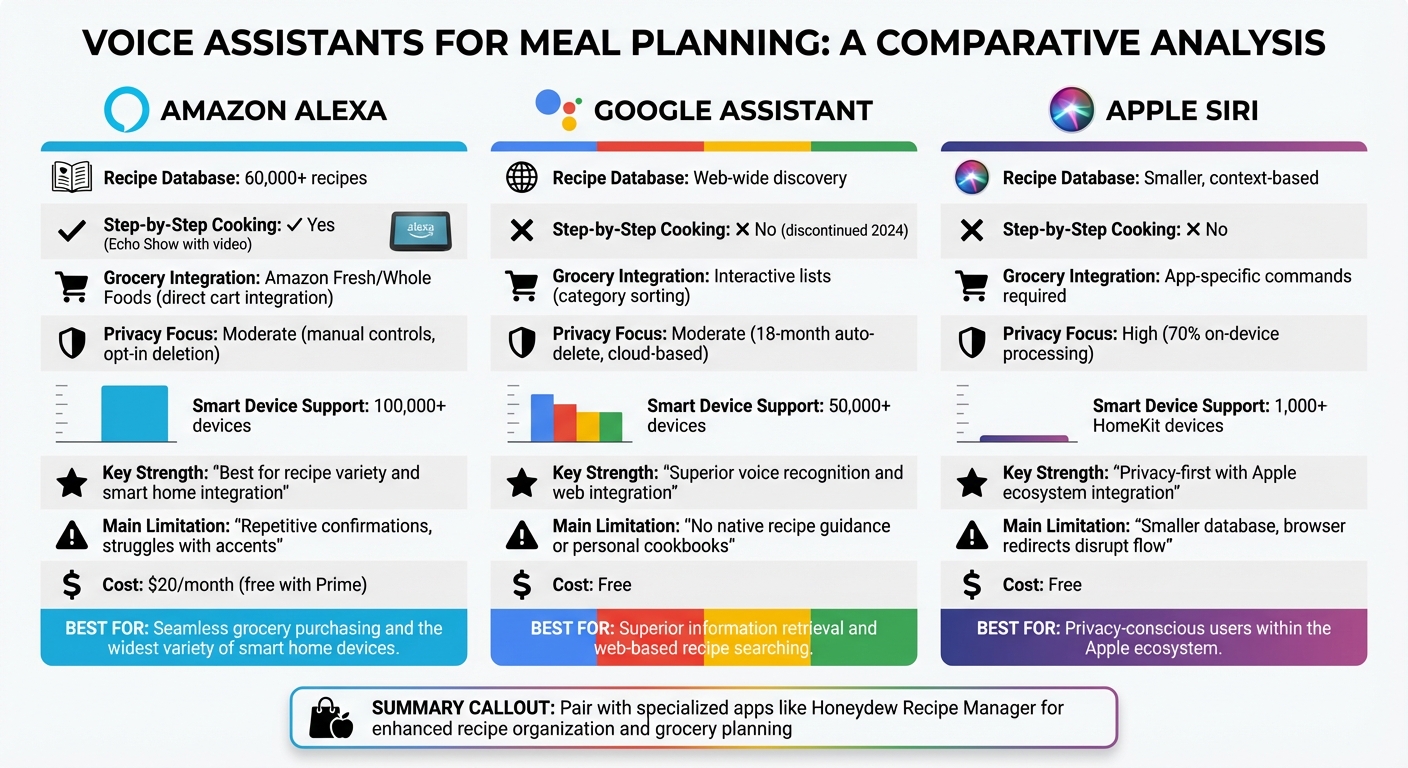
Voice Assistants for Meal Planning: Feature Comparison Chart
1. Amazon Alexa

Meal Planning Features
Amazon Alexa offers access to over 60,000 recipes through skills like Allrecipes, Food Network Kitchen, and Tasty. If you own an Echo Show, you can follow recipes hands-free with step-by-step video guidance - perfect for when your hands are busy. Alexa reads the directions aloud and displays visual guides featuring chefs like Bobby Flay and Alex Guarnaschelli.
You can search for recipes based on what’s in your fridge or tailor them to dietary needs. For example, you could say, “Find a chicken curry recipe without dairy”. Alexa also simplifies kitchen tasks with features like measurement conversions, multiple timers, and ingredient substitutions. Plus, the "Save The Food" skill helps you track how long your groceries will stay fresh and warns you before they expire. These tools make Alexa a helpful companion for meal prep and planning.
Integration with Apps
Alexa works seamlessly with meal planning apps like AnyList. You can ask, “Alexa, what’s on my meal plan for tomorrow?” and get an immediate update. The Alexa+ version, launched in 2025/2026, even lets you digitize handwritten family recipes. Just snap a photo or email them to alexa@alexa.com, and the assistant will convert them into a searchable recipe library. Since its launch, Alexa+ users have turned to the assistant for recipe guidance five times more often than with earlier versions.
For grocery shopping, Alexa integrates with Whole Foods Market and Amazon Fresh, allowing you to add all the ingredients from a recipe directly to your cart for delivery or pickup. Orders over $35 qualify for free curbside pickup. You can also reorder from Domino’s, Grubhub, or Starbucks using simple voice commands.
Privacy and Security
Alexa collects data like voice requests, shopping history, and even sensory information from devices to personalize your experience. However, the assistant occasionally misinterprets its wake word, unintentionally recording conversations. Amazon employees may review audio clips to improve functionality, though you can opt out of this.
To safeguard your privacy, you can use the physical mute button on your Echo device when needed. Setting a four-digit voice PIN or disabling voice purchasing altogether can prevent unauthorized orders from kids or guests. Additionally, Alexa allows you to configure auto-deletion of your voice recordings every 3 or 18 months.
Limitations
Alexa sometimes struggles to understand certain accents or dialects, which can lead to frustration during voice commands. Additionally, the assistant tends to repeat similar recipes, limiting variety. Another common issue is the lack of an easy way to filter recipes by skill level, which can make some options feel overly complicated. The Alexa+ subscription costs $20 per month, but it’s included at no extra charge for Amazon Prime members.
2. Google Assistant

Meal Planning Features
Google Assistant has shifted its focus from guided cooking to broader recipe discovery. While you can still ask it to find recipes, the assistant no longer offers step-by-step cooking instructions. Previously, it provided hands-free access to over 5 million recipes from publishers like The New York Times and Food Network. However, by 2024, Google phased out these guided features, including the option to maintain a personal cookbook.
That said, the assistant still handles essential kitchen tasks like setting timers, converting measurements, and even playing music or podcasts to keep you entertained while cooking. Looking ahead, Google plans to upgrade the mobile Assistant experience to Gemini by March 2025, promising more advanced AI capabilities for daily tasks.
Integration with Apps
The changes in recipe guidance have also influenced how Google Assistant integrates with other apps. It now works seamlessly with third-party meal planning platforms, allowing users to open apps with voice commands like "open [App Name]." Additionally, it can create interactive grocery lists by voice, sorting items into categories like produce or dairy to make shopping more efficient. For those with smart kitchen appliances, the assistant supports voice control for devices such as ovens, slow cookers, and instant pots.
Privacy and Security
One concern with voice assistants is unintended audio recording. Google Assistant can sometimes record snippets of conversations if it mistakenly hears its wake word. Fortunately, you can delete these recordings by simply saying, "Hey Google, that wasn't for you". If the "Web & App Activity" setting is enabled, Google may store text-based interactions to personalize your experience, but audio recordings are not saved on servers by default.
"Google never sells your audio recordings or other personal information." - Google Safety Center
For added privacy, you can activate Guest Mode by saying, "Hey Google, turn on Guest Mode", which ensures your recipe searches remain private. The assistant also provides auto-delete options for activity data, allowing you to choose intervals of 3, 18, or 36 months. With Voice Match, you can secure your personal meal plans and shopping lists, ensuring access is restricted to your recognized voice. While these privacy features are helpful, they don't entirely make up for the reduced functionality.
Limitations
Google Assistant has retired several features that users found helpful. The loss of a personal cookbook, the ability to transfer recipes between devices, and the option to play instructional recipe videos has left many users disappointed. The removal of step-by-step guided cooking on smart displays has been a particular pain point for some. Now, instead of offering native recipe management, the assistant primarily directs users to search the web or watch videos on YouTube.
3. Apple Siri
Meal Planning Features
Siri takes a different approach to meal planning by focusing on your personal context rather than relying on an expansive recipe database. It can sift through your Mail, Messages, and Notes to locate shared recipes. With Visual Intelligence, Siri can even analyze photos of your fridge to suggest recipe ideas based on what's available through AI meal planning with pantry integration. Plus, Siri’s onscreen awareness lets you interact with a recipe displayed in Safari without needing to switch between apps.
These thoughtful features make Siri a handy companion for integrating with your favorite meal planning tools.
Integration with Apps
Siri uses App Shortcuts and the Shortcuts app to simplify tasks like logging meals, checking calorie goals, viewing weekly menus, or setting up custom automations and optimizing ingredient prep (e.g., logging meals when you arrive home). To explore available commands for any app, navigate to Settings > Siri & Search > [App Name]. When adding items to third-party grocery apps, make sure to specify the app name. For example, say, "Add [item] to my list using [App Name]" to prevent Siri from defaulting to the Reminders app.
This level of integration streamlines daily workflows, but Siri’s emphasis on privacy gives it an edge over other assistants.
Privacy and Security
Siri stands out by prioritizing on-device processing for most requests, enhancing user privacy. Apple ensures that any data leaving your device is anonymized using a random identifier that changes frequently, rather than linking it to your Apple Account or email address. Unlike some competitors, Apple does not use Siri data to create marketing profiles or sell your information to third parties.
"Apple does not use Siri transcripts or request data to build marketing profiles, and this information is never sold to third parties."
– Apple Privacy Documentation
You can delete your Siri history anytime by heading to Settings > Siri > Siri & Dictation History. Additionally, Apple does not store audio recordings by default unless you choose to opt into the "Improve Siri and Dictation" program in your privacy settings.
Limitations
Siri isn’t without its quirks. It sometimes struggles to recognize certain third-party app names, and some meal planning apps suggest using shorter, simpler names to avoid confusion. Siri also requires precise phrasing, which can make interactions feel less natural. While Apple Intelligence (available on iOS 18+ with compatible devices) improves Siri’s ability to handle follow-up queries, it still lacks native recipe management features that would make it a fully dedicated meal planning assistant. These limitations can occasionally interrupt the otherwise smooth experience Siri aims to deliver.
Pros and Cons
Each virtual assistant brings its own set of strengths and challenges to the table, especially when it comes to helping out in the kitchen. For more home cooking and meal planning tips, explore our latest guides.
Amazon Alexa offers a massive advantage with its library of over 10,000 specialized cooking skills. These skills make ingredient-based searches a breeze, helping you find recipes that cater to specific dietary needs or use up what you already have on hand. It also integrates seamlessly with smart kitchen devices. However, Alexa can sometimes be frustrating with redundant confirmations during tasks like updating grocery lists.
Google Assistant shines in its ability to pull recipes from across the web and handle complex, multi-part queries. It can even scan your emails for context and offer proactive suggestions, which is perfect for busy home chefs. That said, it can sometimes overwhelm users with too much information for simple questions. It also processes most data in the cloud and supports fewer third-party skills compared to Alexa.
Apple Siri is known for its strong focus on privacy, with around 70% of basic commands processed directly on your device. It works effortlessly within the Apple ecosystem and handles routine kitchen tasks like setting multiple timers and converting measurements with ease. On the downside, Siri’s recipe database is smaller, and it often redirects you to a browser instead of providing direct answers. Additionally, it supports fewer devices - about 1,000 HomeKit-compatible options.
| Feature | Amazon Alexa | Google Assistant | Apple Siri |
|---|---|---|---|
| Meal Planning Features | Ingredient-based searches; 10,000+ cooking skills | Web-wide recipe discovery; personalized suggestions based on history | Basic recipe search; reliable timers and measurement conversions |
| Integration with Apps | 100,000+ smart devices; Amazon Fresh/Whole Foods integration | 50,000+ devices; deep integration with Google Workspace/Calendar | 1,000+ HomeKit devices; uses "Shortcuts" for custom workflows |
| Privacy and Security | Manual controls; opt-in for auto-deletion of recordings | Auto-deletes recordings after 18 months; mostly cloud-based | Processes 70% of requests on-device; strong privacy focus |
| Limitations | Repetitive confirmations; struggles with natural conversation flow | Can overwhelm with excessive details; fewer third-party skills than Alexa | Smaller recipe database; browser links disrupt voice UI |
These features illustrate how each assistant caters to different priorities in the kitchen.
The hands-free functionality of these devices is a game-changer for hygiene and convenience - especially when your hands are covered in flour or handling raw chicken.
Using Voice Assistants with Meal Planning Apps
Pairing voice assistants with a dedicated meal planning app can significantly improve your kitchen workflow. While Alexa, Google Assistant, and Siri each bring unique strengths, their functionality becomes even more powerful when connected to an app like Honeydew Recipe Manager. This combination bridges gaps in recipe organization, grocery planning, and meal scheduling.
Honeydew’s "Talk to AI" feature is a standout. It allows you to create a weekly meal plan using voice commands. Whether you follow a keto, vegan, or gluten-free diet, the AI generates a tailored plan in seconds. Plus, it automatically organizes a grocery list by store departments, which you can send directly to Instacart. This streamlined process removes the hassle of juggling multiple apps or manually managing lists.
The app also makes it easy to import recipes from platforms like TikTok, Instagram, YouTube, and Facebook Reels. With its "no screen lock" setting, your device stays active while you cook, letting you manage recipes hands-free. You can ask questions like, "What's in my grocery list?" or request ingredient substitutions without interrupting your cooking flow. These features transform meal planning into a seamless experience.
Honeydew’s voice logging feature saves time, cutting 40–60 seconds per entry compared to typing. Users of its voice-activated nutrition tools report 65% higher tracking consistency. With over 100,000 downloads and a 4.8/5 star rating on Google Play, Honeydew shows how voice technology and smart apps can create a truly hands-free kitchen experience.
Conclusion
Each voice assistant brings its own strengths and weaknesses to the table:
- Amazon Alexa: Works seamlessly with smart home devices but often processes commands individually, lacking deeper integration.
- Google Assistant: Excels in voice recognition but, as of 2024, no longer supports native meal-planning tools like personal cookbooks.
- Apple Siri: Focuses on privacy with local data processing but offers a smaller recipe library compared to its competitors.
However, a shared challenge among all these platforms is their difficulty in maintaining conversational context. As Razan Jaber and colleagues point out:
"Many of the common problems associated with conversational interaction, such as irrelevant responses, misinterpretation of requests, and information overload, can be traced back to a lack of awareness of the conversational context".
This issue becomes particularly frustrating during multi-step cooking tasks, where assistants struggle to track progress through a recipe.
Enter Honeydew Recipe Manager - a solution designed to address these gaps. By providing structured data and retaining conversational context, Honeydew enhances the hands-free cooking experience. Its AI-powered meal planner creates tailored weekly menus, while its no-screen-lock feature ensures your device stays active throughout the cooking process.
The result? A seamless blend of tools. Voice assistants manage quick tasks like setting timers or converting measurements, while Honeydew handles the heavy lifting - organizing recipes, accommodating dietary needs, and keeping track of ingredients. Together, they transform meal planning from a fragmented process into a smooth, personalized workflow.
FAQs
Which voice assistant is best for hands-free, step-by-step cooking?
Google Assistant stands out as a top choice for hands-free, step-by-step cooking guidance. It can read recipes aloud and walk you through each step with ease, making it especially handy when you're in the middle of cooking and prefer not to touch your device.
How can I use a voice assistant to build a grocery list from recipes?
You can easily create a grocery list using a voice assistant by giving simple voice commands. For instance, while checking a recipe, you could say, "Add chicken to my shopping list", and it’ll be added instantly. This hands-free feature is especially helpful when you're busy cooking or juggling other tasks. For an even smoother experience, make sure your voice assistant works with your favorite meal planning app.
How do I reduce accidental recordings while cooking with a voice assistant?
To avoid accidental recordings while cooking, consider muting or disabling the microphone when you’re not actively using it. Most voice assistants include privacy settings that allow you to turn off voice activation or completely mute the device. It’s a good idea to periodically review and update these settings to control when the assistant listens and records, helping you maintain privacy during sensitive moments.



