Wi-Fi vs Bluetooth: IoT Kitchen Device Connectivity
• Updated
Wi-Fi and Bluetooth are the two main technologies powering smart kitchen devices. Each has strengths and weaknesses depending on your needs. Here's a quick breakdown:
- Wi-Fi: Best for high-bandwidth tasks like streaming or cloud-based features. It offers long range and internet connectivity but uses more power and requires a stable home network.
- Bluetooth: Ideal for low-power, short-range devices like meat thermometers or kitchen scales. It’s easy to set up and energy-efficient but lacks internet connectivity and has limited range.
Key Takeaways:
- Wi-Fi: Perfect for stationary appliances like ovens and refrigerators that need constant internet access.
- Bluetooth: Great for portable, battery-powered tools that need simple, close-range communication.
Quick Comparison
| Feature | Wi-Fi | Bluetooth |
|---|---|---|
| Range | 15–45 meters indoors | 10–20 meters indoors |
| Power Usage | High (200–300 mA) | Low (10–15 mA) |
| Data Speed | Up to 9.6 Gbps | 1–2 Mbps |
| Setup | More complex (SSID/password) | Simple pairing |
| Best For | Ovens, fridges, cameras | Meat thermometers, scales |
Bottom Line: Choose Wi-Fi for devices that need internet access and Bluetooth for energy-efficient, short-range tools.
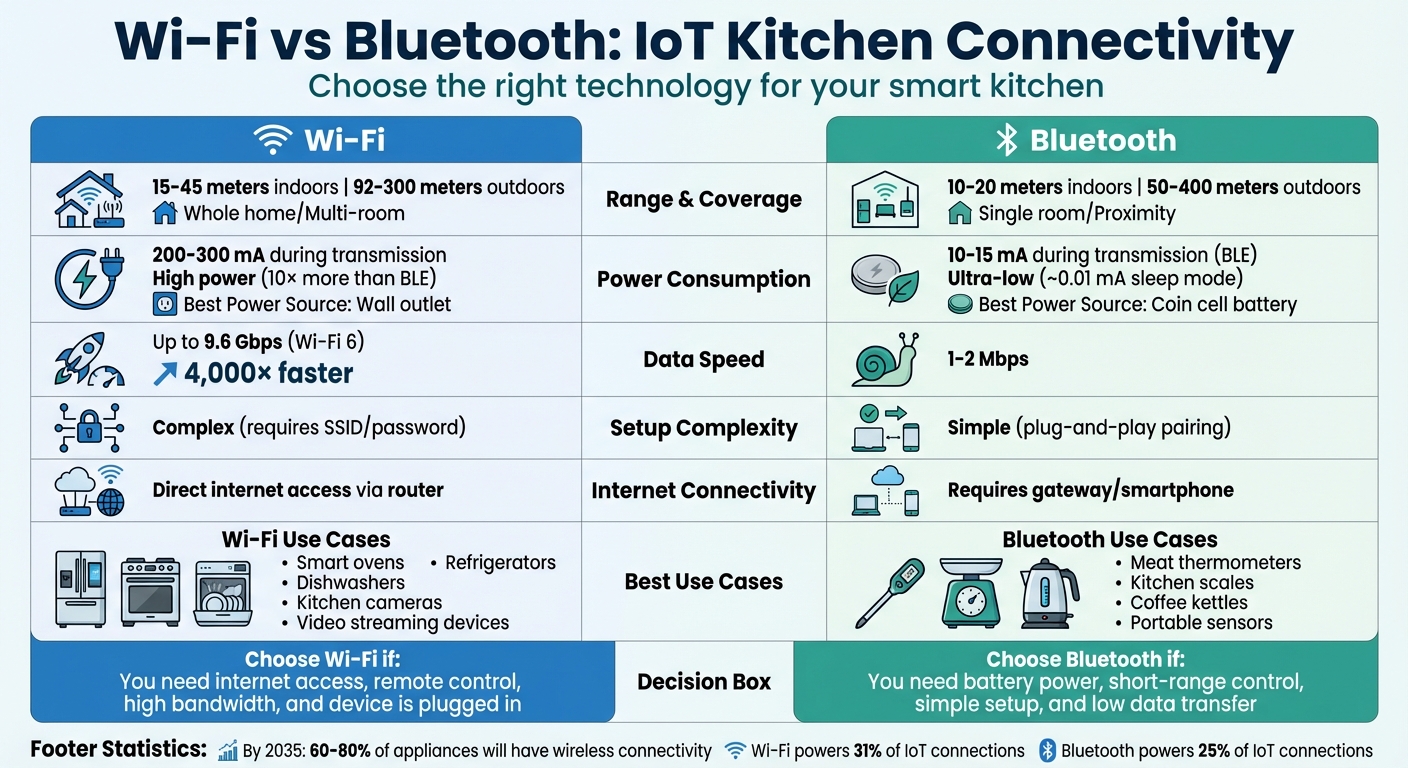
Wi-Fi vs Bluetooth for IoT Kitchen Devices: Complete Comparison Chart
Bluetooth vs. WiFi for Your IoT Project: What Technology to Choose?
Wi-Fi Connectivity in IoT Kitchen Devices
Wi-Fi has become the go-to connectivity option for many smart kitchen appliances. By connecting directly to the internet through your home router, these devices eliminate the need for an intermediary gateway. This means you can control your kitchen gadgets from anywhere, not just when you're physically in the room.
"Any WiFi-enabled device can connect directly to the Internet, meaning it can interact with cloud services or other devices on the network without extra hardware." - Kostiantyn Oliynyk, Head of IoT, WebbyLab
Experts estimate that by 2035, 60–80% of all appliances will feature built-in wireless connectivity. This trend is fueled by Wi-Fi's ability to handle the data-heavy demands of modern kitchens. Imagine streaming recipe videos on your refrigerator screen or using a smart recipe manager to organize your digital cookbook or receiving remote alerts from your oven - Wi-Fi makes it possible. Let’s take a closer look at what Wi-Fi offers and where it falls short in IoT kitchens.
Key Features of Wi-Fi in Kitchen Devices
Wi-Fi excels at handling data-heavy tasks. For instance, Wi-Fi 6 networks can reach speeds of up to 9.6 Gbps, easily managing large data transfers that would overwhelm Bluetooth. This capability is ideal for appliances like the Samsung Family Hub Refrigerator, which uses Wi-Fi to stream live camera feeds of your fridge's contents, sync with other smart devices, integrate with your digital pantry, and display recipe videos on its screen.
Another major advantage is its range. While Bluetooth typically covers only 10–20 meters indoors, Wi-Fi can extend up to 15–45 meters inside homes and as far as 100 meters in larger spaces. This extended range allows you to control your kitchen devices from anywhere in your home without losing connection.
Wi-Fi also shines in remote management. You can preheat your oven, get alerts about your dishwasher, or even receive over-the-air updates to keep your appliances secure and up-to-date - all without needing a technician. Plus, your router can handle multiple devices simultaneously, integrating them with voice assistants via both 2.4GHz and, when available, 5GHz or 6GHz bands.
However, Wi-Fi isn't perfect. It comes with challenges like higher power consumption, reliance on your network, and a more complex setup process.
Limitations of Wi-Fi in IoT Kitchens
One of Wi-Fi's biggest drawbacks is its power consumption. It uses up to 10 times more power than Bluetooth Low Energy, making it unsuitable for battery-operated devices. This is why Wi-Fi is best suited for stationary appliances like refrigerators, ovens, and dishwashers that are always plugged in.
Another challenge is network dependency. If your Wi-Fi goes down, most smart features stop working. For example, you won’t be able to preheat your oven remotely or check your fridge’s inventory from your phone. While core functions like cooling or heating continue, maintaining a reliable router and internet service provider is essential.
The setup process can also be a hurdle. Unlike Bluetooth's straightforward pairing, Wi-Fi requires entering your network name (SSID) and password through a companion app. This can be confusing, especially for users who aren’t tech-savvy or when managing multiple devices.
Lastly, security is a critical issue. Wi-Fi-connected appliances can become vulnerable to hackers if not secured properly. To protect your devices, always use WPA3 encryption - the most secure protocol available - and change default passwords immediately after setup. Regular firmware updates are also necessary to patch security vulnerabilities, but they require ongoing attention from the user.
Bluetooth Connectivity in IoT Kitchen Devices
Bluetooth creates a direct link between smart kitchen devices and your smartphone, bypassing the need for a home network. This makes it a great fit for compact, energy-efficient kitchen gadgets where Wi-Fi might be excessive.
"Bluetooth and WiFi are both radio frequency technologies that wirelessly connect electronic devices, but there are some important differences in how they operate." – Dave Seeman
What makes Bluetooth so appealing is its straightforward setup. Beyond AI meal planning and ingredient prep, simple connectivity is key; you don’t need an internet connection or even a router - just pair your smartphone with the device, and you’re ready to go. This is especially handy for portable, battery-powered kitchen tools that need to conserve energy while still delivering real-time data. Let’s dive into the key features that make Bluetooth a smart choice for these gadgets.
Key Features of Bluetooth in Kitchen Devices
One of Bluetooth’s standout qualities is its low power usage. Bluetooth Low Energy (BLE) consumes about ten times less power than Wi-Fi, allowing devices like smart meat thermometers or coffee scales to function for months - or even years - on a single small battery. Plus, Bluetooth makes setup a breeze with its simple plug-and-play pairing, eliminating the need for network credentials.
Bluetooth also excels at managing interference. Thanks to its Frequency Hopping Spread Spectrum technology, which switches signals across 79 channels, it’s less likely to lose connection even when other 2.4 GHz devices, like microwaves, are active. Additionally, Bluetooth modules are generally more affordable than Wi-Fi hardware, making them a popular choice for budget-friendly kitchen gadgets like sensors and scales. For tasks like transmitting weight or temperature data, Bluetooth’s data speed of 1–2 Mbps is perfectly adequate.
These features make Bluetooth a practical option for specific kitchen tools that require minimal data transfer, complementing the Wi-Fi-enabled appliances we’ve discussed earlier.
Limitations of Bluetooth in IoT Kitchens
While Bluetooth has its perks, it’s not without challenges in kitchen environments. One major drawback is its range. Though it can theoretically reach 100 meters, indoor ranges are often limited to 10–20 meters. Walls, doors, and large metal appliances can weaken the signal even further. If you step out of range, you might miss crucial alerts, making Bluetooth less reliable for long-duration cooking tasks that require remote monitoring.
"Bluetooth is great for grilling and short cooks. Wi-Fi is better for long smoking sessions where you want real freedom." – Eddie van Aken, Founder, The Grilling Dutchman
Another limitation is Bluetooth’s slower data speed of 1–2 Mbps, which isn’t ideal for high-bandwidth needs like video streaming or large firmware updates. Plus, Bluetooth devices can’t connect directly to the internet without a gateway like your smartphone. Multi-device setups can also be tricky. While newer versions like Bluetooth 5.4 have improved communication with multiple devices, traditional Bluetooth often struggles with signal drops when managing several gadgets at once or when signals are obstructed by thick walls.
Wi‑Fi vs Bluetooth: Side‑by‑Side Comparison
This section explores how Wi‑Fi and Bluetooth perform in kitchen environments, highlighting the differences that influence their integration into IoT kitchen systems.
Range and Coverage
Wi‑Fi is designed for whole-home coverage, while Bluetooth focuses on short-range connections. Indoors, Wi‑Fi offers a range of 15–45 meters, compared to Bluetooth's 10–20 meters. This makes Wi‑Fi more suitable for controlling devices from anywhere in the house, while Bluetooth works well for tasks requiring proximity.
However, kitchen layouts can affect signal strength. Thick walls and large metal appliances, like ovens and refrigerators, can weaken Wi‑Fi signals. Bluetooth, with its shorter range, is even more impacted by such obstacles. Additionally, Wi‑Fi connects directly to your router, while Bluetooth depends on a nearby gateway.
| Feature | Wi‑Fi (Standard) | Bluetooth (BLE/5.0) |
|---|---|---|
| Typical Indoor Range | 15–45 meters | 10–20 meters |
| Typical Outdoor Range | 92–300 meters | 50–400 meters |
| Coverage Area | Whole home/Multi-room | Proximity/Single room |
| Obstacle Impact | High (attenuated by walls) | Very High (limited penetration) |
Next, let’s look at how these technologies differ in power usage. For more cooking and meal planning tips, explore our latest guides.
Power Consumption and Efficiency
Wi‑Fi devices consume significantly more power than Bluetooth Low Energy (BLE) devices. This makes Wi‑Fi ideal for appliances connected to a constant power source. For example, Wi‑Fi requires 200–300 mA during data transmission, while BLE uses just 10–15 mA.
"WiFi devices can use 10 times or more electric power than BLE devices. So if you want to use WiFi you must consider providing a power source and count in additional costs." – Netguru
Battery-powered devices typically rely on Bluetooth due to its low energy consumption. A BLE-enabled smart meat thermometer, for instance, can run for months or even years on a single coin cell battery. In contrast, a Wi‑Fi version would need frequent recharging or a larger power source.
| Metric | Wi‑Fi | Bluetooth (BLE) |
|---|---|---|
| Power Consumption | High (10× more than BLE) | Ultra-Low |
| Current During Transmission | 200–300 mA | 10–15 mA |
| Sleep Current | Higher | ~0.01 mA |
| Best Power Source | Wall outlet / Large battery | Coin cell / Small battery |
Now, let’s dive into how they compare in terms of data speed and performance.
Data Speed and Performance
Wi‑Fi 6 delivers speeds up to 9.6 Gbps, making it over 4,000 times faster than Bluetooth's 2 Mbps. This makes Wi‑Fi the go-to for bandwidth-heavy tasks like video streaming or cloud syncing.
Bluetooth, on the other hand, is better suited for simpler tasks. With speeds ranging from 125 Kbps to 2 Mbps, it’s ideal for transmitting basic data, such as temperature readings or weight measurements, without draining battery life.
| Metric | Wi‑Fi (802.11n/ax) | Bluetooth (BLE) |
|---|---|---|
| Max Data Rate | 150 Mbps to 9.6 Gbps | 125 Kbps to 2 Mbps |
| Throughput | High (video/large files) | Low (sensor data/telemetry) |
| Latency | Low | Low (for small bursts) |
| Primary Use Case | Streaming/Cloud sync | Simple control/Status updates |
Cross-Brand Compatibility and Ecosystem Integration
Wi‑Fi devices connect directly to your router, enabling cloud-based interaction across various brands. On the other hand, Bluetooth devices rely on a gateway - usually your smartphone or a dedicated hub - to link with other devices. This distinction plays a key role in understanding the challenges of cross-brand compatibility.
In the past, both Wi‑Fi and Bluetooth devices were often confined to proprietary ecosystems, forcing users to stick to one brand's platform or smart meal planning ecosystem. For example, a smart oven from one manufacturer couldn't communicate with a refrigerator from another. The introduction of the Matter 1.3 standard in May 2024 changed this landscape. Matter provides a universal protocol that works seamlessly across platforms like Apple, Google, and Amazon. Built on existing networks like Wi‑Fi and Thread, Matter uses Bluetooth Low Energy for initial device setup, allowing devices from different brands to interact without relying solely on brand-specific cloud systems.
"Whether it's a single WiFi smart device or several from different manufacturers, all you need is a standard WiFi router... This makes setup and operation much easier as it doesn't require additional infrastructure." – Kostiantyn Oliynyk, Head of IoT at WebbyLab
Another consideration is how connectivity impacts local versus cloud control. Wi‑Fi devices often depend on manufacturer-operated cloud servers, which can be risky if the company discontinues its service. By contrast, Bluetooth and some newer Wi‑Fi devices with local control options allow for hub-based operation, reducing reliance on specific manufacturers. A 2023 survey found that users of open-protocol devices experienced 42% fewer firmware-related issues compared to those using proprietary cloud-dependent systems.
How to Ensure Device Integration
To achieve smooth integration across devices from different brands, start by seeking out the Matter logo when shopping for new appliances. As of late 2024, over 1,135 products have received Matter certification, ensuring compatibility across ecosystems. For Wi‑Fi devices, check for features like "local network control" or "LAN mode" instead of "cloud pairing." This ensures your device will remain functional even if the manufacturer's servers go offline.
If you have older devices, consider using a multi-protocol hub such as Home Assistant, Hubitat, or Samsung SmartThings. These hubs can integrate legacy Bluetooth or Wi‑Fi devices into a unified system. Additionally, many devices you might already own - like the Apple TV 4K, HomePod mini, or Amazon Echo (4th Gen or newer) - can act as Thread Border Routers, connecting low-power kitchen sensors to your Wi‑Fi network.
| Factor | Wi‑Fi Connectivity | Bluetooth Connectivity |
|---|---|---|
| Hub Requirement | None (connects to router) | Requires Gateway/Smartphone |
| Interoperability | High via Matter/Cloud APIs | Moderate via BLE GATT/Third-party apps |
| Setup Complexity | High (SSID/Passwords) | Low (Simple Pairing) |
| Best Kitchen Use | Ovens, Fridges, Cameras | Meat Probes, Scales, Kettles |
For advanced appliances, such as sous vide circulators, search for "[brand] + open API" or check GitHub repositories to see if developers have created cross-brand support. Avoid older Bluetooth 4.0 devices that require cloud accounts for basic functions, as they are particularly vulnerable to service shutdowns.
Choosing the Right Connectivity for Your Kitchen
When to Use Wi‑Fi vs Bluetooth
Deciding between Wi‑Fi and Bluetooth for your kitchen devices boils down to three main factors: power availability, data requirements, and range. For battery-powered and close-range tasks, Bluetooth is the go-to option. On the other hand, Wi‑Fi shines when you need high-bandwidth, remotely managed appliances.
Wi‑Fi is ideal for devices like smart ovens and refrigerators that are constantly plugged in and require features such as cloud connectivity, video streaming, or downloading large recipe databases. Bluetooth, however, is better suited for tasks like monitoring cooking temperatures on the stove or syncing data from a smart scale to your phone nearby.
"WiFi is better for projects involving multiple devices scattered over more extensive ranges... Bluetooth is a far more effective option if you want to connect low-power IoT devices such as basic sensors." – Kamal R
The setup process also varies. Bluetooth offers a straightforward "plug-and-play" experience without needing passwords, making it quick and easy to pair devices. Wi‑Fi, while requiring network configuration, provides direct internet access. This makes Wi‑Fi invaluable for tasks like checking if your coffee maker is still on while you're out or receiving alerts about your dishwasher's cycle status.
Understanding these connectivity options not only helps you choose the right devices but also improves how they integrate with smart kitchen tools, such as Honeydew Recipe Manager. This app exemplifies how a well-connected kitchen ecosystem can simplify meal planning and cooking.
Using Honeydew Recipe Manager with Connected Devices
A connected kitchen becomes even more efficient with tools like Honeydew Recipe Manager, which seamlessly organizes data from both Wi‑Fi and Bluetooth devices into a unified workflow.
The app’s AI-powered meal planning and grocery features work best with Wi‑Fi-connected tablets or smartphones, allowing you to instantly import recipes from platforms like TikTok, Instagram, or YouTube. Meanwhile, its screen-stays-on feature pairs effortlessly with Bluetooth-enabled sensors, letting you monitor cooking temperatures in real time without interruptions.
Honeydew’s Pantry Mode takes things further by using your phone’s camera to scan your fridge. With AI, it suggests recipes based on the ingredients you already have. This feature becomes even more powerful when used with smart refrigerators that track inventory via Wi‑Fi or Bluetooth-enabled kitchen scales for precise portioning. Plus, with voice assistant integration through Alexa or Google Assistant, you can control appliances and follow recipes hands-free.
On average, users report saving $125 per month by cutting down on grocery expenses and food waste. When your connected devices work seamlessly with Honeydew’s meal planning tools, those savings - and the convenience - only grow.
Conclusion
Choosing between Wi‑Fi and Bluetooth depends on what your device needs most. Wi‑Fi handles about 31% of all IoT connections and is perfect for high-bandwidth tasks like streaming video from smart ovens or remotely managing appliances. On the other hand, Bluetooth, which powers around 25% of connected devices, is a go-to for battery-operated gadgets thanks to its low power usage and straightforward pairing process.
The key factors to weigh are power requirements, range, and data demands. For stationary appliances like refrigerators, Wi‑Fi's fast, reliable cloud connectivity is ideal. Meanwhile, portable devices, such as meat thermometers, benefit from Bluetooth's long battery life and ease of use.
"The choice between Bluetooth vs WiFi is up to you. And your project requirements, of course." – Kostiantyn Oliynyk, Head of IoT, WebbyLab
These decisions shape how well your smart kitchen functions as a whole. Pairing the right connectivity protocol with the right appliance ensures everything works seamlessly together. Even apps like Honeydew Recipe Manager can shine when devices are optimized for their roles. As IoT adoption grows, making thoughtful connectivity choices now sets the stage for a smarter, more efficient kitchen in the future.
FAQs
Do Wi-Fi kitchen devices work if my internet goes out?
Most Wi-Fi-enabled kitchen devices rely on an internet connection to work. That said, certain models are designed to function locally, using technologies like Bluetooth or Zigbee. To find out if your device can operate offline, review its specifications or user manual.
Can Bluetooth kitchen gadgets send alerts when I’m not home?
Bluetooth kitchen gadgets are handy for sending alerts, even when you're not in the kitchen. However, they usually need a connected device - like your smartphone - to stay within Bluetooth range. This is because Bluetooth relies on close proximity to work properly.
How do I make Wi-Fi and Bluetooth devices work together across brands?
To allow Wi-Fi and Bluetooth devices from different brands to work together, standardized protocols like Matter are key. Matter ensures devices from various manufacturers can communicate effortlessly.
Since both Wi-Fi and Bluetooth operate on the 2.4 GHz band, interference can be an issue. To reduce this, coexistence strategies such as Time-Division Multiplexing (TDM) can help. Opting for devices with built-in coexistence features or using multi-protocol hubs can also streamline integration, creating a more unified and efficient device ecosystem.



