Free Pantry Inventory Template: Know What's Already Spoken For
A blank stock sheet and a worked example for the groceries you own, the meals they're assigned to, and what's left.
 By Chris HabibUpdated 8 min read
The bottom line
Count what is on hand, mark what is already assigned to meals, and use the available balance before adding more groceries to the shopping list.
Open the free printable pantry inventory sheet, or save the plain-text version. Both are blank templates for recording what you have, where it is, and how much is already promised to a meal. No email or account required.
An inventory answers "What's in the kitchen?" A shopping list answers "What do I need to buy?" Keep those separate. Two cans of tomatoes on a shelf aren't two spare cans if one is already meant for Friday's dinner.
Disclosure
Honeydew created this template and publishes this guide. We also make the Honeydew app. The printable is a manual worksheet, not an app screenshot or an automatically synced inventory.
Get the pantry inventory template
The printable opens as a web page. Use its Print button, choose landscape orientation, and write on the blank sheet. You can also use your browser's Save as PDF option. It is not a spreadsheet or a form that saves entries online.
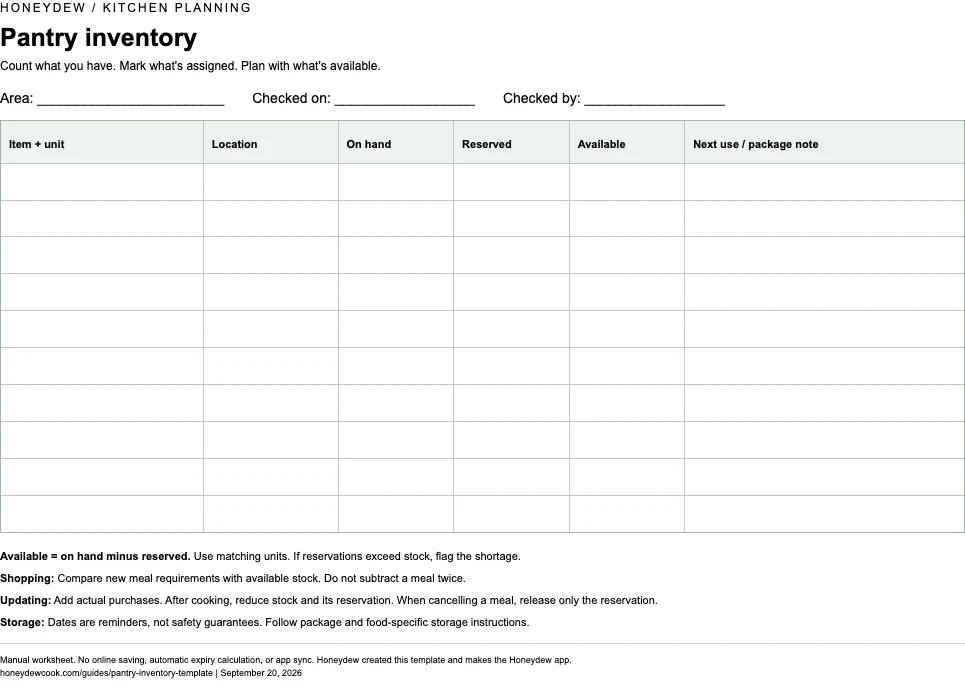
Use one sheet per storage area: pantry, refrigerator, or freezer. Keep dry goods on the pantry sheet and refrigerated food on the refrigerator sheet, even if both appear in the same recipe.
The fields are:
- Item and unit: rice in grams, pasta in ounces, beans in cans. Choose a unit you can repeat.
- Location: upper shelf, door basket, freezer drawer.
- On hand: what is physically there now.
- Reserved: the part assigned to meals you have already planned.
- Available: on hand minus reserved. This is what you can allocate to another meal.
- Next use / package note: the meal name, an opened date, or storage instructions to check.
If reservations exceed what's on hand, mark the shortage and revisit the meals. A negative available balance means food is missing, not that you have anything left to allocate.
For a quick phone note, copy this:
PANTRY CHECK
Area:
Checked on:
Item + unit:
Location:
On hand:
Reserved for which meal:
Available for another meal:
Next use / package note:
The sheet is deliberately blank. You don't need to buy a suggested set of pantry staples to fill it. If you're looking for a list to take to the store instead, use the grocery list template.
Count the food, not just the containers
A jar marked "rice" might hold enough for one dinner or four. Record a usable quantity where it matters. You can weigh a partly used bag, count sealed cans, or write "about half a jar" as a reminder to check before committing to a recipe. Don't turn an estimate into an exact ingredient amount.
Keep quantities comparable. "One can" works when you're counting the same product and size. For a recipe that specifies drained beans, record or check the drained yield. A can's total weight includes liquid and is not necessarily the amount the recipe calls for.
Start with the shelf that affects your next meals. Count its contents, write their locations, and note anything you've already assigned. Add the other shelves when you need them. The useful inventory is the one you can keep current, not the longest one.
If an item moves, change its location. An opened product that needs refrigeration no longer belongs on the pantry sheet.
A filled-in example: what's actually available?
Here's an illustrative stock check before adding two more meals. These are accounting examples, not tested recipes or recommended portions. All rice and pasta weights below are dry.
Scroll the tables sideways on a narrow screen.
| Item and unit | On hand | Reserved for other meals | Available |
|---|---|---|---|
| Rice, g | 600 | 300 | 300 |
| Pasta, g | 250 | 0 | 250 |
| Tomatoes, 400 g cans | 2 | 1 | 1 |
The 300 g of reserved rice and one reserved tomato can belong to Friday's curry. They are still physically in the cupboard. Marking them reserved stops you from spending the same groceries twice.
Now suppose your new meals need 450 g of rice, 200 g of pasta, and two of those tomato cans in total.
| Item | New meals need | Available above | Missing amount |
|---|---|---|---|
| Rice, g | 450 | 300 | 150 |
| Pasta, g | 200 | 250 | 0 |
| Tomatoes, 400 g cans | 2 | 1 | 1 |
For each item, subtract the available amount from what the new meals need. If the result is negative, write zero to buy. Keep the units the same on both sides.
Don't subtract the same meal twice. "Reserved" in this example means Friday's existing plan. "New meals need" means the additional meals only. If you're totaling every meal for the week at once, compare that total directly with all usable stock on hand instead.
The shopping requirement is 150 g of rice, not necessarily one 150 g package. If your chosen store sells a 1 kg bag and you buy it, record the full 1,000 g arriving at home. Your rice stock becomes 1,600 g. Across Friday and the new meals, you've assigned 750 g, leaving 850 g for a future plan.
Our grocery-list method covers the next step: combine the remaining ingredients and sort the shopping list by aisle.
Update the sheet when something changes
You don't need to recount the whole cupboard after making toast. Update the entries that changed.
When groceries arrive
Add what you actually brought home, including the full package quantity. Don't add the smaller shortfall you calculated before shopping. Put the receipt or package beside the sheet if that makes the count easier.
When you cook a planned meal
Reduce both the on-hand amount and that meal's reservation. In the rice example after shopping, cooking a planned 300 g portion changes the figures from 1,600 g on hand and 750 g reserved to 1,300 g on hand and 450 g reserved. The unassigned amount is still 850 g.
When someone changes the plan
Release the reservation without subtracting food that hasn't been eaten. Cancelling a remaining 150 g rice meal changes the last example to 1,300 g on hand and 300 g reserved. Now 1,000 g is unassigned.
If somebody uses an ingredient for a snack or an unplanned meal, reduce the physical count and check the remaining meal commitments. A reservation on paper doesn't stop anyone opening the jar.
Before shopping again, check any approximate quantities and the foods assigned to your next meals. Cross out the old count and write the current one. A readable correction is more useful than a neat but outdated sheet.
Keep storage notes separate from safety decisions
An opened date or planned meal is a reminder, not a guarantee that a food is safe. Follow the product's storage directions and food-specific guidance. The FDA notes that food can be unsafe even when it looks or smells normal; don't use appearance alone to clear an item for dinner. See its food-storage guidance.
The template has no automatic expiry calculation. Only count food you can appropriately use, and don't move a questionable item into the available column just to make the shopping arithmetic work.
Turn the stock check into a Honeydew meal plan
Honeydew can generate a grocery list from your planned recipes, scaled to the servings you choose. Save the recipes, add them to the calendar, set the servings, and generate the list. Its grocery features include pantry checks and automatic aisle sorting. See the meal-planning instructions and grocery-list instructions.
For example, start by noting the rice and tomatoes already assigned to Friday. Choose the rest of your recipes with that commitment in mind. Let Honeydew handle their recipe quantities and grocery list, while you use the worksheet to account for the packages in your cupboard.
If a saved recipe needs an ingredient you'd like to substitute, Honeydew's AI Edit accepts plain-language changes. You can duplicate the recipe first to keep the original, then edit and save the version you want to cook. Its AI Edit instructions include ingredient substitutions and serving changes.
For a household, Honeydew shares grocery-list updates so others can add items and check them off. Agree on who updates the paper inventory after unpacking. The printable's reserved and available columns are this guide's manual planning method, not a claim about fields or automatic stock deductions in the app.
Common questions
What should a pantry inventory include?
Record the item, its unit and location, the amount physically on hand, any amount reserved for planned meals, and what remains available. Add a next-use or package note when helpful, and date the stock check.
Is a pantry inventory the same as a grocery list?
No. A pantry inventory records food you already have. A grocery list records what you intend to buy. Compare your meal requirements with usable, unassigned stock to work out what is missing.
How often should I update a pantry inventory?
Update affected entries when groceries arrive, food is used, or a planned meal changes. Before the next shopping trip, check uncertain quantities and ingredients committed to upcoming meals.
Does this template automatically sync with Honeydew?
No. This is a manual printable and plain-text worksheet. Honeydew separately supports recipe-based grocery lists, pantry checks, aisle sorting, and household grocery-list sharing.
Sources and review
Honeydew created the blank template and all worked quantities in this guide. No household trial, native-app test, food-waste percentage, or cost saving is claimed.
- FDA: Are You Storing Food Safely?, for storage directions and the limits of judging safety by appearance.
- Honeydew's meal-planning, grocery-list, and AI Edit documentation linked above, for the named app capabilities.
Sources checked September 20, 2026. Questions or corrections: support@honeydewcook.com.
Plan the meals. Let Honeydew build the list.
Save recipes, choose servings, check your pantry, and take an aisle-sorted grocery list to the store.
 Organize Recipes and Plan Meals with ChatGPT
 Grocery List for One Person
 High Protein Grocery List
 Grocery List Ideas